Score job applications and write AI feedback with OpenAI and Notion

Workflow preview

Workflow preview
100%
Score job applications and write AI feedback with OpenAI and Notion preview
Open on n8n.io

Important notice

This workflow is provided as-is. Please review and test before using in production.

1. Workflow Overview

Screen resumes & save candidate scores to Notion with OpenAI This template helps you automate the initial screening of job candidates by analyzing resumes against your specific job descriptions usi...

Best for

  • HR automation workflows
  • AI Summarization automation workflows
  • advanced n8n builders looking for reusable templates

Tools used

n8n-nodes-base.notion, n8n-nodes-base.noop, n8n-nodes-base.notiontrigger, n8n-nodes-base.extractfromfile, @n8n/n8n-nodes-langchain.lmchatopenai, @n8n/n8n-nodes-langchain.agent, n8n-nodes-base.code, n8n-nodes-base.if

Source and attribution

This workflow is cataloged by N8N Workflows and links back to its original n8n.io source page by zahir khan.

Original n8n.io source

1.1 Workflow description

Title
Score job applications and write AI feedback with OpenAI and Notion
Workflow name
Score job applications and write AI feedback with OpenAI and Notion

Screen resumes & save candidate scores to Notion with OpenAI

This template helps you automate the initial screening of job candidates by analyzing resumes against your specific job descriptions using AI.

📺 How It Works

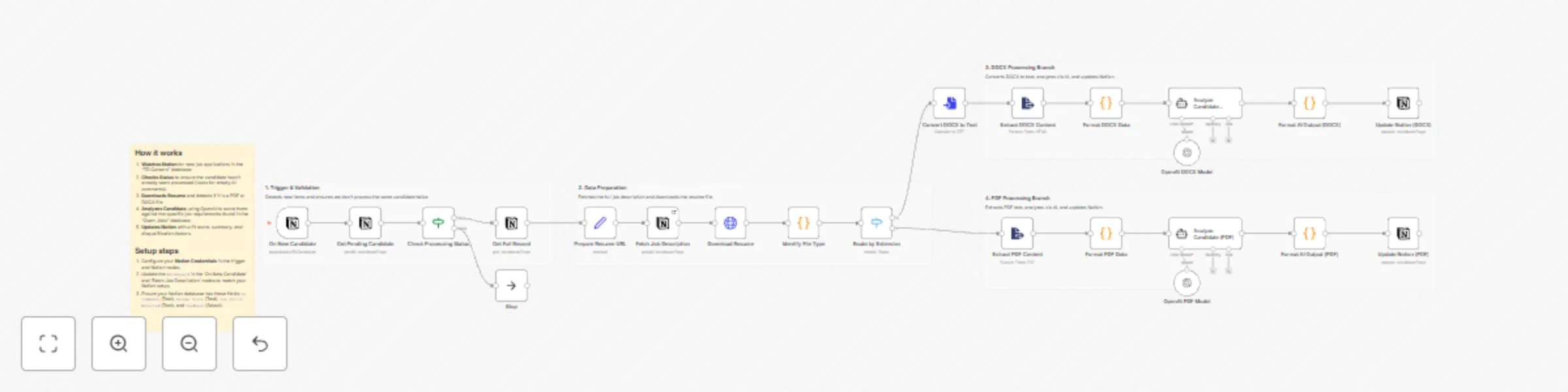
The workflow automatically monitors a Notion database for new job applications. When a new candidate is added:

  1. It checks if the candidate has already been processed to avoid duplicates.
  2. It downloads the resume file (supporting both PDF and DOCX formats).
  3. It extracts the raw text and sends it to OpenAI along with the specific job description and requirements.
  4. The AI acts as a "Senior Technical Recruiter," scoring the candidate on skills, experience, and stability.
  5. Finally, it updates the Notion entry with a fit score (0-100), a one-line summary, detected skills, and a detailed analysis.

đź“„ Notion Database Structure

You will need two databases in Notion: Jobs (containing descriptions/requirements) and Candidates (containing resume files).

  • Candidates DB Fields: AI Comments (Text), Resume Score (Text), Top Skills Detected (Text), Feedback (Select), One Line Summary (Text), Resume File (Files & Media).
  • Jobs DB Fields: Job Description (Text), Requirements (Text).

👤 Who’s it for

This workflow is for recruiters, HR managers, founders, and hiring teams who want to reduce the time spent on manual resume screening.

Whether you are handling high-volume applications or looking for specific niche skills, this tool ensures every resume gets a consistent, unbiased first-pass review.

đź”§ How to set up

  1. Create the required databases in Notion (as described above).
  2. Import the .json workflow into your n8n instance.
  3. Set up credentials for Notion and OpenAI.
  4. Link those credentials in the workflow nodes.
  5. Update Database IDs: Open the "Fetch Job Description" and "On New Candidate" nodes and select your specific Notion databases.
  6. Run a test with a sample candidate and validate the output in Notion.

đź“‹ Requirements

  • An n8n instance (Cloud or Self-hosted)
  • A Notion account
  • OpenAI API Key (GPT-4o or GPT-4 Turbo recommended for best reasoning)

đź§© How to customize the workflow

The system is fully modular. You can:

  • Adjust the Persona: In the Analyze Candidate agent nodes, edit the system prompt to change the "Recruiter" persona (e.g., make it stricter or focus on soft skills).
  • Change Scoring: Modify the scoring matrix in the prompt to weight "Education" or "Experience" differently.
  • Filter Logic: Add a node to automatically disqualify candidates below a certain score (e.g., < 50) and move them to a "Rejected" status in Notion.
  • Multi-language: Update the prompt to translate summaries into your local language if the resume is in English.

1.2 Logical Blocks

This catalog entry is organized from the workflow JSON. The node-level section below shows the executable blocks available for review before importing the template.

2. Block-by-Block Analysis

Block 1 - Fetch Job Description

Type / Role
n8n-nodes-base.notion - notion
Config choices
Version 2.2

Block 2 - Get Pending Candidate

Type / Role
n8n-nodes-base.notion - notion
Config choices
Version 2.2

Block 3 - Stop

Type / Role
n8n-nodes-base.noOp - noOp
Config choices
Version 1

Block 4 - On New Candidate

Type / Role
n8n-nodes-base.notionTrigger - notionTrigger
Config choices
Version 1

Block 5 - Extract PDF Content

Type / Role
n8n-nodes-base.extractFromFile - extractFromFile
Config choices
Version 1

Block 6 - OpenAI PDF Model

Type / Role
@n8n/n8n-nodes-langchain.lmChatOpenAi - lmChatOpenAi
Config choices
Version 1.2

Block 7 - Analyze Candidate (PDF)

Type / Role
@n8n/n8n-nodes-langchain.agent - agent
Config choices
Version 1.8

Block 8 - OpenAI DOCX Model

Type / Role
@n8n/n8n-nodes-langchain.lmChatOpenAi - lmChatOpenAi
Config choices
Version 1.2

Block 9 - Analyze Candidate (DOCX)

Type / Role
@n8n/n8n-nodes-langchain.agent - agent
Config choices
Version 1.8

Block 10 - Format DOCX Data

Type / Role
n8n-nodes-base.code - code
Config choices
Version 2

Block 11 - Check Processing Status

Type / Role
n8n-nodes-base.if - if
Config choices
Version 2.2

Block 12 - Get Full Record

Type / Role
n8n-nodes-base.notion - notion
Config choices
Version 2.2

Block 13 - Prepare Resume URL

Type / Role
n8n-nodes-base.set - set
Config choices
Version 3.4

Block 14 - Download Resume

Type / Role
n8n-nodes-base.httpRequest - httpRequest
Config choices
Version 4.2

Block 15 - Identify File Type

Type / Role
n8n-nodes-base.code - code
Config choices
Version 2

Block 16 - Route by Extension

Type / Role
n8n-nodes-base.switch - switch
Config choices
Version 3.2

Block 17 - Convert DOCX to Text

Type / Role
n8n-nodes-base.convertToFile - convertToFile
Config choices
Version 1.1

Block 18 - Extract DOCX Content

Type / Role
n8n-nodes-base.extractFromFile - extractFromFile
Config choices
Version 1

Block 19 - Format PDF Data

Type / Role
n8n-nodes-base.code - code
Config choices
Version 2

Block 20 - Format AI Output (DOCX)

Type / Role
n8n-nodes-base.code - code
Config choices
Version 2

Block 21 - Format AI Output (PDF)

Type / Role
n8n-nodes-base.code - code
Config choices
Version 2

Block 22 - Update Notion (DOCX)

Type / Role
n8n-nodes-base.notion - notion
Config choices
Version 2.2

Block 23 - Update Notion (PDF)

Type / Role
n8n-nodes-base.notion - notion
Config choices
Version 2.2

Block 24 - Sticky Note18

Type / Role
n8n-nodes-base.stickyNote - stickyNote
Config choices
Version 1

Showing the first 24 of 28 workflow blocks. Download the JSON for the full node graph.

3. Summary Table

Workflow Score job applications and write AI feedback with OpenAI and Notion
Complexity advanced
Nodes 28
Categories HR, AI Summarization
Author zahir khan
Published 30 Dec 2025

4. Reproducing the Workflow from Scratch

  1. 1. Download the workflow JSON

    Use the JSON export at /data/workflows/12323/12323.json as the source template for this automation.

  2. 2. Import the template into n8n

    Open n8n, import the downloaded JSON, and review each node before activating the workflow.

  3. 3. Configure credentials and variables

    Replace placeholder credentials, API keys, webhook URLs, account IDs, and environment-specific values with your own settings.

  4. 4. Test with sample data

    Run the workflow manually or in a staging workspace, inspect node output, and confirm downstream systems receive the expected data.

  5. 5. Activate and monitor

    Enable the workflow only after testing, then monitor executions, errors, and rate limits during the first production runs.

5. General Notes & Resources

Review imported nodes carefully before activation. This catalog entry is intended to help you inspect the workflow structure, understand required services, and find related templates faster.

Node names, credentials, schedules, webhook paths, and external service limits may need adjustment for your workspace.

Frequently asked questions

What does Score job applications and write AI feedback with OpenAI and Notion do?

Screen resumes & save candidate scores to Notion with OpenAI This template helps you automate the initial screening of job candidates by analyzing resumes against your specific job descriptions usi...

What do I need before importing this workflow?

Review the workflow JSON, configure any required credentials in n8n, and test the automation in a safe workspace before using it in production.

Can I customize this workflow?

Yes. Use the block-by-block analysis and the downloadable JSON to inspect each node, then adjust credentials, prompts, schedules, filters, or destinations for your HR, AI Summarization use case.