zahir khan
Workflows by zahir khan
Automate outbound AI sales calls with double-dial using Airtable and Vapi AI
## 🚀 The Ultimate AI Sales Outbound Engine *Stop wasting hours on manual dialing and listening to ringtones. This workflow transforms your **Airtable** into a high-velocity **AI Call Center** using **Vapi AI***. ### ⚡ TL;DR Automate lead qualification calls, handle voicemails like a pro, and sync every transcript back to your CRM without lifting a finger. ### 🧠 How it Works 1. **The Scout:** Every minute, n8n scans your Airtable for leads marked `TBC`. 2. **The Dialer:** It triggers a personalized **Vapi AI** call, passing along the lead’s name and context. 3. **The Reporter:** Once the call ends, a Webhook catches the data, including the **recording, transcript, and AI summary**. 4. **The Strategist:** * **Success?** Updates the lead to `Called` and logs the summary. * **Voicemail?** Automatically triggers a **double-dial** retry after 1 minute. * **Still nothing?** Schedules a final follow-up for the next day at the **optimal time (`your time`)**. ### 🛠️ Setup Guide * **Airtable:** Create a "Leads" table with fields for `Status`, `Mobile`, `Attempt`, and `Summary`. * **Vapi:** Plug in your Assistant ID and set the Webhook URL to this workflow's address. * **n8n:** Use the **Header Auth** credential for your Vapi API key to keep things secure. ### 💎 Why This Wins * **Aggressive Retries:** Includes a built-in "Double-Dial" strategy to increase connection rates. * **Clean CRM:** No more messy notes; get structured AI summaries for every call. * **Plug-and-Play:** Designed to be easily customized for any industry—from real estate to SaaS.
Generate 3D models from images using Hunyuan3D v2 and Google Sheets
*This workflow automates the conversion of 2D images into high-quality 3D models (`.glb` format) by integrating **Google Sheets** with the **Hunyuan3D v2** model on **Fal.ai**. It handles the entire pipeline—from fetching image URLs to polling for completion and saving the final asset—eliminating manual modeling time for artists and developers.*  ### How it works This template operates on a schedule to process images in batches or individually: 1. **Data Retrieval:** The workflow fetches new rows from a Google Sheet where the `RESULT_GLB` column is empty. 2. **AI Generation:** It sends the `IMAGE_URL` to the **Hunyuan3D v2** API on Fal.ai to initiate the 3D generation process. 3. **Status Polling:** The workflow automatically enters a loop, checking the job status every 30 seconds until the model is marked "COMPLETED." 4. **Result Update:** Once finished, it retrieves the download link for the `.glb` file and writes it back to the specific row in your Google Sheet. ### Use Cases * **Game Development:** Rapidly create prototype props and assets from concept art. * **E-commerce:** Convert product photos into 3D models for web viewers. * **AR/VR:** Generate background assets for immersive environments from simple 2D inputs. ### Setup steps 1. **Google Sheet:** * Create a new sheet with two header columns: `IMAGE_URL` and `RESULT_GLB`. * Add the images you want to convert in the first column. 2. **Fal.ai Credentials:** * Sign up at [Fal.ai](https://fal.ai) and generate an API Key. * In n8n, create a **Header Auth** credential with the name `Authorization` and value `Key YOUR_API_KEY`. 3. **Configure Nodes:** * Update the **Get new image** and **Update Result** nodes to select your specific Google Sheet. * Ensure the **HTTP Request** nodes are using your Fal.ai Header Auth credential.
Score job applications and write AI feedback with OpenAI and Notion
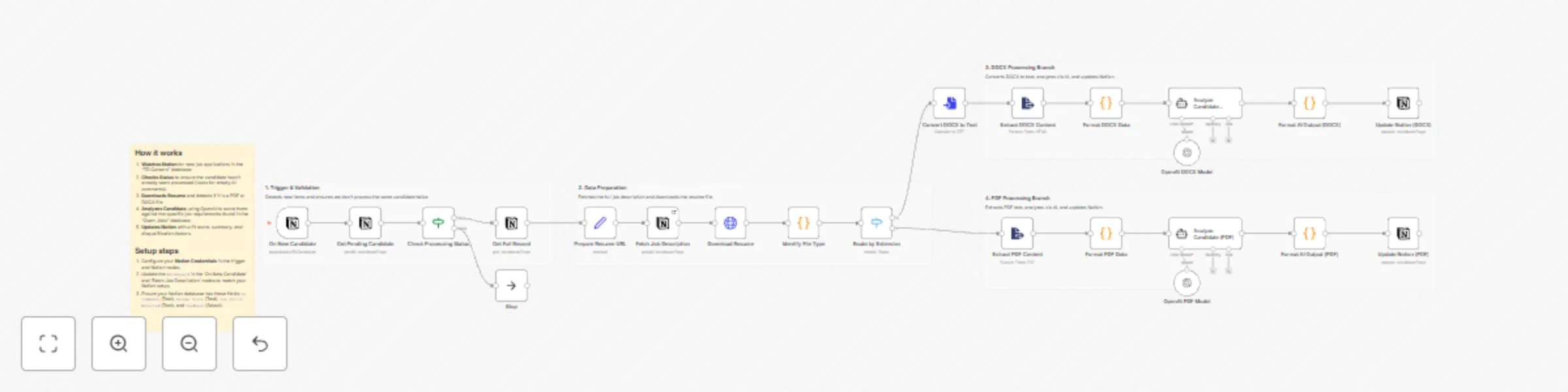
# Screen resumes & save candidate scores to Notion with OpenAI This template helps you automate the initial screening of job candidates by analyzing resumes against your specific job descriptions using AI. ### 📺 How It Works The workflow automatically monitors a **Notion** database for new job applications. When a new candidate is added: 1. It checks if the candidate has already been processed to avoid duplicates. 2. It downloads the resume file (supporting both **PDF** and **DOCX** formats). 3. It extracts the raw text and sends it to **OpenAI** along with the specific job description and requirements. 4. The AI acts as a "Senior Technical Recruiter," scoring the candidate on skills, experience, and stability. 5. Finally, it updates the **Notion** entry with a fit score (0-100), a one-line summary, detected skills, and a detailed analysis. ### 📄 Notion Database Structure You will need two databases in Notion: **Jobs** (containing descriptions/requirements) and **Candidates** (containing resume files). * **Candidates DB Fields:** `AI Comments` (Text), `Resume Score` (Text), `Top Skills Detected` (Text), `Feedback` (Select), `One Line Summary` (Text), `Resume File` (Files & Media). * **Jobs DB Fields:** `Job Description` (Text), `Requirements` (Text). ### 👤 Who’s it for This workflow is for **recruiters, HR managers, founders**, and **hiring teams** who want to reduce the time spent on manual resume screening. Whether you are handling high-volume applications or looking for specific niche skills, this tool ensures every resume gets a consistent, unbiased first-pass review. ### 🔧 How to set up 1. **Create** the required databases in Notion (as described above). 2. **Import** the `.json` workflow into your n8n instance. 3. **Set up credentials** for Notion and OpenAI. 4. **Link** those credentials in the workflow nodes. 5. **Update Database IDs:** Open the "Fetch Job Description" and "On New Candidate" nodes and select your specific Notion databases. 6. **Run a test** with a sample candidate and validate the output in Notion. ### 📋 Requirements * An n8n instance (Cloud or Self-hosted) * A Notion account * OpenAI API Key (GPT-4o or GPT-4 Turbo recommended for best reasoning) ### 🧩 How to customize the workflow The system is fully modular. You can: * **Adjust the Persona:** In the `Analyze Candidate` agent nodes, edit the system prompt to change the "Recruiter" persona (e.g., make it stricter or focus on soft skills). * **Change Scoring:** Modify the scoring matrix in the prompt to weight "Education" or "Experience" differently. * **Filter Logic:** Add a node to automatically disqualify candidates below a certain score (e.g., < 50) and move them to a "Rejected" status in Notion. * **Multi-language:** Update the prompt to translate summaries into your local language if the resume is in English.
Generate and schedule themed social posts with Notion, OpenAI, Fal.ai and Postiz
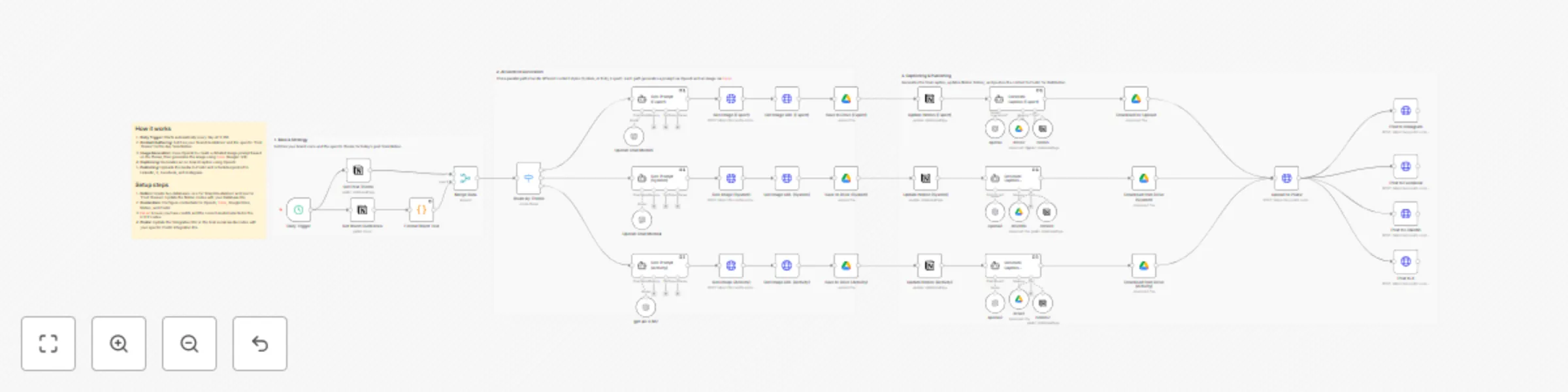
*This workflow automates your daily social media content creation by generating unique, on-brand posts based on specific themes stored in Notion. It creates images using Fal.ai, writes captions with OpenAI, and schedules them to multiple platforms via Postiz.* **📺 How It Works** 1. **Daily Trigger:** The workflow runs automatically every day at a set time. 2. **Context Fetching:** It pulls your "Brand Guidelines" and the specific "Post Theme" for the day (e.g., Expert Advice, System, or Activity) from **Notion**. 3. **Image Generation:** It uses **OpenAI** to craft a detailed image prompt based on the theme, then sends it to **Fal.ai** to generate a high-quality visual. 4. **Caption Writing:** It uses **OpenAI** again to write an engaging caption that adheres to your brand voice. 5. **Scheduling:** Finally, it uploads the media to **Postiz** and schedules it for publication on LinkedIn, X (Twitter), Facebook, and Instagram. **🔧 How to set up** 1. **Notion:** Create a "Brand Guidelines" database and a "Post Themes" database. 2. **Configure Nodes:** Update the Notion nodes in the workflow to point to your specific Database IDs. 3. **Credentials:** Connect your accounts for OpenAI, Fal.ai, Google Drive, Notion, and Postiz. 4. **Postiz IDs:** In the final HTTP Request nodes, replace the `integration_id` fields with the specific IDs from your Postiz account for each social platform. **📋 Requirements** * n8n (Self-hosted or Cloud) * Notion account * OpenAI API Key * Fal.ai API Key * Postiz instance (or account) * Google Drive account (for temporary image storage)