Block 1 - Email Trigger
- Type / Role
- n8n-nodes-base.gmailTrigger - gmailTrigger
- Config choices
- Version 1.3


 Early Deal
This workflow is provided as-is. Please review and test before using in production.
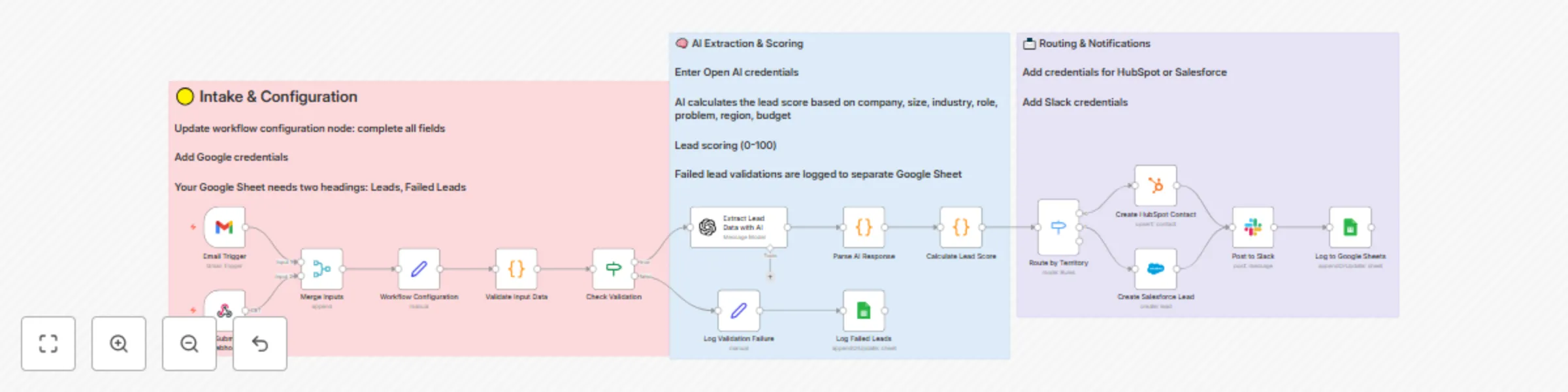
This n8n template demonstrates how to use AI to capture, qualify, and route inbound leads automatically from email or web forms. It extracts key business information using AI, scores the lead based...
n8n-nodes-base.gmailtrigger, n8n-nodes-base.webhook, n8n-nodes-base.merge, n8n-nodes-base.set, n8n-nodes-base.code, n8n-nodes-base.if, n8n-nodes-base.switch, n8n-nodes-base.hubspot
This workflow is cataloged by N8N Workflows and links back to its original n8n.io source page by NodeAlchemy.
Original n8n.io sourceIt extracts key business information using AI, scores the lead based on your ideal customer profile, creates CRM records, notifies your team on Slack, and logs all activity—including failures—to Google Sheets.
Use cases include: automating sales inboxes, qualifying form leads for agencies or SaaS products, routing high-fit prospects to the right territory owner, and keeping your sales and ops teams aligned without manual data entry.
Triggers:
Validation: Incoming data is checked for required fields (email or text). Invalid entries are routed to the Dead Letter Queue (DLQ) for review.
AI Extraction: The OpenAI node extracts structured fields like company name, size, industry, role, region, problem statement, and budget signals from free-form text.
Parsing & Scoring: The AI output is parsed, then a code node calculates a 0–100 lead score based on transparent criteria—industry, size, role, problem clarity, and budget mentions. It also assigns a lead tier (Hot, Warm, Cold, Unqualified).
CRM Routing: Depending on your configuration, the workflow creates a Salesforce lead (default) or can be easily adapted for HubSpot. Territory or CRM owner routing can be extended here.
Slack Notification: A rich Slack message summarizes the lead score and reasoning and includes a “Create intro email” button for quick action.
Logging: All successful leads are logged to Google Sheets for reporting. Any failed or invalid leads are logged separately to the DLQ tab for auditing.
This template can be expanded in many ways:
This catalog entry is organized from the workflow JSON. The node-level section below shows the executable blocks available for review before importing the template.
| Workflow | Qualify & route leads across channels with GPT-4o, Slack & CRM integration |
|---|---|
| Complexity | advanced |
| Nodes | 19 |
| Categories | Lead Nurturing, AI Summarization |
| Author | NodeAlchemy |
| Published | 16 Oct 2025 |
Use the JSON export at /data/workflows/9739/9739.json as the source template for this automation.
Open n8n, import the downloaded JSON, and review each node before activating the workflow.
Replace placeholder credentials, API keys, webhook URLs, account IDs, and environment-specific values with your own settings.
Run the workflow manually or in a staging workspace, inspect node output, and confirm downstream systems receive the expected data.
Enable the workflow only after testing, then monitor executions, errors, and rate limits during the first production runs.
Review imported nodes carefully before activation. This catalog entry is intended to help you inspect the workflow structure, understand required services, and find related templates faster.
Node names, credentials, schedules, webhook paths, and external service limits may need adjustment for your workspace.
This n8n template demonstrates how to use AI to capture, qualify, and route inbound leads automatically from email or web forms. It extracts key business information using AI, scores the lead based...
Review the workflow JSON, configure any required credentials in n8n, and test the automation in a safe workspace before using it in production.
Yes. Use the block-by-block analysis and the downloadable JSON to inspect each node, then adjust credentials, prompts, schedules, filters, or destinations for your Lead Nurturing, AI Summarization use case.