Post bank statement transactions to QuickBooks Online using OpenRouter AI
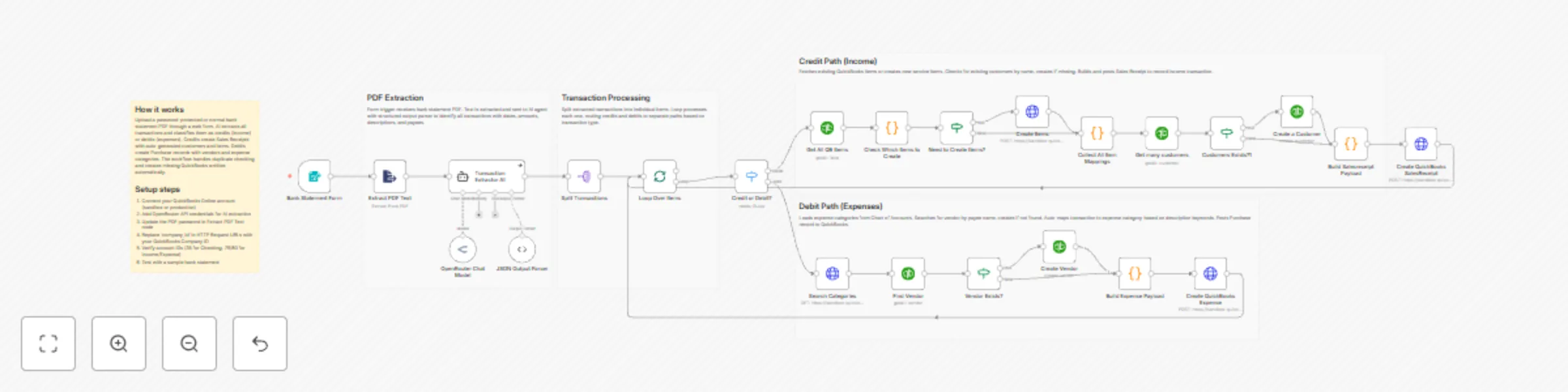
Workflow preview


 Early Deal
DISCOUNT 20%

Important notice
This workflow is provided as-is. Please review and test before using in production.
Overview
✅ What problem does this workflow solve?
Manually entering bank statements into QuickBooks is one of the most time-consuming and error-prone accounting tasks. Accountants often spend hours converting PDF bank statements into individual income and expense entries—risking missed transactions, incorrect categorization, and inconsistencies.
This workflow fully automates the end-to-end process: from uploading a (even password-protected) bank statement PDF to creating accurate Sales Receipts and Expenses directly inside QuickBooks, using AI and n8n.
⚙️ What does this workflow do?
- Accepts bank statement PDFs via a secure web form
- Decrypts and extracts text from password-protected PDFs
- Uses AI to extract structured transactions from raw statement text
- Validates AI output against a strict JSON schema
- Processes each transaction individually for reliability
- Automatically routes transactions based on type:
- Credits → Income (Sales Receipts)
- Debits → Expenses
- Intelligently creates missing QuickBooks entities:
- Customers
- Vendors
- Items
- Expense categories
- Posts transactions directly into QuickBooks
- Eliminates manual accounting entry completely
🧠 How It Works – End-to-End Flow
1️⃣ Secure Bank Statement Upload
A user uploads a bank statement PDF (normal or password-protected) using an n8n Form Trigger.
2️⃣ PDF Decryption & Text Extraction
The workflow:
- Unlocks the PDF (if password-protected)
- Extracts the full statement text using the Extract PDF Text node
3️⃣ AI-Powered Transaction Extraction
An AI Agent reads the raw bank statement text and extracts every transaction with high precision:
- Transaction type (credit / debit)
- Date (YYYY-MM-DD)`
- Amount
- Description
- Reference number
- Payee / counterparty
4️⃣ Strict JSON Validation
AI output is validated using a Structured Output Parser to ensure:
- No malformed data
- Schema-safe transactions
- Reliable downstream processing
5️⃣ Transaction Processing Loop
Each transaction is processed individually using batching and loop control to guarantee accuracy.
6️⃣ Smart Routing: Credit vs Debit
A switch node routes transactions automatically:
- Credits → Income flow
- Debits → Expense flow
💰 Credit Path – Income Automation
For every credit transaction:
- Checks if a matching QuickBooks item exists
- Creates missing service items automatically
- Finds or creates the customer
- Builds a Sales Receipt payload
- Posts the transaction into QuickBooks as income
💸 Debit Path – Expense Automation
For every debit transaction:
- Searches for the vendor by payee name
- Creates the vendor if missing
- Loads expense categories from the Chart of Accounts
- Auto-maps transactions to the correct category using keyword logic
- Builds a Purchase (Expense) payload
- Posts the expense into QuickBooks
🧠 Built-In QuickBooks Intelligence
This workflow intelligently handles:
- Duplicate prevention
- Missing customer/vendor creation
- Automatic item mapping
- Category resolution using transaction descriptions
- Consistent accounting structure across all entries
📊 Results & Benefits
✅ Zero manual bank statement entry
✅ Works with password-protected PDFs
✅ Handles both income and expenses automatically
✅ Creates clean, structured QuickBooks records
✅ Saves dozens of accounting hours every month
✅ Reduces human error and reconciliation issues
🔧 Setup Requirements
- Connect your QuickBooks Online account (Sandbox or Production)
- Add OpenRouter / AI model credentials for transaction extraction
- Update the PDF password (if required) in the extraction node
- Replace
company_idin QuickBooks API endpoints - Verify QuickBooks account IDs (bank, income, expense)
- Test with a sample bank statement PDF
👤 Who is this for?
This workflow is ideal for:
- 📒 Accountants & bookkeeping firms
- 🏢 Businesses managing frequent bank statements
- 💼 Finance teams using QuickBooks Online
- 🤖 Automation-first accounting systems