Post bank statement transactions to QuickBooks Online using OpenRouter AI

Workflow preview

Workflow preview
100%
Post bank statement transactions to QuickBooks Online using OpenRouter AI preview
Open on n8n.io

Important notice

This workflow is provided as-is. Please review and test before using in production.

1. Workflow Overview

What problem does this workflow solve? Manually entering bank statements into QuickBooks is one of the most time consuming and error prone accounting tasks. Accountants often spend hours converti...

Best for

  • Invoice Processing automation workflows
  • AI Summarization automation workflows
  • advanced n8n builders looking for reusable templates

Tools used

n8n-nodes-base.extractfromfile, @n8n/n8n-nodes-langchain.agent, @n8n/n8n-nodes-langchain.outputparserstructured, n8n-nodes-base.httprequest, n8n-nodes-base.formtrigger, @n8n/n8n-nodes-langchain.lmchatopenrouter, n8n-nodes-base.splitout, n8n-nodes-base.splitinbatches

Source and attribution

This workflow is cataloged by N8N Workflows and links back to its original n8n.io source page by InfyOm Technologies.

Original n8n.io source

1.1 Workflow description

Title
Post bank statement transactions to QuickBooks Online using OpenRouter AI
Workflow name
Post bank statement transactions to QuickBooks Online using OpenRouter AI

✅ What problem does this workflow solve?

Manually entering bank statements into QuickBooks is one of the most time-consuming and error-prone accounting tasks. Accountants often spend hours converting PDF bank statements into individual income and expense entries—risking missed transactions, incorrect categorization, and inconsistencies.

This workflow fully automates the end-to-end process: from uploading a (even password-protected) bank statement PDF to creating accurate Sales Receipts and Expenses directly inside QuickBooks, using AI and n8n.


⚙️ What does this workflow do?

  • Accepts bank statement PDFs via a secure web form
  • Decrypts and extracts text from password-protected PDFs
  • Uses AI to extract structured transactions from raw statement text
  • Validates AI output against a strict JSON schema
  • Processes each transaction individually for reliability
  • Automatically routes transactions based on type:
    • Credits → Income (Sales Receipts)
    • Debits → Expenses
  • Intelligently creates missing QuickBooks entities:
    • Customers
    • Vendors
    • Items
    • Expense categories
  • Posts transactions directly into QuickBooks
  • Eliminates manual accounting entry completely

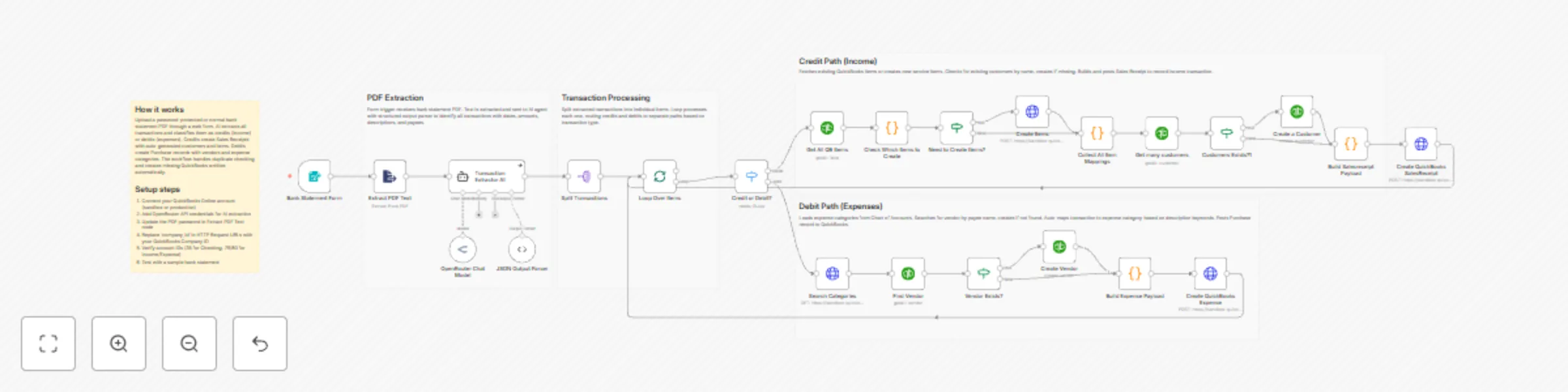
🧠 How It Works – End-to-End Flow

1️⃣ Secure Bank Statement Upload

A user uploads a bank statement PDF (normal or password-protected) using an n8n Form Trigger.

2️⃣ PDF Decryption & Text Extraction

The workflow:

  • Unlocks the PDF (if password-protected)
  • Extracts the full statement text using the Extract PDF Text node

3️⃣ AI-Powered Transaction Extraction

An AI Agent reads the raw bank statement text and extracts every transaction with high precision:

  • Transaction type (credit / debit)
  • Date (YYYY-MM-DD)`
  • Amount
  • Description
  • Reference number
  • Payee / counterparty

4️⃣ Strict JSON Validation

AI output is validated using a Structured Output Parser to ensure:

  • No malformed data
  • Schema-safe transactions
  • Reliable downstream processing

5️⃣ Transaction Processing Loop

Each transaction is processed individually using batching and loop control to guarantee accuracy.

6️⃣ Smart Routing: Credit vs Debit

A switch node routes transactions automatically:

  • Credits → Income flow
  • Debits → Expense flow

💰 Credit Path – Income Automation

For every credit transaction:

  • Checks if a matching QuickBooks item exists
  • Creates missing service items automatically
  • Finds or creates the customer
  • Builds a Sales Receipt payload
  • Posts the transaction into QuickBooks as income

💸 Debit Path – Expense Automation

For every debit transaction:

  • Searches for the vendor by payee name
  • Creates the vendor if missing
  • Loads expense categories from the Chart of Accounts
  • Auto-maps transactions to the correct category using keyword logic
  • Builds a Purchase (Expense) payload
  • Posts the expense into QuickBooks

🧠 Built-In QuickBooks Intelligence

This workflow intelligently handles:

  • Duplicate prevention
  • Missing customer/vendor creation
  • Automatic item mapping
  • Category resolution using transaction descriptions
  • Consistent accounting structure across all entries

📊 Results & Benefits

✅ Zero manual bank statement entry
✅ Works with password-protected PDFs
✅ Handles both income and expenses automatically
✅ Creates clean, structured QuickBooks records
✅ Saves dozens of accounting hours every month
✅ Reduces human error and reconciliation issues


🔧 Setup Requirements

  1. Connect your QuickBooks Online account (Sandbox or Production)
  2. Add OpenRouter / AI model credentials for transaction extraction
  3. Update the PDF password (if required) in the extraction node
  4. Replace company_id in QuickBooks API endpoints
  5. Verify QuickBooks account IDs (bank, income, expense)
  6. Test with a sample bank statement PDF

👤 Who is this for?

This workflow is ideal for:

  • 📒 Accountants & bookkeeping firms
  • 🏢 Businesses managing frequent bank statements
  • 💼 Finance teams using QuickBooks Online
  • 🤖 Automation-first accounting systems

1.2 Logical Blocks

This catalog entry is organized from the workflow JSON. The node-level section below shows the executable blocks available for review before importing the template.

2. Block-by-Block Analysis

Block 1 - Extract PDF Text

Type / Role
n8n-nodes-base.extractFromFile - extractFromFile
Config choices
Version 1.1

Block 2 - Transaction Extractor AI

Type / Role
@n8n/n8n-nodes-langchain.agent - agent
Config choices
Version 1.7

Block 3 - JSON Output Parser

Type / Role
@n8n/n8n-nodes-langchain.outputParserStructured - outputParserStructured
Config choices
Version 1.3

Block 4 - Create QuickBooks SalesReceipt

Type / Role
n8n-nodes-base.httpRequest - httpRequest
Config choices
Version 4.2

Block 5 - Bank Statement Form

Type / Role
n8n-nodes-base.formTrigger - formTrigger
Config choices
Version 2.3

Block 6 - OpenRouter Chat Model

Type / Role
@n8n/n8n-nodes-langchain.lmChatOpenRouter - lmChatOpenRouter
Config choices
Version 1

Block 7 - Split Transactions

Type / Role
n8n-nodes-base.splitOut - splitOut
Config choices
Version 1

Block 8 - Loop Over Items

Type / Role
n8n-nodes-base.splitInBatches - splitInBatches
Config choices
Version 3

Block 9 - Build Salesreceipt Payload

Type / Role
n8n-nodes-base.code - code
Config choices
Version 2

Block 10 - Get many customers

Type / Role
n8n-nodes-base.quickbooks - quickbooks
Config choices
Version 1

Block 11 - Create Vendor

Type / Role
n8n-nodes-base.quickbooks - quickbooks
Config choices
Version 1

Block 12 - Vendor Exists?

Type / Role
n8n-nodes-base.if - if
Config choices
Version 2.2

Block 13 - Find Vendor

Type / Role
n8n-nodes-base.quickbooks - quickbooks
Config choices
Version 1

Block 14 - Search Categories

Type / Role
n8n-nodes-base.httpRequest - httpRequest
Config choices
Version 4.2

Block 15 - Create Items

Type / Role
n8n-nodes-base.httpRequest - httpRequest
Config choices
Version 4.3

Block 16 - Collect All Item Mappings

Type / Role
n8n-nodes-base.code - code
Config choices
Version 2

Block 17 - Need to Create Items?

Type / Role
n8n-nodes-base.if - if
Config choices
Version 2.2

Block 18 - Get All QB Items

Type / Role
n8n-nodes-base.quickbooks - quickbooks
Config choices
Version 1

Block 19 - Check Which Items to Create

Type / Role
n8n-nodes-base.code - code
Config choices
Version 2

Block 20 - Credit or Debit?

Type / Role
n8n-nodes-base.switch - switch
Config choices
Version 3.3

Block 21 - Customers Exists?1

Type / Role
n8n-nodes-base.if - if
Config choices
Version 2.2

Block 22 - Create a Customer

Type / Role
n8n-nodes-base.quickbooks - quickbooks
Config choices
Version 1

Block 23 - Create QuickBooks Expense

Type / Role
n8n-nodes-base.httpRequest - httpRequest
Config choices
Version 4.2

Block 24 - Build Expense Payload

Type / Role
n8n-nodes-base.code - code
Config choices
Version 2

Showing the first 24 of 29 workflow blocks. Download the JSON for the full node graph.

3. Summary Table

Workflow Post bank statement transactions to QuickBooks Online using OpenRouter AI
Complexity advanced
Nodes 29
Categories Invoice Processing, AI Summarization
Author InfyOm Technologies
Published 01 Jan 2026

4. Reproducing the Workflow from Scratch

  1. 1. Download the workflow JSON

    Use the JSON export at /data/workflows/12344/12344.json as the source template for this automation.

  2. 2. Import the template into n8n

    Open n8n, import the downloaded JSON, and review each node before activating the workflow.

  3. 3. Configure credentials and variables

    Replace placeholder credentials, API keys, webhook URLs, account IDs, and environment-specific values with your own settings.

  4. 4. Test with sample data

    Run the workflow manually or in a staging workspace, inspect node output, and confirm downstream systems receive the expected data.

  5. 5. Activate and monitor

    Enable the workflow only after testing, then monitor executions, errors, and rate limits during the first production runs.

5. General Notes & Resources

Review imported nodes carefully before activation. This catalog entry is intended to help you inspect the workflow structure, understand required services, and find related templates faster.

Node names, credentials, schedules, webhook paths, and external service limits may need adjustment for your workspace.

Frequently asked questions

What does Post bank statement transactions to QuickBooks Online using OpenRouter AI do?

What problem does this workflow solve? Manually entering bank statements into QuickBooks is one of the most time consuming and error prone accounting tasks. Accountants often spend hours converti...

What do I need before importing this workflow?

Review the workflow JSON, configure any required credentials in n8n, and test the automation in a safe workspace before using it in production.

Can I customize this workflow?

Yes. Use the block-by-block analysis and the downloadable JSON to inspect each node, then adjust credentials, prompts, schedules, filters, or destinations for your Invoice Processing, AI Summarization use case.