Parse & evaluate HR candidates with GPT-4.1 and LinkedIn data in CSV/XLSX

Workflow preview

Workflow preview
100%
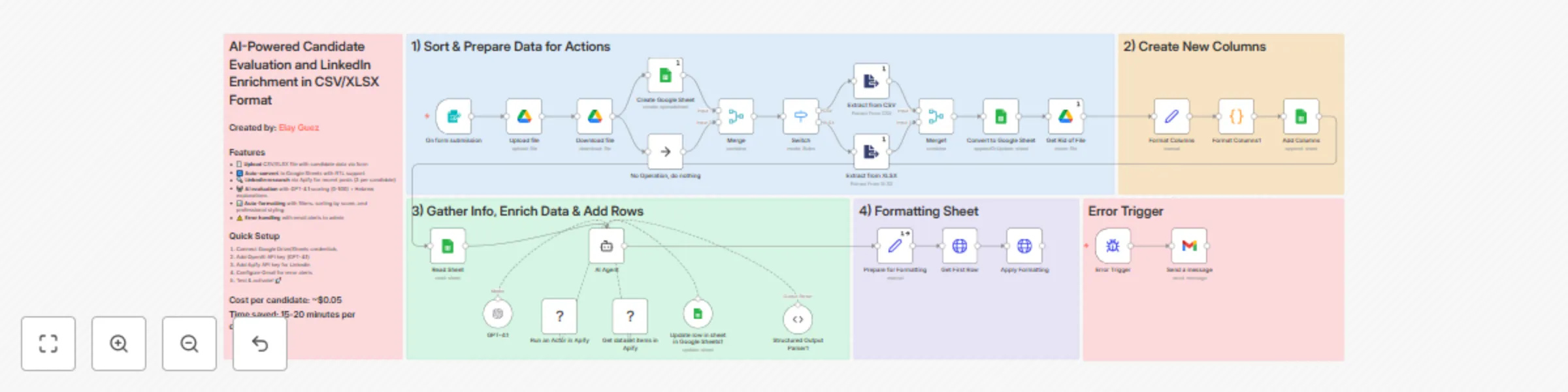
Parse & evaluate HR candidates with GPT-4.1 and LinkedIn data in CSV/XLSX preview
Open on n8n.io

Important notice

This workflow is provided as-is. Please review and test before using in production.

1. Workflow Overview

AI Powered HR Candidate Evaluation Agent with LinkedIn Data Enrichment in CSV/XLSX Format Overview Transform your manual hiring process into an intelligent evaluation system that saves 15 20 min...

Best for

  • HR automation workflows
  • AI Chatbot automation workflows
  • advanced n8n builders looking for reusable templates

Tools used

n8n-nodes-base.formtrigger, n8n-nodes-base.noop, n8n-nodes-base.merge, n8n-nodes-base.googlesheets, n8n-nodes-base.googledrive, n8n-nodes-base.extractfromfile, n8n-nodes-base.code, n8n-nodes-base.set

Source and attribution

This workflow is cataloged by N8N Workflows and links back to its original n8n.io source page by Elay Guez.

Original n8n.io source

1.1 Workflow description

Title
Parse & evaluate HR candidates with GPT-4.1 and LinkedIn data in CSV/XLSX
Workflow name
Parse & evaluate HR candidates with GPT-4.1 and LinkedIn data in CSV/XLSX

AI-Powered HR Candidate Evaluation Agent with LinkedIn Data Enrichment in CSV/XLSX Format

🎯 Overview

Transform your manual hiring process into an intelligent evaluation system that saves 15-20 minutes per candidate! This workflow automates the entire candidate assessment pipeline - from CSV/XLSX upload to AI-powered scoring with LinkedIn insights.

When you upload a candidate list, this workflow automatically:

  • 📊 Converts your file into a formatted Google Sheet with RTL support
  • 🔍 Researches each candidate's recent LinkedIn posts via Apify
  • 🤖 Evaluates candidates using GPT-4.1 with context-aware scoring (0-100)
  • 💬 Generates professional Hebrew explanations for each score
  • 📈 Auto-sorts by score and applies professional formatting
  • ⚠️ Sends error alerts to keep everything running smoothly

Cost per candidate: ~$0.05 | Time saved: 15-20 minutes each

👥 Who's it for?

  • HR teams drowning in candidate applications
  • Recruitment agencies needing consistent evaluation criteria
  • Hiring managers seeking data-driven candidate insights
  • Companies looking to scale their team
  • Anyone tired of manual spreadsheet juggling

⚡ How it works

  1. Form submission triggers with CSV/XLSX upload
  2. Google Drive stores the file and creates a new Sheet
  3. Data extraction processes the file content
  4. AI Agent loops through each candidate:
    • Fetches up to 3 recent LinkedIn posts via Apify
    • Analyzes qualifications against job requirements
    • Generates evaluation score and Hebrew explanation
  5. Sheet formatting applies filters, sorting, and styling
  6. Error handling notifies admin of any issues

🛠️ Setup Instructions

Time to deploy: 15 minutes

Requirements:

  • Google account (Drive + Sheets access)
  • OpenAI API key (GPT-4.1 access)
  • Apify API key (for LinkedIn scraping)
  • Gmail account (for error notifications)

Step-by-step:

  1. Import this template into your n8n instance
  2. Configure Google credentials:
    • Connect Google Drive OAuth2
    • Connect Google Sheets OAuth2
  3. Add OpenAI API key to the GPT-4.1 node
  4. Set up Apify credentials for LinkedIn scraping
  5. Configure Gmail for error alerts (update email in "Send a message" node)
  6. Update folder IDs in Google Drive nodes to your folders
  7. Test with a sample CSV containing 2-3 candidates
  8. Activate and share the form URL with your team!

📋 Input File Format

Your CSV/XLSX should include these columns (Hebrew):

  • שם פרטי (First name)
  • שם משפחה (Last name)
  • חשבון לינקדאין (LinkedIn URL)
  • Your custom evaluation questions

🎨 Customization Options

Easy tweaks:

  • Scoring criteria: Modify the AI agent's system message
  • Language: Switch from Hebrew to any language
  • Scoring rubric: Adjust the 50/25/15/10 weighting
  • LinkedIn posts: Change from 3 posts to more/fewer
  • Sheet styling: Customize colors and formatting

Advanced modifications:

  • Add integration with your ATS (Greenhouse, Lever, etc.)
  • Connect to Slack for real-time notifications
  • Add multiple evaluation agents for different roles
  • Implement multi-language support
  • Add candidate email automation

💡 Pro Tips

  • Better LinkedIn data: Ensure candidates provide complete LinkedIn URLs (not just usernames)
  • Consistent scoring: Run batches of similar roles together for normalized scoring
  • Cost optimization: Adjust Apify settings to fetch only essential data
  • Scale smartly: Process in batches of min 10-20 for optimal performance

⚠️ Important Notes

  • LinkedIn scraping respects Apify's rate limits
  • Scores are relative within each batch - don't compare across different job roles
  • The workflow handles both CSV and XLSX formats automatically
  • Error notifications help you catch issues before they cascade

📊 Expected Results

After implementation, expect:

  • Data-driven evaluation across candidates
  • Professional explanation for hiring decisions
  • Happy recruiters who can focus on human connection

Built with ❤️ by Elay Guez

1.2 Logical Blocks

This catalog entry is organized from the workflow JSON. The node-level section below shows the executable blocks available for review before importing the template.

2. Block-by-Block Analysis

Block 1 - On form submission

Type / Role
n8n-nodes-base.formTrigger - formTrigger
Config choices
Version 2.2

Block 2 - No Operation, do nothing

Type / Role
n8n-nodes-base.noOp - noOp
Config choices
Version 1

Block 3 - Merge

Type / Role
n8n-nodes-base.merge - merge
Config choices
Version 3.1

Block 4 - Create Google Sheet

Type / Role
n8n-nodes-base.googleSheets - googleSheets
Config choices
Version 4.5

Block 5 - Upload file

Type / Role
n8n-nodes-base.googleDrive - googleDrive
Config choices
Version 3

Block 6 - Download file

Type / Role
n8n-nodes-base.googleDrive - googleDrive
Config choices
Version 3

Block 7 - Extract from CSV

Type / Role
n8n-nodes-base.extractFromFile - extractFromFile
Config choices
Version 1

Block 8 - Get Rid of File

Type / Role
n8n-nodes-base.googleDrive - googleDrive
Config choices
Version 3

Block 9 - Format Columns1

Type / Role
n8n-nodes-base.code - code
Config choices
Version 2

Block 10 - Format Columns

Type / Role
n8n-nodes-base.set - set
Config choices
Version 3.4

Block 11 - Add Columns

Type / Role
n8n-nodes-base.googleSheets - googleSheets
Config choices
Version 4.7

Block 12 - Read Sheet

Type / Role
n8n-nodes-base.googleSheets - googleSheets
Config choices
Version 4.7

Block 13 - Get First Row

Type / Role
n8n-nodes-base.httpRequest - httpRequest
Config choices
Version 3

Block 14 - Apply Formatting

Type / Role
n8n-nodes-base.httpRequest - httpRequest
Config choices
Version 3

Block 15 - AI Agent

Type / Role
@n8n/n8n-nodes-langchain.agent - agent
Config choices
Version 2.2

Block 16 - Update row in sheet in Google Sheets1

Type / Role
n8n-nodes-base.googleSheetsTool - googleSheetsTool
Config choices
Version 4.7

Block 17 - Structured Output Parser1

Type / Role
@n8n/n8n-nodes-langchain.outputParserStructured - outputParserStructured
Config choices
Version 1.3

Block 18 - Get dataset items in Apify

Type / Role
@apify/n8n-nodes-apify.apifyTool - apifyTool
Config choices
Version 1

Block 19 - Prepare for Formatting

Type / Role
n8n-nodes-base.set - set
Config choices
Version 3.4

Block 20 - Switch

Type / Role
n8n-nodes-base.switch - switch
Config choices
Version 3.2

Block 21 - Convert to Google Sheet

Type / Role
n8n-nodes-base.googleSheets - googleSheets
Config choices
Version 4.5

Block 22 - Extract from XLSX

Type / Role
n8n-nodes-base.extractFromFile - extractFromFile
Config choices
Version 1

Block 23 - Sticky Note18

Type / Role
n8n-nodes-base.stickyNote - stickyNote
Config choices
Version 1

Block 24 - Sticky Note

Type / Role
n8n-nodes-base.stickyNote - stickyNote
Config choices
Version 1

Showing the first 24 of 33 workflow blocks. Download the JSON for the full node graph.

3. Summary Table

Workflow Parse & evaluate HR candidates with GPT-4.1 and LinkedIn data in CSV/XLSX
Complexity advanced
Nodes 33
Categories HR, AI Chatbot
Author Elay Guez
Published 20 Sept 2025

4. Reproducing the Workflow from Scratch

  1. 1. Download the workflow JSON

    Use the JSON export at /data/workflows/8775/8775.json as the source template for this automation.

  2. 2. Import the template into n8n

    Open n8n, import the downloaded JSON, and review each node before activating the workflow.

  3. 3. Configure credentials and variables

    Replace placeholder credentials, API keys, webhook URLs, account IDs, and environment-specific values with your own settings.

  4. 4. Test with sample data

    Run the workflow manually or in a staging workspace, inspect node output, and confirm downstream systems receive the expected data.

  5. 5. Activate and monitor

    Enable the workflow only after testing, then monitor executions, errors, and rate limits during the first production runs.

5. General Notes & Resources

Review imported nodes carefully before activation. This catalog entry is intended to help you inspect the workflow structure, understand required services, and find related templates faster.

Node names, credentials, schedules, webhook paths, and external service limits may need adjustment for your workspace.

Frequently asked questions

What does Parse & evaluate HR candidates with GPT-4.1 and LinkedIn data in CSV/XLSX do?

AI Powered HR Candidate Evaluation Agent with LinkedIn Data Enrichment in CSV/XLSX Format Overview Transform your manual hiring process into an intelligent evaluation system that saves 15 20 min...

What do I need before importing this workflow?

Review the workflow JSON, configure any required credentials in n8n, and test the automation in a safe workspace before using it in production.

Can I customize this workflow?

Yes. Use the block-by-block analysis and the downloadable JSON to inspect each node, then adjust credentials, prompts, schedules, filters, or destinations for your HR, AI Chatbot use case.