Elay Guez
Workflows by Elay Guez
AI-powered web research in Google Sheets with GPT and Bright Data
# 🔍 AI-Powered Web Research in Google Sheets with Bright Data ## 📋 Overview Transform any Google Sheets cell into an intelligent web scraper! Type `=BRIGHTDATA("cell", "search prompt")` and get AI-filtered result from every website in ~20 seconds. **What happens automatically:** - AI optimizes your search query - Bright Data scrapes the web (bypasses bot detection) - AI analyzes and filters result - Returns clean data directly to your cell - Completes in <25 seconds **Cost:** ~$0.02-0.05 per search | **Time saved:** 3-5 minutes per search --- ## 👥 Who's it for - Market researchers needing competitive intelligence - E-commerce teams tracking prices - Sales teams doing lead prospecting - SEO specialists gathering content research - Real estate agents monitoring listings - Anyone tired of manual copy-paste --- ## ⚙️ How it works 1. **Webhook Call** - Google Sheets function sends POST request 2. **Data Preparation** - Organizes input structure 3. **AI Query Optimization** - GPT-4.1 Mini refines search query 4. **Web Scraping** - Bright Data fetches data while bypassing blocks 5. **AI Analysis** - GPT-4o Mini filters and summarizes result 6. **Response** - Returns plain text to your cell 8. **Logging** - Updates logs for monitoring --- ## 🛠️ Setup Instructions **Time to deploy:** 20 minutes ### Requirements - n8n instance with public URL - Bright Data account + API key - OpenAI API key - Google account for Apps Script ### Part 1: n8n Workflow Setup 1. Import this template into your n8n instance 2. **Configure Webhook node:** - Copy your webhook URL: `https://n8n.yourdomain.com/webhook/brightdata-search` - Set authentication: Header Auth - Set API key: `12312346` (or create your own) 3. **Add OpenAI credentials** to AI nodes. 4. **Configure Bright Data:** Add API credentials 5. **Configure Output Language:** Manually edit the "Set Variables" Node. 6. Test workflow with manual execution 7. Activate the workflow ### Part 2: Google Sheets Function 1. Open Google Sheet → **Extensions** → **Apps Script** 2. Paste this code: ```javascript function BRIGHTDATA(prompt, source) { if (!prompt || prompt === "") { return "❌ Must enter prompt"; } source = source || "google"; // Update with YOUR webhook URL const N8N_WEBHOOK_URL = "https://your-n8n-domain.com/webhook/brightdata-search"; // Update with YOUR password const API_KEY = "12312346"; let spreadsheetId, sheetName, cellAddress; try { const sheet = SpreadsheetApp.getActiveSheet(); const activeCell = sheet.getActiveCell(); spreadsheetId = SpreadsheetApp.getActiveSpreadsheet().getId(); sheetName = sheet.getName(); cellAddress = activeCell.getA1Notation(); } catch (e) { return "❌ Cannot identify cell"; } const payload = { prompt: prompt, source: source.toLowerCase(), context: { spreadsheetId: spreadsheetId, sheetName: sheetName, cellAddress: cellAddress, timestamp: new Date().toISOString() } }; const options = { method: "post", contentType: "application/json", payload: JSON.stringify(payload), muteHttpExceptions: true, headers: { "Accept": "text/plain", "key": API_KEY } }; try { const response = UrlFetchApp.fetch(N8N_WEBHOOK_URL, options); const responseCode = response.getResponseCode(); if (responseCode !== 200) { Logger.log("Error response: " + response.getContentText()); return "❌ Error " + responseCode; } return response.getContentText(); } catch (error) { Logger.log("Exception: " + error.toString()); return "❌ Connection error: " + error.toString(); } } function doGet(e) { return ContentService.createTextOutput(JSON.stringify({ status: "alive", message: "Apps Script is running", timestamp: new Date().toISOString() })).setMimeType(ContentService.MimeType.JSON); } ``` 3. Update `N8N_WEBHOOK_URL` with your webhook 4. Update `API_KEY` with your password 5. **Save** (Ctrl+S / Cmd+S) - Important! 6. Close Apps Script editor --- ## 💡 Usage Examples ``` =BRIGHTDATA("C3", "What is the current price of the product?") =BRIGHTDATA("D30", "What is the size of this company?") =BRIGHTDATA("A4", "Do this comapny is hiring Developers?") ``` --- ## 🎨 Customization ### Easy Tweaks - **AI Models** - Switch to GPT-4o for better optimization - **Response Format** - Modify prompt for specific outputs - **Speed** - Optimize AI prompts to reduce time - **Language** - Change prompts for any language ### Advanced Options - Implement rate limiting - Add data validation - Create async mode for long queries - Add Slack notifications --- ## 🚀 Pro Tips - **Be Specific** - "What is iPhone 15 Pro 256GB US price?" beats "What is iPhone price?" - **Speed Matters** - Keep prompts concise (30s timeout limit) - **Monitor Costs** - Track Bright Data usage - **Debug** - Check workflow logs for errors --- ## ⚠️ Important Notes - **Timeout:** 30-second Google Sheets limit (aim for <20s) - **Plain Text Only:** No JSON responses - **Costs:** Monitor Bright Data at console.brightdata.com - **Security:** Keep API keys secret - **No Browser Storage:** Don't use localStorage/sessionStorage --- ## 🔧 Troubleshooting | Error | Solution | |-------|----------| | "Exceeded maximum execution time" | Optimize AI prompts or use async mode | | "Could not fetch data" | Verify Bright Data credentials | | Empty cell | Check n8n logs for AI parsing issues | | Broken characters | Verify UTF-8 encoding in webhook node | --- ## 📚 Resources - [Bright Data API Docs](https://docs.brightdata.com/) - [n8n Webhook Documentation](https://docs.n8n.io/integrations/builtin/core-nodes/n8n-nodes-base.webhook/) - [Google Apps Script Reference](https://developers.google.com/apps-script/reference/spreadsheet) --- **Built with ❤️ by [Elay Guez](https://www.linkedin.com/in/elay-g)**
Parse & evaluate HR candidates with GPT-4.1 and LinkedIn data in CSV/XLSX
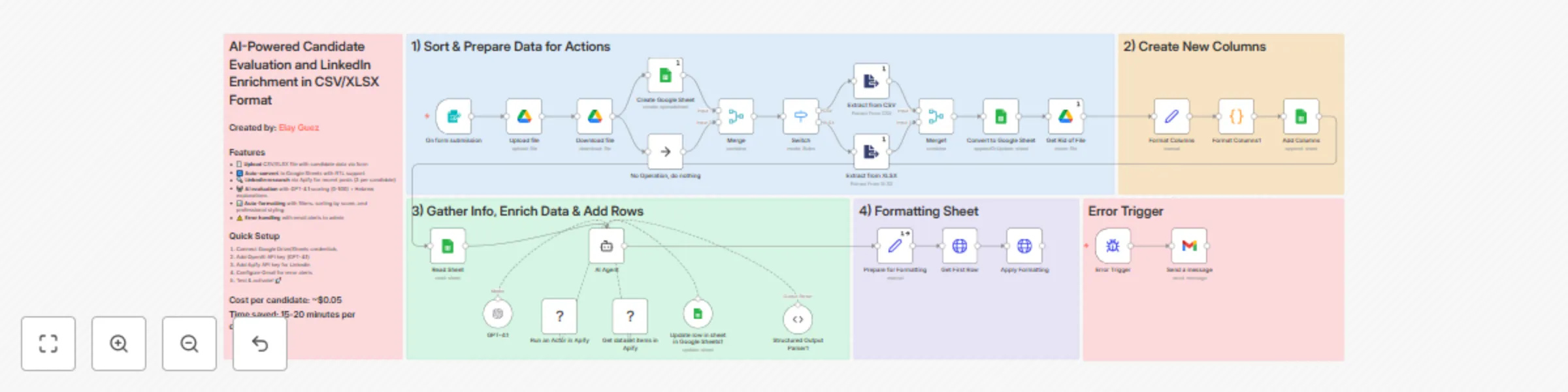
# AI-Powered HR Candidate Evaluation Agent with LinkedIn Data Enrichment in CSV/XLSX Format ## 🎯 Overview Transform your manual hiring process into an intelligent evaluation system that saves 15-20 minutes per candidate! This workflow automates the entire candidate assessment pipeline - from CSV/XLSX upload to AI-powered scoring with LinkedIn insights. When you upload a candidate list, this workflow automatically: - 📊 Converts your file into a formatted Google Sheet with RTL support - 🔍 Researches each candidate's recent LinkedIn posts via Apify - 🤖 Evaluates candidates using GPT-4.1 with context-aware scoring (0-100) - 💬 Generates professional Hebrew explanations for each score - 📈 Auto-sorts by score and applies professional formatting - ⚠️ Sends error alerts to keep everything running smoothly **Cost per candidate: ~$0.05** | **Time saved: 15-20 minutes each** ## 👥 Who's it for? - HR teams drowning in candidate applications - Recruitment agencies needing consistent evaluation criteria - Hiring managers seeking data-driven candidate insights - Companies looking to scale their team - Anyone tired of manual spreadsheet juggling ## ⚡ How it works 1. **Form submission** triggers with CSV/XLSX upload 2. **Google Drive** stores the file and creates a new Sheet 3. **Data extraction** processes the file content 4. **AI Agent** loops through each candidate: - Fetches up to 3 recent LinkedIn posts via Apify - Analyzes qualifications against job requirements - Generates evaluation score and Hebrew explanation 5. **Sheet formatting** applies filters, sorting, and styling 6. **Error handling** notifies admin of any issues ## 🛠️ Setup Instructions **Time to deploy: 15 minutes** ### Requirements: - Google account (Drive + Sheets access) - OpenAI API key (GPT-4.1 access) - Apify API key (for LinkedIn scraping) - Gmail account (for error notifications) ### Step-by-step: 1. Import this template into your n8n instance 2. Configure Google credentials: - Connect Google Drive OAuth2 - Connect Google Sheets OAuth2 3. Add OpenAI API key to the GPT-4.1 node 4. Set up Apify credentials for LinkedIn scraping 5. Configure Gmail for error alerts (update email in "Send a message" node) 6. Update folder IDs in Google Drive nodes to your folders 7. Test with a sample CSV containing 2-3 candidates 8. Activate and share the form URL with your team! ## 📋 Input File Format Your CSV/XLSX should include these columns (Hebrew): - שם פרטי (First name) - שם משפחה (Last name) - חשבון לינקדאין (LinkedIn URL) - Your custom evaluation questions ## 🎨 Customization Options ### Easy tweaks: - **Scoring criteria**: Modify the AI agent's system message - **Language**: Switch from Hebrew to any language - **Scoring rubric**: Adjust the 50/25/15/10 weighting - **LinkedIn posts**: Change from 3 posts to more/fewer - **Sheet styling**: Customize colors and formatting ### Advanced modifications: - Add integration with your ATS (Greenhouse, Lever, etc.) - Connect to Slack for real-time notifications - Add multiple evaluation agents for different roles - Implement multi-language support - Add candidate email automation ## 💡 Pro Tips - **Better LinkedIn data**: Ensure candidates provide complete LinkedIn URLs (not just usernames) - **Consistent scoring**: Run batches of similar roles together for normalized scoring - **Cost optimization**: Adjust Apify settings to fetch only essential data - **Scale smartly**: Process in batches of min 10-20 for optimal performance ## ⚠️ Important Notes - LinkedIn scraping respects Apify's rate limits - Scores are relative within each batch - don't compare across different job roles - The workflow handles both CSV and XLSX formats automatically - Error notifications help you catch issues before they cascade ## 📊 Expected Results After implementation, expect: - Data-driven evaluation across candidates - Professional explanation for hiring decisions - Happy recruiters who can focus on human connection ## Built with ❤️ by [Elay Guez](https://www.linkedin.com/in/elay-g)
Enrich Monday.com leads & draft personalized emails with Explorium MCP and GPT-4.1
# Enrich Monday.com leads with AI-powered company research and personalized email drafts using Explorium MCP and GPT-4.1 ## AI-Powered Lead Enrichment & Email Writer for Monday.com ## 🚀 Overview **Stop losing deals to slow response times!** Transform your inbound leads into qualified opportunities with this intelligent workflow that automates lead enrichment and personalized outreach. When a new lead drops into your Monday.com board, magic happens: * 🔍 **Deep-dives** into company data using Explorium MCP's advanced intelligence engine * 🧠 **Analyzes** business priorities, pain points, and growth opportunities * 💡 **Identifies** specific AI automation use cases tailored to each company * ✉️ **Crafts** hyper-personalized email drafts with GPT-4.1 (under 120 words!) * 📊 **Enriches** your CRM with actionable insights and AI solution recommendations * 📧 **Saves** draft emails directly to Gmail for your review * 🔄 **Updates** Monday.com automatically with all the juicy insights **Perfect for sales teams, growth marketers, and BizDev pros who want to turn every lead into a conversation starter that actually converts!** ## 👥 Who's it for? * B2B sales teams drowning in inbound leads * Growth teams needing lightning-fast lead qualification * BizDev professionals seeking that personal touch at scale * Companies rocking Monday.com as their CRM ## ⚡ How it works 1. **Webhook triggers** when fresh lead hits Monday.com 2. **Company Researcher agent** unleashes Explorium MCP for company intel 3. **Email Writer agent** crafts personalized outreach that doesn't sound like a robot 4. **CRM Enrichment agent** adds golden nuggets of AI recommendations 5. **Gmail integration** parks the draft in your inbox 6. **Monday.com updates** with all the enriched goodness ## 🛠️ Setup Instructions **Time to magic:** 20 minutes **You'll need:** * OpenAI API Key (for GPT-4.1) * Explorium MCP API Key * Monday.com API Token * Gmail OAuth credentials * Monday.com webhook setup **Step-by-step:** 1. Import this template into your n8n instance 2. Hook up Monday.com webhook via "Respond to Webhook" node 3. Deactivate that "Respond to Webhook" node (important!) 4. Plug in your API credentials 5. Customize agent prompts with YOUR company's secret sauce 6. Match your Monday.com columns to the workflow 7. Test drive with a dummy lead 8. Hit activate and watch the magic! ✨ ## 📋 Requirements * Monday.com board with these columns: Company Name, Contact Name, Email, Comments * Explorium MCP access (for that company intelligence gold) * OpenAI API (GPT-4.1 model ready) * Gmail account (where drafts go to shine) ## 🎨 Make it yours * Tweak email tone - formal, casual, or somewhere in between * Adjust research depth in Company Researcher * Add your unique value props to agent prompts * Connect more data sources for extra enrichment * Hook up other CRMs (HubSpot, Salesforce, Pipedrive) * Add Slack alerts for hot leads 🔥 ## 💪 Why this rocks **Real talk:** Manual lead research is SO 2023. While your competitors are still googling companies, you're already in their inbox with an email that mentions their latest funding round, understands their tech stack, and offers solutions to problems they didn't even know you could solve. This isn't just another "Hi {{first_name}}" template. It's AI that actually gets context, writes like a human, and makes your prospects think "How did they know exactly what we need?" **Results you can expect:** * Faster lead response time * Higher email open rates * Actually useful CRM data (not just "interested in our product") * Your sales team thanking you (seriously) **Built with ❤️ by:** [Elay Guez](https://www.linkedin.com/in/elay-g) **Pro tip:** The more context you feed the AI agents about your business, the scarier-good the personalization gets. Don't hold back on those System Message customizations!
Automated stock analysis reports with technical & news sentiment using GPT-4o
Stock Analysis Agent (Hebrew, RTL, GPT-4o) ### Overview ### Get comprehensive stock analysis with this AI-powered workflow that provides actionable insights for your investment decisions. On a weekly basis, this workflow: - Analyzes stock data from multiple sources (Chart-img, Twelve Data API, Alphavantage) - Performs technical analysis using advanced indicators (RSI, MACD, Bollinger Bands, Resistance and Support Levels) - Scans financial news from Alpha Vantage to capture market sentiment - Uses OpenAI's GPT-4o to identify patterns, trends, and trading opportunities - Generates a fully styled, responsive HTML email (with proper RTL layout) in Hebrew - Sends detailed recommendations directly to your inbox **Perfect for investors, traders, and financial analysts who want data-driven stock insights - combining technical indicators with news sentiment for more informed decisions.** ### Setup Instructions ### **Estimated setup time:** - 15 minutes **Required credentials:** - OpenAI API Key - Chart-img API Key (free tier) - Twelve Data API Key (free tier) - Alpha Vantage API Key (free tier) - SMTP credentials (for email delivery) **Steps:** 1. Import this template into your n8n instance. 2. Add your API keys under credentials. 3. Configure the SMTP Email node with: Host (e.g., smtp.gmail.com), Port (465 or 587), Username (your email), Password (app-specific password or login). 4. Activate the workflow. 5. Fill in the Form. 6. **Enjoy!** (Check your Spam mailbox) ### Customization Tips ### - Modify the analysis timeframe (daily, weekly, monthly) - Add integrations with trading platforms or portfolio management tools - Adjust the recommendation criteria based on your risk tolerance ### Why Use This? ### This is more than just stock data. It's an intelligent financial assistant that combines technical analysis with market sentiment to provide actionable recommendations - automatically. ### Important Note: ### This report is being generated automatically and does not constitute an investment recommendation. **Please consult a licensed investment advisor before making any investment decisions.**
Create daily Israeli economic newsletter using RSS and GPT-4o
Daily Economic News Brief for Israel (Hebrew, RTL, GPT-4o) ### Overview ### Stay ahead of the curve with this AI-powered workflow that delivers a daily economic summary tailored for professionals tracking the Israeli economy. At 8:00 PM Israel Time, this workflow: - Retrieves the latest articles from Calcalist and Mako via RSS - Filters duplicates and irrelevant stories - Uses OpenAI’s GPT-4o to identify the 5 most important stories of the day - Summarizes each article in concise, readable Hebrew - Generates a fully styled, responsive HTML email (with proper RTL layout) - Sends it to your inbox using your preferred SMTP email provider **Perfect for economists, analysts, investors, or policymakers who want an actionable and personalized news digest -- no distractions, no fluff.** ### Setup Instructions ### **Estimated setup time:** - 10 minutes **Required credentials:** - OpenAI API Key - SMTP credentials (for email delivery) **Steps:** 1. Import this template into your n8n instance. 3. Add your OpenAI API Key under credentials. 5. Configure the SMTP Email node with: Host (e.g. smtp.gmail.com) Port (465 or 587) Username (your email) Password (app-specific password or login) 15. Set your target email address in the last node. 17. (Optional) Customize the GPT prompt to adjust tone or audience (e.g. general public, policy makers). 19. Activate the workflow and receive daily updates straight to your inbox. ### Customization Tips ### - Change the RSS sources to pull from other Hebrew or international news websites - Modify the summarization prompt to fit different sectors (e.g. tech, health, politics) - Add integrations like Notion, Airtable, or Telegram for logging or distribution - Apply your branding to the HTML output (logos, footer, colors) ### Why Use This? ### This is more than a news digest. It’s an intelligent economic assistant that filters noise, highlights what matters, and keeps you informed-automatically. **You can set it up in 10 minutes and benefit every single day.**