Orchestrate security vulnerability remediation with Port, OpenAI, Jira and Slack
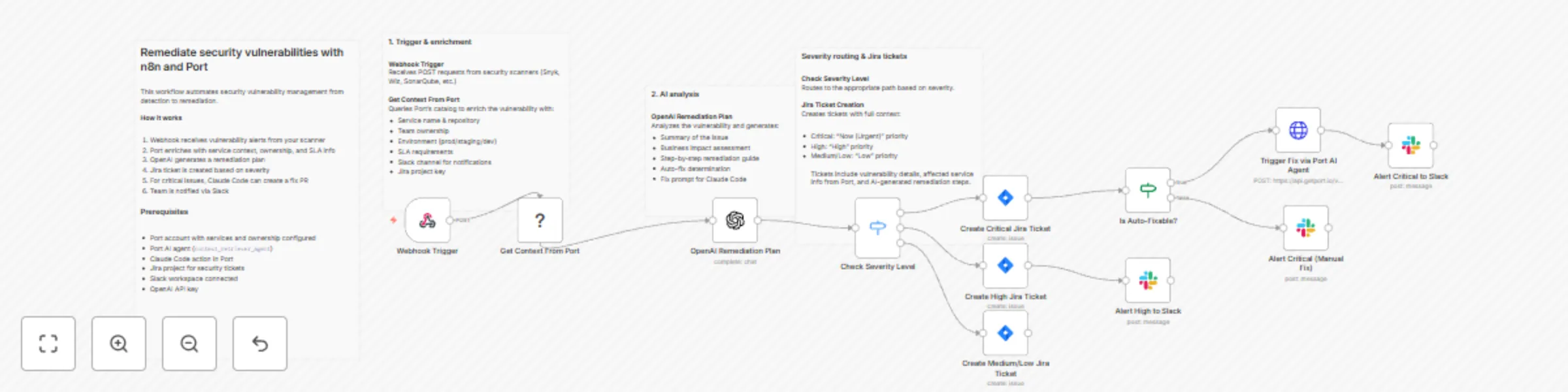
Workflow preview

$20/month : Unlimited workflows
2500 executions/month

THE #1 IN WEB SCRAPING
Scrape any website without limits
HOSTINGER  Early Deal
DISCOUNT 20% Try free
Early DealDISCOUNT 20%
Self-hosted n8n
Unlimited workflows - from $4.99/mo

#1 hub for scraping, AI & automation
6000+ actors - $5 credits/mo
Important notice
This workflow is provided as-is. Please review and test before using in production.
Overview
Complete security workflow from vulnerability detection to automated remediation, with severity-based routing and full organizational context from Port's catalog. This template provides end-to-end lifecycle management including automatic Jira ticket creation with appropriate priority, AI-powered remediation planning, and Claude Code-triggered fixes for critical vulnerabilities.
The full guide is available here.
How it works
The n8n workflow orchestrates the following steps:
- Webhook trigger: Receives vulnerability alerts from security scanners (Snyk, Wiz, SonarQube, etc.) via POST request.
- Port context enrichment: Uses Port's n8n node to query your software catalog for service metadata, ownership, environment, SLA requirements, and dependencies related to the vulnerability.
- AI remediation planning: OpenAI analyzes the vulnerability with Port context and generates a remediation plan, determining if automated fixing is possible.
- Severity-based routing: Routes vulnerabilities through different paths based on severity level:
- Critical: Jira ticket (Highest priority) → Check if auto-fixable → Trigger Claude Code fix → Slack alert with fix status
- High: Jira ticket (High priority) → Slack notification to team channel
- Medium/Low: Jira ticket only for tracking
- Jira integration: Creates tickets with full context including vulnerability details, affected service information from Port, and AI-generated remediation steps.
- Claude Code remediation: For auto-fixable critical vulnerabilities, triggers Claude Code via Port action to create a pull request with the security patch, referencing the Jira ticket.
- Slack notifications: Sends contextual alerts to the appropriate team channel (retrieved from Port) with Jira ticket reference and remediation status.
Prerequisites
- You have a Port account and have completed the onboarding process.
- Services and repositories are cataloged in Port with ownership information.
- Your security scanner (Snyk, Wiz, SonarQube) can send webhooks.
- You have a working n8n instance (Cloud or self-hosted) with Port's n8n custom node installed.
- Jira Cloud account with appropriate project permissions.
- Slack workspace with bot permissions to post messages.
- OpenAI API key for remediation planning.
Setup
- Register for free on Port.io if you haven't already.
- Create the Context Retriever Agent in Port following the guide.
- Import the workflow and configure credentials (Port, Jira, Slack, OpenAI, Bearer Auth).
- Select your Jira project in each Jira node (Critical, High, Medium/Low).
- Update
default-organization/repositorywith your default repository for Claude Code fixes. - Point your security scanner webhook to the workflow URL.
- Test with a sample vulnerability payload.
⚠️ This template is intended for Self-Hosted instances only.