Monitor solar energy production & send alerts with Gmail, Google Sheets, and Slack
Workflow preview

$20/month : Unlimited workflows
2500 executions/month

THE #1 IN WEB SCRAPING
Scrape any website without limits
HOSTINGER  Early Deal
DISCOUNT 20% Try free
Early DealDISCOUNT 20%
Self-hosted n8n
Unlimited workflows - from $4.99/mo

#1 hub for scraping, AI & automation
6000+ actors - $5 credits/mo
Important notice
This workflow is provided as-is. Please review and test before using in production.
Overview
Solar Energy Production Monitoring Alert Workflow
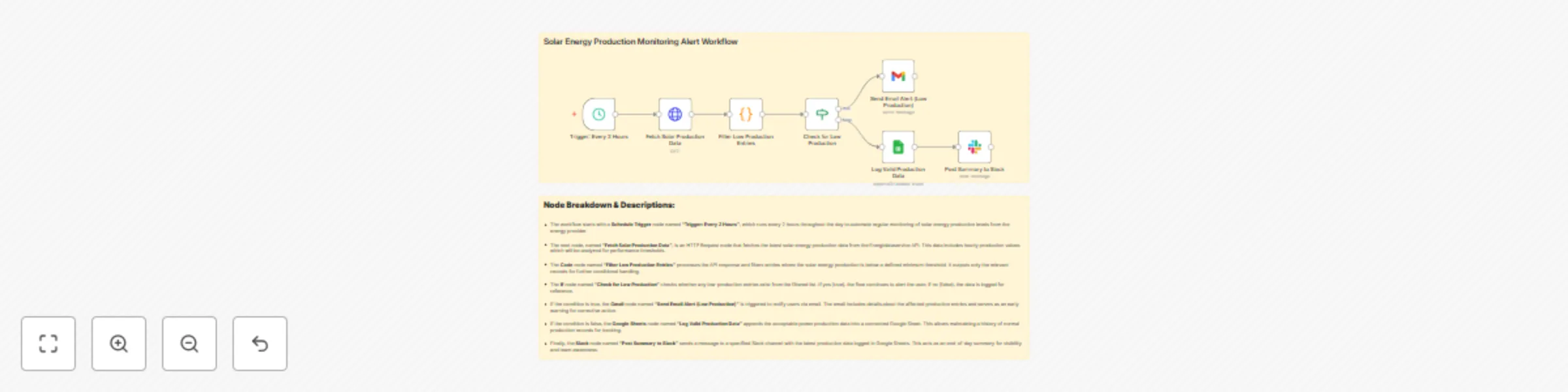
This workflow automatically monitors solar energy production every 2 hours by fetching data from the Energidataservice API. If the energy output falls below a predefined threshold, it instantly notifies users via email. Otherwise, it logs the data into a Google Sheet and posts a daily summary to Slack.
Who’s It For
- Renewable energy teams monitoring solar output.
- Facility managers and power plant supervisors.
- ESG compliance officers tracking sustainability metrics.
- Developers or analysts automating solar energy reporting.
How It Works
- Trigger: The workflow starts every 2 hours using a Schedule Trigger.
- Data Fetch: An HTTP Request node fetches solar energy production data from the Energidataservice API.
- Processing: A Code node filters out entries with production below the minimum threshold.
- Decision Making: An If node checks whether any low-production entries are present.
- Alerts: If low-production is detected, an email is sent via the Gmail node.
- Logging: If all entries are valid, they are logged into a Google Sheet.
- Slack Summary: A Slack node posts the summary sheet data for end-of-day visibility.
How to Set Up
- Schedule Trigger: Configure to run every 2 hours.
- HTTP Request Node:
- Method:
GET - URL:
https://api.energidataservice.dk/dataset/YourDatasetHere - Add necessary headers and params as required by the API.
- Method:
- Code Node: Define logic to filter entries where
solar_energy_production < required_threshold. - If Node: Use
items.length > 0to check for low-production entries. - Gmail Node:
- Auth with Gmail credentials.
- Customize recipient and message template.
- Google Sheets Node:
- Connect to a spreadsheet.
- Map appropriate columns.
- Slack Node:
- Use Slack OAuth2 credentials.
- Specify channel and message content.
Requirements
- n8n Cloud or Self-hosted instance.
- Access to Energidataservice API.
- Gmail account (with n8n OAuth2 integration).
- Google Sheets account & sheet ID.
- Slack workspace and app with appropriate permissions.
How to Customize
- Change Frequency: Adjust the Schedule Trigger interval (e.g., every hour or 4x per day).
- Threshold Tuning: Modify the value in the Code node to change the minimum acceptable solar production.
- Alert Routing: Update Gmail recipients or replace Gmail with Microsoft Outlook/SendGrid.
- Sheet Format: Add or remove columns in the Google Sheet based on extra metrics (e.g., wind or nuclear data).
- Slack Posting: Customize Slack messages using Markdown for improved readability.
Add‑ons
- Telegram Node: Send alerts to a Telegram group instead of email.
- Discord Webhook: Push updates to a Discord channel.
- n8n Webhook Trigger: Extend it to receive external production update notifications.
- Integromat/Make or Zapier: For multi-platform integration with CRMs or ticketing tools.
Use Case Examples
- Utility Companies: Automatically detect and act on solar underperformance to maintain grid stability.
- Solar Farm Operators: Log clean production data for auditing and compliance reports.
- Sustainability Teams: Track daily performance and anomalies without manual checks.
- Home Solar System Owners: Get notified if solar generation drops below expected.
Common Troubleshooting
| Issue | Possible Cause | Solution |
|---|---|---|
| HTTP Request fails | API key missing or URL is incorrect | Check API endpoint, parameters, and authentication headers |
| Gmail not sending alerts | Missing or invalid Gmail credentials | Re-authenticate Gmail OAuth2 in n8n credentials |
| No data getting logged in Google Sheet | Incorrect mapping or sheet permissions | Ensure the sheet exists, columns match, and credentials are correct |
| Slack node fails | Invalid token or missing channel ID | Reconnect Slack credentials and check permissions |
| Code node returns empty | Filter logic may be too strict | Validate data format and relax the threshold condition |
Need Help?
Need help setting this up or customizing it for your own solar or energy monitoring use case?
✅ Set it up on your n8n Cloud or self-hosted instance ✅ Customize it for your own API or data source ✅ Modify alerts to suit your internal tools (Teams, Discord, SMS, etc.)
👉 Just reach out to our n8n automation team at WeblineIndia, we'll be happy to help.