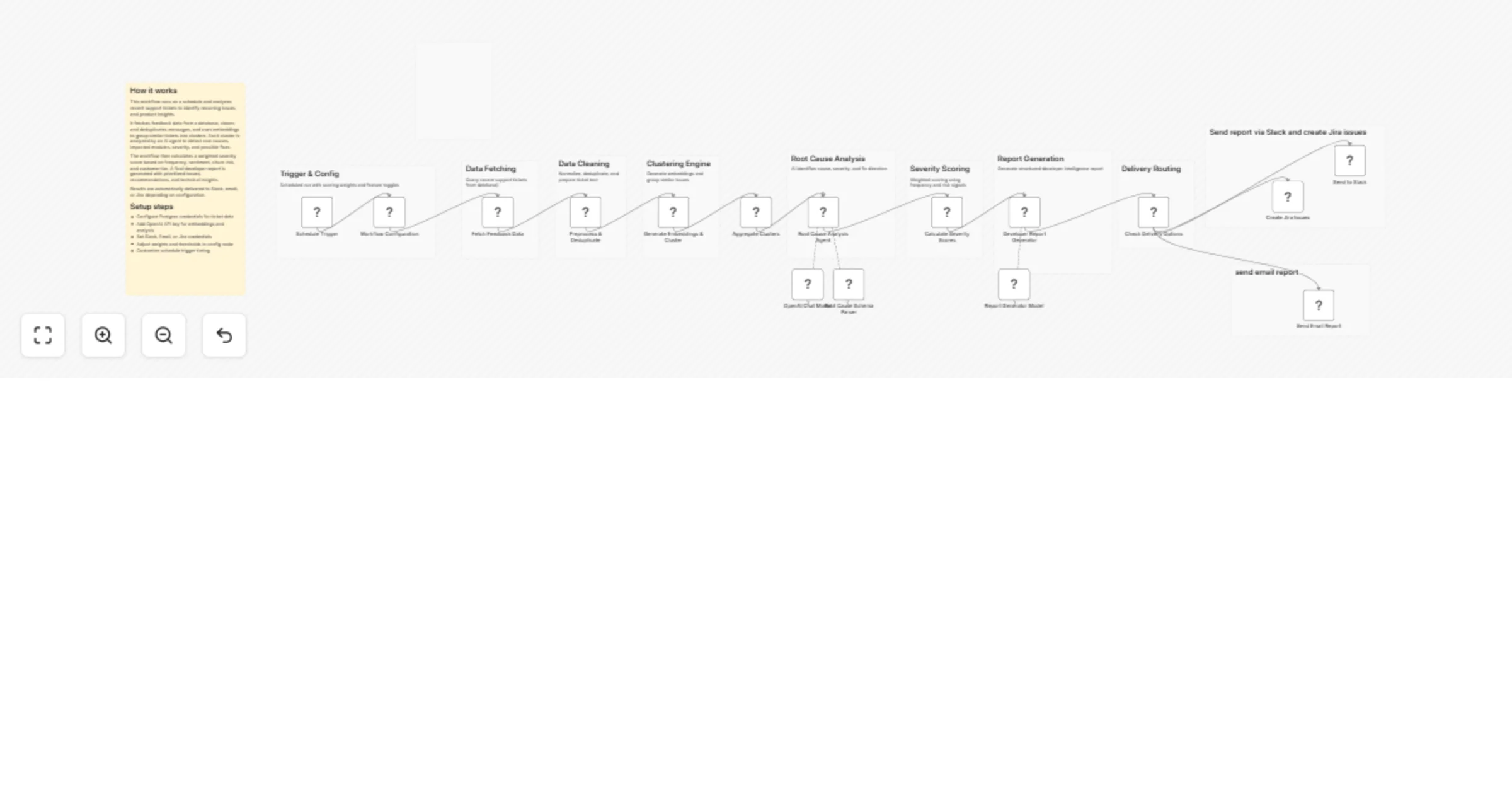
Turn support tickets into developer insights with OpenAI, Postgres, Slack and Jira

Workflow preview

Workflow preview
100%
Turn support tickets into developer insights with OpenAI, Postgres, Slack and Jira preview
Open on n8n.io

1. Workflow Overview

Overview This workflow transforms raw support tickets into actionable developer insights using AI and data processing. It automatically detects recurring issues, identifies root causes, ranks sever...

Best for

  • Engineering automation workflows
  • AI Summarization automation workflows
  • advanced n8n builders looking for reusable templates

Tools used

n8n-nodes-base.scheduletrigger, n8n-nodes-base.set, n8n-nodes-base.postgres, n8n-nodes-base.code, n8n-nodes-base.aggregate, @n8n/n8n-nodes-langchain.lmchatopenai, @n8n/n8n-nodes-langchain.outputparserstructured, @n8n/n8n-nodes-langchain.agent

Source and attribution

This workflow is cataloged by N8N Workflows and links back to its original n8n.io source page by ResilNext.

Original n8n.io source

1.1 Workflow description

Title
Turn support tickets into developer insights with OpenAI, Postgres, Slack and Jira
Workflow name
Turn support tickets into developer insights with OpenAI, Postgres, Slack and Jira

Overview

This workflow transforms raw support tickets into actionable developer insights using AI and data processing. It automatically detects recurring issues, identifies root causes, ranks severity, and generates a structured engineering report.

By combining embeddings, clustering, and AI analysis, it helps teams prioritize bugs, understand user pain points, and take data-driven product decisions.


How It Works

  1. Scheduled Trigger
  • Runs automatically at a defined time (e.g., daily).
  1. Workflow Configuration
  • Defines time window, similarity threshold, scoring weights, and delivery options.
  1. Fetch Feedback Data
  • Retrieves recent support tickets (bugs and feature requests) from Postgres.
  1. Preprocessing
  • Cleans, normalizes, and removes duplicate messages.
  1. Embedding & Clustering
  • Generates embeddings using OpenAI.
  • Groups similar tickets using cosine similarity.
  1. Cluster Aggregation
  • Combines related tickets into structured clusters.
  1. Root Cause Analysis
  • AI agent analyzes clusters to identify:
  • Root cause
  • Impacted module
  • Severity
  • Debug steps
  • Fix direction
  1. Severity Scoring
  • Calculates weighted score based on:
  • Frequency
  • Sentiment
  • Churn risk
  • Enterprise impact
  1. Report Generation
  • Generates a developer-focused report including:
  • Executive summary
  • Ranked bugs
  • Feature requests
  • Risk analysis
  • Sprint priorities
  1. Delivery
  • Sends report to Slack
  • Optionally creates Jira issues
  • Optional email delivery

Setup Instructions

  1. Database Setup
  • Configure Postgres credentials
  • Ensure support_tickets table exists with required fields
  1. OpenAI Configuration
  • Add API key for:
  • Embeddings (text-embedding-3-small)
  • AI analysis agents
  1. Slack Integration
  • Add Slack credentials
  • Set channel ID
  1. Email Setup (Optional)
  • Configure SMTP or email service
  1. Jira Integration (Optional)
  • Add Jira credentials
  • Set project key and issue type
  1. Customize Parameters
  • Adjust:
  • Similarity threshold
  • Scoring weights
  • Time window
  1. Schedule Configuration
  • Modify trigger timing as needed

Use Cases

  • Product teams analyzing user feedback at scale
  • Engineering teams prioritizing bug fixes
  • SaaS companies tracking churn-related issues
  • Customer support insights automation
  • AI-driven product intelligence dashboards

Requirements

  • OpenAI API key
  • Postgres database with support ticket data
  • Slack (optional)
  • Email service (optional)
  • Jira account (optional)
  • n8n instance

Key Features

  • Automated feedback clustering using embeddings
  • AI-driven root cause analysis
  • Weighted severity scoring system
  • Developer-ready intelligence reports
  • Multi-channel delivery (Slack, Email, Jira)
  • Fully customizable scoring and thresholds

Summary

A powerful AI-driven workflow that converts raw support tickets into structured developer intelligence. It automates clustering, root cause detection, prioritization, and reporting helping teams fix the right problems faster and build better products.

1.2 Logical Blocks

This catalog entry is organized from the workflow JSON. The node-level section below shows the executable blocks available for review before importing the template.

2. Block-by-Block Analysis

Block 1 - Schedule Trigger

Type / Role
n8n-nodes-base.scheduleTrigger - scheduleTrigger
Config choices
Version 1.3

Block 2 - Workflow Configuration

Type / Role
n8n-nodes-base.set - set
Config choices
Version 3.4

Block 3 - Fetch Feedback Data

Type / Role
n8n-nodes-base.postgres - postgres
Config choices
Version 2.6

Block 4 - Preprocess & Deduplicate

Type / Role
n8n-nodes-base.code - code
Config choices
Version 2

Block 5 - Generate Embeddings & Cluster

Type / Role
n8n-nodes-base.code - code
Config choices
Version 2

Block 6 - Aggregate Clusters

Type / Role
n8n-nodes-base.aggregate - aggregate
Config choices
Version 1

Block 7 - OpenAI Chat Model

Type / Role
@n8n/n8n-nodes-langchain.lmChatOpenAi - lmChatOpenAi
Config choices
Version 1.3

Block 8 - Root Cause Schema Parser

Type / Role
@n8n/n8n-nodes-langchain.outputParserStructured - outputParserStructured
Config choices
Version 1.3

Block 9 - Root Cause Analysis Agent

Type / Role
@n8n/n8n-nodes-langchain.agent - agent
Config choices
Version 3

Block 10 - Calculate Severity Scores

Type / Role
n8n-nodes-base.code - code
Config choices
Version 2

Block 11 - Report Generator Model

Type / Role
@n8n/n8n-nodes-langchain.lmChatOpenAi - lmChatOpenAi
Config choices
Version 1.3

Block 12 - Developer Report Generator

Type / Role
@n8n/n8n-nodes-langchain.agent - agent
Config choices
Version 3

Block 13 - Check Delivery Options

Type / Role
n8n-nodes-base.if - if
Config choices
Version 2.3

Block 14 - Send to Slack

Type / Role
n8n-nodes-base.slack - slack
Config choices
Version 2.4

Block 15 - Send Email Report

Type / Role
n8n-nodes-base.emailSend - emailSend
Config choices
Version 2.1

Block 16 - Create Jira Issues

Type / Role
n8n-nodes-base.jira - jira
Config choices
Version 1

Block 17 - Sticky Note

Type / Role
n8n-nodes-base.stickyNote - stickyNote
Config choices
Version 1

Block 18 - Sticky Note1

Type / Role
n8n-nodes-base.stickyNote - stickyNote
Config choices
Version 1

Block 19 - Sticky Note2

Type / Role
n8n-nodes-base.stickyNote - stickyNote
Config choices
Version 1

Block 20 - Sticky Note3

Type / Role
n8n-nodes-base.stickyNote - stickyNote
Config choices
Version 1

Block 21 - Sticky Note4

Type / Role
n8n-nodes-base.stickyNote - stickyNote
Config choices
Version 1

Block 22 - Sticky Note5

Type / Role
n8n-nodes-base.stickyNote - stickyNote
Config choices
Version 1

Block 23 - Sticky Note6

Type / Role
n8n-nodes-base.stickyNote - stickyNote
Config choices
Version 1

Block 24 - Sticky Note7

Type / Role
n8n-nodes-base.stickyNote - stickyNote
Config choices
Version 1

Showing the first 24 of 28 workflow blocks. Download the JSON for the full node graph.

3. Summary Table

Workflow Turn support tickets into developer insights with OpenAI, Postgres, Slack and Jira
Complexity advanced
Nodes 28
Categories Engineering, AI Summarization
Author ResilNext
Published 03 Apr 2026

4. Reproducing the Workflow from Scratch

  1. 1. Download the workflow JSON

    Use the JSON export at /data/workflows/14684/14684.json as the source template for this automation.

  2. 2. Import the template into n8n

    Open n8n, import the downloaded JSON, and review each node before activating the workflow.

  3. 3. Configure credentials and variables

    Replace placeholder credentials, API keys, webhook URLs, account IDs, and environment-specific values with your own settings.

  4. 4. Test with sample data

    Run the workflow manually or in a staging workspace, inspect node output, and confirm downstream systems receive the expected data.

  5. 5. Activate and monitor

    Enable the workflow only after testing, then monitor executions, errors, and rate limits during the first production runs.

5. General Notes & Resources

Review imported nodes carefully before activation. This catalog entry is intended to help you inspect the workflow structure, understand required services, and find related templates faster.

Node names, credentials, schedules, webhook paths, and external service limits may need adjustment for your workspace.

Frequently asked questions

What does Turn support tickets into developer insights with OpenAI, Postgres, Slack and Jira do?

Overview This workflow transforms raw support tickets into actionable developer insights using AI and data processing. It automatically detects recurring issues, identifies root causes, ranks sever...

What do I need before importing this workflow?

Review the workflow JSON, configure any required credentials in n8n, and test the automation in a safe workspace before using it in production.

Can I customize this workflow?

Yes. Use the block-by-block analysis and the downloadable JSON to inspect each node, then adjust credentials, prompts, schedules, filters, or destinations for your Engineering, AI Summarization use case.