Monitor solar energy production & send alerts with Gmail, Google Sheets, and Slack

Workflow preview

Workflow preview
100%
Monitor solar energy production & send alerts with Gmail, Google Sheets, and Slack preview
Open on n8n.io

Important notice

This workflow is provided as-is. Please review and test before using in production.

1. Workflow Overview

Solar Energy Production Monitoring Alert Workflow This workflow automatically monitors solar energy production every 2 hours by fetching data from the Energidataservice API. If the energy output fa...

Best for

  • Engineering automation workflows
  • Multimodal AI automation workflows
  • intermediate n8n builders looking for reusable templates

Tools used

n8n-nodes-base.stickynote, n8n-nodes-base.scheduletrigger, n8n-nodes-base.httprequest, n8n-nodes-base.code, n8n-nodes-base.if, n8n-nodes-base.gmail, n8n-nodes-base.googlesheets, n8n-nodes-base.slack

Source and attribution

This workflow is cataloged by N8N Workflows and links back to its original n8n.io source page by WeblineIndia.

Original n8n.io source

1.1 Workflow description

Title
Monitor solar energy production & send alerts with Gmail, Google Sheets, and Slack
Workflow name
Monitor solar energy production & send alerts with Gmail, Google Sheets, and Slack

Solar Energy Production Monitoring Alert Workflow

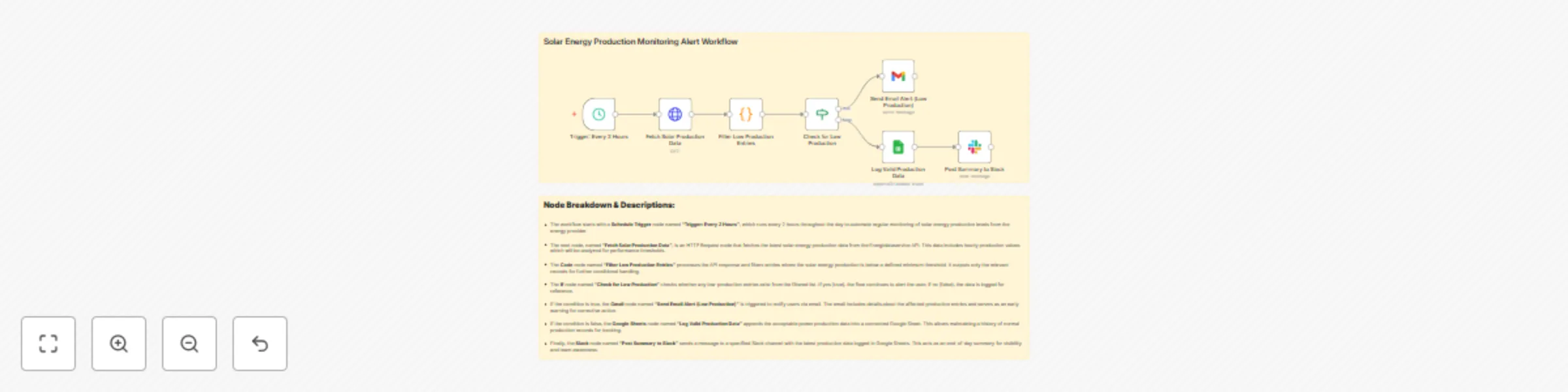
This workflow automatically monitors solar energy production every 2 hours by fetching data from the Energidataservice API. If the energy output falls below a predefined threshold, it instantly notifies users via email. Otherwise, it logs the data into a Google Sheet and posts a daily summary to Slack.

Who’s It For

  • Renewable energy teams monitoring solar output.
  • Facility managers and power plant supervisors.
  • ESG compliance officers tracking sustainability metrics.
  • Developers or analysts automating solar energy reporting.

How It Works

  1. Trigger: The workflow starts every 2 hours using a Schedule Trigger.
  2. Data Fetch: An HTTP Request node fetches solar energy production data from the Energidataservice API.
  3. Processing: A Code node filters out entries with production below the minimum threshold.
  4. Decision Making: An If node checks whether any low-production entries are present.
  5. Alerts: If low-production is detected, an email is sent via the Gmail node.
  6. Logging: If all entries are valid, they are logged into a Google Sheet.
  7. Slack Summary: A Slack node posts the summary sheet data for end-of-day visibility.

How to Set Up

  1. Schedule Trigger: Configure to run every 2 hours.
  2. HTTP Request Node:
    • Method: GET
    • URL: https://api.energidataservice.dk/dataset/YourDatasetHere
    • Add necessary headers and params as required by the API.
  3. Code Node: Define logic to filter entries where solar_energy_production < required_threshold.
  4. If Node: Use items.length > 0 to check for low-production entries.
  5. Gmail Node:
    • Auth with Gmail credentials.
    • Customize recipient and message template.
  6. Google Sheets Node:
    • Connect to a spreadsheet.
    • Map appropriate columns.
  7. Slack Node:
    • Use Slack OAuth2 credentials.
    • Specify channel and message content.

Requirements

  • n8n Cloud or Self-hosted instance.
  • Access to Energidataservice API.
  • Gmail account (with n8n OAuth2 integration).
  • Google Sheets account & sheet ID.
  • Slack workspace and app with appropriate permissions.

How to Customize

  • Change Frequency: Adjust the Schedule Trigger interval (e.g., every hour or 4x per day).
  • Threshold Tuning: Modify the value in the Code node to change the minimum acceptable solar production.
  • Alert Routing: Update Gmail recipients or replace Gmail with Microsoft Outlook/SendGrid.
  • Sheet Format: Add or remove columns in the Google Sheet based on extra metrics (e.g., wind or nuclear data).
  • Slack Posting: Customize Slack messages using Markdown for improved readability.

Add‑ons

  • Telegram Node: Send alerts to a Telegram group instead of email.
  • Discord Webhook: Push updates to a Discord channel.
  • n8n Webhook Trigger: Extend it to receive external production update notifications.
  • Integromat/Make or Zapier: For multi-platform integration with CRMs or ticketing tools.

Use Case Examples

  • Utility Companies: Automatically detect and act on solar underperformance to maintain grid stability.
  • Solar Farm Operators: Log clean production data for auditing and compliance reports.
  • Sustainability Teams: Track daily performance and anomalies without manual checks.
  • Home Solar System Owners: Get notified if solar generation drops below expected.

Common Troubleshooting

Issue Possible Cause Solution
HTTP Request fails API key missing or URL is incorrect Check API endpoint, parameters, and authentication headers
Gmail not sending alerts Missing or invalid Gmail credentials Re-authenticate Gmail OAuth2 in n8n credentials
No data getting logged in Google Sheet Incorrect mapping or sheet permissions Ensure the sheet exists, columns match, and credentials are correct
Slack node fails Invalid token or missing channel ID Reconnect Slack credentials and check permissions
Code node returns empty Filter logic may be too strict Validate data format and relax the threshold condition

Need Help?

Need help setting this up or customizing it for your own solar or energy monitoring use case?

✅ Set it up on your n8n Cloud or self-hosted instance ✅ Customize it for your own API or data source ✅ Modify alerts to suit your internal tools (Teams, Discord, SMS, etc.)

👉 Just reach out to our n8n automation team at WeblineIndia, we'll be happy to help.

1.2 Logical Blocks

This catalog entry is organized from the workflow JSON. The node-level section below shows the executable blocks available for review before importing the template.

2. Block-by-Block Analysis

Block 1 - Sticky Note

Type / Role
n8n-nodes-base.stickyNote - stickyNote
Config choices
Version 1

Block 2 - Trigger: Every 2 Hours

Type / Role
n8n-nodes-base.scheduleTrigger - scheduleTrigger
Config choices
Version 1.2

Block 3 - Fetch Solar Production Data

Type / Role
n8n-nodes-base.httpRequest - httpRequest
Config choices
Version 4.2

Block 4 - Filter Low Production Entries

Type / Role
n8n-nodes-base.code - code
Config choices
Version 2

Block 5 - Check for Low Production

Type / Role
n8n-nodes-base.if - if
Config choices
Version 2.2

Block 6 - Send Email Alert (Low Production)

Type / Role
n8n-nodes-base.gmail - gmail
Config choices
Version 2.1

Block 7 - Log Valid Production Data

Type / Role
n8n-nodes-base.googleSheets - googleSheets
Config choices
Version 4.6

Block 8 - Post Summary to Slack

Type / Role
n8n-nodes-base.slack - slack
Config choices
Version 2.3

Block 9 - Sticky Note1

Type / Role
n8n-nodes-base.stickyNote - stickyNote
Config choices
Version 1

3. Summary Table

Workflow Monitor solar energy production & send alerts with Gmail, Google Sheets, and Slack
Complexity intermediate
Nodes 9
Categories Engineering, Multimodal AI
Author WeblineIndia
Published 07 Aug 2025

4. Reproducing the Workflow from Scratch

  1. 1. Download the workflow JSON

    Use the JSON export at /data/workflows/7125/7125.json as the source template for this automation.

  2. 2. Import the template into n8n

    Open n8n, import the downloaded JSON, and review each node before activating the workflow.

  3. 3. Configure credentials and variables

    Replace placeholder credentials, API keys, webhook URLs, account IDs, and environment-specific values with your own settings.

  4. 4. Test with sample data

    Run the workflow manually or in a staging workspace, inspect node output, and confirm downstream systems receive the expected data.

  5. 5. Activate and monitor

    Enable the workflow only after testing, then monitor executions, errors, and rate limits during the first production runs.

5. General Notes & Resources

Review imported nodes carefully before activation. This catalog entry is intended to help you inspect the workflow structure, understand required services, and find related templates faster.

Node names, credentials, schedules, webhook paths, and external service limits may need adjustment for your workspace.

Frequently asked questions

What does Monitor solar energy production & send alerts with Gmail, Google Sheets, and Slack do?

Solar Energy Production Monitoring Alert Workflow This workflow automatically monitors solar energy production every 2 hours by fetching data from the Energidataservice API. If the energy output fa...

What do I need before importing this workflow?

Review the workflow JSON, configure any required credentials in n8n, and test the automation in a safe workspace before using it in production.

Can I customize this workflow?

Yes. Use the block-by-block analysis and the downloadable JSON to inspect each node, then adjust credentials, prompts, schedules, filters, or destinations for your Engineering, Multimodal AI use case.