Block 1 - When clicking ‘Test workflow’
- Type / Role
- n8n-nodes-base.manualTrigger - manualTrigger
- Config choices
- Version 1


 Early Deal
This workflow is provided as-is. Please review and test before using in production.
About The ICP Company Scoring Automation Sorting through lists of potential leads manually to determine who's truly worth your sales team's time isn't just tedious, it's incredibly inefficient. Wit...
n8n-nodes-base.manualtrigger, n8n-nodes-base.googlesheets, n8n-nodes-base.airtop, n8n-nodes-base.code
This workflow is cataloged by N8N Workflows and links back to its original n8n.io source page by Airtop.
Original n8n.io sourceSorting through lists of potential leads manually to determine who's truly worth your sales team's time isn't just tedious, it's incredibly inefficient. Without proper qualification, your team might spend hours pursuing prospects who aren't the right fit for your product, while ideal customers slip through the cracks.
With this automation, you'll learn how to automatically score and prioritize leads using data extracted directly from LinkedIn profiles via Airtop's integration with n8n. By the end, you'll have a fully automated workflow that analyzes prospects and calculates an Ideal Customer Profile (ICP) score, helping your sales team focus on high-potential opportunities.
This automation transforms how you qualify and prioritize leads by extracting real-time, accurate information directly from LinkedIn profiles. Unlike static databases that quickly become outdated, this workflow taps into the most current professional information available.
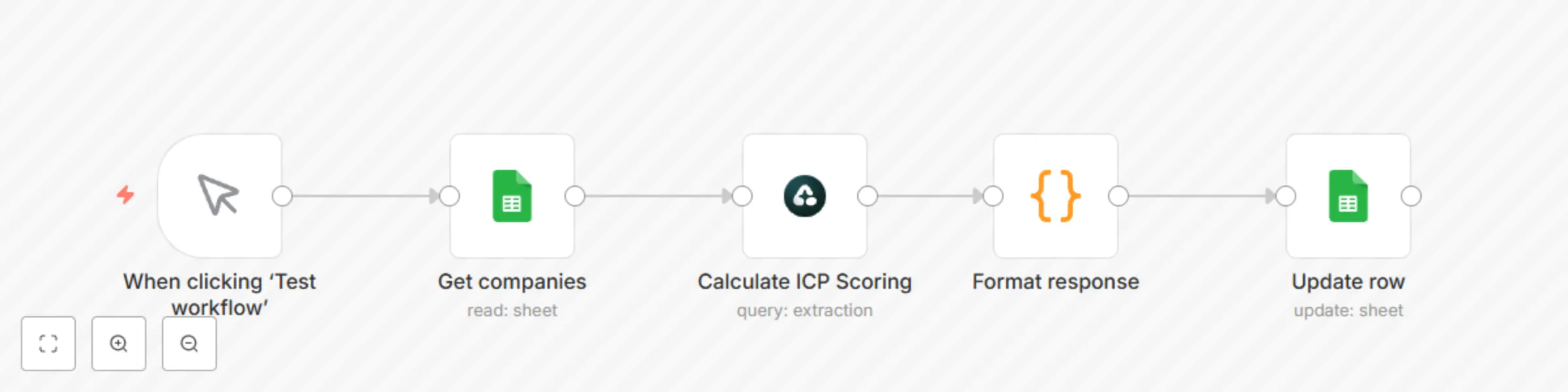
The workflow in this template:
Our company-focused workflow analyzes company LinkedIn profiles with a comprehensive set of criteria:
To then calculate the ICP Scoring, it will focus on:
We've created ready-to-use templates for both person and company ICP scoring. Here's how to get started:
While our templates work out of the box, you might want to customize them for your specific needs:
Here's how businesses are using this automation:
AI Sales Platform: A B2B AI company could implement this workflow to process their trade show lead list of contacts. Within hours, they can identify the top 50 prospects based on ICP score.
SaaS Analytics Tool: A SaaS company could implement LinkedIn enrichment to identify which companies fit best. The automation processes weekly leads and categorizes them into high, medium, and low priority tiers, allowing their sales team to focus on the most promising opportunities first.
To get the most out of this automation:
Now that you've automated your ICP scoring with LinkedIn data, you might be interested in:
Happy automating!
This catalog entry is organized from the workflow JSON. The node-level section below shows the executable blocks available for review before importing the template.
| Workflow | LinkedIn company ICP scoring automation with Airtop & Google Sheets |
|---|---|
| Complexity | intermediate |
| Nodes | 5 |
| Categories | Lead Generation, AI Summarization |
| Author | Airtop |
| Published | 08 Apr 2025 |
Use the JSON export at /data/workflows/3475/3475.json as the source template for this automation.
Open n8n, import the downloaded JSON, and review each node before activating the workflow.
Replace placeholder credentials, API keys, webhook URLs, account IDs, and environment-specific values with your own settings.
Run the workflow manually or in a staging workspace, inspect node output, and confirm downstream systems receive the expected data.
Enable the workflow only after testing, then monitor executions, errors, and rate limits during the first production runs.
Review imported nodes carefully before activation. This catalog entry is intended to help you inspect the workflow structure, understand required services, and find related templates faster.
Node names, credentials, schedules, webhook paths, and external service limits may need adjustment for your workspace.
About The ICP Company Scoring Automation Sorting through lists of potential leads manually to determine who's truly worth your sales team's time isn't just tedious, it's incredibly inefficient. Wit...
Review the workflow JSON, configure any required credentials in n8n, and test the automation in a safe workspace before using it in production.
Yes. Use the block-by-block analysis and the downloadable JSON to inspect each node, then adjust credentials, prompts, schedules, filters, or destinations for your Lead Generation, AI Summarization use case.