A

Airtop

38
Workflows

Workflows by Airtop

Workflow preview: Weekly competitor Facebook ads intelligence report with Airtop and Gmail
Free beginner

Weekly competitor Facebook ads intelligence report with Airtop and Gmail

README # Monitor Competitor Facebook Ads with Airtop ## Use Case Monitor a competitor’s active Facebook ads and get a weekly HTML intelligence brief by email — saving time on manual research and helping you spot messaging, offers, and creative trends quickly. ## What This Automation Does * Runs weekly on a set schedule. * Uses **Airtop** to visit the competitor’s Facebook Ad Library page and extract up to 30 active ads. * Summarizes each ad with key points: message, topic, CTA, duration active, language, target audience. * Sends the compiled HTML report via Gmail. ## How It Works 1. **Schedule Trigger** – Fires once a week at the configured time. 2. **Airtop Extraction** – Loads the Ad Library URL and runs a prompt to extract and format the ads into HTML. 3. **Email Delivery** – Sends the HTML report to your specified recipient using Gmail. ## Setup Requirements 1. **Airtop API Key** — [Generate here](https://portal.airtop.ai/api-keys). 2. **Airtop Credential in n8n** — Add your API key under “Airtop” in n8n. 3. **Gmail OAuth2 Credential** — Connect the Gmail account to send reports. 4. **Competitor’s Ad Library URL** — Replace the default `view_all_page_id` in the workflow with your target. ## Next Steps * Duplicate the Airtop step for multiple competitors. * Enrich reports by visiting ad landing pages for deeper analysis. * Send outputs to Slack or archive in a shared workspace. [Read about ways to monitor your competitors ads here](https://www.airtop.ai/automations/competitor-facebook-ads-intelligence-agent-n8n)

A
Airtop
Market Research
12 Aug 2025
784
0
Workflow preview: Generate LinkedIn posts from web pages with GPT-4 and human review
Free intermediate

Generate LinkedIn posts from web pages with GPT-4 and human review

## Use Case Turn any web page into a compelling LinkedIn post — complete with an AI-generated image. This automation is ideal for sharing content like blog posts, case studies, or product updates in a polished and engaging format. ## What This Automation Does Given a page URL and optional user instructions, this automation: - Scrapes the content of the webpage - Uses AI to write a clear, educational, and LinkedIn-optimized post - Sends both to Slack for review and approval - Handles feedback and revisions via Slack interactions Input: - **Page URL** — The link to the webpage (required) - **Instructions** — Optional notes on tone, emphasis, or format Output: - LinkedIn post text - Slack message with review/approval options ## How It Works 1. **Form Submission**: User inputs a web page and optional instructions. 2. **Web Scraping**: Uses Airtop to extract page content. 3. **Post Generation**: AI agent writes a post based on the page and instructions. 4. **Slack Review Flow**: - Post and image sent to Slack for feedback - User can approve, request revisions, or decline - Revisions trigger reprocessing steps automatically 5. **Final Post Delivery**: Approved post is sent back to Slack, ready to publish. ## Setup Requirements 1. Generate an [Airtop API key](https://portal.airtop.ai/api-keys) completely free. 2. Configure your [OpenAI credentials](https://docs.n8n.io/integrations/builtin/credentials/openai/) for post and image prompt generation 3. [Slack OAuth](https://docs.n8n.io/integrations/builtin/credentials/slack/#slack-trigger-configuration) credentials and a Slack channel ## Next Steps - **Post Directly**: Add LinkedIn publishing to automate the full content workflow. - **Template Variations**: Offer post style presets (e.g., technical, story-driven, short-form). - **CRM Sync**: Save approved posts and stats in Airtable or Notion for team use. Read more about [generating social content using AI](https://www.airtop.ai/automations/generate-linkedin-post-from-a-webpage)

A
Airtop
Content Creation
8 Jul 2025
809
0
Workflow preview: Generate LinkedIn posts and AI images from web pages with Airtop and GPT-4
Free advanced

Generate LinkedIn posts and AI images from web pages with Airtop and GPT-4

## Use Case Turn any web page into a compelling LinkedIn post — complete with an AI-generated image. This automation is ideal for sharing content like blog posts, case studies, or product updates in a polished and engaging format. ## What This Automation Does Given a page URL and optional user instructions, this automation: - Scrapes the content of the webpage - Uses AI to write a clear, educational, and LinkedIn-optimized post - Generates a brand-aligned visual that matches the content - Sends both to Slack for review and approval - Handles feedback and revisions via Slack interactions Input: - **Page URL** — The link to the webpage (required) - **Instructions** — Optional notes on tone, emphasis, or format Output: - LinkedIn post text - AI-generated visual prompt and image - Slack message with review/approval options ## How It Works 1. **Form Submission**: User inputs a web page and optional instructions. 2. **Web Scraping**: Uses Airtop to extract page content. 3. **Post Generation**: AI agent writes a post based on the page and instructions. 4. **Visual Generation**: Another AI model creates an image prompt; this is sent to a sub-workflow for image rendering. 5. **Slack Review Flow**: - Post and image sent to Slack for feedback - User can approve, request revisions, or decline - Revisions trigger reprocessing steps automatically 6. **Final Post Delivery**: Approved post and image are sent back to Slack, ready to publish. ## Setup Requirements 1. Airtop API key 2. OpenAI credentials for post and image prompt generation 3. Slack OAuth integration with a review channel 4. A sub-workflow for branded image generation ## Next Steps - **Post Directly**: Add LinkedIn publishing to automate the full content workflow. - **Template Variations**: Offer post style presets (e.g., technical, story-driven, short-form). - **CRM Sync**: Save approved posts and stats in Airtable or Notion for team use. [Read more about content generation with Airtop](https://www.airtop.ai/automations/generate-linkedin-post-and-image-from-a-webpage-n8n)

A
Airtop
Content Creation
8 Jul 2025
974
0
Workflow preview: Extract and analyze Truth Social posts for stock market impact with Airtop & Slack
Free intermediate

Extract and analyze Truth Social posts for stock market impact with Airtop & Slack

# Trump-o-meter: Extract and Evaluate Truth Social Posts ## Use Case Automatically extracting posts from Donald Trump's Truth Social account and estimating their potential impact on the U.S. stock market enables teams to monitor high-profile communications that may influence financial markets. This automation streamlines intelligence gathering for analysts, traders, and policy observers. ## What This Automation Does This automation retrieves up to 3 posts from Donald Trump's Truth Social profile and outputs structured information including: * Author name * Image URL * Post text * Post URL * Estimated stock market impact: * Direction: positive, negative, or neutral * Magnitude: None, Small, Medium, Large ## How It Works 1. Creates a browser session on Truth Social using an Airtop profile. 2. Navigates to `https://truthsocial.com/@realDonaldTrump`. 3. Uses a natural language prompt with a defined JSON schema to extract structured data for up to 3 posts. 4. Splits the results into individual post items. 5. Filters posts that contain actual content and have a non-zero estimated market impact. 6. Sends selected posts and impact summaries to a Slack channel. 7. Terminates the browser session to clean up. ## Setup Requirements 1. [Airtop API Key](https://portal.airtop.ai/api-keys) — free to generate. 2. An [Airtop Profile](https://portal.airtop.ai/browser-profiles) that is connected and logged into Truth Social. 3. A Slack workspace and authorized app with write permissions to a target channel. ## Next Steps * **Integrate with Trading Signals**: Link output to financial alert systems or dashboards for timely insights. * **Expand Monitoring**: Extend to other high-impact accounts (e.g., politicians, CEOs). * **Enhance Analysis**: Add sentiment scoring or topic classification for deeper context. ## Legal Disclaimer This tool is intended solely for informational and analytical purposes. The market impact estimations provided are speculative and should not be construed as financial advice. **Do not make investment decisions based on this automation.** Always consult with a licensed financial advisor before making any trades. Read more about [Trump-o-meter automation](https://www.airtop.ai/automations/trump-o-meter-extract-and-evaluate-truth-social-posts-n8n)

A
Airtop
Crypto Trading
8 Jul 2025
2109
0
Workflow preview: Competitor LinkedIn monitor with Airtop
Free intermediate

Competitor LinkedIn monitor with Airtop

# Automating LinkedIn Competitive Monitoring ## Use Case Automatically track and summarize LinkedIn posts from key executives at competitor companies. This agent provides structured insights into hiring trends, product announcements, strategic shifts, and thought leadership, helping teams stay informed and responsive without manual monitoring. ## What This Automation Does This automation monitors and summarizes LinkedIn posts from competitor profiles and shares the results on Slack. It uses the following input parameters: * **Airtop Profile**: A browser profile authenticated to LinkedIn. [Create one](https://portal.airtop.ai/browser-profiles) * **Google Sheet**: A document listing LinkedIn profile URLs of competitors, [copy this one](https://docs.google.com/spreadsheets/d/1TknyHS8ie0KONgF4-KFGR76I74egHLt7-M9sIxjQXGY/edit?usp=sharing). * **Slack Channel**: The destination for sharing summarized post insights. ## How It Works 1. **Trigger**: The workflow is scheduled to run weekly at a specific time. 2. **Data Collection**: Retrieves the list of competitor LinkedIn URLs from a Google Sheet. 3. **Browser Automation**: Uses Airtop to navigate to each LinkedIn profile and analyze up to 5 recent posts. 4. **Summarization**: Summarizes number of recent posts, main topics, and engagement levels using Airtop’s AI. 5. **Slack Notification**: Posts a formatted summary to a predefined Slack channel. ## Setup Requirements 1. [Airtop API Key](https://portal.airtop.ai/api-keys) — free to generate. 2. An [Airtop Profile](https://portal.airtop.ai/browser-profiles) authenticated to LinkedIn. 3. Google Sheet with competitor post URLs, [copy this one](https://docs.google.com/spreadsheets/d/1TknyHS8ie0KONgF4-KFGR76I74egHLt7-M9sIxjQXGY/edit?usp=sharing). 4. Slack Bot credentials with access to the target channel. ## Next Steps * **Expand Coverage**: Add more competitor profiles to the Google Sheet to scale monitoring. * **Integrate with CRM**: Feed summarized insights into your CRM for competitor tracking. * **Enhance Analysis**: Include post-level engagement metrics over time for trend analysis. Read more about [competitve analysis using Linkedin](https://www.airtop.ai/automations/competitor-linkedin-monitor-n8n)

A
Airtop
Market Research
24 Jun 2025
881
0
Workflow preview: Extract Facebook group posts with Airtop
Free beginner

Extract Facebook group posts with Airtop

# Extract Facebook Group Posts with Airtop ## Use Case Extracting content from Facebook Groups allows community managers, marketers, and researchers to gather insights, monitor discussions, and collect engagement metrics efficiently. This automation streamlines the process of retrieving non-sponsored post data from group feeds. ## What This Automation Does This automation extracts key post details from a Facebook Group feed using the following input parameters: * **Facebook Group URL**: The URL of the Facebook Group feed you want to scrape. * **Airtop Profile**: The name of your [Airtop Profile](https://portal.airtop.ai/browser-profiles) authenticated to Facebook. It returns up to 5 non-sponsored posts with the following attributes for each: * Post text * Post URL * Page/profile URL * Timestamp * Number of likes * Number of shares * Number of comments * Page or profile details * Post thumbnail ## How It Works 1. **Form Trigger**: Collects the Facebook Group URL and Airtop Profile via a form. 2. **Browser Automation**: * Initiates a new browser session using Airtop. * Navigates to the provided Facebook Group feed. * Uses an AI prompt to extract post data, including interaction metrics and profile information. 3. **Structured Output**: The results are returned in a defined JSON schema, ready for downstream use. ## Setup Requirements 1. [Airtop API Key](https://portal.airtop.ai/api-keys) — Free to generate. 2. An [Airtop Profile](https://portal.airtop.ai/browser-profiles) logged into Facebook. ## Next Steps * **Integrate With Analytics Tools**: Feed the output into dashboards or analytics platforms to monitor community engagement. * **Automate Alerts**: Trigger notifications for posts matching certain criteria (e.g., high engagement, keywords). * **Combine With Comment Automation**: Extend this to reply to posts or engage with users using other Airtop automations. Let me know if you’d like this saved as a `.md` file or included in your Airtop automation library. Read more about how to [extract posts from Facebook groups](https://www.airtop.ai/automations/extract-facebook-groups-posts-n8n)

A
Airtop
Market Research
23 Jun 2025
1961
0
Workflow preview: Automated video download from Sample.cat using Airtop Browser Automation
Free intermediate

Automated video download from Sample.cat using Airtop Browser Automation

README # Automating Video File Download from Sample.cat with Airtop.ai ## Use Case Automating file downloads from web pages is useful for scenarios like bulk media retrieval, dataset access, or recurring content backups. This workflow ensures a hands-free, consistent process for retrieving downloadable content. ## What This Automation Does This automation performs a reliable download of a video file from a specified webpage using the following steps: - Initiates an Airtop browser session. - Opens a specified URL containing downloadable media. - Interacts with the page to click the download button. - Waits for the file to be processed and made available. - Retrieves metadata to confirm availability. - Downloads the file. - Terminates the browser session to clean up resources. ## How It Works 1. **Manual Trigger**: Activated by user test. 2. **Session**: Starts an Airtop browser session. 3. **Window**: Navigates to `https://sample.cat/en/webm`. 4. **Interaction**: Simulates a click on the download button for the video titled “SD 640x360 (Seawater, drone view video, 30 FPS)”. 5. **Wait**: Pauses for 10 seconds to allow the file to be ready for download. 6. **Get File Data**: Checks for downloadable files in the session. 7. **Download File**: Retrieves the file using its ID. 8. **Terminate**: Ends the browser session to free up resources. ## Setup Requirements 1. [Airtop API Key](https://portal.airtop.ai/api-keys) — required to authenticate API calls. ## Next Steps - **Enhance with Retry Logic**: Loop file availability check until `status = available` for more robust automation. - **Customize File Targets**: Dynamically pass URLs and button descriptors for multi-source downloads. - **Connect to Storage**: Pipe downloaded files to cloud storage or databases for archiving. Read more about [automating file downloads from the web](https://www.airtop.ai/automations/simple-file-download-n8n)

A
Airtop
File Management
31 May 2025
1320
0
Workflow preview: Automate screenshot upload to Postimages.org with Airtop browser automation
Free intermediate

Automate screenshot upload to Postimages.org with Airtop browser automation

# Automating File (Image) Upload to Postimages.org ## Use Case Manually uploading screenshots or other image files to hosting platforms like Postimages.org can be tedious and time-consuming. This automation simplifies the process by automatically uploading an image to Postimages.org and validating the result, which is especially useful for repetitive QA tasks, reporting, or archiving visual web data. ## What This Automation Does This automation uploads a screenshot to [Postimages.org](https://postimages.org/) using the following steps: - Creates a browser session using Airtop. - Navigates to the Postimages.org upload page. - Takes a screenshot using the browser session. - Uploads the screenshot to the site via the "Choose images" button. - Waits briefly to ensure upload processing. - Captures a post-upload screenshot for validation. ## How It Works 1. **Session Initialization**: Starts a browser session using the Airtop node. 2. **Navigation**: Opens the URL `https://postimages.org/` in a new window. 3. **Screenshot Capture**: Takes a screenshot to use for upload. 4. **File Upload**: Uploads the screenshot to the site using the file upload interaction. 5. **Validation**: Waits 5 seconds and then captures a second screenshot to confirm the image was uploaded successfully. ## Setup Requirements 1. [Airtop API Key](https://portal.airtop.ai/api-keys) — required for session creation and browser interactions. ## Next Steps - **Customize for Other Sites**: Adapt this workflow to automate file uploads to different platforms. - **Integrate with Reporting Tools**: Combine this automation with workflows that require image reporting or archiving. - **Enhance Validation**: Add logic to parse the upload confirmation or retrieve the image URL programmatically for logging or sharing. Read more about how to [automate file uploads to the web](https://www.airtop.ai/automations/simple-file-upload-n8n)

A
Airtop
File Management
31 May 2025
938
0
Workflow preview: Verify Linkedin company page by domain with Airtop
Free intermediate

Verify Linkedin company page by domain with Airtop

# Automating LinkedIn Company URL Verification ## Use Case This automation verifies that a given LinkedIn URL actually belongs to a company by comparing the website listed on their LinkedIn page against the expected company domain. It is essential for ensuring data accuracy in lead qualification, enrichment, and CRM updates. ## What This Automation Does ### Input Parameters - **Company LinkedIn**: The LinkedIn URL to be verified. - **Company Domain**: The expected domain (e.g., `example.com`) for validation. - **Airtop Profile (connected to LinkedIn)**: [Airtop Profile](https://portal.airtop.ai/browser-profiles) with LinkedIn authentication. ### Output - Confirmation whether the LinkedIn page corresponds to the provided domain. - Returns the verified LinkedIn URL if the match is confirmed. ## How It Works 1. Extracts the website URL from the specified LinkedIn company profile. 2. Compares the extracted URL with the provided company domain. 3. If the domain is contained in the extracted website, the LinkedIn profile is confirmed as valid. 4. Returns the original LinkedIn URL if the match is successful. ## Setup Requirements 1. [Airtop API Key](https://portal.airtop.ai/api-keys) 2. [LinkedIn-authenticated Airtop Profile](https://portal.airtop.ai/browser-profiles) ## Next Steps - **Use for LinkedIn Discovery Validation**: Ensure correctness after automated LinkedIn page discovery. - **Combine with CRM Updates**: Prevent incorrect LinkedIn links from being stored in CRM. - **Automate in Data Pipelines**: Use this as a validation gate before enrichment or scoring steps.

A
Airtop
Lead Generation
21 May 2025
353
0
Workflow preview: Score company ICP (Ideal Customer Profile) with Airtop
Free intermediate

Score company ICP (Ideal Customer Profile) with Airtop

# Automating Company ICP Scoring via LinkedIn ## Use Case This automation scores companies based on their LinkedIn profile using custom Ideal Customer Profile (ICP) criteria. It’s ideal for qualifying B2B leads and prioritizing outreach based on fit. ## What This Automation Does Inputs required: - **Company LinkedIn URL**: Public LinkedIn profile of the company. - **Airtop Profile (connected to LinkedIn)**: [Airtop Profile](https://portal.airtop.ai/browser-profiles) authenticated to access and extract profile data. The automation analyzes the LinkedIn page and calculates a score based on: ### Scoring Criteria | **Category** | **Classification** | **Points** | |--------------------|---------------------------|------------| | **AI Focus** | Low | 5 | | | Medium | 10 | | | High | 25 | | **Technical Level** | Basic | 5 | | | Intermediate | 15 | | | Advanced | 25 | | | Expert | 35 | | **Employee Count** | 0–9 | 5 | | | 10–150 | 25 | | | 150+ | 30 | | **Agency Status** | Not Automation Agency | 0 | | | Automation Agency | 20 | | **Geography** | Outside US/Europe | 0 | | | US/Europe Based | 10 | The result includes: - Total ICP score - Detailed justifications for each score component ## How It Works 1. Opens the company’s LinkedIn page using Airtop. 2. Analyzes metadata including employee count, headquarters, services, and keywords. 3. Applies the scoring rubric and returns structured JSON with scores and reasons. 4. Optionally flattens the result for storage or CRM integration. ## Setup Requirements 1. [Airtop API Key](https://portal.airtop.ai/api-keys) 2. LinkedIn-authenticated [Airtop Profile](https://portal.airtop.ai/browser-profiles) ## Next Steps - **Combine with Lead Lists**: Score companies from outreach lists. - **Push to CRM**: Add scores to HubSpot or Salesforce records. - **Adjust Scoring Weights**: Modify rubric to reflect your ICP strategy. Read more about [company ICP scoring automation with Airtop and n8n](https://www.airtop.ai/automations/score-company-icp-n8n)

A
Airtop
Lead Generation
21 May 2025
379
0
Workflow preview: Extract Linkedin company data with Airtop
Free intermediate

Extract Linkedin company data with Airtop

# Automating LinkedIn Company Data Extraction ## Use Case This automation extracts detailed company insights from a LinkedIn company page, including identity, scale, classification, and funding data. Ideal for investors, sales teams, and market researchers. ## What This Automation Does This automation accepts the following inputs: - **Company's LinkedIn URL**: The public LinkedIn page URL of the company. - **Airtop Profile (connected to LinkedIn)**: Your [Airtop Profile](https://portal.airtop.ai/browser-profiles) authenticated on LinkedIn. It then extracts and returns structured data with: ### 1. Company Identity - Full name - Tagline - Headquarters location (city, state, country) - About section - Website ### 2. Company Scale - Current employee count - Employee size bracket: [0-9], [10-150], [150+] ### 3. Business Classification - Is the company an automation agency? (true/false) - AI implementation level: Low / Medium / High - Technical sophistication: Basic / Intermediate / Advanced / Expert ### 4. Funding Profile - Most recent funding round - Total amount raised - Key investors - Last funding update date ## How It Works 1. Creates an Airtop session using the provided profile. 2. Navigates to the company LinkedIn page. 3. Executes an Airtop query to extract data. 4. Outputs the result in a standardized JSON schema. ## Setup Requirements 1. [Airtop API Key](https://portal.airtop.ai/api-keys) 2. A [LinkedIn-authenticated Airtop Profile](https://portal.airtop.ai/browser-profiles) ## Next Steps - **Feed into CRM**: Enrich your accounts with detailed LinkedIn data. - **Prioritize Leads**: Use classification and funding data to prioritize outreach. - **Combine with People Data**: Integrate with individual-level enrichment for full context. Read more about how to [extract company data from Linkedin with Airtop and n8n](https://www.airtop.ai/automations/extract-linkedin-company-information-n8n)

A
Airtop
Lead Generation
21 May 2025
478
0
Workflow preview: Extract company data and calculate ICP score with Airtop
Free intermediate

Extract company data and calculate ICP score with Airtop

# Automating Company Data Enrichment and ICP Calculation ## Use Case This automation identifies a company's LinkedIn profile, extracts key business data, and calculates an ICP (Ideal Customer Profile) score to qualify and enrich company records. It is perfect for sales teams, data enrichment pipelines, and CRM integrations. ## What This Automation Does ### Input Parameters - **Company domain**: The company's website domain (e.g., `example.com`). - **Airtop Profile (connected to LinkedIn)**: Your [Airtop Profile](https://portal.airtop.ai/browser-profiles) authenticated for LinkedIn. - **Company LinkedIn** *(optional)*: If already known, skips search. ### Output Includes - Verified LinkedIn company URL (if not provided) - Company profile (name, tagline, website, location, about) - Scale metrics (employee count and bracket) - Classification (automation agency status, AI focus, technical level) - ICP score with justifications - Structured JSON object with all values merged ## How It Works 1. **LinkedIn Detection**: If not provided, attempts to locate the LinkedIn URL using website scraping or search. 2. **Data Extraction**: Uses Airtop to gather structured data from the company’s LinkedIn profile. 3. **ICP Scoring**: Applies a scoring rubric based on AI/tech orientation, scale, agency status, and geography. 4. **Merge Results**: All data components are merged into a unified output. ## Setup Requirements 1. [Airtop API Key](https://portal.airtop.ai/api-keys) 2. [Airtop Profile](https://portal.airtop.ai/browser-profiles) with LinkedIn authentication ## Next Steps - **Combine with Person Enrichment**: Pair with workflows that enrich individuals tied to the company. - **Sync to CRM**: Connect the output to your CRM for record enrichment or scoring fields. - **Adjust ICP Scoring Logic**: Modify the rubric for your organization's ICP model. Read more about [company data enrichment and ICP scoring](https://www.airtop.ai/automations/extract-person-data-and-calculate-icp-n8n)

A
Airtop
Lead Generation
21 May 2025
411
0
Workflow preview: Enrich company data with Airtop and Hubspot
Free intermediate

Enrich company data with Airtop and Hubspot

# Automating Company Data Enrichment and HubSpot Integration ## Use Case This automation enriches company data based on email domain and LinkedIn profile, calculates an ICP (Ideal Customer Profile) score, and updates the corresponding company record in HubSpot. It’s ideal for onboarding, qualification, and CRM enrichment. ## What This Automation Does ### Input Parameters - **Contact email**: Used to derive the company domain. - **Company domain**: Primary web domain of the company. - **Company LinkedIn** *(optional)*: LinkedIn URL for enrichment accuracy. - **Airtop Profile (connected to LinkedIn)**: An authenticated [Airtop Profile](https://portal.airtop.ai/browser-profiles). ### What It Outputs - Full company profile (name, tagline, website, headquarters) - Employee count - ICP score based on AI/tech profile, scale, agency type, and location - Updates/creates record in HubSpot with all enriched attributes ## How It Works 1. **Input Validation**: Filters out non-corporate domains like Gmail, Yahoo, or .edu. 2. **Enrichment Trigger**: Launches Airtop workflows to extract and analyze data from LinkedIn and calculate the ICP score. 3. **Data Mapping**: Compiles structured fields including: - Overview, location (city, state, country) - Company website and domain - LinkedIn URL, employee count - ICP score 4. **HubSpot Sync**: Sends all the enriched fields to the designated HubSpot object for upsertion. ## Setup Requirements 1. [Airtop API Key](https://portal.airtop.ai/api-keys) 2. [Airtop Profile](https://portal.airtop.ai/browser-profiles) with active LinkedIn authentication 3. HubSpot integration enabled for object updates ## Next Steps - **Use in Webforms**: Trigger this on signup to auto-populate CRM records. - **Enrich Manually Entered Contacts**: Use with list-based workflows for batch enrichment. - **Sync to Other CRMs**: Replace HubSpot step with Salesforce, Pipedrive, etc. for flexible integration. Read more about [comapny data enrichment](https://www.airtop.ai/automations/enrich-company-data-n8n)

A
Airtop
Lead Generation
21 May 2025
385
0
Workflow preview: Score person ICP (Ideal Customer Profile) with Airtop
Free intermediate

Score person ICP (Ideal Customer Profile) with Airtop

# Scoring LinkedIn Profiles Against Your ICP ## Use Case This automation scores individual LinkedIn profiles against your Ideal Customer Profile (ICP) based on interest in AI, technical depth, and seniority level. It's ideal for prioritizing leads and understanding how well a person fits your ICP criteria. ## What This Automation Does Given a LinkedIn profile and an Airtop profile, it: - Extracts relevant data from the person's profile - Determines levels of AI interest, seniority, and technical depth - Calculates an ICP score based on weighted criteria - Returns the full enriched profile with the score ## Input parameters: - **LinkedIn Profile URL** (e.g., `https://linkedin.com/in/janedoe`) - **Airtop Profile** connected to LinkedIn - **ICP scoring method** in the Airtop node prompt ## Output fields in JSON format: - Full name, job title, employer, company LinkedIn URL, location, number of connections and followers, about section content and more - Calculated ICP Score (out of 95) ## How It Works 1. **Form Trigger or Workflow Trigger**: Accepts input from either a form or another workflow. 2. **Parameter Assignment**: Ensures proper variable names for downstream nodes. 3. **Airtop Enrichment Tool**: Extracts and scores the person based on a detailed prompt. 4. **Scoring**: Uses this point system: - AI Interest: beginner (5), intermediate (10), advanced (25), expert (35) - Technical Depth: basic (5), intermediate (15), advanced (25), expert (35) - Seniority Level: junior (5), mid-level (15), senior (25), executive (30) 5. **Output Formatting**: Cleans and returns the result as JSON. ## Setup Requirements 1. IMPORTANT: Enter your ICP scoring method in the prompt field of the Airtop node 2. [Airtop Profile](https://portal.airtop.ai/browser-profiles) connected to LinkedIn. 3. Airtop API credentials configured in n8n. 4. Optional: a front-end form to collect profile URLs and trigger the automation. ## Next Steps - **Embed in CRM**: Trigger this automation on new leads to auto-score them. - **Batch Process Leads**: Run it over a list of profile URLs for segmentation. - **Customize Scoring**: Adjust point weights based on your sales priorities. Read more about [ICP Scoring with Airtop and n8n](https://www.airtop.ai/automations/score-person-icp-n8n)

A
Airtop
Lead Generation
21 May 2025
347
0
Workflow preview: Find and verify Linkedin profile with Airtop
Free intermediate

Find and verify Linkedin profile with Airtop

# Automating LinkedIn Profile Discovery with Verification ## Use Case Accurately identifying and verifying a person’s LinkedIn profile is essential for prospecting, recruiting, or contact enrichment. This automation ensures high accuracy by combining search logic with optional profile validation. ## What This Automation Does This automation locates and verifies a LinkedIn profile using the following inputs: - **Person_info**: Any identifying information about the person (e.g., name, company, email). - **Airtop_profile**: Your [Airtop Profile](https://portal.airtop.ai/browser-profiles) authenticated on LinkedIn, used for verifying the profile. ## How It Works 1. Extracts a likely LinkedIn URL by performing a Google search using the provided person info. 2. Validates the result (if Airtop Profile is provided): - Visits the LinkedIn profile. - Verifies match by checking the content (e.g., experience, role) against the person info. 3. Returns a verified LinkedIn profile URL or "NA" if not found or not valid. ## Setup Requirements 1. [Airtop API Key](https://portal.airtop.ai/api-keys) 2. Optional but recommended: an [Airtop Profile](https://portal.airtop.ai/browser-profiles) authenticated on LinkedIn. ## Next Steps - **Combine with Email Lookup**: Use email-to-profile tools upstream to gather inputs. - **CRM Integration**: Automatically append LinkedIn profiles to contact records. - **Automate Outreach**: Use the verified URLs for personalized LinkedIn engagement workflows. Read more about how [find and verify Linkedin profiles](https://www.airtop.ai/automations/discover-and-verify-linkedin-profile-n8n)

A
Airtop
Lead Generation
21 May 2025
670
0
Workflow preview: Extract person data and calculate ICP score with Airtop
Free intermediate

Extract person data and calculate ICP score with Airtop

# Automating LinkedIn Enrichment and ICP Scoring ## Use Case This automation enriches a person’s data using LinkedIn and calculates an Ideal Customer Profile (ICP) score based on their professional presence. It is particularly useful for lead qualification, contact research, and targeted outreach. ## What This Automation Does The automation processes the following input parameters: - **Person Name**: Full name of the individual. - **Work Email**: Business email address to validate corporate identity. - **Airtop Profile (connected to Linkedin)**: A [LinkedIn-authenticated Airtop Profile](https://portal.airtop.ai/browser-profiles) for enrichment. ## How It Works 1. **Email Filtering**: Checks if the email is corporate (excludes free and personal domains). 2. **LinkedIn Profile Discovery**: Searches and verifies the correct LinkedIn URL using Airtop. 3. **Data Enrichment**: Extracts professional details from the LinkedIn profile. 4. **ICP Scoring**: Calculates an ICP score based on extracted data and profile context. 5. **Merge Outputs**: Consolidates enriched profile data and ICP results into a single output. ## Setup Requirements 1. [Airtop API Key](https://portal.airtop.ai/api-keys) 2. An [Airtop Profile](https://portal.airtop.ai/browser-profiles) authenticated on LinkedIn. ## Next Steps - **Combine with CRM Integration**: Push enriched and scored data into CRMs like HubSpot or Salesforce. - **Batch Processing**: Automate for lists of leads using Airtop + n8n or Airtop SDK. - **Scoring Customization**: Adjust scoring logic to reflect your ideal customer attributes more precisely. Read more about [data enrichment and ICP scoring](https://www.airtop.ai/automations/extract-person-data-and-calculate-icp-n8n)

A
Airtop
Lead Generation
21 May 2025
348
0
Workflow preview: Enrich person data and update CRM with Airtop and Hubspot
Free intermediate

Enrich person data and update CRM with Airtop and Hubspot

# Automating Person Data Enrichment and CRM Update ## Use Case This automation enriches a person’s professional profile using their name and work email, scores them against an ICP (Ideal Customer Profile), and updates their record in HubSpot. It’s ideal for sales, marketing, and recruitment teams needing reliable contact insights. ## What This Automation Does This automation performs the following using the input parameters: - **Person name**: The full name of the individual. - **Work email**: The professional email address of the contact. - **Airtop Profile (connected to LinkedIn)**: An authenticated [Airtop Profile](https://portal.airtop.ai/browser-profiles) used for LinkedIn-based enrichment. - **Hubspot object id**: The internal HubSpot ID for the contact to be updated. ## How It Works 1. Initiates the workflow using a form or external trigger. 2. Uses the name and email to extract and enrich the person’s data, including: - LinkedIn profile and company page - About section, job title, location - ICP score, seniority level, AI interest, technical depth, connection and follower counts 3. Formats and maps the enriched data. 4. Pushes the updated data to HubSpot using the object ID. ## Setup Requirements 1. [Airtop API Key](https://portal.airtop.ai/api-keys) 2. [Airtop Profile](https://portal.airtop.ai/browser-profiles) logged in to LinkedIn. 3. HubSpot access with object ID field for each contact to update. ## Next Steps - **Combine with Lead Generation**: Use as part of an end-to-end workflow that sources leads and enriches them in real time. - **Trigger from CRM**: Initiate this workflow when a new contact is added in HubSpot or another CRM. - **Customize Scoring Logic**: Tailor the ICP calculation to your team’s specific criteria. Read more about [person data enrichment](https://www.airtop.ai/automations/enrich-person-data-n8n)

A
Airtop
Lead Generation
21 May 2025
415
0
Workflow preview: Find Linkedin company page with Airtop
Free advanced

Find Linkedin company page with Airtop

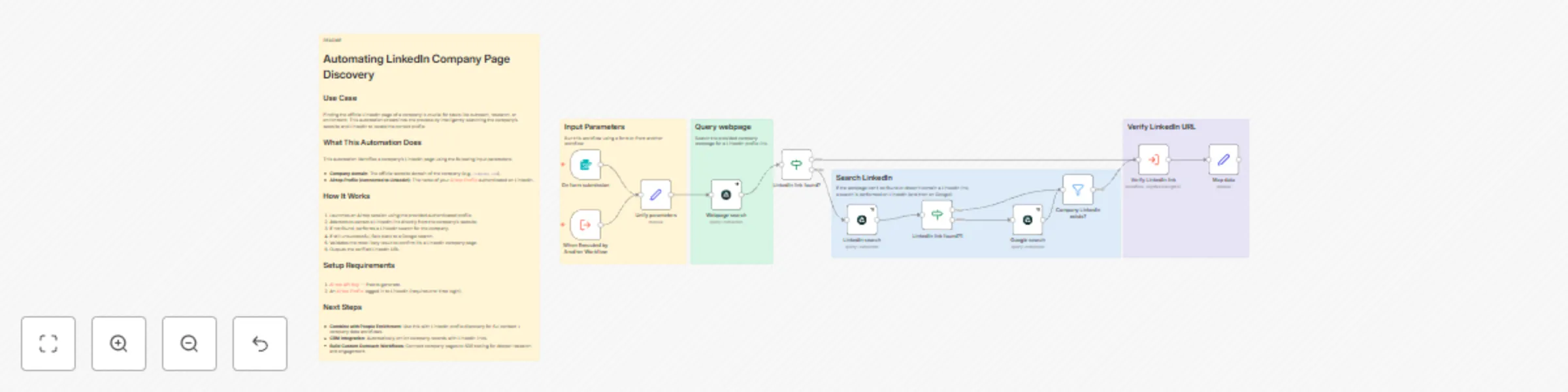
# Automating LinkedIn Company Page Discovery ## Use Case Finding the official LinkedIn page of a company is crucial for tasks like outreach, research, or enrichment. This automation streamlines the process by intelligently searching the company’s website and LinkedIn to locate the correct profile. ## What This Automation Does This automation identifies a company's LinkedIn page using the following input parameters: - **Company domain**: The official website domain of the company (e.g., `company.com`). - **Airtop Profile (connected to LinkedIn)**: The name of your [Airtop Profile](https://portal.airtop.ai/browser-profiles) authenticated on LinkedIn. ## How It Works 1. Launches an Airtop session using the provided authenticated profile. 2. Attempts to extract a LinkedIn link directly from the company's website. 3. If not found, performs a LinkedIn search for the company. 4. If still unsuccessful, falls back to a Google search. 5. Validates the most likely result to confirm it’s a LinkedIn company page. 6. Outputs the verified LinkedIn URL. ## Setup Requirements 1. [Airtop API Key](https://portal.airtop.ai/api-keys) — free to generate. 2. An [Airtop Profile](https://portal.airtop.ai/browser-profiles) logged in to LinkedIn (requires one-time login). ## Next Steps - **Combine with People Enrichment**: Use this with LinkedIn profile discovery for full contact + company data workflows. - **CRM Integration**: Automatically enrich company records with LinkedIn links. - **Build Custom Outreach Workflows**: Connect company pages to SDR tooling for deeper research and engagement. Read more about how to [find Linkedin Company page](https://www.airtop.ai/automations/find-linkedin-company-page-n8n)

A
Airtop
Lead Generation
21 May 2025
494
0
Workflow preview: Send Linkedin connection request with Airtop
Free advanced

Send Linkedin connection request with Airtop

# Automating LinkedIn Connection Requests ## Use Case Automatically sending LinkedIn connection requests to prospects can significantly streamline your outreach process. This automation ensures you only send requests to users you're not already connected with, and can optionally include a personalized message. ## What This Automation Does This automation sends a LinkedIn connection request using the following input parameters: - **linked_url**: The LinkedIn profile URL of the person you want to connect with. - **airtop_profile**: The name of your [Airtop Profile](https://portal.airtop.ai/browser-profiles) authenticated on LinkedIn. - **message** *(optional)*: The note you want to include with your connection request. ## How It Works 1. Starts an Airtop browser session using your authenticated profile. 2. Opens the target LinkedIn profile in a new browser window. 3. Detects if you're already connected or if a connection request is pending. 4. If the "Connect" button is available: - If no message is provided, clicks "Connect" and sends the request without a note. - If a message is provided, clicks "Add a note", types the message, and sends the request. 5. Terminates the browser session. ## Setup Requirements 1. [Airtop API Key](https://portal.airtop.ai/api-keys) — free to generate. 2. An [Airtop Profile](https://portal.airtop.ai/browser-profiles) logged in to LinkedIn (requires one-time authentication). ## Next Steps - **Pair with People Enrichment**: Use with the [LinkedIn Profile Finder](https://www.airtop.ai/blog/find-linkedin-profile-from-email) to generate URLs before sending requests. - **CRM Integration**: Log connection attempts and responses in your CRM. - **Campaign Sequencing**: Combine with message follow-up automations for a complete outreach flow. Read more about [automating Linkedin Connection Requests](https://www.airtop.ai/automations/send-linkedin-connection-request-n8n)

A
Airtop
Lead Nurturing
21 May 2025
2079
0
Workflow preview: Web site scraper for LLMs with Airtop
Free advanced

Web site scraper for LLMs with Airtop

# Recursive Web Scraping ## Use Case Automating web scraping with recursive depth is ideal for collecting content across multiple linked pages—perfect for content aggregation, lead generation, or research projects. ## What This Automation Does This automation reads a list of URLs from a Google Sheet, scrapes each page, stores the content in a document, and adds newly discovered links back to the sheet. It continues this process for a specified number of iterations based on the defined scraping depth. ### Input Parameters: - `Seed URL`: The starting URL to begin the scraping process. Example: `https://example.com/` - `Links must contain`: Restricts the links to those that contain this specified string. Example: `https://example.com/` - `Depth`: The number of iterations (layers of links) to scrape beyond the initial set. Example: `3` ## How It Works 1. Starts by reading the `Seed URL` from the Google Sheet. 2. Scrapes each page and saves its content to the specified document. 3. Extracts new links from each page that match the `Links must contain` string, appends them to the Google Sheet. 4. Repeats steps 2–3 for the number of times specified by `Depth - 1`. ## Setup Requirements 1. [Airtop API Key](https://portal.airtop.ai/api-keys) — free to generate. 2. Credentials set up for Google Docs (requires creating a project on Google Console). Read [how to](https://docs.n8n.io/integrations/builtin/credentials/google/). 3. Credentials set up for Google Spreadsheet. ## Next Steps - **Add Filtering Rules**: Filter which links to follow based on domain, path, or content type. - **Combine with Scheduler**: Run this automation on a schedule to continuously explore newly discovered pages. - **Export Structured Data**: Extend the process to store extracted data in a CSV or database for analysis. Read more about [website scraping for LLMS](https://www.airtop.ai/automations/scrape-website-data-n8n)

A
Airtop
Engineering
21 May 2025
8689
0
Workflow preview: Extract LinkedIn post engagement data with Airtop
Free intermediate

Extract LinkedIn post engagement data with Airtop

# LinkedIn Post Engagement Data Extractor ## Use Case This automation is designed to extract key engagement metrics and audience data from a LinkedIn post. It's useful for analyzing the impact of content and identifying engaged users for lead generation, marketing, or research purposes. ## What It Does Given a LinkedIn post URL and an Airtop profile, this automation extracts: - Total number of reactions - Total number of comments - Total number of reposts - A list of users who reacted or commented, including: - Their full name - Their job title - A link to their LinkedIn profile ## Input Parameters | Name | Description | Required | |------------------|------------------------------------------------------------|----------| | airtop_profile | The name of an [Airtop Profile](https://portal.airtop.ai/browser-profiles) that's logged into LinkedIn | Yes | | linkedin_post_url| The full URL of the LinkedIn post you want to analyze | Yes | ## How It Works 1. The workflow starts when triggered manually or from another workflow/form. 2. It maps input fields for Airtop profile and post URL. 3. Airtop opens a browser session and loads the LinkedIn post. 4. An AI agent is instructed to extract engagement data via prompt-based analysis. 5. The response is parsed and output in a structured format. ## Output Format The output will be a structured JSON object with the following fields: ```json { "interactors": [ { "name": "Jane Doe", "job_title": "Marketing Director at ExampleCorp", "profile_url": "https://linkedin.com/in/janedoe" } // ... more interactors ], "reactions_count": 153, "comments_count": 21, "reposts_count": 8 } Read more about how to [extract Linkedin post comments and reactions](https://www.airtop.ai/automations/linkedin-post-engagement-data-extractor-n8n).

A
Airtop
Market Research
21 May 2025
1036
0
Workflow preview: Extract and structure X Post Comments with Airtop Browser Automation
Free intermediate

Extract and structure X Post Comments with Airtop Browser Automation

# Extracting Comments from an X Post ## Use Case Engaging with conversations on X (formerly Twitter) is critical for brands and individuals monitoring sentiment, leads, or emerging trends. Manually collecting comments is time-consuming—this automation enables scalable extraction of comment data to inform your outreach or analysis. ## What This Automation Does This automation extracts comments from a specified X post, with the following input parameters: - **`airtop_profile`**: The name of your [Airtop Profile](https://portal.airtop.ai/browser-profiles) connected to X. - **`x_post_url`**: The URL of the X post to extract comments from. - **`max_number_of_comments`**: The maximum number of comments to retrieve. ## How It Works 1. Takes input via a form or another workflow. 2. Normalizes the input values. 3. Creates a new browser session using Airtop. 4. Navigates to the provided X post. 5. Uses a prompt to extract up to the specified number of comments, returning: - Author name - Author profile URL - Comment text ## Setup Requirements 1. [Airtop API Key](https://portal.airtop.ai/api-keys) — free to generate. 2. An [Airtop Profile](https://portal.airtop.ai/browser-profiles) connected to X (requires one-time login). ## Next Steps - **Pair with X Monitoring**: Use this with the [X monitoring automation](https://www.airtop.ai/blog/automating-x-monitoring-with-airtop-and-make) to detect relevant posts and extract discussion context automatically. - **Feed into Analytics**: Combine with summarization or sentiment analysis tools to understand audience response at scale. - **Export for CRM/BI**: Pipe the structured comment data into your CRM or business intelligence stack for lead tracking or reporting. Read more about [Extracting Comments from X Posts](https://www.airtop.ai/automations/extract-x-post-comments-n8n)

A
Airtop
Market Research
19 May 2025
434
0
Workflow preview: Monitoring job changes on LinkedIn with Airtop
Free beginner

Monitoring job changes on LinkedIn with Airtop

# Monitoring Job Changes on LinkedIn ## Use Case This automation tracks job changes among your LinkedIn connections and extracts relevant details. It's ideal for triggering timely outreach, updating CRM records, or feeding lead scoring workflows based on new roles. ## What This Automation Does It scrapes your LinkedIn "Job Changes" feed and returns: - Name of the person - Their new position - LinkedIn profile URL - Functional category (e.g., marketing, sales, HR, executive) Each run processes 5 job changes at a time. ## How It Works 1. **Manual Trigger**: Starts the workflow when the user clicks "Test workflow." 2. **Airtop Enrichment**: Navigates to the LinkedIn job changes page and extracts: - `name` - `new_position` - `linkedin_profile_url` - `position_function` (classification such as marketing, sales, HR, etc.) 3. **Formatting**: Output is structured into clean JSON for use in further workflows. ## Setup Requirements 1. [Airtop Profile](https://portal.airtop.ai/browser-profiles) connected to LinkedIn 2. Airtop API key configured in n8n 3. A LinkedIn account with a populated “Job Changes” feed ## Next Steps - **Automate Alerts**: Add Slack, email, or CRM integrations to notify your team. - **Enrich and Score Leads**: Chain this with your ICP scoring workflow to evaluate new roles. - **Customize Scope**: Expand extraction to more than 5 job changes or add filters based on job titles or functions. Read more about [Monitoring Job Changes on Linkedin](https://www.airtop.ai/automations/monitor-job-changes-on-linkedin-n8n).

A
Airtop
Lead Generation
19 May 2025
711
0
Workflow preview: Real-time X post monitoring & auto-categorization with Airtop
Free intermediate

Real-time X post monitoring & auto-categorization with Airtop

# Monitor X for Relevant Posts ## Use Case This automation monitors X (formerly Twitter) search pages in real time and extracts high-signal posts that match your categories of interest. It’s ideal for community engagement, lead discovery, thought leadership tracking, or competitive analysis. ## What This Automation Does Given a search URL and a list of categories, it: - Logs into X using Airtop - Opens the specified search URL - Scrolls through the results - Extracts up to 10 valid, English-language posts - Filters and classifies each post by category (or marks as `[NA]` if unrelated) - Returns the structured results as JSON Input parameters: - **airtop_profile** — An Airtop browser profile authenticated on X - **x_url** — X search URL (e.g., `https://x.com/search?q=ai agents&f=live`) - **relevant_categories** — Text-based list of categories to classify posts (e.g., "Web automation use cases", "Thought leadership") Output: A JSON array of posts, each with: - `writer` - `time` - `text` - `url` - `category` ## How It Works 1. **Trigger**: This workflow is triggered by another workflow (e.g., a community engagement pipeline). 2. **Input Setup**: Accepts the Airtop profile, search URL, and categories to use for classification. 3. **Session**: Starts a browser session using the Airtop profile. 4. **Window Navigation**: Opens the provided X search URL. 5. **Extraction**: Scrapes up to 10 posts with `/status/` in the URL and text in English. 6. **Classification**: Each post is labeled with a category if relevant, or `[NA]` otherwise. 7. **Filtering**: Discards `[NA]` posts. 8. **Output**: Returns the list of classified posts. ## Setup Requirements 1. Airtop profile with an active X login. 2. Airtop API key connected in n8n. 3. List of category definitions to guide post classification (used in prompt). ## Next Steps - **Feed into Engagement Workflows**: Pass the results to workflows that reply, retweet, or track posts. - **Use in Slack Alerts**: Push classified posts into Slack channels for review and reaction. - **Customize Classifier**: Refine the categorization logic to include sentiment or company mentions. Read more about [Monitoring X for Relevant Posts](https://www.airtop.ai/automations/monitor-x-for-relevant-posts-n8n)

A
Airtop
Market Research
19 May 2025
525
0