Host your own JWT authentication system with Data Tables and token management
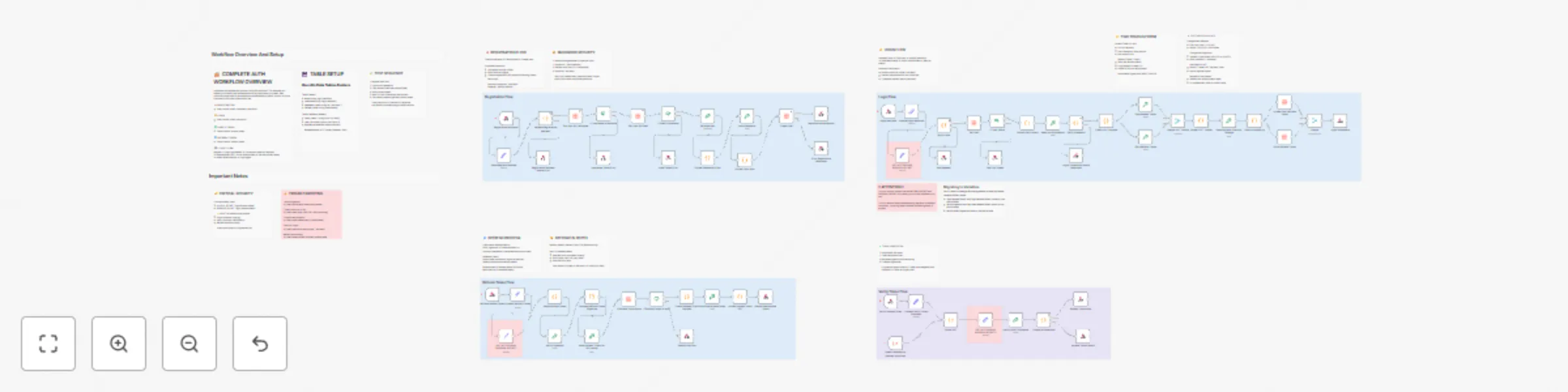
Workflow preview


 Early Deal
DISCOUNT 20%

Important notice
This workflow is provided as-is. Please review and test before using in production.
Overview
Description
A production-ready authentication workflow implementing secure user registration, login, token verification, and refresh token mechanisms. Perfect for adding authentication to any application without needing a separate auth service.
Get started with n8n now!
What it does
This template provides a complete authentication backend using n8n workflows and Data Tables:
- User Registration: Creates accounts with secure password hashing (SHA-512 + unique salts)
- Login System: Generates access tokens (15 min) and refresh tokens (7 days) using JWT
- Token Verification: Validates access tokens for protected endpoints
- Token Refresh: Issues new access tokens without requiring re-login
- Security Features: HMAC-SHA256 signatures, hashed refresh tokens in database, protection against rainbow table attacks
Why use this template
- No external services: Everything runs in n8n - no Auth0, Firebase, or third-party dependencies
- Production-ready security: Industry-standard JWT implementation with proper token lifecycle management
- Easy integration: Simple REST API endpoints that work with any frontend framework
- Fully customizable: Adjust token lifespans, add custom user fields, implement your own business logic
- Well-documented: Extensive inline notes explain every security decision and implementation detail
How to set up
Prerequisites
- n8n instance (cloud or self-hosted)
- n8n Data Tables feature enabled
Setup Steps
- Create Data Tables:
- users table: id, email, username, password_hash, refresh_token
- refresh_tokens table: id, user_id, token_hash, expires_at
- Generate Secret Keys: Run this command to generate a random secret:
node -e "console.log(require('crypto').randomBytes(32).toString('hex'))"
Generate two different secrets for ACCESS_SECRET and REFRESH_SECRET 3. Configure Secrets:
- Update the three "SET ACCESS AND REFRESH SECRET" nodes with your generated keys
- Or migrate to n8n Variables for better security (instructions in workflow notes)
- Connect Data Tables:
- Open each Data Table node
- Select your created tables from the dropdown
- Activate Workflow:
- Save and activate the workflow
- Note your webhook URLs
API Endpoints
Register: POST /webhook/register-user Request body:
{
 "email": "[email protected]",
 "username": "username",
 "password": "password123"
}
Login: POST /webhook/login Request body:
{
 "email": "[email protected]",
 "password": "password123"
}
Returns:
{
 "accessToken": "...",
 "refreshToken": "...",
 "user": {...}
}
Verify Token: POST /webhook/verify-token Request body:
{
 "access_token": "your_access_token"
}
Refresh: POST /webhook/refresh Request body:
{
 "refresh_token": "your_refresh_token"
}
Frontend Integration Example (Vue.js/React)
Login flow:
const response = await fetch('https://your-n8n.app/webhook/login', {
 method: 'POST',
 headers: { 'Content-Type': 'application/json' },
 body: JSON.stringify({ email, password })
});
const { accessToken, refreshToken } = await response.json();
localStorage.setItem('accessToken', accessToken);
Make authenticated requests:
const data = await fetch('https://your-api.com/protected', {
 headers: { 'Authorization': Bearer ${accessToken} }
});
Key Features
- Secure Password Storage: Never stores plain text passwords; uses SHA-512 with unique salts
- Two-Token System: Short-lived access tokens (security) + long-lived refresh tokens (convenience)
- Database Token Revocation: Refresh tokens can be revoked for logout-all-devices functionality
- Duplicate Prevention: Checks username and email availability before account creation
- Error Handling: Generic error messages prevent information leakage
- Extensive Documentation: 30+ sticky notes explain every security decision
Use Cases
- SaaS applications needing user authentication
- Mobile app backends
- Internal tools requiring access control
- MVP/prototype authentication without third-party costs
- Learning JWT and auth system architecture
Customization
- Token Lifespan: Modify expiration times in "Create JWT Payload" nodes
- User Fields: Add custom fields to registration and user profile
- Password Rules: Update validation in "Validate Registration Request" node
- Token Rotation: Implement refresh token rotation for enhanced security (notes included)
Security Notes
:warning: Important:
- Change the default secret keys before production use
- Use HTTPS for all webhook endpoints
- Store secrets in n8n Variables (not hardcoded)
- Regularly rotate secret keys in production
- Consider rate limiting for login endpoints
Support & Documentation
The workflow includes comprehensive documentation:
- Complete authentication flow overview
- Security explanations for every decision
- Troubleshooting guide
- Setup instructions
- FAQ section with common issues Perfect for developers who want full control over their authentication system without the complexity of managing separate auth infrastructure.
Get Started with n8n now!
Tags: authentication, jwt, login, security, user-management, tokens, password-hashing, api, backend