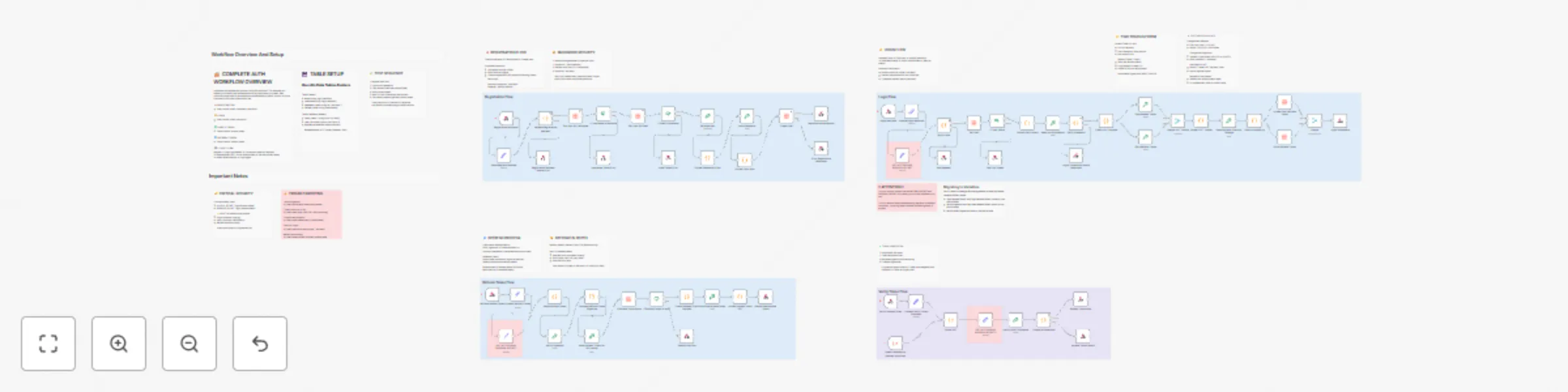
Host your own JWT authentication system with Data Tables and token management

Workflow preview

Workflow preview
100%
Host your own JWT authentication system with Data Tables and token management preview
Open on n8n.io

Important notice

This workflow is provided as-is. Please review and test before using in production.

1. Workflow Overview

Description A production ready authentication workflow implementing secure user registration, login, token verification, and refresh token mechanisms. Perfect for adding authentication to any appli...

Best for

  • Engineering automation workflows
  • advanced n8n builders looking for reusable templates

Tools used

n8n-nodes-base.crypto, n8n-nodes-base.set, n8n-nodes-base.datatable, n8n-nodes-base.code, n8n-nodes-base.merge, n8n-nodes-base.stickynote, n8n-nodes-base.webhook, n8n-nodes-base.respondtowebhook

Source and attribution

This workflow is cataloged by N8N Workflows and links back to its original n8n.io source page by Luka Zivkovic.

Original n8n.io source

1.1 Workflow description

Title
Host your own JWT authentication system with Data Tables and token management
Workflow name
Host your own JWT authentication system with Data Tables and token management

Description

A production-ready authentication workflow implementing secure user registration, login, token verification, and refresh token mechanisms. Perfect for adding authentication to any application without needing a separate auth service.

Get started with n8n now!

What it does

This template provides a complete authentication backend using n8n workflows and Data Tables:

  • User Registration: Creates accounts with secure password hashing (SHA-512 + unique salts)
  • Login System: Generates access tokens (15 min) and refresh tokens (7 days) using JWT
  • Token Verification: Validates access tokens for protected endpoints
  • Token Refresh: Issues new access tokens without requiring re-login
  • Security Features: HMAC-SHA256 signatures, hashed refresh tokens in database, protection against rainbow table attacks

Why use this template

  • No external services: Everything runs in n8n - no Auth0, Firebase, or third-party dependencies
  • Production-ready security: Industry-standard JWT implementation with proper token lifecycle management
  • Easy integration: Simple REST API endpoints that work with any frontend framework
  • Fully customizable: Adjust token lifespans, add custom user fields, implement your own business logic
  • Well-documented: Extensive inline notes explain every security decision and implementation detail

How to set up

Prerequisites

  • n8n instance (cloud or self-hosted)
  • n8n Data Tables feature enabled

Setup Steps

  1. Create Data Tables:
  • users table: id, email, username, password_hash, refresh_token
  • refresh_tokens table: id, user_id, token_hash, expires_at
  1. Generate Secret Keys: Run this command to generate a random secret:
  node -e "console.log(require('crypto').randomBytes(32).toString('hex'))"

Generate two different secrets for ACCESS_SECRET and REFRESH_SECRET 3. Configure Secrets:

  • Update the three "SET ACCESS AND REFRESH SECRET" nodes with your generated keys
  • Or migrate to n8n Variables for better security (instructions in workflow notes)
  1. Connect Data Tables:
  • Open each Data Table node
  • Select your created tables from the dropdown
  1. Activate Workflow:
  • Save and activate the workflow
  • Note your webhook URLs

API Endpoints

Register: POST /webhook/register-user Request body:

{
 "email": "[email protected]",
 "username": "username",
 "password": "password123"
}

Login: POST /webhook/login Request body:

{
 "email": "[email protected]",
 "password": "password123"
}

Returns:

{
 "accessToken": "...",
 "refreshToken": "...",
 "user": {...}
}

Verify Token: POST /webhook/verify-token Request body:

{
 "access_token": "your_access_token"
}

Refresh: POST /webhook/refresh Request body:

{
 "refresh_token": "your_refresh_token"
}

Frontend Integration Example (Vue.js/React)

Login flow:

const response = await fetch('https://your-n8n.app/webhook/login', {
 method: 'POST',
 headers: { 'Content-Type': 'application/json' },
 body: JSON.stringify({ email, password })
});
const { accessToken, refreshToken } = await response.json();
localStorage.setItem('accessToken', accessToken);

Make authenticated requests:

const data = await fetch('https://your-api.com/protected', {
 headers: { 'Authorization': Bearer ${accessToken} }
});

Key Features

  • Secure Password Storage: Never stores plain text passwords; uses SHA-512 with unique salts
  • Two-Token System: Short-lived access tokens (security) + long-lived refresh tokens (convenience)
  • Database Token Revocation: Refresh tokens can be revoked for logout-all-devices functionality
  • Duplicate Prevention: Checks username and email availability before account creation
  • Error Handling: Generic error messages prevent information leakage
  • Extensive Documentation: 30+ sticky notes explain every security decision

Use Cases

  • SaaS applications needing user authentication
  • Mobile app backends
  • Internal tools requiring access control
  • MVP/prototype authentication without third-party costs
  • Learning JWT and auth system architecture

Customization

  • Token Lifespan: Modify expiration times in "Create JWT Payload" nodes
  • User Fields: Add custom fields to registration and user profile
  • Password Rules: Update validation in "Validate Registration Request" node
  • Token Rotation: Implement refresh token rotation for enhanced security (notes included)

Security Notes

:warning: Important:

  • Change the default secret keys before production use
  • Use HTTPS for all webhook endpoints
  • Store secrets in n8n Variables (not hardcoded)
  • Regularly rotate secret keys in production
  • Consider rate limiting for login endpoints

Support & Documentation

The workflow includes comprehensive documentation:

  • Complete authentication flow overview
  • Security explanations for every decision
  • Troubleshooting guide
  • Setup instructions
  • FAQ section with common issues Perfect for developers who want full control over their authentication system without the complexity of managing separate auth infrastructure.

Get Started with n8n now!

Tags: authentication, jwt, login, security, user-management, tokens, password-hashing, api, backend

1.2 Logical Blocks

This catalog entry is organized from the workflow JSON. The node-level section below shows the executable blocks available for review before importing the template.

2. Block-by-Block Analysis

Block 1 - Generate Salt

Type / Role
n8n-nodes-base.crypto - crypto
Config choices
Version 1

Block 2 - Hash Password

Type / Role
n8n-nodes-base.crypto - crypto
Config choices
Version 1

Block 3 - Process login webhook

Type / Role
n8n-nodes-base.set - set
Config choices
Version 3.4

Block 4 - Get User

Type / Role
n8n-nodes-base.dataTable - dataTable
Config choices
Version 1

Block 5 - Extract Salt & Hash

Type / Role
n8n-nodes-base.code - code
Config choices
Version 2

Block 6 - Hash Input Password

Type / Role
n8n-nodes-base.crypto - crypto
Config choices
Version 1

Block 7 - Sign Access Token

Type / Role
n8n-nodes-base.crypto - crypto
Config choices
Version 1

Block 8 - Sign Refresh Token

Type / Role
n8n-nodes-base.crypto - crypto
Config choices
Version 1

Block 9 - Format JWT Tokens

Type / Role
n8n-nodes-base.code - code
Config choices
Version 2

Block 10 - Merge JWT Tokens

Type / Role
n8n-nodes-base.merge - merge
Config choices
Version 3.2

Block 11 - Hash Refresh Token for Storage

Type / Role
n8n-nodes-base.crypto - crypto
Config choices
Version 1

Block 12 - Sticky Note1

Type / Role
n8n-nodes-base.stickyNote - stickyNote
Config choices
Version 1

Block 13 - Parse JWT

Type / Role
n8n-nodes-base.code - code
Config choices
Version 2

Block 14 - Verify HMAC Signature

Type / Role
n8n-nodes-base.crypto - crypto
Config choices
Version 1

Block 15 - Compare Signatures

Type / Role
n8n-nodes-base.code - code
Config choices
Version 2

Block 16 - Sticky Note2

Type / Role
n8n-nodes-base.stickyNote - stickyNote
Config choices
Version 1

Block 17 - Create User

Type / Role
n8n-nodes-base.dataTable - dataTable
Config choices
Version 1

Block 18 - Registration Webhook

Type / Role
n8n-nodes-base.webhook - webhook
Config choices
Version 2.1

Block 19 - Format Password & Salt

Type / Role
n8n-nodes-base.code - code
Config choices
Version 2

Block 20 - Format User Data

Type / Role
n8n-nodes-base.code - code
Config choices
Version 2

Block 21 - Error Registration Response

Type / Role
n8n-nodes-base.respondToWebhook - respondToWebhook
Config choices
Version 1.4

Block 22 - Validate Registration Request

Type / Role
n8n-nodes-base.code - code
Config choices
Version 2

Block 23 - Registration Successful

Type / Role
n8n-nodes-base.respondToWebhook - respondToWebhook
Config choices
Version 1.4

Block 24 - If User Exists

Type / Role
n8n-nodes-base.if - if
Config choices
Version 2.2

Showing the first 24 of 87 workflow blocks. Download the JSON for the full node graph.

3. Summary Table

Workflow Host your own JWT authentication system with Data Tables and token management
Complexity advanced
Nodes 87
Categories Engineering
Author Luka Zivkovic
Published 14 Oct 2025

4. Reproducing the Workflow from Scratch

  1. 1. Download the workflow JSON

    Use the JSON export at /data/workflows/9660/9660.json as the source template for this automation.

  2. 2. Import the template into n8n

    Open n8n, import the downloaded JSON, and review each node before activating the workflow.

  3. 3. Configure credentials and variables

    Replace placeholder credentials, API keys, webhook URLs, account IDs, and environment-specific values with your own settings.

  4. 4. Test with sample data

    Run the workflow manually or in a staging workspace, inspect node output, and confirm downstream systems receive the expected data.

  5. 5. Activate and monitor

    Enable the workflow only after testing, then monitor executions, errors, and rate limits during the first production runs.

5. General Notes & Resources

Review imported nodes carefully before activation. This catalog entry is intended to help you inspect the workflow structure, understand required services, and find related templates faster.

Node names, credentials, schedules, webhook paths, and external service limits may need adjustment for your workspace.

Frequently asked questions

What does Host your own JWT authentication system with Data Tables and token management do?

Description A production ready authentication workflow implementing secure user registration, login, token verification, and refresh token mechanisms. Perfect for adding authentication to any appli...

What do I need before importing this workflow?

Review the workflow JSON, configure any required credentials in n8n, and test the automation in a safe workspace before using it in production.

Can I customize this workflow?

Yes. Use the block-by-block analysis and the downloadable JSON to inspect each node, then adjust credentials, prompts, schedules, filters, or destinations for your Engineering use case.