Generate and email PDF invoices from Tally Forms with Google Docs
Workflow preview


 Early Deal
DISCOUNT 20%

Important notice
This workflow is provided as-is. Please review and test before using in production.
Overview
Stop copy-pasting invoice details!
This gentle workflow turns a simple Tally form into a beautiful PDF invoice and delivers it to your client before you finish your latte ☕.**
Perfect for Etsy sellers, coaches, freelancers and side-hustlers who want soft-tech automation that feels like magic, not middleware.
How it works
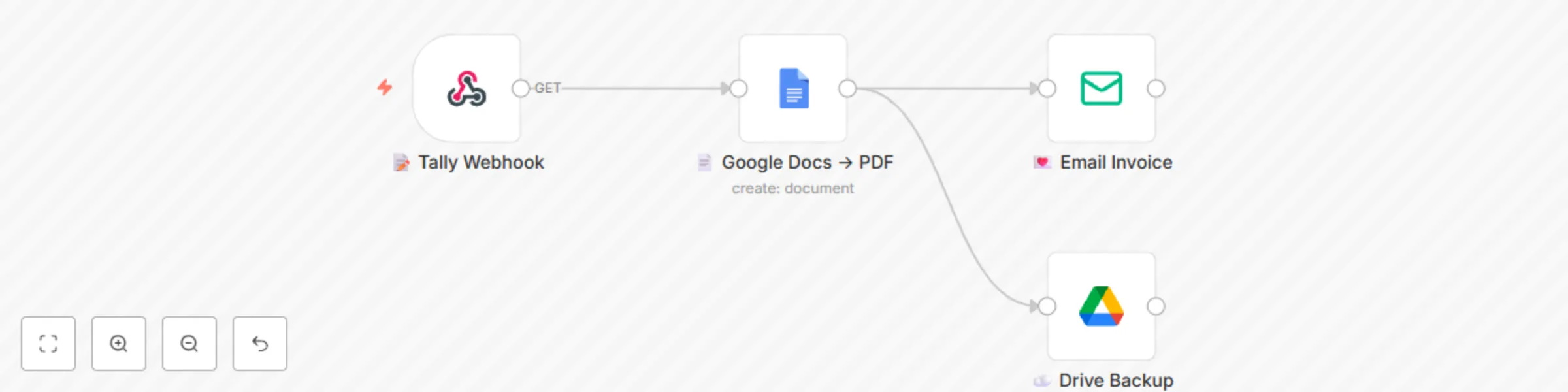
1️⃣ You (or your VA) fill a 4-question Tally form: client name, email, amount, due date.
2️⃣ n8n instantly merges the data into a Google Docs template you pre-design (logo, colours, your vibe).
3️⃣ PDF is generated & emailed with a warm, on-brand note.
4️⃣ Optional: same PDF is auto-saved to a “2024-Invoices” Google Drive folder for painless bookkeeping 📁.
Zero code, zero Zapier, zero monthly fees—just pure calm productivity.
Bonus: template includes placeholder variables so you can add discount lines, PO numbers or custom thank-you messages in seconds.
Grab it, swap in your own Tally & Gmail credentials, and watch your invoicing shrink from 15 minutes to 15 seconds. Your future self (and your accountant) will send you heart emojis 💌.
🗂️ Tally form schema (share with buyers)
Question 1: Client Name (Short text)
Question 2: Client Email (Email)
Question 3: Amount (Number)
Question 4: Due Date (Date)
Question 5: Invoice Number (Short text, auto-increment or manual)
Webhook URL: copy from the “📝 Tally Webhook” node after import.