Block 1 - 📝 Tally Webhook
- Type / Role
- n8n-nodes-base.webhook - webhook
- Config choices
- Version 1


 Early Deal
This workflow is provided as-is. Please review and test before using in production.
Stop copy pasting invoice details! This gentle workflow turns a simple Tally form into a beautiful PDF invoice and delivers it to your client before you finish your latte . Perfect for Etsy seller...
n8n-nodes-base.webhook, n8n-nodes-base.googledocs, n8n-nodes-base.emailsend, n8n-nodes-base.googledrive
This workflow is cataloged by N8N Workflows and links back to its original n8n.io source page by Shelly-Ann Davy.
Original n8n.io sourceStop copy-pasting invoice details!
This gentle workflow turns a simple Tally form into a beautiful PDF invoice and delivers it to your client before you finish your latte ☕.**
Perfect for Etsy sellers, coaches, freelancers and side-hustlers who want soft-tech automation that feels like magic, not middleware.
How it works
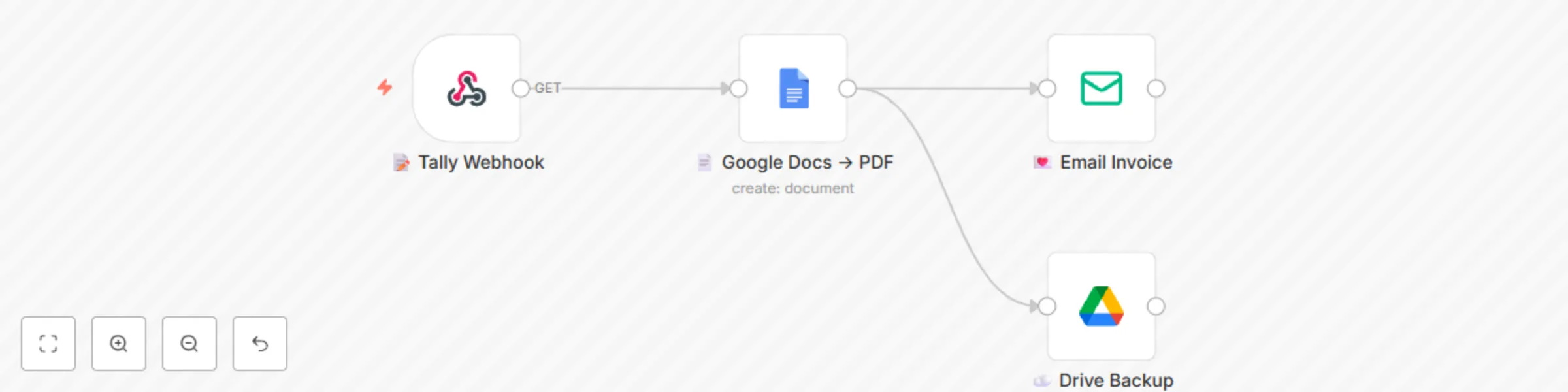
1️⃣ You (or your VA) fill a 4-question Tally form: client name, email, amount, due date.
2️⃣ n8n instantly merges the data into a Google Docs template you pre-design (logo, colours, your vibe).
3️⃣ PDF is generated & emailed with a warm, on-brand note.
4️⃣ Optional: same PDF is auto-saved to a “2024-Invoices” Google Drive folder for painless bookkeeping 📁.
Zero code, zero Zapier, zero monthly fees—just pure calm productivity.
Bonus: template includes placeholder variables so you can add discount lines, PO numbers or custom thank-you messages in seconds.
Grab it, swap in your own Tally & Gmail credentials, and watch your invoicing shrink from 15 minutes to 15 seconds. Your future self (and your accountant) will send you heart emojis 💌.
🗂️ Tally form schema (share with buyers)
Question 1: Client Name (Short text)
Question 2: Client Email (Email)
Question 3: Amount (Number)
Question 4: Due Date (Date)
Question 5: Invoice Number (Short text, auto-increment or manual)
Webhook URL: copy from the “📝 Tally Webhook” node after import.
This catalog entry is organized from the workflow JSON. The node-level section below shows the executable blocks available for review before importing the template.
| Workflow | Generate and email PDF invoices from Tally Forms with Google Docs |
|---|---|
| Complexity | beginner |
| Nodes | 4 |
| Categories | Invoice Processing, Multimodal AI |
| Author | Shelly-Ann Davy |
| Published | 28 Aug 2025 |
Use the JSON export at /data/workflows/7982/7982.json as the source template for this automation.
Open n8n, import the downloaded JSON, and review each node before activating the workflow.
Replace placeholder credentials, API keys, webhook URLs, account IDs, and environment-specific values with your own settings.
Run the workflow manually or in a staging workspace, inspect node output, and confirm downstream systems receive the expected data.
Enable the workflow only after testing, then monitor executions, errors, and rate limits during the first production runs.
Review imported nodes carefully before activation. This catalog entry is intended to help you inspect the workflow structure, understand required services, and find related templates faster.
Node names, credentials, schedules, webhook paths, and external service limits may need adjustment for your workspace.
Stop copy pasting invoice details! This gentle workflow turns a simple Tally form into a beautiful PDF invoice and delivers it to your client before you finish your latte . Perfect for Etsy seller...
Review the workflow JSON, configure any required credentials in n8n, and test the automation in a safe workspace before using it in production.
Yes. Use the block-by-block analysis and the downloadable JSON to inspect each node, then adjust credentials, prompts, schedules, filters, or destinations for your Invoice Processing, Multimodal AI use case.