S

Shelly-Ann Davy

36
Workflows

Workflows by Shelly-Ann Davy

Workflow preview: AI-Powered Contact Intelligence & Enrichment with OpenAI/Anthropic and Supabase
Free intermediate

AI-Powered Contact Intelligence & Enrichment with OpenAI/Anthropic and Supabase

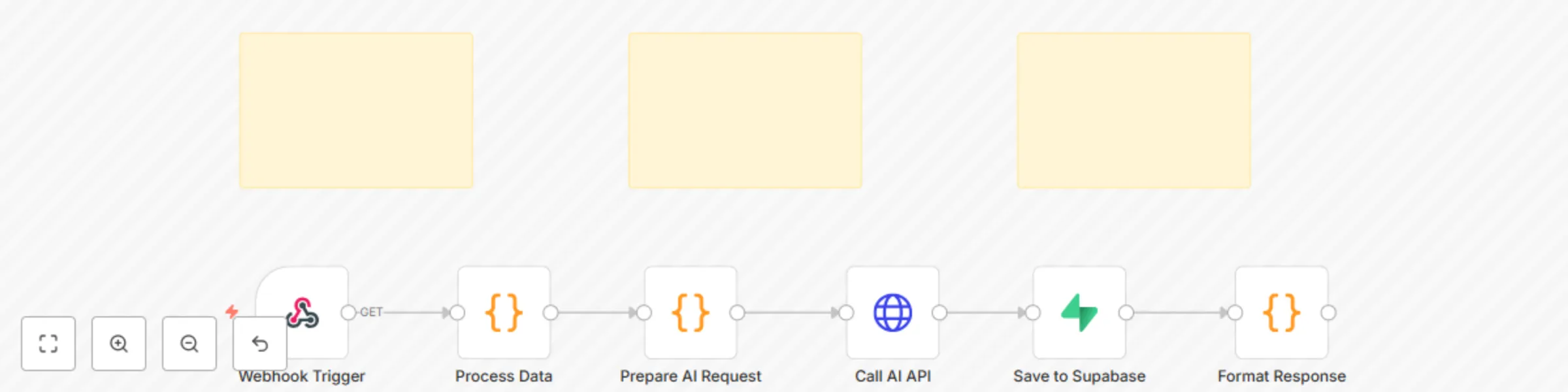
# AI Contact Enrichment ## 📋 Template Description ### Overview Automatically enhance and enrich contact data using AI to fill in missing information, generate insights, and create detailed buyer personas. Supports multiple AI providers (OpenAI, Anthropic, etc.) with automatic logging to Supabase. ### Description This workflow transforms incomplete contact records into rich, actionable profiles. By leveraging AI, it can infer job roles, company information, likely pain points, communication preferences, and buying motivations from minimal input data. Perfect for sales and marketing teams looking to improve data quality and personalize outreach. **Key Benefits:** - **Smart Data Completion**: Fill in missing contact fields using AI inference - **Buyer Persona Generation**: Create detailed profiles from basic information - **Universal AI Support**: Works with OpenAI, Anthropic Claude, or custom providers - **CRM Enhancement**: Automatically enrich contacts as they enter your system - **Lead Qualification**: Assess lead quality and fit based on enriched data - **Personalization Engine**: Generate insights for tailored outreach - **Data Quality**: Maintain clean, complete contact records **Use Cases:** - Sales prospecting and lead enrichment - Marketing persona development - CRM data cleansing and completion - Account-based marketing (ABM) research - Lead scoring and qualification - Personalized email campaign preparation - Contact segmentation and targeting --- ## ⚙️ Setup Instructions ### Prerequisites 1. **n8n instance** (cloud or self-hosted) 2. **AI Provider account** (OpenAI, Anthropic, or custom) 3. **Supabase account** with database access ### Step 1: Configure Environment Variables Add these to your n8n environment settings: ```bash AI_PROVIDER=openai # or 'anthropic', 'custom' AI_API_KEY=your_api_key_here AI_MODEL=gpt-3.5-turbo # or 'gpt-4', 'claude-3-sonnet-20240229' AI_ENDPOINT= # Only for custom providers ``` **Recommended Models:** - **Cost-effective**: `gpt-3.5-turbo` (fast, affordable, good for basic enrichment) - **High-quality**: `gpt-4` or `claude-3-sonnet-20240229` (better inference, deeper insights) - **Premium**: `claude-3-opus-20240229` (best for complex persona generation) **How to set environment variables:** - **n8n Cloud**: Go to Settings → Environment Variables - **Self-hosted**: Add to your `.env` file or docker-compose configuration ### Step 2: Set Up Supabase Database Create the logging table in your Supabase database: ```sql CREATE TABLE workflow_logs ( id BIGSERIAL PRIMARY KEY, workflow_name TEXT NOT NULL, data JSONB NOT NULL, ai_response JSONB NOT NULL, created_at TIMESTAMP WITH TIME ZONE DEFAULT NOW() ); CREATE INDEX idx_workflow_logs_created_at ON workflow_logs(created_at); CREATE INDEX idx_workflow_logs_workflow_name ON workflow_logs(workflow_name); -- Optional: Create a view for enriched contacts CREATE VIEW enriched_contacts AS SELECT id, data->>'email' as email, data->>'name' as name, data->>'company' as company, ai_response as enrichment_data, created_at FROM workflow_logs WHERE workflow_name = 'AI Contact Enrichment' ORDER BY created_at DESC; ``` **To run this SQL:** 1. Open your Supabase project dashboard 2. Go to the SQL Editor 3. Paste the SQL above and click "Run" ### Step 3: Configure Supabase Credentials in n8n 1. Go to **Settings** → **Credentials** 2. Click **Add Credential** → **Supabase API** 3. Enter your Supabase URL and API key (found in Project Settings → API) 4. Name it `Supabase API` 5. Click **Save** ### Step 4: Activate the Webhook 1. Import this workflow into n8n 2. Click the **Activate** toggle in the top-right corner 3. Click on the "Webhook Trigger" node 4. Copy the **Production URL** (this is your webhook endpoint) 5. Save this URL for integration with your applications ### Step 5: Test the Workflow Send a test POST request to the webhook: ```bash curl -X POST https://your-n8n-instance.com/webhook/contact-enrichment \ -H "Content-Type: application/json" \ -d '{ "email": "[email protected]", "name": "John Doe", "company": "Acme Corporation", "linkedin_url": "https://linkedin.com/in/johndoe" }' ``` **Successful Response:** ```json { "success": true, "workflow": "AI Contact Enrichment", "timestamp": "2025-01-14T12:00:00.000Z" } ``` --- ## 📥 Expected Payload Format The webhook accepts JSON with basic contact information: ### Minimal Input ```json { "email": "string (required or name required)", "name": "string (required or email required)" } ``` ### Recommended Input ```json { "email": "string", "name": "string", "company": "string", "job_title": "string", "linkedin_url": "string", "phone": "string", "location": "string", "website": "string" } ``` ### Complete Input Example ```json { "email": "[email protected]", "name": "Sarah Chen", "company": "TechStartup Inc.", "job_title": "VP of Marketing", "linkedin_url": "https://linkedin.com/in/sarahchen", "phone": "+1-555-0123", "location": "San Francisco, CA", "website": "https://techstartup.io", "industry": "B2B SaaS", "company_size": "50-200 employees", "notes": "Met at SaaS conference 2024" } ``` **Field Guidelines:** - At minimum, provide either `email` or `name` - More input fields = better AI enrichment quality - Include `linkedin_url` for best results - `company` helps with firmographic enrichment - Any additional context improves accuracy --- ## 🔄 Workflow Flow 1. **Webhook Trigger**: Receives basic contact information from your application, form, or CRM 2. **Process Data**: Adds unique ID and timestamp to the incoming data 3. **Prepare AI Request**: Configures AI provider settings from environment variables 4. **Call AI API**: Sends contact data to AI with enrichment prompt 5. **Save to Supabase**: Archives original data and enrichment results 6. **Format Response**: Returns success confirmation --- ## 🎯 Customization Tips ### Enhance AI Prompts for Better Enrichment Modify the "Prepare AI Request" node to customize enrichment: ```javascript // Enhanced prompt for contact enrichment const systemPrompt = `You are an expert sales intelligence analyst. Analyze the provided contact information and generate a comprehensive enrichment including: 1. INFERRED DETAILS: Fill in missing information based on available data - Full job title and seniority level - Department and reporting structure - Years of experience (estimated) - Professional background 2. COMPANY INSIGHTS: If company name provided - Industry and sub-industry - Company size and revenue (estimated) - Key products/services - Recent news or developments 3. BUYER PERSONA: Create a detailed profile - Primary responsibilities - Likely pain points and challenges - Key priorities and goals - Decision-making authority - Budget influence level 4. ENGAGEMENT STRATEGY: Provide outreach recommendations - Best communication channels - Optimal outreach timing - Key talking points - Personalization suggestions - Content interests 5. LEAD SCORE: Rate 1-10 based on: - Fit for product/service (specify your ICP) - Seniority and decision power - Company size and maturity - Engagement potential Return as structured JSON with clear sections.`; const userMessage = `Contact Information:\n${JSON.stringify($json.data, null, 2)}`; const aiConfig = { provider: $env.AI_PROVIDER || 'openai', apiKey: $env.AI_API_KEY, model: $env.AI_MODEL || 'gpt-3.5-turbo', endpoint: $env.AI_ENDPOINT, messages: [ { role: 'system', content: systemPrompt }, { role: 'user', content: userMessage } ] }; return { json: { aiConfig, data: $json } }; ``` ### Add External Data Sources Enhance enrichment with third-party APIs: **After "Process Data" node, add:** 1. **Clearbit/Hunter.io Node**: Get verified company data 2. **LinkedIn API**: Pull professional information 3. **Company Database**: Query internal customer data 4. **Web Scraping**: Extract data from company websites **Then merge all data before AI enrichment for best results** ### Connect to Your CRM Auto-update contacts after enrichment: **Salesforce Integration:** ```javascript // Add after "Call AI API" node // Update Salesforce contact with enriched data const enrichedData = JSON.parse($json.ai_response); return { json: { contactId: $json.data.salesforce_id, updates: { Description: enrichedData.buyer_persona, Custom_Score__c: enrichedData.lead_score, Pain_Points__c: enrichedData.pain_points } } }; ``` **HubSpot Integration:** - Add **HubSpot** node to update contact properties - Map enriched fields to custom HubSpot properties **Pipedrive Integration:** - Use **Pipedrive** node to update person records - Add custom fields for AI insights ### Implement Lead Scoring Add scoring logic after enrichment: ```javascript // Calculate lead score based on enrichment const enrichment = JSON.parse($json.ai_response); let score = 0; // Job title scoring if (enrichment.seniority === 'C-Level') score += 30; else if (enrichment.seniority === 'VP/Director') score += 20; else if (enrichment.seniority === 'Manager') score += 10; // Company size scoring if (enrichment.company_size === 'Enterprise') score += 25; else if (enrichment.company_size === 'Mid-Market') score += 15; // Decision authority scoring if (enrichment.decision_authority === 'High') score += 25; else if (enrichment.decision_authority === 'Medium') score += 15; // Budget influence if (enrichment.budget_influence === 'Direct') score += 20; return { json: { ...enrichment, lead_score: score } }; ``` ### Add Compliance Checks Insert before AI processing: ```javascript // Check for opt-out or compliance flags const email = $json.email.toLowerCase(); // Check against suppression list const suppressedDomains = ['competitor.com', 'spam.com']; const domain = email.split('@')[1]; if (suppressedDomains.includes(domain)) { throw new Error('Contact on suppression list'); } // Verify email format const emailRegex = /^[^\s@]+@[^\s@]+\.[^\s@]+$/; if (!emailRegex.test(email)) { throw new Error('Invalid email format'); } return { json: $json }; ``` ### Batch Enrichment Process multiple contacts: 1. Add **Spreadsheet File** trigger instead of webhook 2. Add **Split In Batches** node (process 10-20 at a time) 3. Run enrichment for each contact 4. Combine results and export to CSV --- ## 🛠️ Troubleshooting ### Common Issues **Issue**: "Enrichment is too generic" - **Solution**: Provide more input data (company, job title, LinkedIn) - Use GPT-4 or Claude models for better inference - Enhance the system prompt with specific instructions **Issue**: "AI_API_KEY is undefined" - **Solution**: Ensure environment variables are set correctly - Verify variable names match exactly (case-sensitive) **Issue**: "Enrichment contradicts actual data" - **Solution**: AI makes inferences - always validate critical information - Add validation step to check enriched data against known facts - Use external APIs for verification **Issue**: "Too slow for real-time use" - **Solution**: Implement queue system for async processing - Use faster models (gpt-3.5-turbo) for speed - Process in batches during off-peak hours **Issue**: "Supabase credentials not found" - **Solution**: Check credential name matches exactly: "Supabase API" - Verify Supabase URL and API key are correct ### Debugging Tips 1. Test with known contacts first to validate accuracy 2. Compare AI enrichment against actual data 3. Check execution logs for API errors 4. Start with minimal prompt, then enhance gradually 5. Use "Execute Node" to test individual steps --- ## 📊 Analyzing Enriched Data Query and analyze your enriched contacts: ```sql -- Get all enriched contacts SELECT * FROM enriched_contacts ORDER BY created_at DESC; -- Find high-value leads (assuming scoring implemented) SELECT email, name, company, ai_response->>'lead_score' as score FROM enriched_contacts WHERE (ai_response->>'lead_score')::int > 70 ORDER BY (ai_response->>'lead_score')::int DESC; -- Analyze enrichment by company SELECT data->>'company' as company, COUNT(*) as contact_count, AVG((ai_response->>'lead_score')::int) as avg_score FROM workflow_logs WHERE workflow_name = 'AI Contact Enrichment' AND ai_response->>'lead_score' IS NOT NULL GROUP BY data->>'company' ORDER BY contact_count DESC; -- Find contacts needing follow-up SELECT email, name, ai_response->>'engagement_strategy' as strategy, created_at FROM enriched_contacts WHERE created_at > NOW() - INTERVAL '7 days' ORDER BY created_at DESC; ``` ### Export Enriched Data ```sql -- Export to CSV COPY ( SELECT data->>'email' as email, data->>'name' as name, data->>'company' as company, ai_response->>'job_title' as enriched_title, ai_response->>'seniority' as seniority, ai_response->>'lead_score' as score FROM workflow_logs WHERE workflow_name = 'AI Contact Enrichment' ) TO '/tmp/enriched_contacts.csv' WITH CSV HEADER; ``` --- ## 📈 Integration Ideas ### Form Integration Automatically enrich new leads from forms: - **Typeform**: Trigger on form submission - **Google Forms**: Use Google Sheets trigger - **Calendly**: Enrich after meeting booking - **Webflow Forms**: Webhook trigger from form ### CRM Integration Real-time enrichment as contacts enter CRM: - **Salesforce**: Trigger on new lead/contact creation - **HubSpot**: Enrich on form submission or import - **Pipedrive**: Auto-enrich new persons - **Close**: Webhook on lead creation ### Email Tools Enhance cold outreach campaigns: - **Instantly.ai**: Enrich before campaign launch - **Lemlist**: Generate personalization variables - **Apollo.io**: Supplement with AI insights - **Mailshake**: Enrich prospect lists ### Marketing Automation Power ABM and segmentation: - **Marketo**: Enrich leads for scoring - **Pardot**: Enhance prospect profiles - **ActiveCampaign**: Personalization data - **Klaviyo**: E-commerce customer insights ### Slack Integration Team notifications and collaboration: - Send enrichment summaries to sales channel - Notify reps of high-value leads - Share persona insights with marketing - Alert on key account contacts --- ## 🔒 Security & Compliance Best Practices ### Data Protection 1. **Encrypt Sensitive Data**: Use environment variables for all credentials 2. **Access Control**: Limit webhook access with authentication 3. **Data Retention**: Set automatic deletion policies in Supabase 4. **Audit Logging**: Track all enrichment activities ### Privacy Compliance 1. **GDPR Compliance**: - Get consent before enriching personal data - Allow contacts to request data deletion - Document legal basis for processing 2. **CCPA Compliance**: Honor do-not-sell requests 3. **Data Minimization**: Only enrich necessary fields 4. **Right to Access**: Allow contacts to view enriched data ### AI Ethics 1. **Bias Awareness**: Review AI inferences for bias 2. **Accuracy Validation**: Verify critical information 3. **Transparency**: Disclose use of AI enrichment 4. **Human Oversight**: Review before critical decisions --- ## 💡 Best Practices ### Input Data Quality - **Always include email or full name** as anchor point - **Add LinkedIn URLs** for 50% better accuracy - **Provide company name** for firmographic insights - **Include any known details** - more data = better results ### Prompt Engineering - **Be specific** about your ideal customer profile (ICP) - **Request structured output** (JSON format) - **Define scoring criteria** that match your business - **Ask for actionable insights** not just descriptions ### Post-Enrichment Workflow - **Always validate** critical information before use - **Review AI inferences** for accuracy and bias - **Update CRM promptly** to maintain data freshness - **Track enrichment ROI** (conversion rates, time saved) ### Performance Optimization - **Batch process** during off-peak hours - **Use appropriate models** (gpt-3.5 for speed, gpt-4 for quality) - **Cache common enrichments** to reduce API costs - **Set rate limits** to avoid API throttling --- ## 🏷️ Tags `sales-automation`, `lead-enrichment`, `ai-automation`, `crm-integration`, `data-enrichment`, `contact-intelligence`, `buyer-personas`, `lead-scoring`, `webhook`, `supabase`, `openai`, `anthropic`, `b2b-sales` --- ## 📝 License This workflow template is provided as-is for use with n8n. ## 🤝 Support For questions or issues: - n8n Community Forum: https://community.n8n.io - n8n Documentation: https://docs.n8n.io ## 🌟 Example Output **Input:** ```json { "email": "[email protected]", "name": "Mike Johnson", "company": "CloudTech Solutions", "job_title": "Director of IT" } ``` **AI-Generated Enrichment:** ```json { "full_title": "Director of Information Technology", "seniority": "Director", "department": "Technology/IT", "experience_years": "10-15", "company_insights": { "industry": "Cloud Computing", "size": "Mid-Market (100-500)", "revenue_estimate": "$10M-$50M" }, "buyer_persona": { "responsibilities": ["Infrastructure management", "Vendor selection", "Security oversight"], "pain_points": ["Legacy system migration", "Cost optimization", "Security compliance"], "priorities": ["Scalability", "Cost reduction", "Team efficiency"] }, "engagement_strategy": { "best_channels": ["Email", "LinkedIn"], "timing": "Tuesday-Thursday, 9-11 AM", "talking_points": ["ROI and cost savings", "Security features", "Ease of implementation"], "personalization": "Reference cloud migration challenges" }, "lead_score": 75 } ``` --- ## 🔄 Version History - **v1.0.0** (2025-01-14): Initial release with universal AI provider support

S
Shelly-Ann Davy
Lead Generation
15 Oct 2025
38
0
Workflow preview: Insurance news aggregation keyword analysis & database storage via Supabase
Free advanced

Insurance news aggregation keyword analysis & database storage via Supabase

Automatically collect, analyze, and store industry news articles with intelligent filtering and dual-database storage 🎯 What This Workflow Does This comprehensive news scraping automation monitors multiple industry sources every 6 hours, intelligently extracts relevant content, analyzes it for keyword relevance, and stores high-quality articles in both a content library and knowledge base. Perfect for content marketers, researchers, industry analysts, and anyone building an AI-powered knowledge system. ✨ Key Features Multi-Source Aggregation: Collects from RSS feeds, Google News, and direct website scraping Smart Content Extraction: Uses Cheerio to parse HTML and extract clean article content AI-Ready Keyword Analysis: Automatically identifies and tags industry-specific terms Intelligent Filtering: Only stores articles meeting your relevance threshold (default: 30%) Dual Storage System: Saves to both content library (marketing) and knowledge base (AI training) Rate Limiting: Includes polite delays to respect website resources Fully Automated: Runs on schedule without manual intervention 🔧 Technical Highlights Schedule-based trigger (every 6 hours, customizable) Handles 3 content types: RSS feeds, Google News RSS, and web pages Limits to top 10 articles per source to manage volume Tracks 17+ insurance-specific keywords (easily customizable for any industry) Includes comprehensive error handling and timeout management Supabase integration (works with any REST API database) 📚 Perfect For Building AI chatbot knowledge bases Content marketing research Competitive intelligence gathering Industry trend monitoring News aggregation platforms SEO content research Market analysis and reporting 🚀 Setup Requirements n8n instance (self-hosted or cloud) Supabase account (free tier works) or any REST API database Basic understanding of JSON and HTTP requests All setup instructions included in sticky notes within the workflow! 📦 What's Included Complete workflow JSON (ready to import) 8 detailed sticky notes with beginner-friendly explanations Setup guide with step-by-step instructions Customization tips for different industries Example sources for insurance industry (easily adaptable) 🎨 Customization Options Modify schedule interval (hourly, daily, weekly) Add your own RSS feeds and websites Adjust relevance threshold Customize keyword lists for your industry Change article limits per source Modify storage destinations ⚠️ Important Notes Remember to update Supabase credentials before running Test with a single source before deploying all sources Respect website terms of service and robots.txt Consider API rate limits for your sources The workflow includes rate limiting to be respectful to websites 🏷️ Tags content-scraping rss-feeds web-scraping automation knowledge-base supabase cheerio news-aggregation content-marketing ai-training-data Version: 2.0 Last Updated: January 2025 Difficulty: Intermediate Estimated Setup Time: 30 minutes

S
Shelly-Ann Davy
Market Research
12 Oct 2025
34
0
Workflow preview: AI-powered Reddit lead generation & community management with advanced scoring
Free advanced

AI-powered Reddit lead generation & community management with advanced scoring

Build authentic Reddit presence and generate qualified leads through AI-powered community engagement that provides genuine value without spam or promotion. 🎯 What This Workflow Does: This intelligent n8n workflow monitors 9 targeted subreddits every 4 hours, uses AI to analyze posts for relevance and lead potential, generates authentic helpful responses that add value to discussions, posts comments automatically, and captures high-quality leads (70%+ potential score) directly into your CRM—all while maintaining full Reddit compliance and looking completely human. ✨ Key Features: 6 Daily Checks: Monitors subreddits every 4 hours for fresh content 9 Subreddit Coverage: Customizable list of target communities AI Post Analysis: Determines relevance, intent, and lead potential Intelligent Engagement: Only comments when you can add genuine value Authentic Responses: AI-generated comments that sound human, not promotional Lead Scoring: 0-1.0 scale identifies high-potential prospects (0.7+ captured) Automatic CRM Integration: High-quality leads flow directly to Supabase Rate Limit Protection: 60-second delays ensure Reddit API compliance Native Reddit Integration: Official n8n Reddit node with OAuth2 Beginner-Friendly: 14+ detailed sticky notes explaining every component 🎯 Target Subreddits (Customizable): Insurance & Claims: r/Insurance - General insurance questions r/ClaimAdvice - Claim filing help r/AutoInsurance - Auto coverage discussions r/FloodInsurance - Flood damage queries r/PropertyInsurance - Property coverage Property & Home: r/homeowners - Property issues and claims r/RoofingContractors - Roof damage discussions Financial & Legal: r/PersonalFinance - Insurance decisions r/legaladvice - Legal aspects of claims 🤖 AI Analysis Components: Post Evaluation: Relevance score (0-100%) User intent detection Damage type identification (hail, water, fire, wind) Urgency level (low/medium/high) Lead potential score (0-1.0) Recommended services Engagement opportunity assessment Decision Criteria: Should engage? (boolean) Can we add value? (quality check) Is this promotional? (avoid spam) Lead worth capturing? (70%+ threshold) Typical Engagement Rate: 5-10% of analyzed posts (67-135 comments/day) 🔧 Technical Stack: Trigger: Schedule (every 4 hours, 6x daily) Reddit API: Native n8n node with OAuth2 AI Analysis: Supabase Edge Functions Response Generation: AI-powered contextual replies Lead Capture: Supabase CRM integration Rate Limiting: Wait node (60-second delays)

S
Shelly-Ann Davy
Lead Generation
9 Oct 2025
80
0
Workflow preview: GitHub to Jira bug sync with GPT-4o analysis & team alerts
Free advanced

GitHub to Jira bug sync with GPT-4o analysis & team alerts

# Automate Bug Reports: GitHub Issues → AI Analysis → Jira Tickets with Slack & Discord Alerts Automatically convert GitHub issues into analyzed Jira tickets with AI-powered severity detection, developer assignment, and instant team alerts. ## Overview This workflow captures GitHub issues in real-time, analyzes them with GPT-4o for severity and categorization, creates enriched Jira tickets, assigns the right developers, and notifies your team across Slack and Discord—all automatically. ## Features - **AI-Powered Triage**: GPT-4o analyzes bug severity, category, root cause, and generates reproduction steps - **Smart Assignment**: Automatically assigns developers based on mentioned files and issue context - **Two-Way Sync**: Posts Jira ticket links back to GitHub issues - **Multi-Channel Alerts**: Rich notifications in Slack and Discord with action buttons - **Time Savings**: Eliminates 15-30 minutes of manual triage per bug - **Customizable Routing**: Easy developer mapping and priority rules ## What Gets Created **Jira Ticket:** - Original GitHub issue details with reporter info - AI severity assessment and categorization - Reproduction steps and root cause analysis - Estimated completion time - Automatic labeling and priority assignment **GitHub Comment:** - Jira ticket link - AI analysis summary - Assigned developer and estimated time **Team Notifications:** - Severity badges and quick-access buttons - Developer assignment and root cause summary - Color-coded priority indicators ## Use Cases - Development teams managing 10+ bugs per week - Open source projects handling community reports - DevOps teams tracking infrastructure issues - QA teams coordinating with developers - Product teams monitoring user-reported bugs ## Setup Requirements **Required:** - GitHub repository with admin access - Jira Software workspace - OpenAI API key (GPT-4o access) - Slack workspace OR Discord server **Customization Needed:** 1. Update developer email mappings in "Parse GPT Response & Map Data" node 2. Replace `YOUR_JIRA_PROJECT_KEY` with your project key 3. Update Slack channel name (default: `dev-alerts`) 4. Replace `YOUR_DISCORD_WEBHOOK_URL` with your webhook 5. Change `your-company.atlassian.net` to your Jira URL **Setup Time:** 15-20 minutes ## Configuration Steps 1. Import workflow JSON into n8n 2. Add credentials: GitHub OAuth2, Jira API, OpenAI API, Slack, Discord 3. Configure GitHub webhook in repository settings 4. Customize developer mappings and project settings 5. Test with sample GitHub issue 6. Activate workflow ## Expected Results - 90% faster bug triage (20 min → 2 min per issue) - 100% consistency in bug analysis - Zero missed notifications - Better developer allocation - Improved bug documentation ## Tags GitHub, Jira, AI, GPT-4, Bug Tracking, DevOps, Automation, Slack, Discord, Issue Management, Development, Project Management, OpenAI, Webhook, Team Collaboration

S
Shelly-Ann Davy
Project Management
3 Oct 2025
167
0
Workflow preview: Automate meeting scheduling through Telegram with Google Calendar & Notion CRM
Free advanced

Automate meeting scheduling through Telegram with Google Calendar & Notion CRM

# 💼 Graceful Scheduler Bot — Client & Affiliate Booking Automation The **Graceful Scheduler Bot** transforms scheduling into an elegant, automated process. Clients and affiliates simply send a `/book` message in Telegram, and the workflow manages everything: conflict checks, calendar booking, confirmations, CRM logging, and reminders. ✨ --- ## 🌸 Features - 📲 **Telegram Intake**: Accepts `/book` command with meeting type, date, time, and email. - 📅 **Google Calendar Integration**: Checks if the requested time is free and creates a 30-minute event. - 💌 **Confirmations**: Sends instant confirmation by **Email** and **Telegram**. - 🗂️ **Notion CRM Log**: Records details (Name, Email, Meeting Type, Date, Status). - ⏰ **Reminders**: Sends polite reminders 24h before the meeting via **Email** and **Telegram**. --- ## ⚙️ Setup Instructions 1. **Telegram Bot**: - Create a bot with BotFather - Add your token into n8n credentials 2. **Google Calendar**: - Connect your account in n8n credentials - Use `primary` or specify your calendar ID 3. **Email Send Node**: - Configure SMTP or Gmail OAuth 4. **Notion Database**: - Create a database with properties: - `Name` (title) - `Email` (email) - `Meeting Type` (select) - `Date` (date) - `Status` (select) - Replace `YOUR_NOTION_DATABASE_ID` in the workflow 5. **Customize Messages**: - Update confirmation + reminder copy to match your tone 6. **Test Example**: /book client 2025-09-20 14:00 [email protected] Jane Doe --- ## 🧩 Node List - **Telegram Trigger** → listens for `/book` messages - **Function (Parse Command)** → extracts meeting type, date/time, email, name - **IF Valid?** → routes to help or booking flow - **Google Calendar (Get Events)** → checks for conflicts - **IF Time Free?** → prevents double booking - **Google Calendar (Create Event)** → books slot + invites guest - **Email Send (Confirmation)** → elegant confirmation email - **Telegram (Confirmation)** → graceful in-chat confirmation - **Notion (Create Page)** → logs details into CRM - **Wait** → pauses until 24h before meeting - **Email Send (Reminder)** → gentle email reminder - **Telegram (Reminder)** → in-chat reminder --- ## 🧪 Testing Tips - Start with a test booking command using today’s date/time. - Check Google Calendar → event should appear with guest invite. - Confirm both **email** and **Telegram** confirmations are sent. - Verify a new page is created in your Notion database. - Let the Wait node trigger → reminders should arrive 24h before. --- ## 🏷️ Tags `Automation`, `Scheduling`, `Calendars`, `CRM`, `Telegram`, `Notion` --- ✨ With the **Graceful Scheduler Bot**, scheduling feels less like admin work and more like having your own **digital assistant** — polished, timely, and beautifully automated.

S
Shelly-Ann Davy
Support Chatbot
15 Sep 2025
38
0
Workflow preview: Automate job search with AI cover letters using Google Jobs, RemoteOK & GPT-3.5
Free advanced

Automate job search with AI cover letters using Google Jobs, RemoteOK & GPT-3.5

# Automated Job Search with AI-Generated Cover Letters ## 🎯 What This Template Does This workflow transforms your job search from a time-consuming daily chore into a fully automated system. Every 24 hours, it searches Google Jobs and RemoteOK for positions matching your criteria, generates unique AI-powered cover letters for each role, and delivers a polished HTML email digest straight to your inbox. ## ⚡ Key Features - **Multi-Platform Search**: Simultaneously queries Google Jobs (via SerpAPI) and RemoteOK - **Smart Filtering**: Automatically removes duplicates and low-quality postings - **AI-Powered Cover Letters**: Uses OpenAI GPT-3.5 to write personalized 60-word cover letters for each position - **Beautiful Email Digests**: HTML-formatted emails with job details, descriptions, and apply buttons - **Zero Manual Work**: Runs automatically every 24 hours - **Cost-Effective**: ~$0 for first 3 months using free API tiers, then ~$3/month ## ⏱️ Time Saved | Method | Time Required | |--------|---------------| | **Manual Job Search** | 2-3 hours daily | | **With This Workflow** | 0 minutes (fully automated) | | **Annual Time Savings** | ~800 hours per year | ## 📋 Prerequisites ### 1. SerpAPI Account - **Cost**: FREE tier (100 searches/month) - **Sign up**: https://serpapi.com/ - **What you need**: API key from dashboard ### 2. OpenAI Account - **Cost**: FREE ($5 trial credits) - **Sign up**: https://platform.openai.com/ - **What you need**: API key (requires phone verification) ### 3. Email Service - **Cost**: FREE (use existing email) - **Options**: Gmail, Outlook, or any SMTP provider - **Gmail users**: Use App Password (requires 2FA enabled) ## 🚀 Quick Start Guide ### Step 1: Get API Keys (10 minutes) **SerpAPI Setup** 1. Go to https://serpapi.com/ and sign up 2. Verify your email 3. Log in → Dashboard 4. Copy your API key **OpenAI Setup** 1. Go to https://platform.openai.com/ 2. Create account and verify phone number 3. Profile icon → View API keys 4. Create new secret key 5. Copy immediately (shown only once) **Gmail Setup** (if using Gmail) 1. Google Account → Security 2. Enable 2-Step Verification 3. Search for "App Passwords" 4. Generate app password for Mail 5. Copy the 16-character password ### Step 2: Add Credentials to n8n (5 minutes) **Add SerpAPI** 1. n8n Credentials → Add Credential 2. Select "HTTP Query Auth" 3. Name: `api_key` 4. Value: [paste your SerpAPI key] 5. Save **Add OpenAI** 1. Add Credential → OpenAI 2. Paste your API key 3. Save **Add SMTP** 1. Add Credential → SMTP 2. Configure: - Host: `smtp.gmail.com` - Port: `587` - Security: `STARTTLS` - Username: [email protected] - Password: [app password] 3. Save ### Step 3: Configure Your Search (2 minutes) Click the **"Settings"** node and update: **query** - Your target job title - ✅ Good: `senior react developer` - ✅ Good: `product manager saas` - ✅ Good: `data scientist machine learning` - ❌ Bad: `developer` (too broad) **location** - Where you want to work - For remote: `Remote` - For city: `San Francisco, CA` - For city: `New York, NY` - For state: `Texas` - 💡 Tip: Start with `Remote` for most options **email** - Your email address - Use the SAME email from SMTP setup - Example: `[email protected]` ### Step 4: Connect Credentials 1. Click **"Search Google Jobs"** node → Select SerpAPI credential 2. Click **"Generate Letter"** node → Select OpenAI credential 3. Click **"Send Email"** node → Select SMTP credential 4. Click **"No Results Email"** node → Select SMTP credential ### Step 5: Test & Activate 1. Click **"Execute Workflow"** button (top right) 2. Watch nodes light up green ✅ 3. Wait 30-60 seconds 4. Check your email inbox 5. If successful → Toggle **"Active"** switch 6. Done! You'll receive daily job digests ## 📧 What You'll Receive Each day, you'll get an email containing: - **Up to 4 highly relevant job listings** - Company name and location for each - Job description snippets - **AI-generated personalized cover letter** for each position - Direct **"Apply Now"** button - Source attribution (Google Jobs vs RemoteOK)

S
Shelly-Ann Davy
HR
15 Sep 2025
79
0
Workflow preview: Automate digital product delivery & sales tracking with Stripe, Email, Notion & Telegram
Free intermediate

Automate digital product delivery & sales tracking with Stripe, Email, Notion & Telegram

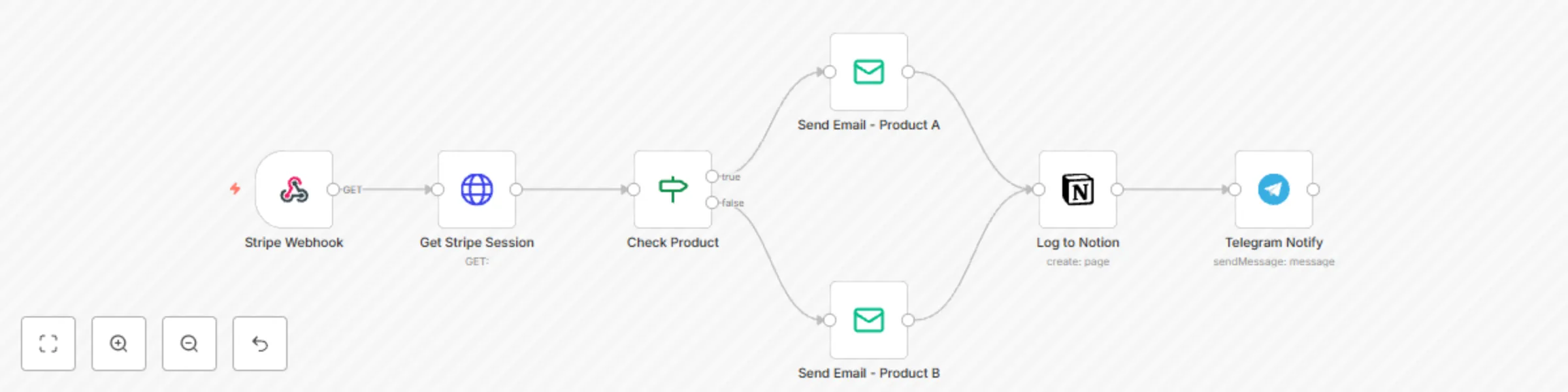
Overview This workflow automates the end-to-end delivery of digital products after a successful Stripe checkout. It eliminates manual fulfillment, keeps a structured sales log in Notion, and optionally notifies you in Telegram. It’s designed for template sellers, coaches, course creators, and micro-SaaS owners who want to professionalize their delivery process without custom code. Workflow Logic Webhook Trigger (Stripe) Listens for the checkout.session.completed event. Path: /stripe-webhook Method: POST Response Mode: onReceived HTTP Request – Get Checkout Session Fetches full session details from Stripe API. URL: https://api.stripe.com/v1/checkout/sessions/{{$json.body.data.object.id}} Authentication: Header Auth (Authorization: Bearer YOUR_STRIPE_SECRET_KEY) IF Node – Check Product Evaluates line_items.data[0].description from Stripe response. Routes flow depending on which product was purchased (e.g., Notion Template A vs Notion Template B). Email Send Nodes Sends product delivery emails with personalized greeting and download link. To: {{$json.customer_details.email}} Subject: Your Elegant Template is Ready ✨ Body text includes product-specific link. Notion Node – Log Sale Creates a page in your Sales Log database. Properties: Name → {{$json.customer_details.name}} Email → {{$json.customer_details.email}} Product → {{$json.line_items.data[0].description}} Date → {{$now}} Status → Delivered Telegram Notify Node (Optional) Sends you a private message: 💸 New Sale! Product: {{ $json.line_items.data[0].description }} Buyer: {{ $json.customer_details.name }} Requires YOUR_TELEGRAM_CHAT_ID and bot token. Node List Webhook (Stripe) HTTP Request (Stripe API) IF (Check Product) Email Send (Product Delivery) Notion (Create Page) Telegram (Send Message) Setup Instructions Stripe: Create a webhook endpoint in your Stripe dashboard. Subscribe to checkout.session.completed. Add your secret key into the HTTP Request node (YOUR_STRIPE_SECRET_KEY). Notion: Create a Sales Log database. Share with your Notion API integration. Replace YOUR_NOTION_DATABASE_ID with the correct ID. Email: Configure SMTP credentials or Gmail OAuth in the Email Send node. Update sender email (fromEmail). Telegram (Optional): Create a bot with BotFather. Get your chat ID. Add your token and YOUR_TELEGRAM_CHAT_ID in the node. Why It’s Gallery-Ready ✅ Clear business use case (digital delivery, sales tracking). ✅ Proper variable usage ($json syntax, no hardcoded customer data). ✅ No exposed API keys (placeholders provided). ✅ Markdown-based documentation with H2 headings. ✅ Broad but specific: works for any digital seller (Notion, PDFs, Canva, courses). Example Use Cases Auto-deliver Notion templates or digital kits after Stripe checkout. Log all sales in a Notion database for tracking/reporting. Send instant Telegram notifications so you never miss a new customer. Replace manual fulfillment with a professional automation pipeline. ✨ With this workflow, you’ll never have to manually email files again. Customers are delighted with instant delivery, your sales records stay organized, and you gain real-time visibility on every transaction.

S
Shelly-Ann Davy
CRM
15 Sep 2025
81
0
Workflow preview: Automated finance tracker with Gmail, Google Sheets & GPT-4o monthly reports
Free advanced

Automated finance tracker with Gmail, Google Sheets & GPT-4o monthly reports

### 🚀 What This Workflow Does This automation helps small business owners **track income and expenses effortlessly**, turning scattered emails and WhatsApp messages into structured financial data — all without manual entry. Every month, it: - Pulls receipts and invoices from your Gmail and WhatsApp - Uses AI to extract key details (date, vendor, amount, category) - Logs everything into Google Sheets - Generates a **monthly cash flow forecast** with visual insights - Sends you a clear, concise email report with **AI-powered recommendations** No more spreadsheet stress. No more missing receipts. Just **financial peace of mind — delivered every month**. ### 💡 Why It Matters As a small business owner, your time is too valuable to spend manually logging transactions. This workflow automates the **entire finance tracking loop** — from receipt capture to insight delivery — so you can: - Know exactly where your money is going - Spot trends and plan ahead - Make smarter decisions with real-time data - Start each month with confidence It's **soft tech at its best**: simple, elegant, and deeply useful. ### 🛠️ How It Works 1. **Triggers monthly** on the 1st at 9 AM (customizable) 2. **Scans your inbox** for new receipts/invoices via Gmail 3. **Uses GPT-4o** to parse text and extract financial data 4. **Avoids duplicates** by checking existing entries 5. **Saves to Google Sheets** with clean formatting 6. **Generates a monthly summary** with: - Total income & expenses - Net profit/loss - Expense breakdown (pie chart via QuickChart) - AI-written insights and action steps 7. **Delivers a beautiful email report** with visuals and next steps ### 🧩 Tools Used - Gmail (IMAP) - WhatsApp (via Twilio) - Google Sheets - OpenAI (GPT-4o) - Cron (scheduled trigger) - Email (SMTP) ### ✅ Built With Soft Tech Principles - Zero-code design - Human-first UX - Scalable for any small business - Privacy-respecting (no sensitive data stored) - Easy to customize and extend ### 📌 Perfect For - Solopreneurs - Coaches & consultants - E-commerce sellers - Service-based businesses - Anyone tired of manual bookkeeping "I used to dread my monthly financial review. Now I get a clear, friendly report that tells me what’s working — and what to fix. This one workflow saved me 4 hours a month." — *Sarah L., Online Coach*

S
Shelly-Ann Davy
AI Summarization
11 Sep 2025
260
0
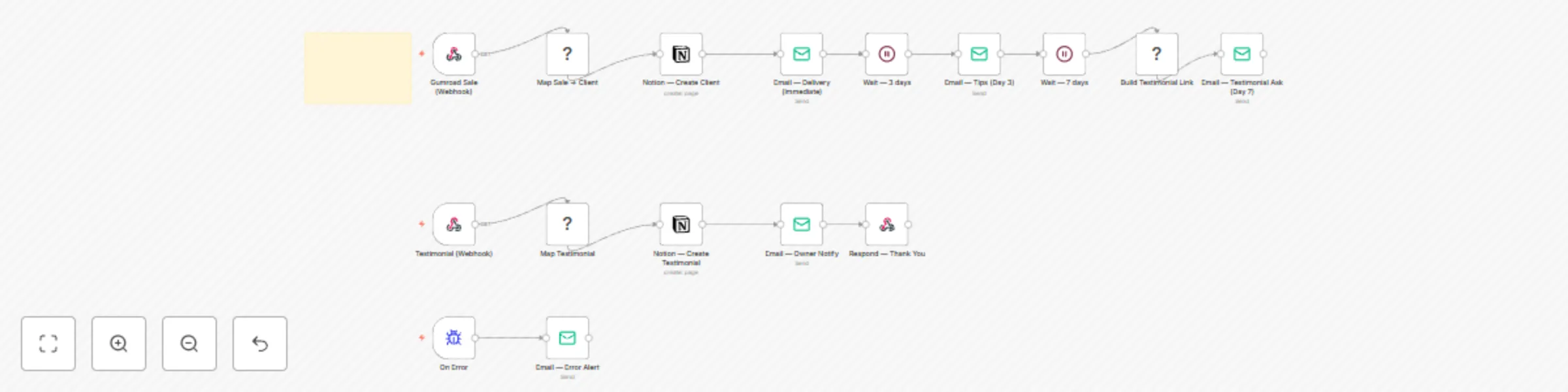
Workflow preview: Automate client nurture & testimonial collection with Notion, Email, Tally & Telegram
Free advanced

Automate client nurture & testimonial collection with Notion, Email, Tally & Telegram

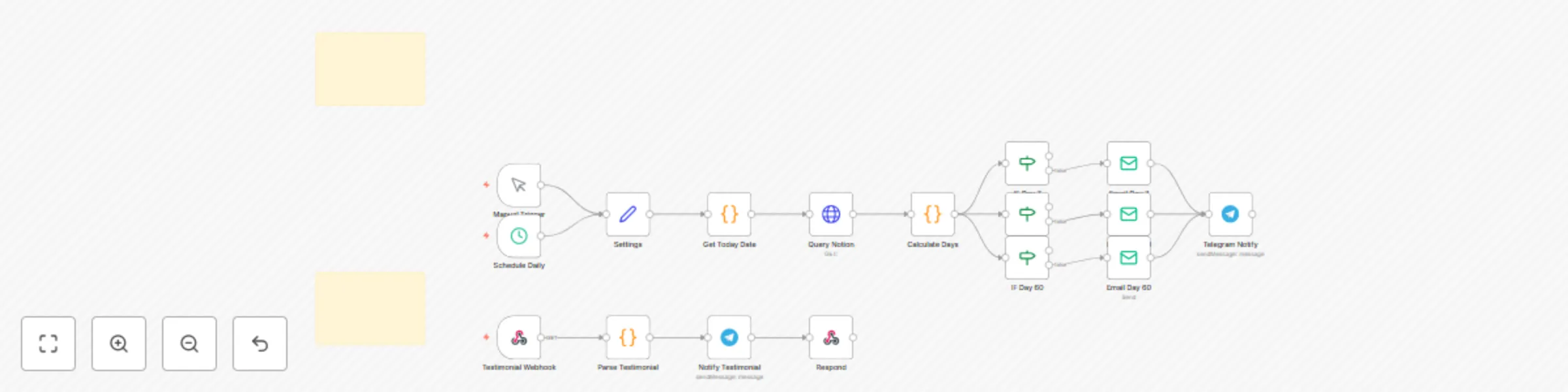
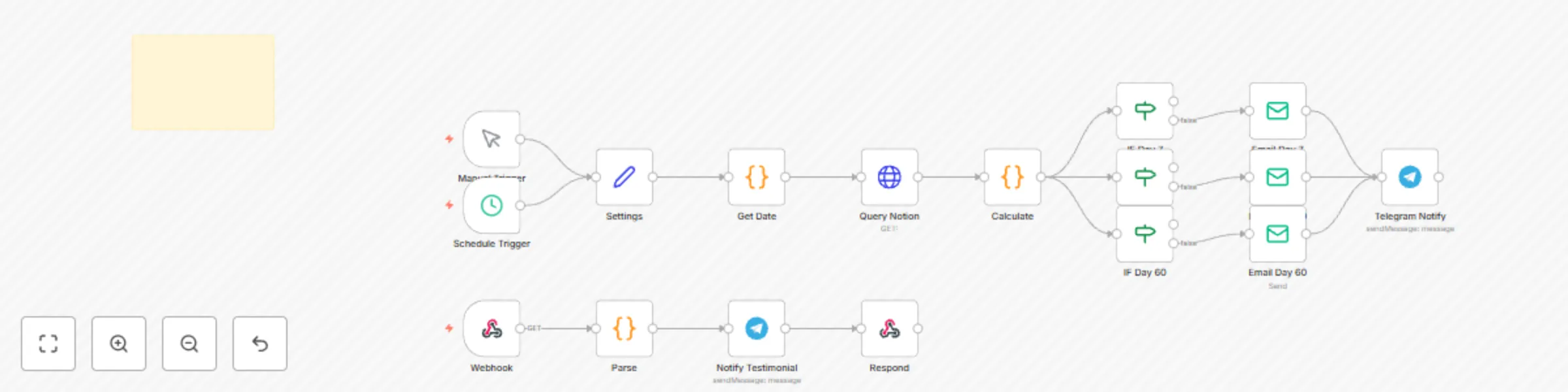
## Automate Client Nurture & Testimonial Collection with Notion and Email You’ve onboarded your client with elegance. Now, keep the relationship warm — and get glowing testimonials — without manual follow-up. This workflow listens to your **Notion Clients database** and automatically: - 💌 Sends a 3-part nurture sequence (7, 30, 60 days) - 🎉 Celebrates milestones with personalized messages - 📝 Requests a testimonial at the perfect moment - 💬 Notifies you on Telegram when feedback arrives - 📊 Logs everything in Notion for tracking Perfect for: - Coaches who want consistent client care - Designers building social proof - Service providers scaling with grace No spreadsheets. No forgotten follow-ups. Just **gentle, timely nurturing** — on autopilot. ## Prerequisites | Service | Purpose | Free Tier? | |--------|--------|-----------| | n8n | Orchestrate automation | Yes | | Notion | Store client records | Yes | | SMTP Email | Send nurture emails | Yes (Gmail) | | Telegram | Owner notifications | Yes | | Tally or Fillout | Testimonial form | Yes | 🔐 Store all API keys securely in n8n’s **Credentials** section. ## Notion Database Requirements Your `Clients` database must include these properties: | Property | Type | Example | |--------|------|--------| | `Name` | Title | Ava Laurent | | `Email` | Email | [email protected] | | `Status` | Select | Confirmed | | `Onboarded Date` | Date | 2025-09-01 | | `Package` | Select | Growth, Pro | | `Testimonial` | Text | “Best coach ever!” | | `Consent` | Checkbox | True | | `Milestone` | Select | Day 7, Day 30, Day 60 | 📌 Use the same database as your **Onboarding Concierge**. ## Step-by-Step Setup Instructions ### 1. Import the Workflow 1. In n8n, go to **Workflows > Create from JSON** 2. Paste the provided JSON 3. Click **Import** ### 2. Set Up Credentials - **Notion**: Connect to your `Clients` database - **Email**: Set up SMTP (e.g., Gmail app password) - **Telegram** (optional): Add bot token and chat ID 🔐 Never hardcode keys. ### 3. Configure Nurture Emails In the **Email: Send Nurture** nodes: - Customize tone for your industry (coaching, design, e-commerce) - Add your logo and branding - Include a personal note ### 4. Build Your Testimonial Form Use **Tally** or **Fillout** to create a simple form: - “How has this program helped you?” - “What would you tell someone considering it?” - Webhook sends response to n8n ### 5. Automate the Flow The workflow uses **Schedule Triggers** and **Delays** to send emails at: - Day 7: “Getting Started” tips - Day 30: “Midpoint Check-In” + resource - Day 60: “How’s it going?” + testimonial ask 🔁 Runs automatically for every new client. ## Customization Guidance - 🎨 **Change email tone**: Friendly, professional, or bold - 🎁 **Add a bonus**: Send a gift card for testimonials - 📲 **Swap Telegram for WhatsApp**: Use WhatsAble - 📊 **Sync to Airtable**: Mirror feedback for reporting - 🖥️ **Build a testimonial gallery**: Use Softr + Notion This workflow grows with your business. ## Nodes Used - `n8n-nodes-base.notion` – Monitor client status - `n8n-nodes-base.email` – Send nurture emails - `n8n-nodes-base.tally` – Collect testimonials - `n8n-nodes-base.telegram` – Owner alerts - `n8n-nodes-base.scheduleTrigger` – Time-based actions

S
Shelly-Ann Davy
Social Media
6 Sep 2025
32
0
Workflow preview: Generate 7-day event plans with Google Calendar, GPT-3.5 and Notion
Free intermediate

Generate 7-day event plans with Google Calendar, GPT-3.5 and Notion

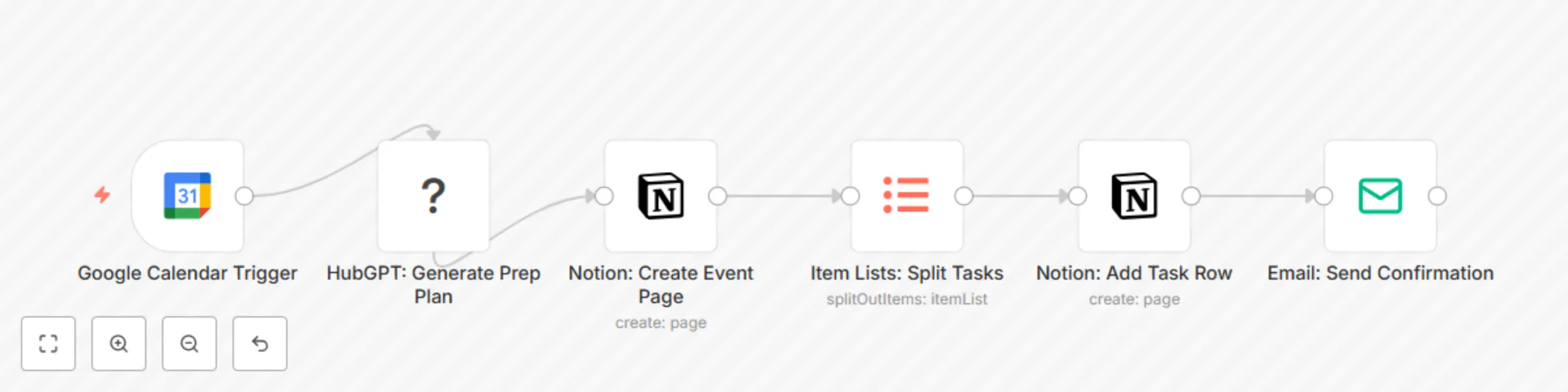
## Generate 7-Day Event Plans with Google Calendar, GPT-3.5 and Notion 🎉 ### *Automate Your Event Planning: From Calendar Entry to Done-For-You Checklist* Stop scrambling before birthdays, anniversaries, or family gatherings. This workflow turns a simple **Google Calendar event** into a **7-day prep plan** — complete with shopping lists, tasks, and reminders — all auto-sent to **Notion** and your inbox. Perfect for: - 👩‍👧 Homemakers hosting family events - 💼 Solopreneurs planning launches or webinars - 🎉 Anyone who wants to celebrate without the stress The workflow: 1. 📅 Detects a new event in Google Calendar (e.g., “Emma’s Birthday”) 2. 🤖 Uses **GPT-3.5** to generate a 7-day prep plan (buy cake, send invites, decorate) 3. 📝 Creates a **Notion page** for the event, then **loops through each AI-generated task** to add them as individual rows/items with due dates 4. 📨 Emails you a summary + link to the Notion page No spreadsheets. No mental load. Just **set the date — and let AI handle the rest**. > 🔁 **Key Detail**: After the Notion page is created, the workflow uses an **Item Lists node** to split the AI-generated task array into individual items. Each task is then processed in a loop and appended to the Notion database as a separate row — ensuring clean, actionable checklists. --- ## Prerequisites Before using this workflow, ensure you have: | Service | Purpose | Free Tier? | |--------|--------|-----------| | [n8n](https://n8n.io) | Orchestrate automation | Yes | | [Google Calendar](https://calendar.google.com) | Trigger on new events | Yes | | [Notion](https://notion.so) | Store prep checklist | Yes | | [OpenAI](https://openai.com) | AI planning logic (GPT-3.5) | Yes (limited free tier) | | [SMTP Email](https://smtp.email) | Send confirmation email | Yes (via Gmail or similar) | 🔐 Store all API keys securely in n8n’s **Credentials** section. --- ## Google Calendar Setup Your event must include: - **Title**: e.g., "Emma’s Birthday" - **Date**: The event date - **Description** (optional): e.g., “Theme: Unicorn, Guests: 10” 💡 Tip: Use a **specific keyword** in the title (e.g., “🎂”) to trigger only special events. --- ## Notion Database Requirements Create a Notion database with these **columns**: | Column Name | Type | Example | |------------|------|--------| | `Name` | Title | "Emma’s Birthday Prep" | | `Task` | Text | "Buy cake" | | `Due Date` | Date | 2025-09-10 | | `Status` | Status | To Do, In Progress, Done | | `Event Date` | Date | 2025-09-12 | | `Notes` | Text | "Vanilla with rainbow sprinkles" | 📌 Share your Notion workspace with your n8n integration (via integration token). --- ## Step-by-Step Setup Instructions ### 1. Import the Workflow 1. In n8n, go to **Workflows > Create from JSON** 2. Paste the provided JSON 3. Click **Import** ### 2. Set Up Credentials - **Google Calendar**: Connect via OAuth - **Notion**: Add your integration token - **OpenAI**: Add your API key - **Email**: Set up SMTP (e.g., Gmail app password) 🔐 Never hardcode keys — use n8n’s credential system. ### 3. Configure the AI Prompt In the **HubGPT: Generate Prep Plan** node: ```text You're planning "{{ $json['summary'] }}" on {{ $json['start'] }}. Generate a 7-day prep plan with 5–7 tasks (e.g., shopping, invites, setup). Include: - 3 days before: Send invites - 2 days before: Buy supplies - 1 day before: Decorate Return as a JSON array with 'task' and 'dueDate'.

S
Shelly-Ann Davy
Personal Productivity
6 Sep 2025
41
0
Workflow preview: Extract and organize receipt data with WhatsApp, GPT-4V and Google Sheets
Free advanced

Extract and organize receipt data with WhatsApp, GPT-4V and Google Sheets

## Extract and Organize Receipt Data with WhatsApp, GPT-4V and Google Sheets 📸 ### *Turn Photos of Receipts into a Smart, Automatic Expense Log — No Typing, No Stress* You’re not bad at budgeting. You’re not disorganized. You’re just **drowning in paper**. A receipt from the school fundraiser. The oil change you forgot to log. That grocery run after soccer practice. The birthday gift you bought last-minute online. They start in your wallet. Then your purse. Then the car seat. Then… gone. And when tax time comes? You’re left guessing. Stress rises. Confidence drops. What if you could just… **snap, send, and forget**? Introducing **Snap & Save** — a gentle, powerful automation that turns your **phone’s camera** into a **smart expense tracker**, using AI to read receipts, categorize spending, and build a clean, living log — all in the background. No spreadsheets. No data entry. No more “I *know* I had that receipt!” Just peace of mind. --- ### 💡 How It Works: Effortless, Step by Step This workflow runs quietly in the background — like a personal assistant who *actually* listens. #### 1. 📸 **Snap a Photo of Your Receipt** At the store, in the car, at the kitchen table — just take a clear photo of any receipt. It doesn’t matter if it’s crumpled, handwritten, or half-torn. As long as the total is visible, AI can read it. #### 2. 📲 **Send It to WhatsApp** Forward the photo to your **private WhatsApp number or group** (e.g., “My Receipts”). No new apps. No extra steps. Just the tool you already use every day. #### 3. 🤖 **AI “Sees” the Receipt (Using `vlmRun`)** This is the magic moment. The **Vision Language Model (VLM)** — the same AI tech behind GPT-4V — *looks at the image* and understands it like a human would. It extracts: - 🏪 **Vendor** (e.g., Walmart, Shell, Etsy) - 📅 **Date** (even if handwritten!) - 💵 **Total Amount** and currency - 🧾 **Item type** (if visible) No OCR errors. No manual typing. Just smart, accurate reading. #### 4. 🧹 **Auto-Categorize with Simple Logic** The workflow uses a **Function node** to sort your spending: - “Walmart” → **Groceries** - “Shell” → **Fuel** - “Amazon” → **Online** - “Art Supply Co” → **Kids** - “Therapy” → **Self-Care** You can customize these rules in plain English — no coding needed. Want to track “Date Nights” or “Gifts”? Just add it. #### 5. 📊 **Save to Google Sheets — Your Living Expense Log** Every receipt becomes a row in a clean, organized spreadsheet: | Date | Vendor | Amount | Category | Image Link | |------|--------|--------|----------|------------| | 2025-04-05 | Walmart | $87.42 | Groceries | [View] | You can: - Add monthly totals - Create charts - Share with your partner or accountant - Export for taxes And because it’s in **Google Sheets**, it works on any device — no new software to learn. --- ### 🎯 Who Is This For? #### 👩‍👧 **Homemakers & Parents** You’re managing a household budget with receipts flying everywhere. This helps you: - Track where the money goes - Stay within grocery limits - Show your partner you’ve got this - Feel *in control* — not overwhelmed #### 💼 **Solopreneurs & Digital Business Owners** You’re building a business — not an accounting firm. This helps you: - Separate personal vs. business expenses - Build clean records for taxes - Reimburse yourself fairly - Look professional during audits #### 🧑‍🤝‍🧑 **Couples & Shared Households** No more “Did you save that receipt?” fights. Both partners can send to the same WhatsApp group — and everything gets logged automatically. #### 📅 **Anyone Prepping for Tax Season** Start in January. By April, you’ll have a **complete, auditable expense history** — no scrambling, no stress. --- ### 🔧 Tech That Feels Human We used **real-world tools** — not sci-fi promises. | Node | What It Does | Why It’s Perfect | |------|-------------|------------------| | `whatsAble` | Gets your receipt photo from WhatsApp | Mobile-first, no app download | | `vlmRun` | AI reads the image and extracts data | Cutting-edge, accurate, magical | | `function` | Auto-categorizes based on vendor | Simple logic, easy to customize | | `googleSheets` | Stores everything in a familiar format | Exportable, shareable, reliable | And yes — it works even if you’re not techy. Every step includes **colorful sticky notes** that explain: - What the node does - Why it matters - How to customize it You don’t need to understand AI to use it. You just need to **snap and send**. It’s like having a **mini financial advisor** — built by you, for you. --- ### 💬 Real Talk: This Isn’t Just About Receipts This is about: - 🕊️ **Reducing mental load** - 📊 **Feeling financially seen** - 🛠️ **Using tech that serves you — not the other way around** - 💪 **Building systems that make you feel like you’re winning** You don’t need perfection. You need a system that’s **simple, kind, and actually works**. And that’s exactly what **Snap & Save** is. --- ### ❓ FAQs **Do I need to be techy?** No. If you can take a photo and send it on WhatsApp, you can do this. **What if the AI misreads a receipt?** You’ll see it in the log — just edit the row. Over time, you can improve the prompt. **Can I use this for business expenses?** Yes! Perfect for solopreneurs, coaches, and freelancers. **What if I don’t use WhatsApp?** You can adapt it to email or Google Drive — just let me know, and I’ll send you the tweak. **Is the Softr dashboard hard to build?** No — I’ll walk you through it step by step, with screenshots. --- ### 💬 What People Are Saying (Sample Testimonial) > _“I used to lose at least 3 receipts a week. Now I just snap and send. My partner actually trusts my budget now — and I feel like a grown-up for the first time!”_ > — **Lena, mom of two + online course creator** --- ### 🌿 Final Thought You’re not behind. You’re not failing. You’re just using tools that weren’t built for real life. **Snap & Save** was. It meets you where you are — in the car, in the kitchen, in the chaos — and says: > *“I’ve got this. Just send the photo.”* Let the AI do the work. You keep doing what matters. 💛 With love, The WorkFlow Muse @SheCodesFlow Helping homemakers & solopreneurs lead with ease — one smart system at a time. --- ### 🔖 Tags `receipt-tracker` `ai-expense-tracker` `vlmrun` `whatsapp-automation` `google-sheets` `no-code-finance` `homemaker-tools` `solopreneur-automation` `n8n-workflow` `ai-vision` `snap-and-save` `business-expenses` `tax-prep` `function-node` `digital-organization`

S
Shelly-Ann Davy
Document Extraction
4 Sep 2025
54
0
Workflow preview: Convert voice memos to blog posts with Deepgram, GPT-3.5 & Google Sheets dashboard
Free intermediate

Convert voice memos to blog posts with Deepgram, GPT-3.5 & Google Sheets dashboard

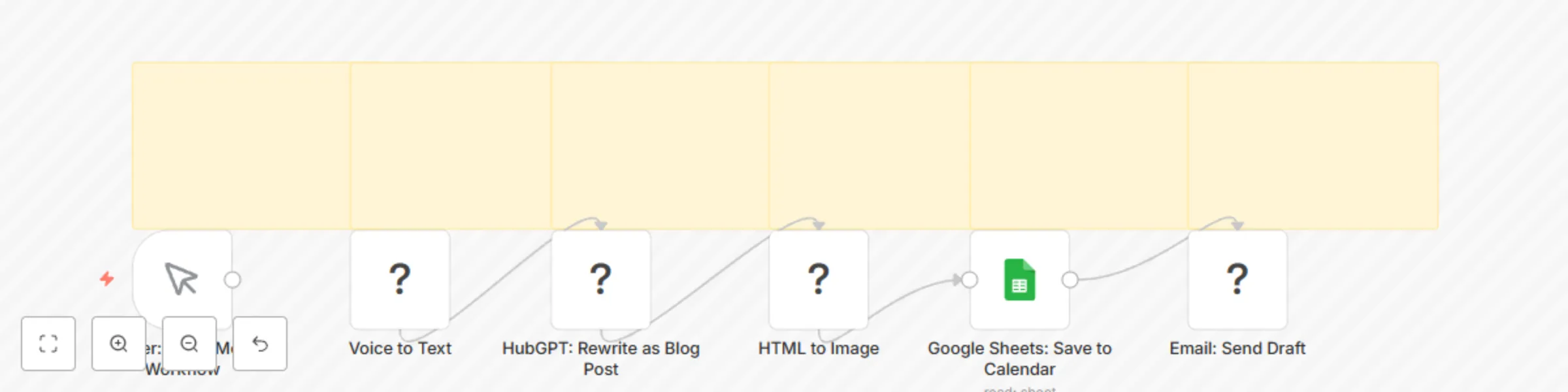
## Voice Memo to Blog Post with Deepgram, GPT-3.5 & Softr for Creators ### *Turn Voice Memos into Published Blog Posts Using AI and Automation* Stop letting great ideas vanish in your Notes app. This workflow transforms your **voice memos into polished blog posts, LinkedIn articles, or newsletters** — automatically. Perfect for: - Coaches and course creators who teach best by speaking - Homemakers sharing wisdom without typing - Solopreneurs building authority without burnout - Anyone who thinks out loud but hates writing The workflow: 1. 🎙️ Transcribes your voice memo using **Deepgram** (via n8n’s Voice to Text node) 2. ✍️ Rewrites it into a publish-ready post using **GPT-3.5** 3. 🖼️ Generates a **featured image** using HTML to Image 4. 📊 Saves the post to **Google Sheets** as your content calendar 5. 📨 Emails you a draft for review 6. 🖥️ Syncs to your **Softr dashboard** for visual content planning No typing. No staring at a blank screen. Just speak — and publish. --- ## Prerequisites Before using this workflow, ensure you have the following accounts: | Service | Purpose | Free Tier Available? | |--------|--------|----------------------| | [n8n](https://n8n.io) | Orchestrate the automation | Yes | | [Deepgram](https://deepgram.com) | Voice-to-text transcription | Yes (free tier) | | [OpenAI](https://openai.com) | AI writing (GPT-3.5 or GPT-4) | Yes | | [Google Sheets](https://sheets.google.com) | Store blog drafts and metadata | Yes | | [SMTP Email](https://smtp.email) | Send draft emails (e.g., Gmail) | Yes (via app password) | | [Softr](https://softr.io) | Build a visual content dashboard | Yes | 🔐 You’ll need API keys for: Deepgram, OpenAI, and SMTP ✅ All credentials should be stored securely in n8n --- ## Google Sheets Setup Your Google Sheet must have the following **columns** for the workflow to work correctly: | Column Name | Purpose | Example | |------------|--------|--------| | `Date` | When the post was created | 2025-09-05 | | `Title` | Blog post title (AI-generated or custom) | "What I Learned About Boundaries" | | `Content` | AI-generated post body | "Today, I realized..." | | `Image_URL` | Link to generated featured image | https://.../image.png | | `Status` | Publishing status | Draft, Published, Reviewed | | `Audio_URL` (optional) | Link to original voice memo | https://.../memo.mp3 | 📌 **Tip**: Name your sheet **"Content Calendar"** and share it with your n8n service account or use OAuth. --- ## Step-by-Step Setup Instructions ### 1. Import the Workflow into n8n 1. Go to your n8n dashboard. 2. Click **Workflows > Create from JSON**. 3. Paste the provided JSON. 4. Click **Import**. ### 2. Set Up Credentials For each service, go to **Credentials > Add New**: - **Deepgram**: Enter your API key - **OpenAI**: Use your GPT API key - **Google Sheets**: Connect via OAuth or service account - **SMTP**: Enter your email credentials (e.g., Gmail app password) 🔐 Never hardcode keys — always use n8n’s secure credential system. ### 3. Configure the AI Prompt In the **HubGPT: Rewrite as Blog Post** node: - Edit the prompt to match your tone: ```text Rewrite this raw voice memo into a warm, engaging blog post: {{ $json["text"] }} Use short paragraphs, friendly tone, and end with a question to engage readers.

S
Shelly-Ann Davy
Content Creation
4 Sep 2025
30
0
Workflow preview: Weekly meal planner: AI-generated grocery lists with price comparison to WhatsApp
Free intermediate

Weekly meal planner: AI-generated grocery lists with price comparison to WhatsApp

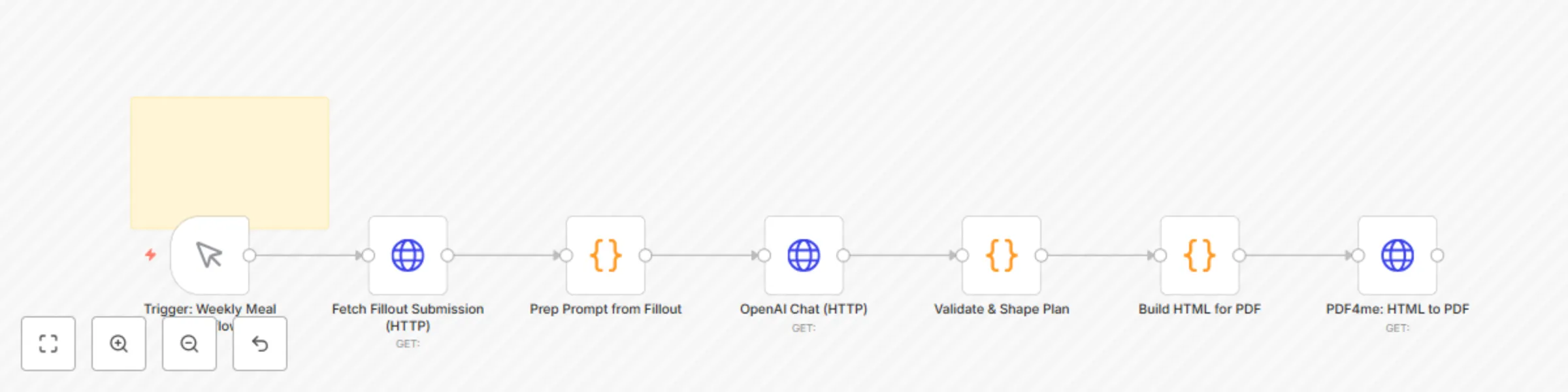
## Weekly Meal Planner with Auto Grocery Lists using Fillout, FluentC AI & WhatsApp 🍽️ ### *Automate Your Weekly Family Meal Planning with AI and WhatsApp* Say goodbye to mealtime stress. This workflow automates your entire weekly meal planning process — from family input to a WhatsApp-sent grocery list — using AI and no-code tools. Perfect for: - Homemakers managing household routines - Solopreneurs balancing business and family - Parents who want to reduce decision fatigue The workflow: 1. 🗳️ Collects meal preferences via a **Fillout form** 2. 🤖 Uses **FluentC AI** to generate a 5-day dinner plan and categorized grocery list 3. 🛒 Checks prices using **Scrappey** (Walmart, Target, etc.) 4. 📄 Generates a printable **PDF grocery list** with **PDF4me** 5. 📲 Sends the list to your spouse or family group via **WhatsApp** using **WhatsAble** Fully automated, beginner-friendly, and designed to bring calm to your home. --- ## Setup Requirements Before using this workflow, ensure you have the following accounts and tools: | Service | Purpose | Free Tier Available? | |--------|--------|----------------------| | [Fillout](https://fillout.com) | Collect family meal preferences | Yes | | [FluentC AI](https://fluentc.ai) or OpenAI | AI-powered meal and grocery list generation | Yes (if using OpenAI) | | [Scrappey](https://scrappey.com) | Scrape real-time prices from stores | Yes (150 free scrapes) | | [PDF4me](https://pdf4me.com) | Generate clean, printable PDFs | Yes | | [WhatsAble](https://whatsable.com) | Send WhatsApp messages via API | Yes | | [n8n](https://n8n.io) | Orchestrate the automation | Yes | 💡 You’ll need API keys for: FluentC, Scrappey, PDF4me, WhatsAble 🔐 All credentials should be stored securely in n8n --- ## Step-by-Step Setup Instructions ### 1. Create Your Fillout Form Your form must include the following **fields** to work with this workflow: | Field Name | Type | Example | |----------|------|--------| | `Meal Choices` | Multiple Choice or Long Text | “Pasta, Tacos, Stir Fry” | | `Dietary Notes` | Short Text (Optional) | “No dairy, vegetarian” | | `Preferred Days` | Checkbox | Mon, Tue, Wed | | `Submit Timestamp` | Hidden Field | Auto-generated | 📌 **Tip**: Name your form “Weekly Family Meal Poll” and set it to auto-save responses. 🔗 After publishing, copy the **form URL** and add it to the Fillout node in n8n. --- ### 2. Import the Workflow into n8n 1. Go to your n8n dashboard. 2. Click **Workflows > Create from JSON**. 3. Paste the provided JSON. 4. Click **Import**. --- ### 3. Set Up Credentials For each service, go to **Credentials > Add New** and enter your API key: - **FluentC AI** (or OpenAI) - **Scrappey** - **PDF4me** - **WhatsAble** - **Fillout** 🔐 Never hardcode keys — always use n8n’s credential system. --- ### 4. Configure the AI Prompt In the **FluentC: Generate Meal Plan** node: - Edit the prompt to include dietary needs and output structure: ```text Based on these meal preferences: {{ $json["Meal Choices"] }}. Create a 5-day dinner plan (Mon-Fri) with simple, family-friendly recipes. Then generate a categorized grocery list. Consider dietary notes: {{ $json["Dietary Notes"] }}. Use a warm, friendly tone. Output format: { "mealPlan": "Monday: Creamy Garlic Pasta\nTuesday: Black Bean Tacos...", "groceryList": "Produce: Bell peppers, onions, spinach\nPantry: Canned black beans, pasta, olive oil..." }

S
Shelly-Ann Davy
Personal Productivity
4 Sep 2025
76
0
Workflow preview: Automate product launch sequence with Notion, Mailchimp, Buffer, Google Calendar & Telegram
Free advanced

Automate product launch sequence with Notion, Mailchimp, Buffer, Google Calendar & Telegram

## Automate Product Launch Sequence with Notion, Mailchimp, Buffer, Google Calendar & Telegram 🚀 ### *Launch your digital products, courses, or content with confidence — using a fully automated sequence that handles email, social media, internal tracking, and team alerts.* No more missed steps. No last-minute panic. Just smooth, professional launches — on autopilot. This workflow is perfect for: - 🧑‍🏫 Creators launching a course or eBook - 💼 Solopreneurs introducing a new offer - 📣 Marketers running a 5-day launch - 👩‍👧 Homemakers sharing a printables bundle It automatically: 1. 📅 Pulls launch content from your **Notion database** 2. 💌 Sends email campaigns via **Mailchimp** 3. 📱 Schedules social posts using **Buffer** 4. 📆 Logs events in **Google Calendar** 5. 📢 Sends internal alerts via **Telegram** --- ## Setup Instructions ### 1. Notion Database Requirements Your Notion database must have the following **columns**: | Property | Type | Example | |--------|------|--------| | `Name` | Title | "Day 1: Welcome Email" | | `Content Type` | Select | `Email`, `Social Post`, `Webinar` | | `Platform` | Multi-select | `Mailchimp`, `Buffer`, `Telegram` | | `Scheduled Date` | Date | 2025-09-05 9:00 AM | | `Email Subject` | Text | "You're In! Here’s Your Guide" | | `Email Body` | Text | "Hi {{name}}, thanks for joining..." | | `Social Message` | Text | "Our new planner is live! Grab it here →" | | `Status` | Status | `To Do`, `In Progress`, `Done` | 📌 **Tip**: Duplicate our [free Notion template](https://yourwebsite.com/notion-launch-template) to get started quickly. --- ## How to Install 1. Import the JSON into n8n. 2. Set up credentials: - Notion API - Mailchimp API - Buffer (OAuth) - Google Calendar - Telegram Bot 3. Connect to your Notion database. 4. Run the workflow — it will process all items scheduled for today. --- ## Customization Guidance - 🔄 **Change the schedule**: Replace the Trigger node with a Schedule node (e.g., daily at 8 AM). - 📧 **Add more email platforms**: Swap Mailchimp for ConvertKit or ActiveCampaign. - 📲 **Use WhatsApp instead of Telegram**: Replace Telegram with WhatsAble for team alerts. - 🎯 **Filter by tag or audience**: Add a Function node to route content based on `Content Type`. - 🌐 **Add Instagram or LinkedIn**: Extend Buffer to post to more platforms. This workflow grows with your launch strategy. --- ## Nodes Used - `n8n-nodes-base.notion` – Pull launch tasks - `n8n-nodes-base.mailchimp` – Send email campaigns - `n8n-nodes-base.buffer` – Schedule social media - `n8n-nodes-base.googleCalendar` – Log launch events - `n8n-nodes-base.telegram` – Send internal alerts

S
Shelly-Ann Davy
Social Media
3 Sep 2025
45
0
Workflow preview: 🎙️ Convert voice notes to X posts with Google Drive and AssemblyAI
Free beginner

🎙️ Convert voice notes to X posts with Google Drive and AssemblyAI

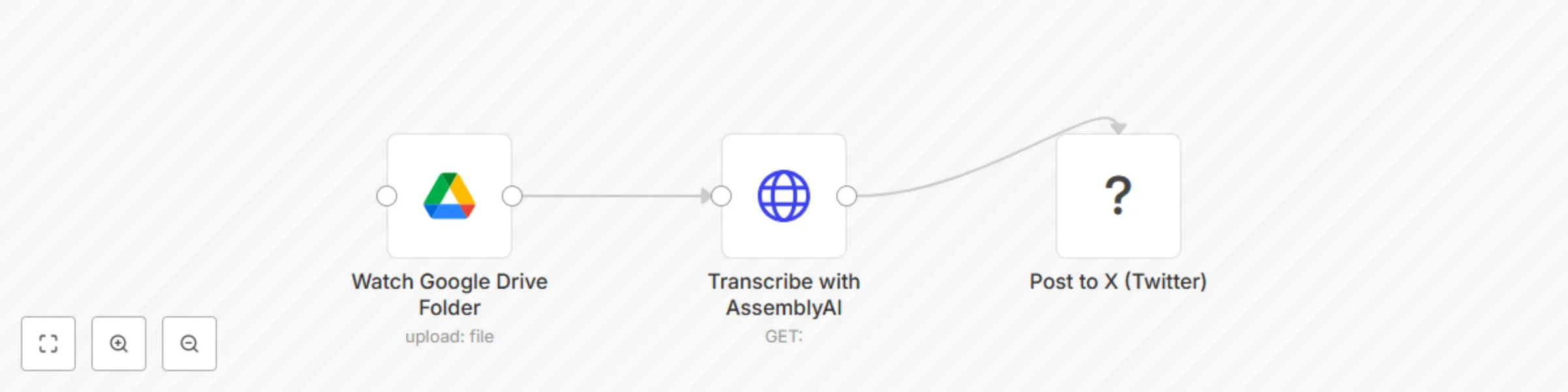
## 🎙️ Voice Note to Tweet: Turn Audio Ideas into X Posts with n8n A **lean, 3-node automation** that turns voice memos into tweets — so creators can capture ideas on the go and publish fast, without typing. Capture inspiration the moment it strikes — even when you’re not at your desk. This 3-node workflow lets **content creators, coaches, and solopreneurs** turn voice memos into **X (Twitter) posts** automatically. Just record a voice note, upload it to a Google Drive folder, and n8n will: ## 🛠️ Step-by-Step Setup Instructions ### 1. **Prepare Google Drive Folder** - Create a folder: `Voice Notes to Tweet` - Enable **Google Drive API** in your n8n credentials - Share the folder with your automation account (if needed) ### 2. **Set Up AssemblyAI (or Whisper)** - Sign up at [assemblyai.com](https://www.assemblyai.com/) - Get your API key - In n8n, add a credential for **HTTP Request** or use a dedicated node > 🔁 Alternative: Use OpenAI’s Whisper API if preferred ### 3. **Connect X (Twitter) Account** - Use n8n’s **X (Twitter) node** - Authenticate with your app key, secret, access token - Ensure **write permissions** ### 4. **Deploy the Workflow** - Import the JSON below - Replace placeholder credentials: - `{{GOOGLE_DRIVE_FOLDER_ID}}` - `{{ASSEMBLYAI_API_KEY}}` - `{{TWITTER_CREDENTIAL}}` - Activate the workflow Now, every time you upload a `.m4a`, `.mp3`, or `.wav` file to your folder — it becomes a tweet. --- ## 🔄 Workflow Explanation 1. **Watch Google Drive** → Triggers when a new voice note is added 2. **Transcribe Audio** → Sends file to AssemblyAI for speech-to-text 3. **Post to X (Twitter)** → Publishes the transcript as a tweet Optional: Add a **Slack approval step** if you don’t want auto-posting. --- ## 📦 Pre-Conditions - ✅ **n8n account** with access to HTTP and X nodes - ✅ **Google Drive API enabled** - ✅ **AssemblyAI or Whisper API key** - ✅ **X (Twitter) Developer Account** with app credentials - ✅ Internet-accessible audio files (hosted in Drive) > ⚠️ Note: X API v2 requires OAuth 2.0 and app approval. --- ## 🎨 Customization Guidance | Enhancement | How | |-----------|-----| | **Add Approval Step** | Insert Slack/Telegram node to approve before posting | | **Trim Long Transcripts** | Use Function node to limit to 280 chars | | **Add Hashtags** | Append `#VoiceToTweet #ContentCreatorTips` | | **Save to Archive** | After posting, move file to “Processed” folder | | **Support iOS Voice Memos** | Auto-convert `.m4a` → compatible format | --- ## 🌐 Who It’s For - **Coaches** who record insights on walks - **Solopreneurs** building personal brands - **Content creators** who hate writing from scratch - **Thought leaders** capturing ideas in motion ### ✅ Final Notes for Submission - All nodes have **sticky notes** explaining purpose - Uses **standard APIs** with documented credentials - Solves a **real creator pain point** - No fluff, no “magic” — just **practical automation**

S
Shelly-Ann Davy
Social Media
3 Sep 2025
26
0
Workflow preview: Weekly gratitude pulse: Automated appreciation DMs for Slack & Discord communities
Free intermediate

Weekly gratitude pulse: Automated appreciation DMs for Slack & Discord communities

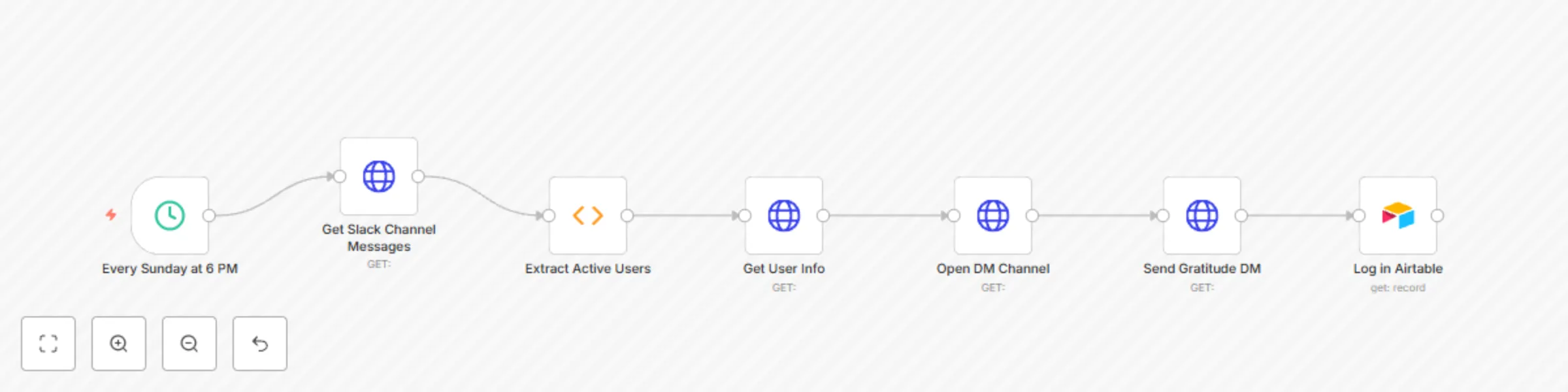
## Weekly Gratitude Pulse: Automated Appreciation DMs for Slack & Discord Communities Foster belonging with a **weekly, automated appreciation message** sent directly to members who engaged in your **Slack or Discord community**. The **Weekly Gratitude Pulse** **runs every Sunday at 6 PM**, quietly recognizing presence — not performance — with a warm, personalized DM that says: *“You showed up. We see you. Thank you.”* No manual tracking. No public callouts. Just gentle, scalable care. Perfect for coaches, Etsy sellers, and solopreneurs who want to nurture emotional safety and connection — **without adding to their workload.** --- ## 🛠️ Step-by-Step Setup Instructions Deploy this workflow in under 10 minutes. ### 1. **Import the Workflow** - Go to **Scenarios > Import from File** - Upload the provided JSON template ### 2. **Set the Weekly Schedule** - Find the **Schedule Trigger** node - Set to: - **Day**: Sunday - **Time**: 6:00 PM - Adjust **timezone** to match your audience ### 3. **Connect Your Messaging Platform** #### For Slack: - Use **Slack → List Conversations** or **HTTP Request** to get channel messages - Replace `{{SLACK_BOT_TOKEN}}` with a token that has: - `channels:history` - `users:read` - `im:write` (for DMs) - Set `{{SLACK_CHANNEL_ID}}` (e.g., your main community channel) #### For Discord: - Use **Discord Bot** with: - `Read Message History` - `Send Messages` - `Create DM` - Set `{{DISCORD_BOT_TOKEN}}` and `{{GUILD_ID}}` > 🔗 Guide: [Slack API Permissions](https://api.slack.com/scopes) | [Discord Bot Setup](https://discord.com/developers/applications) ### 4. **Pull Active Users** - The workflow pulls all users who: - Posted a message - Reacted to a message - Filters out bots and duplicates ### 5. **Send Personalized DMs** Uses a templated message like: > “Hey {{Name}}, > Just wanted to say — I noticed you were around this week, and I’m so glad you were. > You’re part of what makes this space feel like home. 💛 > Rest well, and I’ll see you in the week ahead. > — [Your Name]” Customize the message in the **Set Message** node. ### 6. **Log in Airtable (Optional)** - Each sent DM is logged in Airtable for reflection - Never for surveillance — for gratitude auditing --- ## 🗃️ Airtable Structure ### Base: `Community Wellness Tracker` #### Table: `Gratitude Logs` | Field | Type | Description | |------|------|-------------| | `Date Sent` | Date | When the DM was sent | | `User ID` | Text | Slack/Discord user ID | | `Username` | Text | Display name (e.g., `@alex`) | | `Engagement Type` | Multi-select | `Message`, `Reaction`, `Thread Reply` | | `Message Preview` | Text | First 50 characters of their post | | `Gratitude Sent` | Checkbox | `true` after DM sent | | `Channel` | Text | Source channel (e.g., `#general`) | > 📊 Use a **Monthly View** to reflect on community rhythm — not to rank, but to honor. --- ## 🔄 Workflow Explanation The **Weekly Gratitude Pulse** runs a thoughtful, automated cycle: 1. **Trigger**: Fires every **Sunday at 6:00 PM** 2. **Fetch Messages**: Pulls all messages from the past 7 days 3. **Extract Users**: Gathers IDs of users who posted or reacted 4. **De-duplicate & Filter**: Removes bots and duplicates 5. **Personalize Message**: Injects first name or username 6. **Send DM**: Direct message via Slack/DM or Discord/DM 7. **Log in Airtable**: Records the gesture for reflection 🔁 This creates a **culture of quiet recognition** — where showing up is enough. --- ## 📦 Pre-Conditions & Requirements - ✅ **Make.com or n8n account** (Free tier supported) - ✅ **Slack Bot Token** with scopes: - `channels:history`, `users:read`, `im:write` - **OR** **Discord Bot** with: - `Read Message History`, `Send Messages`, `Create DM` - ✅ **Airtable base** with `Gratitude Logs` table - ✅ Internet access and JSON parsing > ⚠️ Note: Slack DMs require resolving user → IM channel via `conversations.open`. Discord requires `users.get` and `channels.create` for DMs. --- ## 🎨 Customization Guidance Make it your own: ### 🎯 Change the Message Tone - Use warm, coach-like, or playful tones - Add emojis: 💤 🫶 🌸 ☕ ### 🧩 Adjust Engagement Criteria - Only send to those who posted (not just reacted) - Exclude certain channels (e.g., announcements) ### 📆 Change Frequency - Bi-weekly? Edit the schedule. - Monthly “Big Thank You”? Add a filter for high engagement. ### 💌 Add a Small Gift - Auto-send a **discount code** or **freebie link** in the DM - Use **Google Sheets** or **Shopify** to generate unique codes ### 📈 Combine with Hydration Hug - Use the same Airtable base - Create a **“Care Score”** view: Hydration reactions + Gratitude receipts --- ## 🌐 Who It’s For - **Coaches & Facilitators** who want to deepen trust - **Etsy Sellers** with VIP customer groups - **Wellness Creators** building mindful spaces - **Community Managers** reducing burnout This isn’t engagement farming. It’s **digital hospitality** — automation with a heartbeat.

S
Shelly-Ann Davy
Social Media
2 Sep 2025
27
0
Workflow preview: 🌸 CFO sunrise — Soft-Tech morning brief for household CEOs (n8n template)
Free advanced

🌸 CFO sunrise — Soft-Tech morning brief for household CEOs (n8n template)

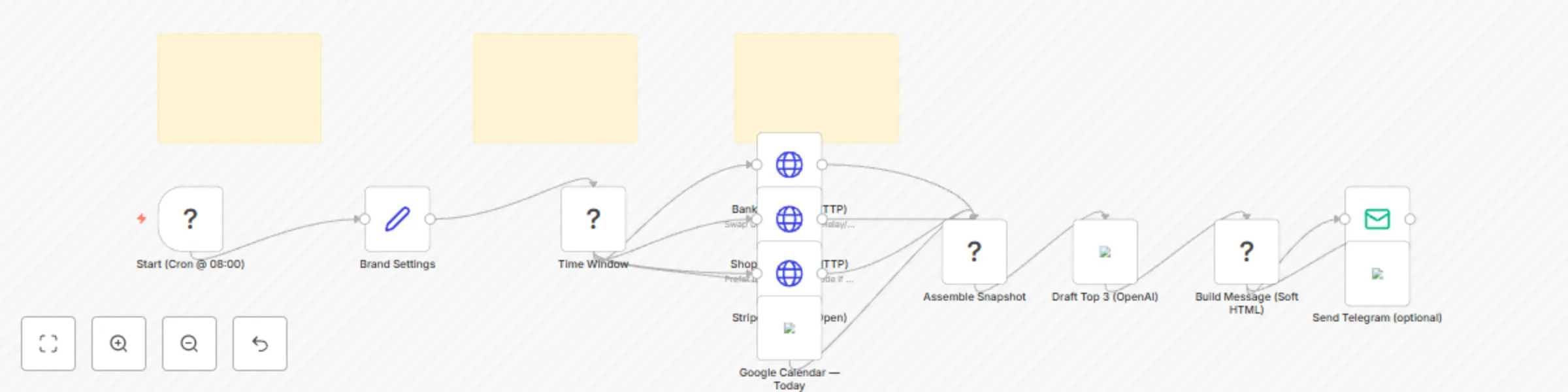
🌸 **Overview** **Serene CFO Sunrise** is a gentle morning brief for Household CEOs — founders who run a business and a home. At **8:00 AM local time**, it gathers bank balances, last-24h shop orders, open/overdue invoices, and today’s calendar, then sends one elegant email (optional Telegram). Calm and family-hour friendly. ✨ **Perfect For** Real estate pros, insurance & tax advisors, Shopify/Etsy owners, and homemaker-entrepreneurs who prefer graceful soft tech over dashboards and data chaos. 🧠 **What It Does** Pulls bank balances (Mercury/Relay/Plaid via HTTP) Summarizes Shopify orders (last 24h) Lists Stripe invoices (open/overdue) Reads Google Calendar (today) (Optional) Uses OpenAI to draft “Top 3 Priorities” Sends a soft-styled morning email (+ optional Telegram) 🔐 **Requirements** Bank API via HTTP (Mercury/Relay/Plaid) Shopify Admin API Stripe API Google Calendar (OAuth2) SMTP or Gmail (Optional) Telegram Bot, OpenAI API 🧩 Placeholders to Update YOUR_BANK_API_TOKEN YOUR_SHOP (yourshop.myshopify.com) YOUR_SHOPIFY_TOKEN YOUR_STRIPE_SECRET YOUR_FROM_EMAIL, YOUR_TO_EMAIL YOUR_TELEGRAM_CHAT_ID (optional) 🛠️**Setup (5–10 min)** Add credentials (HTTP Header Auth for Stripe/Shopify/Bank, Google Calendar OAuth2, SMTP/Gmail, optional Telegram, optional OpenAI). Replace placeholders listed above. Set the Cron to your preferred hour (default 08:00, local timezone). Run once manually to confirm each section, then enable. 🔄 **Flow (Node Map)** Cron (08:00) → Time Window → HTTP (Bank) + HTTP (Shopify) + HTTP (Stripe) + Google Calendar → Assemble Snapshot → (Optional) OpenAI “Top 3” → Build Message (soft HTML + text) → Email Send (+ optional Telegram) 🧪 **Testing Tips** Temporarily set Cron to Every Minute. Use Stripe test mode keys. In Shopify, set created_at_min to a recent ISO time to force sample orders. Add a dummy event to Google Calendar for today. Check “Assemble Snapshot” output for metrics before sending. 🎨 **Brand & Tone** This template includes a Brand Settings block (brandName, signature, accentEmoji) so your brief feels on-voice without edits to the logic. ✅ **Template Notes** Use Sticky Notes for setup/testing (included). No hardcoded API keys — store in credentials. Keep Markdown headings (##) in this description. Original use case; practical, production-ready. 🧯**Failure Handling** Each data source is optional — if one API fails, the brief still sends the remaining sections so your morning stays calm.

S
Shelly-Ann Davy
Personal Productivity
2 Sep 2025
48
0
Workflow preview: Service scheduling & route planner for deliveries with Notion, Telegram and Maps
Free advanced

Service scheduling & route planner for deliveries with Notion, Telegram and Maps

*This workflow contains community nodes that are only compatible with the self-hosted version of n8n.* **🌸 Graceful Deliveries — Service Scheduling & Route Planner (Notion + Telegram) What this template does** Turn new bookings into a graceful, automated delivery plan—with geocoded addresses, a one-tap Google Maps route, owner alerts on Telegram, and sweet pre-arrival updates to your clients (email/SMS). Optional Notion/Sheets logging gives you a beautiful **“Delivery Day Planner”** you can filter by day or status. **Perfect for:** florists, mobile dog groomers, massage therapists, cleaners, and any home-visit service that loves systems with a feminine touch. ✨ 💗 **Warm: on-brand, human copy clients adore** 🧭 **Clear logistics: route links, timing, and notes—without chaos** 🧰 **No-code friendly: plug-and-play nodes, optional storage** 🔐 **Safe: no API keys in JSON; credentials live in n8n** **Requirements** n8n account (self-hosted or cloud) Telegram Bot (for owner alerts) Email (Gmail OAuth2 or SMTP) for client messages (Optional) Notion or Google Sheets for storing bookings Geocoding: OpenStreetMap Nominatim (no API key required) Setup (5–10 minutes) Import the JSON into n8n. Open Webhook (Bookings) → copy its Test URL (then Production URL when ready). In your booking tool (Calendly, Tally/Typeform/Airtable, Google Forms via Apps Script), POST bookings to the webhook with the fields below. Add Telegram credential to “Telegram → Owner Alert.” Add Email credential to “Email → Client (Pre-arrival).” (Optional) Connect Notion or Google Sheets and add a “Create Page / Append Row” step. **Sample Payload (copy for testing)** { "name": "Sarah Bloom", "email": "[email protected]", "phone": "+1 555-1234", "address": "123 Maple St, Austin, TX 78701", "datetime": "2025-09-01T10:30:00-05:00", "service": "Mobile Grooming – Full Bath", "notes": "Max is shy; prefers lavender shampoo", "pet_name": "Max", "pet_photo_url": "https://example.com/max.jpg" } **Fallbacks supported:** client_name, full_name, appointment, date + time, booking_type, special_notes, street/line1 + city + state + zip. **How it works (flow)** Webhook (Bookings): receives the booking payload. Parse Booking (Function): normalizes fields, derives ISO datetime if possible. Geocode (HTTP → OSM Nominatim): looks up lat/lng (no API key). Format Geocode (Function): extracts coordinates. Merge Data: combines parsed booking + coordinates. Build Summary & Links (Function): Creates a Google Maps route link Calculates pre-arrival time = 1 hour before datetime Composes the owner alert text Telegram → Owner Alert: sends “🚗 Route ready!” with map link. Wait until 1h before: schedules pre-arrival message. Email → Client (Pre-arrival): warm, on-brand message with ETA + route link. Respond to Webhook: returns status + route to your booking tool. **Optional:** Notion / Google Sheets schema Notion DB: Delivery Day Planner Date (Date), Client (Title), Email (Email), Phone (Phone), Address (Rich Text), Service (Select), Notes (Rich Text), Lat (Number), Lng (Number), Status (Select: Planned / On the way / Done) Google Sheets columns: DateTime, Client, Email, Phone, Address, Service, Notes, Lat, Lng, Status **Customize (ideas)** ✉️ Swap Email for Twilio SMS (or add both). 🗂️ Log every booking to Notion/Sheets for day and route views. 🧾 Generate a Driver PDF (Google Docs API → export PDF). 🧮 Multi-stop routes: add a Function node (nearest-neighbor) to sort stops. 🎨 Keep copy on-brand (Playfair Display + Lato; Blush #F7D6DC, Gold #F5E1A4, Taupe #D8CFC4, Slate #4A4A4A). Testing In Webhook node, click Test and POST the sample JSON. Confirm Telegram alert arrives with the route link. Set a near-future datetime to quickly test the Wait → Email path. If datetime missing/invalid, the pre-arrival node sends immediately (intended fallback). **Troubleshooting & Rate Limits** No Telegram message? Start a chat with your bot first; bots can’t initiate. Check you used the correct chat ID. Email didn’t send? Ensure credential is attached to the Email node and the “to” address is valid. Geocode failed? Try a more complete address (street, city, state, ZIP). OSM is free but rate-limited—avoid rapid bulk tests. Timezone drift? datetime should include timezone if possible (e.g., 2025-09-01T10:30:00-05:00). **Keywords (SEO)** service scheduling, delivery route planner, booking automation, n8n workflow, Notion CRM, mobile business, florist delivery, pet grooming, client reminders, Telegram alerts, pre-arrival updates, geocoding, Google Maps link **Made with love by The Workflow Muse** 💖 Elegant automation for those who run heart-led businesses.

S
Shelly-Ann Davy
Project Management
31 Aug 2025
214
0
Workflow preview: Personalized evening wind-down system with mood tracking via Telegram, Notion & Email
Free advanced

Personalized evening wind-down system with mood tracking via Telegram, Notion & Email

🌸 **The Quiet Evening Ritual — Wind-Down Automation (Telegram + Notion + Email)** Create a calming **9PM evening** routine that runs itself. This n8n template checks in via Telegram with mood buttons, **delivers personalized support** (meditation when you’re tired, celebration when you’re thriving), logs reflections to a Notion “Evening Reflection Log,” and **sends a gentle goodnight email** with tomorrow’s affirmation. **Who it’s for** Homemakers, moms, and creators who feel “always on” and want a graceful, one-tap transition into rest. **What it does** **9:00 PM Telegram** mood check (I’m Tired 💤 / Felt Great ✨) Personalized content (**5-min meditation or celebration prompt**) Automatic Notion journaling (mood, reflection, wins, date, affirmation) Goodnight email with a fresh morning affirmation **Optional: GPT-4o mini for gentle reflection prompts** **Why it’s different** Not just logging—this is a ritualized, emotionally intelligent handoff from work to rest that protects your peace and builds consistency. **Stack & Nodes** Cron → Telegram → IF → Notion → Email (+ optional GPT)

S
Shelly-Ann Davy
Personal Productivity
31 Aug 2025
222
0
Workflow preview: Generate daily business digest with Notion, Gmail, Stripe, Calendar, and GPT-4o
Free intermediate

Generate daily business digest with Notion, Gmail, Stripe, Calendar, and GPT-4o

**💬 "I used to start my day reacting to emails… now I start with purpose."** What if you could wake up and know exactly what to focus on — without checking 5 different apps? **This soft-tech workflow delivers a personalized morning digest every day that shows you** ✅ Today’s top 3 priorities (from Notion or Google Tasks) ✅ Yesterday’s income (from Stripe, PayPal, or invoices) ✅ Upcoming client meetings (from Google Calendar) ✅ One motivational note (AI-generated, based on your mood) ✅ One household reminder (optional: groceries, chores, family) **All sent to your email or Telegram — before you even open your laptop** 🎯 **Perfect for:** - Tax preparers during busy season - Consultants, coaches, and freelancers - Salon owners, shopify store operators, daycare providers **Anyone running a solo business who wants to start strong** 🔧 **Tools Used:** **Notion • Google Calendar • Gmail • Stripe/PayPal • GPT-4o • Cron** 📦 **What You Get:** Ready-to-import n8n JSON workflow Step-by-step setup guide (PDF) Notion Daily Dashboard template Customizable AI prompt library 5-minute video walkthrough (optional) 💡 **Why You’ll Love It:** **No more “Where do I even start?** Build momentum with a clear, calm morning ritual Stay aware of income without being obsessive Blend business + personal in a healthy way Feel like a CEO — even if you’re a team of one 🚀 **Set it up once. Get clarity every morning. Forever** 👉 **Start your day with focus — not frenzy.**

S
Shelly-Ann Davy
Personal Productivity
30 Aug 2025
69
0
Workflow preview: Automate client communications & management with Notion, Gmail, and GPT-4o
Free intermediate

Automate client communications & management with Notion, Gmail, and GPT-4o

**I used to lose clients because I forgot follow-ups… now my workflow does it all.** Say goodbye to manual check-ins, missed opportunities, and scattered client data. This all-in-one automation turns your client journey into a seamless, self-running system — so you can focus on growing your business while your clients feel seen, supported, and valued. **🎯 Perfect for:** - Solopreneurs & coaches - Small business owners (consulting, tax prep, boutique services) - Content creators & influencers with clients - Anyone running a single-member LLC or side hustle. **✅ What this workflow does:** - Automatically welcomes new clients with a warm email - Sends personalized check-ins based on service stage - Collects feedback at key milestones - Generates testimonials automatically - Flags inactive clients before they leave - Schedules next steps & sends reminders - All in Notion + Email — no coding needed! **🧠 Powered by GPT-4o, it learns your tone and writes messages that sound like you.** **⏱️ Set it up once → let it run forever** **💡 Why you’ll love it:** No more "did I send that?" anxiety Boost retention by 30%+ with consistent touchpoints Turn happy clients into free marketing (testimonials!) Save 5+ hours per week on client management **📌 Tools Used:** **Notion • Gmail • CRM (Zoho/HubSpot) • GPT-4o • Cron • Telegram (optional)** **🔗 Includes:** - Step-by-step setup guide - Customizable templates - AI message generator - Client status tracking **👉 Ideal for anyone who wants to run their business like a pro — without the team.** **🚀 Get started today and never lose another client again.**

S
Shelly-Ann Davy
Lead Nurturing
30 Aug 2025
352
0
Workflow preview: Client nurture & testimonial auto-pilot for Gumroad with Notion and Email
Free advanced

Client nurture & testimonial auto-pilot for Gumroad with Notion and Email

## ✨ Client Nurture & Testimonial Auto-Pilot (Gumroad → Notion → Email) ### TL;DR Every **Gumroad sale** becomes a gentle, on-brand experience: instant delivery 💌, a Day-3 check-in 🌷, and a Day-7 **1-click testimonial** ⭐ — all saved to **Notion** for your “Wall of Love.” Install in \~15 minutes. --- ## Who It’s For Soft-tech creators, solopreneurs, women-led businesses, and busy homemakers who want **kind, reliable** automation without dev headaches. If you sell templates/courses on Gumroad and want *hands-off onboarding* + *real social proof*, this is for you. --- ## What It Does (in plain English) * **Listen for sales** from Gumroad (webhook) * **Create a Client** record in Notion 📇 * Send **3 friendly emails**: 1. **Delivery** right away (access + quick start) 2. **Tips** on Day 3 (mini wins + troubleshooting) 3. **Testimonial ask** on Day 7 with a **1-click rating link** * When they click the rating → **log testimonial** in Notion + **notify you** --- ## What You Get * n8n workflow (JSON import) * Notion DB templates (Clients, Testimonials) * 3 pre-written email drafts (delivery, tips, ask) * A short Loom script for your demo 🎥 --- ## Requirements * n8n (Cloud or self-hosted with public URL) * Gumroad account (Sale webhook) * Notion workspace * Email (SMTP, Gmail, or Outlook node) > ✅ **No hard-coded secrets.** Use n8n Credentials + the env vars below. --- ## Environment Variables * `PUBLIC_N8N_URL` → e.g. `https://your-n8n.example.com` * `NOTION_CLIENTS_DB_ID` → Notion **Clients** DB * `NOTION_TESTIMONIALS_DB_ID` → Notion **Testimonials** DB --- ## Notion Database Fields **Clients** → `Name (title)`, `Email`, `Product`, `Sale ID`, `Purchased At (date)`, `Status (select)` **Testimonials** → `Email`, `Rating (number)`, `Quote (text)`, `Permission (checkbox)`, `Published (checkbox)` --- ## Setup (5 Steps) 1. **Import** the JSON into n8n. 2. **Connect credentials**: Notion + Email (no keys in nodes). 3. **Create/Import** the Notion databases (CSV templates included). 4. **Set env vars** above in n8n Settings → Variables. 5. In **Gumroad → Settings → Advanced → Webhooks**, add **Sale** → `POST https://<your-n8n>/webhook/gumroad-sale`. Run a **\$0 test purchase** → watch the Client appear in Notion → Delivery email lands → after waits, Tips + Testimonial emails send → click the rating link → testimonial saves in Notion ✨ --- ## How It Flows (node map) Gumroad Webhook → Function (map payload) → Notion (create client) → Email (Delivery) → Wait 3d → Email (Tips) → Wait 7d → Function (build testimonial link) → Email (Ask) Testimonial Webhook → Function (map rating) → Notion (create testimonial) → Email (owner notify) → Respond (thank-you) --- ## Testing & Troubleshooting * Emails not sending? Attach Email credentials + set **From**. * Testimonial not saving? Check `PUBLIC_N8N_URL` + Notion DB IDs. * Long delays use **Wait** nodes; keep **Save Execution Progress** ✅. --- ## Privacy & Safety * Stores only the fields shown above; you control the Notion workspace. * Buyers can be removed on request; simply delete rows from Notion. * Works with \$0 products for early feedback (great for soft launches). --- ## Suggested Tags `gumroad`, `notion`, `email`, `onboarding`, `crm`, `testimonials`, `soft-tech`, `creators` --- ## Changelog * **v1.0** — First release: delivery + tips + 1-click testimonials, Notion logging, owner alerts.

S
Shelly-Ann Davy
Social Media
29 Aug 2025
35
0
Workflow preview: Daily hydration 💧 reminder with Slack/Discord & Airtable reaction tracking
Free intermediate

Daily hydration 💧 reminder with Slack/Discord & Airtable reaction tracking

## 💧 Daily Hydration Reminder with Slack/Discord & Airtable Reaction Tracking Automate wellness engagement in your community with a **twice-daily hydration reminder** sent to **Slack or Discord**, and automatically **track member reactions in Airtable**. This no-code workflow nurtures self-care culture while capturing engagement data—zero manual effort required. Perfect for coaches, community managers, and solopreneurs who want to foster mindful habits and recognize active members. --- ## 🛠️ Step-by-Step Setup Instructions Follow these steps to deploy the workflow in **Make.com** (compatible with n8n): ### 1. **Import the Workflow** - In Make.com or n8n, go to **Scenarios > Import from File** - Upload the provided JSON template ### 2. **Set Up Scheduling** - Locate the **Schedule Trigger** node - Confirm times are set to: - `10:00 AM` - `3:00 PM` - Adjust **timezone** in Make/n8n settings to match your audience ### 3. **Configure GIF Library** - Open the **"Pick Random GIF"** node - Replace placeholder URLs with your own: - Hosted on Giphy, Imgur, or a public CDN - Must end in `.gif` and allow hotlinking - Example: ```text https://media.giphy.com/media/abc123/giphy.gif ``` ### 4. **Connect Messaging Platform** Choose **Slack** or **Discord**: #### For Slack: - Go to **Send to Slack** node - Replace `{{SLACK_WEBHOOK_URL}}` with your incoming webhook - Ensure the channel allows bot messages #### For Discord: - Go to **Send to Discord** node - Replace `{{DISCORD_WEBHOOK_URL}}` with your server webhook - Enable embed permissions > 🔗 Webhook Guide: > - [Slack Webhooks](https://api.slack.com/messaging/webhooks) > - [Discord Webhooks](https://support.discord.com/hc/en-us/articles/228383668-Intro-to-Webhooks) ### 5. **Enable Reaction Polling (Slack)** - In **Get Slack Reactions**, add: - `{{SLACK_BOT_TOKEN}}` with scopes: - `reactions:read` - `channels:history` - `{{SLACK_CHANNEL_ID}}` (e.g., `C012AB3CD`) - The workflow uses the message timestamp to fetch reactions after 24 hours > ⚠️ Discord note: Native reaction polling requires a **Discord bot**. This version supports Slack; Discord support can be extended using the Discord API. ### 6. **Set Up Airtable Logging** - In **Log in Airtable** node: - Enter your **Airtable Base ID** - Ensure table `Hydration Reactions` exists (see structure below) - Map fields correctly (Date, Username, Reaction Count, etc.) - Connect your **Airtable API credential** --- ## 🗃️ Airtable Base Structure This workflow logs every ✅ reaction into Airtable for long-term tracking. ### Base: `Community Wellness Tracker` #### Table: `Hydration Reactions` | Field | Type | Description | |------|------|-------------| | `Date` | Date | Date of the reminder (auto-filled) | | `Time Slot` | Single Select | `10:00 AM` or `3:00 PM` | | `User ID` | Text | Slack/Discord user ID | | `Username` | Text | Display name (e.g., `@alex`) | | `Platform` | Single Select | `Slack` or `Discord` | | `Reaction Count` | Number | Always `1` per reaction | | `Message Timestamp` | Text | Message ID for reference | | `Processed` | Checkbox | Marked `false` initially | > 🏆 Use a **Grouped View** in Airtable to create a monthly leaderboard: > - Group by `Username` > - Rollup: `SUM(Reaction Count)` --- ## 🔄 Workflow Explanation The automation runs a **daily cycle** with feedback tracking: 1. **Trigger**: Fires at 10 AM and 3 PM via **Schedule node** 2. **GIF Selection**: Randomly picks a calming hydration GIF 3. **Message Delivery**: Sends formatted message to Slack or Discord 4. **Wait**: Pauses for 24 hours to allow reactions 5. **Reaction Check**: Uses Slack API to fetch ✅ reactions 6. **Filter**: Only proceeds if at least one ✅ is found 7. **Log**: Creates a record in Airtable for each reacting user 🔁 This creates a **self-sustaining wellness loop**—encouraging care and capturing engagement. --- ## 📦 Pre-Conditions & Requirements Before use, ensure: - ✅ **Make.com or n8n account** (Free tier supported) - ✅ **Slack workspace** with webhook and bot token **or** **Discord server** with webhook - ✅ **Airtable account** with base and API key - ✅ Publicly accessible **GIF library** - ✅ Internet access and JSON parsing enabled > ❗ Permissions Required: > - Slack: `reactions:read`, `channels:history` > - Airtable: `create`, `read` access to table --- ## 🎨 Customization Guidance Extend the workflow to fit your needs: ### 🕒 Change Timing - Edit the **Schedule node** to send at 9 AM and 1 PM, or only once daily. ### 🖼️ Add Seasonal GIFs - Rotate GIFs by season (e.g., winter themes in December). ### 🧩 Track Multiple Emojis - Add switches for 💧, 🫶, or ❤️ to measure different engagement types. ### 📈 Auto-Generate Monthly Reports - Use **Airtable Automations** to: - Email top 5 members - Export CSV for reward fulfillment - Post leaderboard in your community ### 🎁 Reward Integration - Connect **Shopify**, **Gmail**, or **Printful** to auto-send stickers or discount codes. ### 🔕 Opt-Out Option - Let users react with ❌ to be excluded from future tracking. - Add a filter to skip users in a “Do Not Disturb” Airtable table. --- ## 🌐 Who It’s For - **Coaches & Facilitators** running masterminds or accountability groups - **Etsy Sellers** with private customer communities - **Remote Teams** supporting wellness - **Wellness Creators** promoting mindful habits **Deploy once. Nurture your community forever.** With **Daily Hydration Reminder**, consistency meets compassion—automatically. 💧💙

S
Shelly-Ann Davy
Personal Productivity
28 Aug 2025
32
0
Workflow preview: Generate and email PDF invoices from Tally Forms with Google Docs
Free beginner

Generate and email PDF invoices from Tally Forms with Google Docs

**Stop copy-pasting invoice details!** This gentle workflow turns a simple **Tally form** into a beautiful **PDF invoice** and delivers it to your client before you finish your latte ☕.** **Perfect for Etsy sellers, coaches, freelancers and side-hustlers who want soft-tech automation that feels like magic, not middleware.** **How it works** 1️⃣ You (or your VA) fill a 4-question Tally form: client name, email, amount, due date. 2️⃣ n8n instantly merges the data into a Google Docs template you pre-design (logo, colours, your vibe). 3️⃣ PDF is generated & emailed with a warm, on-brand note. 4️⃣ Optional: same PDF is auto-saved to a “2024-Invoices” Google Drive folder for painless bookkeeping 📁. Zero code, zero Zapier, zero monthly fees—just pure calm productivity. **Bonus:** template includes placeholder variables so you can add discount lines, PO numbers or custom thank-you messages in seconds. **Grab it, swap in your own Tally & Gmail credentials, and watch your invoicing shrink from 15 minutes to 15 seconds. Your future self (and your accountant) will send you heart emojis 💌.** 🗂️ **Tally form schema (share with buyers)** Question 1: Client Name (Short text) Question 2: Client Email (Email) Question 3: Amount (Number) Question 4: Due Date (Date) Question 5: Invoice Number (Short text, auto-increment or manual) **Webhook URL: copy from the “📝 Tally Webhook” node after import.**

S
Shelly-Ann Davy
Invoice Processing
28 Aug 2025
87
0