Forward Netflix emails to multiple email addresses with GMail and Mailjet
Workflow preview

$20/month : Unlimited workflows
2500 executions/month

THE #1 IN WEB SCRAPING
Scrape any website without limits
HOSTINGER  Early Deal
DISCOUNT 20% Try free
Early DealDISCOUNT 20%
Self-hosted n8n
Unlimited workflows - from $4.99/mo

#1 hub for scraping, AI & automation
6000+ actors - $5 credits/mo
Important notice
This workflow is provided as-is. Please review and test before using in production.
Overview
Who is this template for?
This workflow template is designed for everyone with a Gmail address, who wants to forward all Netflix emails, including temporary login codes, to friends and family effortlessly.
How it works
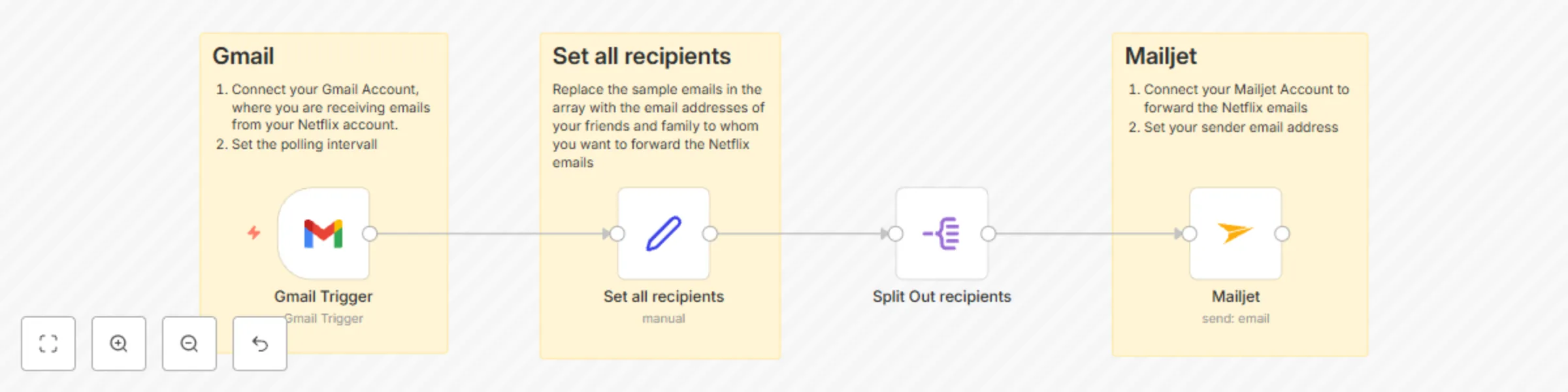
- Scans your Gmail inbox every minute for new e-mails from Netflix
- Forwards all Netflix e-mails to all desired e-mail addresses via the e-mail provider Mailjet
Setup Steps
- Connect your Google Mail Account to n8n following the official n8n instructions
- Add all recipients you want to the recipients array at the "Set all recipients" node.
- Create and connect your Mailjet Account to n8n following the official n8n instructions. Note: You cannot use an Gmail e-mail address as the sender address, as mailjet does not support this. I recommend using your own email address from a custom domain. This works perfectly.