Extract high-engagement YouTube keyword trends for content strategy
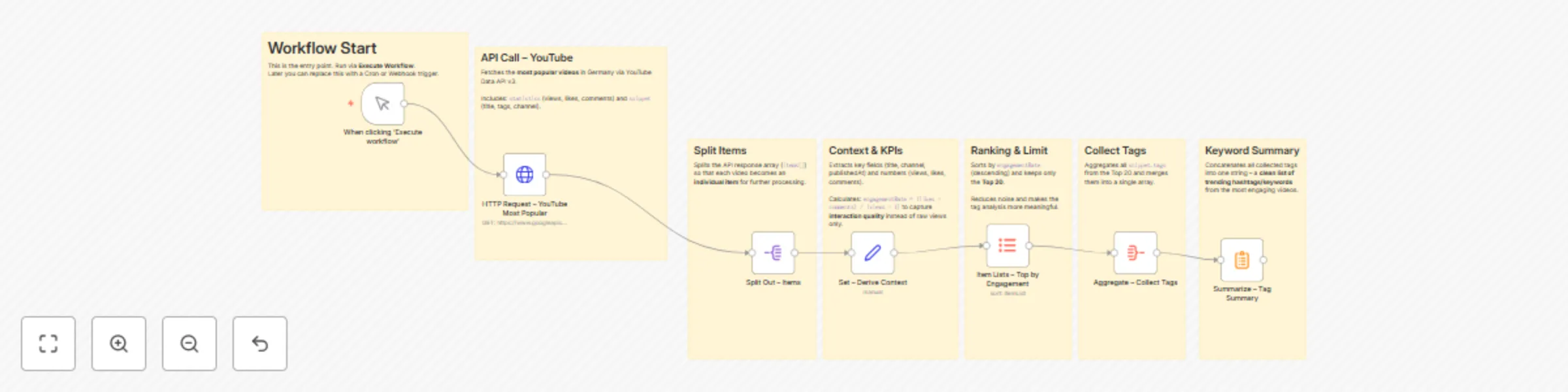
Workflow preview

$20/month : Unlimited workflows
2500 executions/month

THE #1 IN WEB SCRAPING
Scrape any website without limits
HOSTINGER  Early Deal
DISCOUNT 20% Try free
Early DealDISCOUNT 20%
Self-hosted n8n
Unlimited workflows - from $4.99/mo

#1 hub for scraping, AI & automation
6000+ actors - $5 credits/mo
Important notice
This workflow is provided as-is. Please review and test before using in production.
Overview
📊 YouTube Trends Workflow in n8n
🎯 Goal of the Workflow
This workflow fetches the most popular YouTube videos in Germany and transforms them into a clean list of trending hashtags/keywords.
It’s not just raw data – it highlights qualitative insights about which topics and keywords drive real engagement.
Useful for:
- Content creators & marketers → quick inspiration for viral topics
- SEO/hashtag research → discover high-performing keywords
- Social media teams → automated trend reporting
⚙️ How It Works – Step by Step
1. Trigger
- Node:
Manual Trigger - Entry point of the workflow.
→ Can later be replaced with a Cron or Webhook trigger to run automatically.
2. API Call – YouTube
- Node:
HTTP Request - Calls the YouTube Data API v3 with:
chart=mostPopularregionCode=DEmaxResults=50
- Returns a list of trending videos in Germany, including title, channel, views, likes, comments, and tags.
3. Split Items
- Node:
Split Out - Splits the API response (
items[]) into individual items, so each video is processed separately.
4. Context & KPIs
- Node:
Set - Extracts key fields:
title,channel,publishedAtviews,likes,comments
- Calculates:
engagementRate = (likes + comments) / (views + 1)
Why?
Looking at views alone is misleading. Engagement rate reveals which videos truly resonate with the audience.
5. Ranking & Limit
- Node:
Item Lists - Sorts videos by highest engagement rate (descending).
- Limits results to the Top 20 videos.
Why?
This reduces noise and focuses only on the most relevant trends.
6. Collect Tags
- Node:
Aggregate - Collects all
snippet.tagsfrom the top videos. - Merges them into a single keyword list.
7. Keyword Summary
- Node:
Summarize - Concatenates all collected tags into one string.
Result:
A compact hashtag/keyword list → ready to use for:
- Content ideas
- SEO/hashtag strategies
- Social media planning
📈 Why This Workflow Is Useful
- Automated trend analysis: no need to manually browse YouTube.
- Quality focus: uses engagement rate, not just views.
- Reusable: results can be:
- stored in Google Sheets or Airtable,
- sent to Slack/Telegram,
- or used in a dashboard.
🚀 Possible Extensions
- Cron Trigger → run daily for automated reports.
- Notifier → send results directly to Slack, Discord, or Telegram.
- Storage → save trends in a database for historical analysis.
- AI Node → use GPT to summarize trends into “3 key insights of the day.”
✅ Conclusion
With a few smartly combined nodes, this workflow:
- fetches external API data (YouTube),
- cleans and enriches it,
- calculates qualitative KPIs,
- and delivers actionable trend insights.
Perfect as a community showcase or a practical tool for creators and marketers.