Extract high-engagement YouTube keyword trends for content strategy

Workflow preview

Workflow preview
100%
Extract high-engagement YouTube keyword trends for content strategy preview
Open on n8n.io

Important notice

This workflow is provided as-is. Please review and test before using in production.

1. Workflow Overview

YouTube Trends Workflow in n8n Goal of the Workflow This workflow fetches the most popular YouTube videos in Germany and transforms them into a clean list of trending hashtags/keywords . It’s...

Best for

  • Market Research automation workflows
  • intermediate n8n builders looking for reusable templates

Tools used

n8n-nodes-base.manualtrigger, n8n-nodes-base.stickynote, n8n-nodes-base.httprequest, n8n-nodes-base.splitout, n8n-nodes-base.set, n8n-nodes-base.itemlists, n8n-nodes-base.aggregate, n8n-nodes-base.summarize

Source and attribution

This workflow is cataloged by N8N Workflows and links back to its original n8n.io source page by SuS.

Original n8n.io source

1.1 Workflow description

Title
Extract high-engagement YouTube keyword trends for content strategy
Workflow name
Extract high-engagement YouTube keyword trends for content strategy

πŸ“Š YouTube Trends Workflow in n8n

🎯 Goal of the Workflow

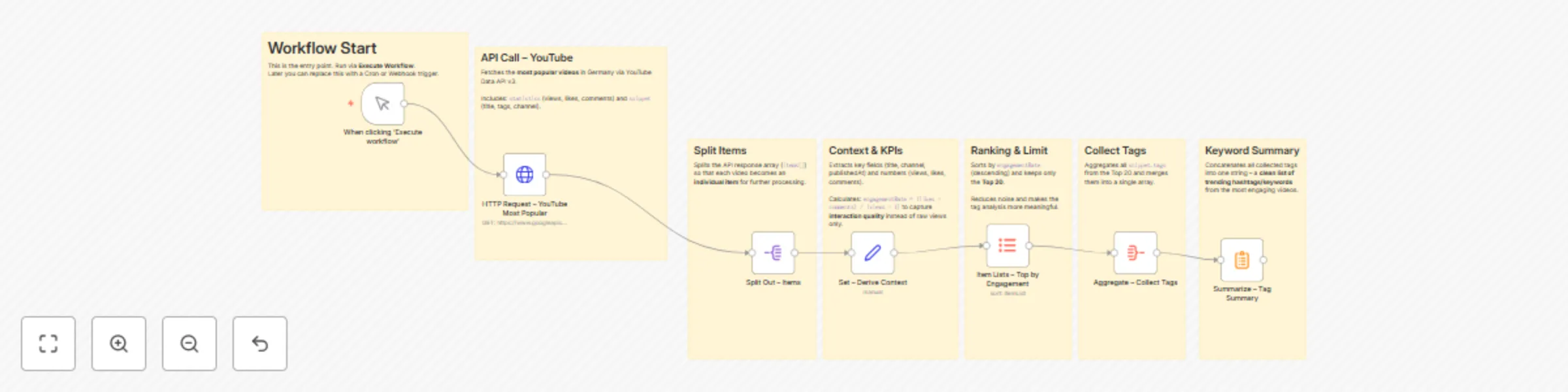
This workflow fetches the most popular YouTube videos in Germany and transforms them into a clean list of trending hashtags/keywords.
It’s not just raw data – it highlights qualitative insights about which topics and keywords drive real engagement.

Useful for:

  • Content creators & marketers β†’ quick inspiration for viral topics
  • SEO/hashtag research β†’ discover high-performing keywords
  • Social media teams β†’ automated trend reporting

βš™οΈ How It Works – Step by Step

1. Trigger

  • Node: Manual Trigger
  • Entry point of the workflow.
    β†’ Can later be replaced with a Cron or Webhook trigger to run automatically.

2. API Call – YouTube

  • Node: HTTP Request
  • Calls the YouTube Data API v3 with:
    • chart=mostPopular
    • regionCode=DE
    • maxResults=50
  • Returns a list of trending videos in Germany, including title, channel, views, likes, comments, and tags.

3. Split Items

  • Node: Split Out
  • Splits the API response (items[]) into individual items, so each video is processed separately.

4. Context & KPIs

  • Node: Set
  • Extracts key fields:
    • title, channel, publishedAt
    • views, likes, comments
  • Calculates:
    • engagementRate = (likes + comments) / (views + 1)

Why?
Looking at views alone is misleading. Engagement rate reveals which videos truly resonate with the audience.


5. Ranking & Limit

  • Node: Item Lists
  • Sorts videos by highest engagement rate (descending).
  • Limits results to the Top 20 videos.

Why?
This reduces noise and focuses only on the most relevant trends.


6. Collect Tags

  • Node: Aggregate
  • Collects all snippet.tags from the top videos.
  • Merges them into a single keyword list.

7. Keyword Summary

  • Node: Summarize
  • Concatenates all collected tags into one string.

Result:
A compact hashtag/keyword list β†’ ready to use for:

  • Content ideas
  • SEO/hashtag strategies
  • Social media planning

πŸ“ˆ Why This Workflow Is Useful

  • Automated trend analysis: no need to manually browse YouTube.
  • Quality focus: uses engagement rate, not just views.
  • Reusable: results can be:
    • stored in Google Sheets or Airtable,
    • sent to Slack/Telegram,
    • or used in a dashboard.

πŸš€ Possible Extensions

  • Cron Trigger β†’ run daily for automated reports.
  • Notifier β†’ send results directly to Slack, Discord, or Telegram.
  • Storage β†’ save trends in a database for historical analysis.
  • AI Node β†’ use GPT to summarize trends into β€œ3 key insights of the day.”

βœ… Conclusion

With a few smartly combined nodes, this workflow:

  • fetches external API data (YouTube),
  • cleans and enriches it,
  • calculates qualitative KPIs,
  • and delivers actionable trend insights.

Perfect as a community showcase or a practical tool for creators and marketers.

1.2 Logical Blocks

This catalog entry is organized from the workflow JSON. The node-level section below shows the executable blocks available for review before importing the template.

2. Block-by-Block Analysis

Block 1 - When clicking β€˜Execute workflow’

Type / Role
n8n-nodes-base.manualTrigger - manualTrigger
Config choices
Version 1

Block 2 - Sticky: Workflow Start

Type / Role
n8n-nodes-base.stickyNote - stickyNote
Config choices
Version 1

Block 3 - HTTP Request – YouTube Most Popular

Type / Role
n8n-nodes-base.httpRequest - httpRequest
Config choices
Version 4.2

Block 4 - Sticky: API Call

Type / Role
n8n-nodes-base.stickyNote - stickyNote
Config choices
Version 1

Block 5 - Split Out – Items

Type / Role
n8n-nodes-base.splitOut - splitOut
Config choices
Version 1

Block 6 - Sticky: Split Items

Type / Role
n8n-nodes-base.stickyNote - stickyNote
Config choices
Version 1

Block 7 - Set – Derive Context

Type / Role
n8n-nodes-base.set - set
Config choices
Version 3.2

Block 8 - Sticky: Context & KPIs

Type / Role
n8n-nodes-base.stickyNote - stickyNote
Config choices
Version 1

Block 9 - Item Lists – Top by Engagement

Type / Role
n8n-nodes-base.itemLists - itemLists
Config choices
Version 1

Block 10 - Sticky: Ranking & Limit

Type / Role
n8n-nodes-base.stickyNote - stickyNote
Config choices
Version 1

Block 11 - Aggregate – Collect Tags

Type / Role
n8n-nodes-base.aggregate - aggregate
Config choices
Version 1

Block 12 - Sticky: Collect Tags

Type / Role
n8n-nodes-base.stickyNote - stickyNote
Config choices
Version 1

Block 13 - Summarize – Tag Summary

Type / Role
n8n-nodes-base.summarize - summarize
Config choices
Version 1.1

Block 14 - Sticky: Keyword Summary

Type / Role
n8n-nodes-base.stickyNote - stickyNote
Config choices
Version 1

3. Summary Table

Workflow Extract high-engagement YouTube keyword trends for content strategy
Complexity intermediate
Nodes 14
Categories Market Research
Author SuS
Published 31 Aug 2025

4. Reproducing the Workflow from Scratch

  1. 1. Download the workflow JSON

    Use the JSON export at /data/workflows/8091/8091.json as the source template for this automation.

  2. 2. Import the template into n8n

    Open n8n, import the downloaded JSON, and review each node before activating the workflow.

  3. 3. Configure credentials and variables

    Replace placeholder credentials, API keys, webhook URLs, account IDs, and environment-specific values with your own settings.

  4. 4. Test with sample data

    Run the workflow manually or in a staging workspace, inspect node output, and confirm downstream systems receive the expected data.

  5. 5. Activate and monitor

    Enable the workflow only after testing, then monitor executions, errors, and rate limits during the first production runs.

5. General Notes & Resources

Review imported nodes carefully before activation. This catalog entry is intended to help you inspect the workflow structure, understand required services, and find related templates faster.

Node names, credentials, schedules, webhook paths, and external service limits may need adjustment for your workspace.

Frequently asked questions

What does Extract high-engagement YouTube keyword trends for content strategy do?

YouTube Trends Workflow in n8n Goal of the Workflow This workflow fetches the most popular YouTube videos in Germany and transforms them into a clean list of trending hashtags/keywords . It’s...

What do I need before importing this workflow?

Review the workflow JSON, configure any required credentials in n8n, and test the automation in a safe workspace before using it in production.

Can I customize this workflow?

Yes. Use the block-by-block analysis and the downloadable JSON to inspect each node, then adjust credentials, prompts, schedules, filters, or destinations for your Market Research use case.