Compare physical vs digital 24K gold costs and returns with GoldAPI, IBJA, Groq and Google Sheets

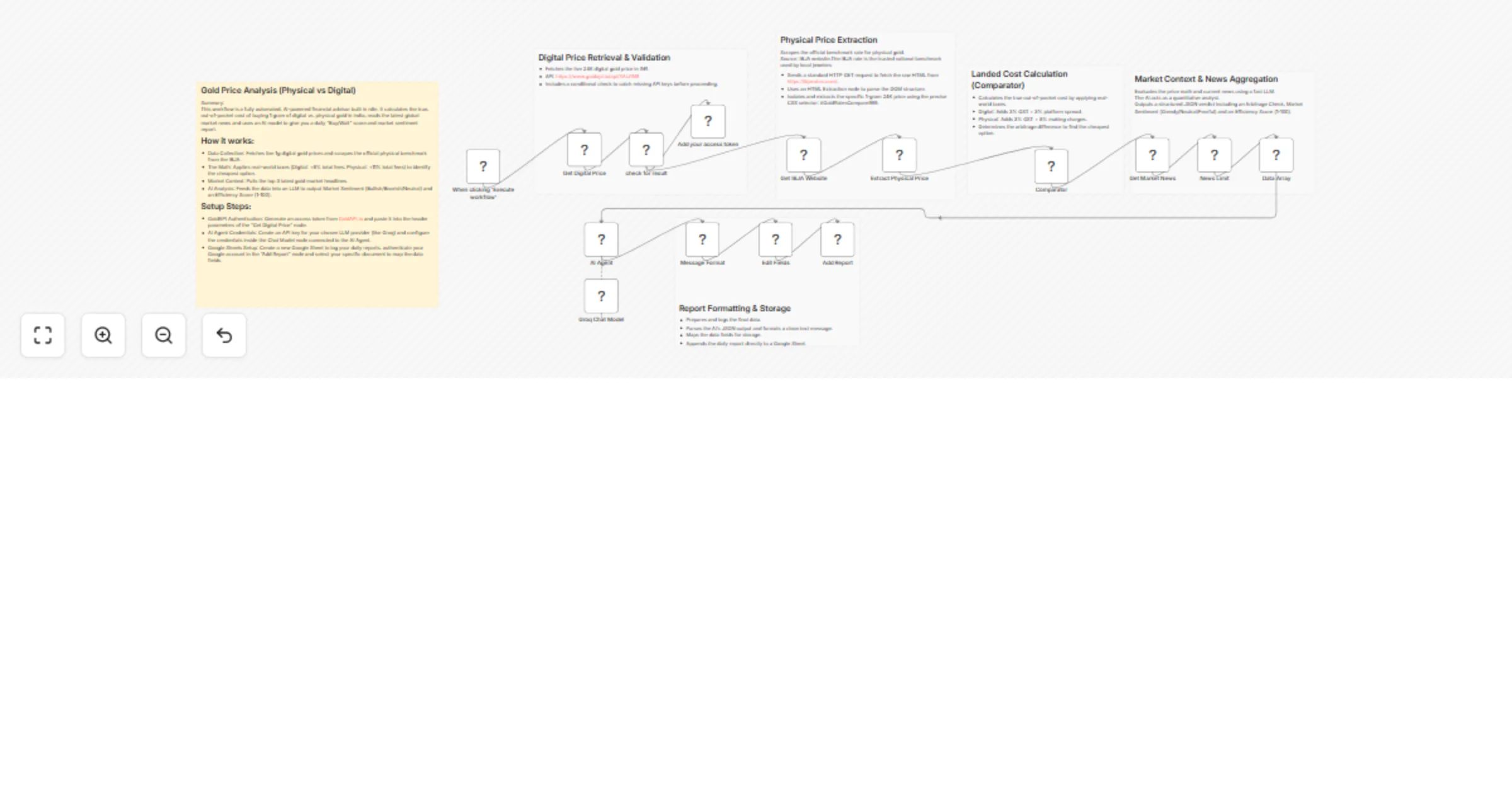
Workflow preview

Workflow preview
100%
Compare physical vs digital 24K gold costs and returns with GoldAPI, IBJA, Groq and Google Sheets preview
Open on n8n.io

1. Workflow Overview

Gold Investment Intelligence: Physical vs. Digital 24K Cost & Return Analysis This high performance n8n workflow automates the complex task of comparing gold investment types in the Indian market. ...

Best for

  • Market Research automation workflows
  • AI Summarization automation workflows
  • advanced n8n builders looking for reusable templates

Tools used

n8n-nodes-base.manualtrigger, n8n-nodes-base.httprequest, n8n-nodes-base.html, n8n-nodes-base.stickynote, n8n-nodes-base.rssfeedread, @n8n/n8n-nodes-langchain.agent, @n8n/n8n-nodes-langchain.lmchatgroq, n8n-nodes-base.code

Source and attribution

This workflow is cataloged by N8N Workflows and links back to its original n8n.io source page by WeblineIndia.

Original n8n.io source

1.1 Workflow description

Title
Compare physical vs digital 24K gold costs and returns with GoldAPI, IBJA, Groq and Google Sheets
Workflow name
Compare physical vs digital 24K gold costs and returns with GoldAPI, IBJA, Groq and Google Sheets

Gold Investment Intelligence: Physical vs. Digital 24K Cost & Return Analysis

This high-performance n8n workflow automates the complex task of comparing gold investment types in the Indian market. By pulling live data from the GoldAPI (Digital) and the IBJA (Physical benchmark), it calculates the "Landed Cost" including GST and making charges to provide a data-driven "Buy/Wait" verdict powered by a Groq-hosted LLM.

Stop manually calculating gold spreads across different platforms. This workflow fetches real-time 24K gold rates, applies localized taxes (3% GST) and industry-standard fees (3-8%), analyzes global market sentiment via Yahoo Finance RSS and logs a professional investment report to Google Sheets. It transforms raw data into an actionable "Efficiency Score" using AI.

Quick Implementation Steps:

  1. Import the JSON file into your n8n canvas.
  2. Get API Key: Sign up at GoldAPI.io and paste your token into the "Get Digital Price" header.
  3. Connect AI: Add your Groq API credentials to the "Groq Chat Model" node.
  4. Prepare Sheet: Create a Google Sheet with these headers: Date, Digital_Price, Physical_Price, Arbitrage, Sentiment and Efficiency_Score.
  5. Authorize: Link your Google account in the "Add Report" node and select your spreadsheet.

What It Does

This workflow acts as a 24/7 Quantitative Financial Analyst specialized in the gold market. It eliminates the "hidden cost" surprise by calculating the absolute final price an investor pays out-of-pocket for 1 gram of 24K gold. It doesn't just look at the ticker price; it factors in the 3% GST applicable in India, platform spreads for digital gold apps and making charges for physical coins/bars.

Beyond raw arithmetic, the workflow contextually understands the global landscape. By scraping the latest commodity headlines from Yahoo Finance, the integrated AI Agent determines if the current market vibe is "Greedy," "Neutral," or "Fearful." It then synthesizes the price gap and the news into a single "Efficiency Score" (1-100), telling you exactly how favorable the buying conditions are today.

Finally, it maintains a permanent investment ledger. Every execution logs the data into a Google Sheet and formats a clean report ready to be sent to messaging apps, ensuring you never miss a buying opportunity when the "Arbitrage" (the price difference) favors one medium over the other.

Who’s It For

  • Retail Investors: Who want to know if it's cheaper to buy gold on a digital app or from a local jeweler today.
  • Financial Advisors: Who need automated, data-backed daily gold market sentiment reports for their clients.
  • Gold Enthusiasts: Tracking the price variance (Arbitrage) between digital and physical assets to optimize their portfolio.
  • FinTech Developers: Looking for a professional blueprint on how to combine Web Scraping, Financial APIs and LLMs in n8n.

Requirements

  • n8n Instance (supporting LangChain nodes).
  • GoldAPI Token: Free or Paid API key from GoldAPI.io.
  • Groq API Key: To power the AI analysis (supports Llama 3 or Mixtral models).
  • Google Account: For logging data into Google Sheets.
  • Internet Access: To scrape the IBJA (India Bullion and Jewellers Association) website.

How It Works & Set Up

Step 1: Data Collection

The workflow starts with a Manual Trigger (can be changed to a Schedule Trigger for daily runs). It fetches the live 1-gram digital gold price in INR via an HTTP Request to GoldAPI. Simultaneously, it scrapes the official IBJA website to extract the physical benchmark rate using the CSS selector #GoldRatesCompare999.

Step 2: The Math (Landed Costs)

The Comparator node uses JavaScript to apply real-world fees:

  • Digital: Adds 3% GST and a 3% platform spread.
  • Physical: Adds 3% GST and 8% making charges (standard for coins).
  • It then determines which is cheaper and calculates the exact difference.

Step 3: Market Context

The workflow pulls the top 3 most recent gold market headlines from Yahoo Finance. These are bundled together so the AI can read them in one go.

Step 4: AI Analysis & Output

The AI Agent takes the math and the news headlines. It outputs a structured JSON verdict containing:

  • Arbitrage Check: A one-sentence summary of the best deal.
  • Sentiment: A label (Greedy/Neutral/Fearful).
  • Efficiency Score: A rating out of 100.

Step 5: Logging

The data is formatted into a readable message and appended as a new row in your designated Google Sheet.

How To Customize Nodes

  • Adjust Fees: If your local jeweler charges 10% instead of 8%, simply open the Comparator node and change the 1.08 value in the code.
  • Change AI Model: In the Groq Chat Model node, you can switch between different models (e.g., Llama-3-70b vs 8b) depending on your speed and accuracy needs.
  • Update Selectors: If the IBJA website updates its design, you can update the CSS Selector in the Extract Physical Price node to point to the new data location.

Add-ons

  • WhatsApp/Telegram Notifications: Add a node after "Message Format" to send the daily report directly to your phone.
  • Email Summary: Use the Gmail or Outlook node to send a weekly summary of the best buying days to your inbox.
  • Price Drop Alert: Add an IF Node to only trigger the workflow if the gold price drops by more than 2% in a single day.

Use Case Examples

  • Automated Savings: Set the workflow to run every morning at 10 AM to decide where to put your daily savings.
  • Jewelry Business Tool: Use the data to show customers that your physical prices are competitive compared to digital market apps.
  • Market Research: Use the Google Sheet history to track how "Sentiment" affects the price of gold over several months.
  • Arbitrage Trading: Identify moments when digital gold is significantly undervalued compared to physical benchmarks.
  • Wealth Management: Proactively notify clients when the "Efficiency Score" hits 90+, indicating a prime buying opportunity.

Troubleshooting Guide

Issue Possible Cause Solution
Digital Price = 0 or Error API Key is missing or expired. Check the "Get Digital Price" node; ensure the token is in the headers.
Physical Price Extraction Fails Website structure changed. Verify the URL and the CSS selector #GoldRatesCompare999 on IBJA.
AI Agent gives generic response Prompt is too vague or news is missing. Ensure the "Data Array" node is successfully bundling headlines.
Google Sheets won't append Missing columns or incorrect ID. Ensure headers (Date, Sentiment, etc.) match exactly in your sheet.

Need Help?

Need assistance setting up your GoldAPI credentials, customizing the making charges or adding custom notifications to this workflow? We can help you build and scale your automation ideas.

Contact WeblineIndia to help you customize this workflow or build similar AI-powered financial tools for your business.

1.2 Logical Blocks

This catalog entry is organized from the workflow JSON. The node-level section below shows the executable blocks available for review before importing the template.

2. Block-by-Block Analysis

Block 1 - When clicking ‘Execute workflow’

Type / Role
n8n-nodes-base.manualTrigger - manualTrigger
Config choices
Version 1

Block 2 - Get Digital Price

Type / Role
n8n-nodes-base.httpRequest - httpRequest
Config choices
Version 4.3

Block 3 - Get IBJA Website

Type / Role
n8n-nodes-base.httpRequest - httpRequest
Config choices
Version 4.3

Block 4 - Extract Physical Price

Type / Role
n8n-nodes-base.html - html
Config choices
Version 1.2

Block 5 - Sticky Note

Type / Role
n8n-nodes-base.stickyNote - stickyNote
Config choices
Version 1

Block 6 - Sticky Note1

Type / Role
n8n-nodes-base.stickyNote - stickyNote
Config choices
Version 1

Block 7 - Sticky Note2

Type / Role
n8n-nodes-base.stickyNote - stickyNote
Config choices
Version 1

Block 8 - Get Market News

Type / Role
n8n-nodes-base.rssFeedRead - rssFeedRead
Config choices
Version 1.2

Block 9 - AI Agent

Type / Role
@n8n/n8n-nodes-langchain.agent - agent
Config choices
Version 3.1

Block 10 - Groq Chat Model

Type / Role
@n8n/n8n-nodes-langchain.lmChatGroq - lmChatGroq
Config choices
Version 1

Block 11 - Sticky Note4

Type / Role
n8n-nodes-base.stickyNote - stickyNote
Config choices
Version 1

Block 12 - Comparator

Type / Role
n8n-nodes-base.code - code
Config choices
Version 2

Block 13 - News Limit

Type / Role
n8n-nodes-base.limit - limit
Config choices
Version 1

Block 14 - Data Array

Type / Role
n8n-nodes-base.aggregate - aggregate
Config choices
Version 1

Block 15 - Message Format

Type / Role
n8n-nodes-base.code - code
Config choices
Version 2

Block 16 - Add Report

Type / Role
n8n-nodes-base.googleSheets - googleSheets
Config choices
Version 4.7

Block 17 - Add your access token

Type / Role
n8n-nodes-base.noOp - noOp
Config choices
Version 1

Block 18 - check for result

Type / Role
n8n-nodes-base.if - if
Config choices
Version 2.3

Block 19 - Edit Fields

Type / Role
n8n-nodes-base.set - set
Config choices
Version 3.4

Block 20 - Sticky Note5

Type / Role
n8n-nodes-base.stickyNote - stickyNote
Config choices
Version 1

Block 21 - Sticky Note3

Type / Role
n8n-nodes-base.stickyNote - stickyNote
Config choices
Version 1

3. Summary Table

Workflow Compare physical vs digital 24K gold costs and returns with GoldAPI, IBJA, Groq and Google Sheets
Complexity advanced
Nodes 21
Categories Market Research, AI Summarization
Author WeblineIndia
Published 14 Apr 2026

4. Reproducing the Workflow from Scratch

  1. 1. Download the workflow JSON

    Use the JSON export at /data/workflows/15039/15039.json as the source template for this automation.

  2. 2. Import the template into n8n

    Open n8n, import the downloaded JSON, and review each node before activating the workflow.

  3. 3. Configure credentials and variables

    Replace placeholder credentials, API keys, webhook URLs, account IDs, and environment-specific values with your own settings.

  4. 4. Test with sample data

    Run the workflow manually or in a staging workspace, inspect node output, and confirm downstream systems receive the expected data.

  5. 5. Activate and monitor

    Enable the workflow only after testing, then monitor executions, errors, and rate limits during the first production runs.

5. General Notes & Resources

Review imported nodes carefully before activation. This catalog entry is intended to help you inspect the workflow structure, understand required services, and find related templates faster.

Node names, credentials, schedules, webhook paths, and external service limits may need adjustment for your workspace.

Frequently asked questions

What does Compare physical vs digital 24K gold costs and returns with GoldAPI, IBJA, Groq and Google Sheets do?

Gold Investment Intelligence: Physical vs. Digital 24K Cost & Return Analysis This high performance n8n workflow automates the complex task of comparing gold investment types in the Indian market. ...

What do I need before importing this workflow?

Review the workflow JSON, configure any required credentials in n8n, and test the automation in a safe workspace before using it in production.

Can I customize this workflow?

Yes. Use the block-by-block analysis and the downloadable JSON to inspect each node, then adjust credentials, prompts, schedules, filters, or destinations for your Market Research, AI Summarization use case.