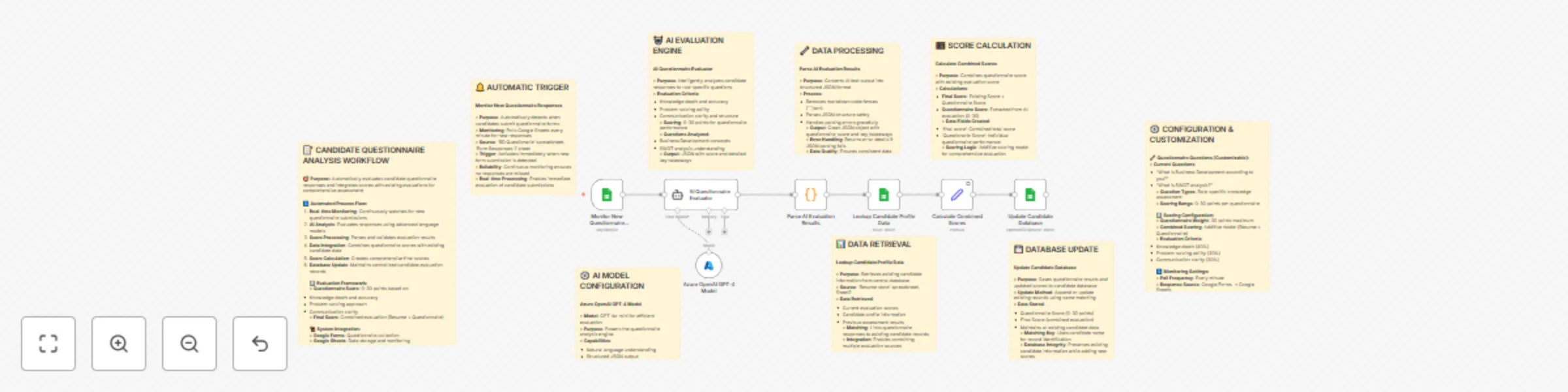
Evaluate interview & update scores with Azure GPT-4o-mini and Google Sheets

Workflow preview

Workflow preview
100%
Evaluate interview & update scores with Azure GPT-4o-mini and Google Sheets preview
Open on n8n.io

Important notice

This workflow is provided as-is. Please review and test before using in production.

1. Workflow Overview

Description Automatically score candidate questionnaire responses using Azure OpenAI (GPT 4o mini), combine them with existing evaluations from Google Sheets, and keep your candidate database up to...

Best for

  • HR automation workflows
  • AI Summarization automation workflows
  • advanced n8n builders looking for reusable templates

Tools used

n8n-nodes-base.googlesheetstrigger, @n8n/n8n-nodes-langchain.agent, @n8n/n8n-nodes-langchain.lmchatazureopenai, n8n-nodes-base.googlesheets, n8n-nodes-base.code, n8n-nodes-base.set, n8n-nodes-base.stickynote

Source and attribution

This workflow is cataloged by N8N Workflows and links back to its original n8n.io source page by Rahul Joshi.

Original n8n.io source

1.1 Workflow description

Title
Evaluate interview & update scores with Azure GPT-4o-mini and Google Sheets
Workflow name
Evaluate interview & update scores with Azure GPT-4o-mini and Google Sheets

Description

Automatically score candidate questionnaire responses using Azure OpenAI (GPT-4o-mini), combine them with existing evaluations from Google Sheets, and keep your candidate database up to date—all in near real time. Get consistent, structured scores and key takeaways for faster, fairer decisions. ⚡📊

What This Template Does

  • Monitors new questionnaire submissions in Google Sheets every minute. ⏱️
  • Evaluates responses with Azure OpenAI and returns structured JSON (score + takeaways). 🤖
  • Parses model output safely and normalizes fields. 🧩
  • Retrieves existing candidate data from a central Google Sheet. 📂
  • Calculates combined final scores and updates/append records by candidate name. ➕

Key Benefits

  • Consistent, objective scoring across all responses. 🎯
  • Real-time processing from form submission to database update. 🚀
  • Clear JSON outputs for downstream reporting and analytics. 📈
  • No-code customization of questions, weights, and fields. 🛠
  • Scales effortlessly with high submission volumes. 📥

Features

  • Continuous polling of the “BD Questionarie” → “Form Responses 1” sheet. 🔄
  • AI evaluation with GPT-4o-mini returning score (0–30) and takeaways. 🧠
  • Resilient JSON parsing (handles code fences and errors). 🧼
  • Candidate lookup in “Resume store” → “Sheet2” for data fusion. 🔗
  • Additive scoring model: Final Score = Existing Score + Questionnaire Score. ➕
  • Append or update records by name while preserving existing data. 📝

Requirements

  • n8n instance (Cloud or self-hosted). 🌐
  • Google Sheets access:
  • “BD Questionarie” spreadsheet (sheet: “Form Responses 1”) for new responses.
  • “Resume store” spreadsheet (sheet: “Sheet2”) for existing profiles.
  • Credentials configured in n8n (OAuth/Service Account) with read/write where needed. 🔐
  • Azure OpenAI access with a GPT-4o-mini deployment for evaluation and JSON output. 🤖
  • Ability to customize evaluation questions and scoring weights within the workflow. ⚙️

Target Audience

  • Teams evaluating candidate questionnaires and consolidating scores. 👥
  • Operations teams centralizing hiring data in Google Sheets. 🗂️
  • Organizations seeking real-time, AI-assisted screening. 🧭
  • No-code/low-code builders standardizing hiring workflows. 🧱

**Step-by-Step Setup Instructions **

  • Connect Google Sheets in n8n Credentials; grant access to “BD Questionarie” and “Resume store.” 🔑
  • Add Azure OpenAI credentials in n8n; ensure a GPT-4o-mini deployment is available. 🤝
  • Import the workflow, assign credentials to each node, and set the sheet IDs/ranges. 📋
  • Confirm name is the matching key, and adjust evaluation weights or questions as needed. ⚖
  • Run once to validate parsing and score calculation, then enable polling (every minute). ▶️

1.2 Logical Blocks

This catalog entry is organized from the workflow JSON. The node-level section below shows the executable blocks available for review before importing the template.

2. Block-by-Block Analysis

Block 1 - Monitor New Questionnaire Responses

Type / Role
n8n-nodes-base.googleSheetsTrigger - googleSheetsTrigger
Config choices
Version 1

Block 2 - AI Questionnaire Evaluator

Type / Role
@n8n/n8n-nodes-langchain.agent - agent
Config choices
Version 2.1

Block 3 - Azure OpenAI GPT-4 Model

Type / Role
@n8n/n8n-nodes-langchain.lmChatAzureOpenAi - lmChatAzureOpenAi
Config choices
Version 1

Block 4 - Lookup Candidate Profile Data

Type / Role
n8n-nodes-base.googleSheets - googleSheets
Config choices
Version 4.6

Block 5 - Parse AI Evaluation Results

Type / Role
n8n-nodes-base.code - code
Config choices
Version 2

Block 6 - Calculate Combined Scores

Type / Role
n8n-nodes-base.set - set
Config choices
Version 3.4

Block 7 - Update Candidate Database

Type / Role
n8n-nodes-base.googleSheets - googleSheets
Config choices
Version 4.6

Block 8 - Sticky Note1

Type / Role
n8n-nodes-base.stickyNote - stickyNote
Config choices
Version 1

Block 9 - Sticky Note2

Type / Role
n8n-nodes-base.stickyNote - stickyNote
Config choices
Version 1

Block 10 - Sticky Note3

Type / Role
n8n-nodes-base.stickyNote - stickyNote
Config choices
Version 1

Block 11 - Sticky Note4

Type / Role
n8n-nodes-base.stickyNote - stickyNote
Config choices
Version 1

Block 12 - Sticky Note5

Type / Role
n8n-nodes-base.stickyNote - stickyNote
Config choices
Version 1

Block 13 - Sticky Note6

Type / Role
n8n-nodes-base.stickyNote - stickyNote
Config choices
Version 1

Block 14 - Sticky Note7

Type / Role
n8n-nodes-base.stickyNote - stickyNote
Config choices
Version 1

Block 15 - Sticky Note8

Type / Role
n8n-nodes-base.stickyNote - stickyNote
Config choices
Version 1

Block 16 - Sticky Note9

Type / Role
n8n-nodes-base.stickyNote - stickyNote
Config choices
Version 1

3. Summary Table

Workflow Evaluate interview & update scores with Azure GPT-4o-mini and Google Sheets
Complexity advanced
Nodes 16
Categories HR, AI Summarization
Author Rahul Joshi
Published 12 Sept 2025

4. Reproducing the Workflow from Scratch

  1. 1. Download the workflow JSON

    Use the JSON export at /data/workflows/8526/8526.json as the source template for this automation.

  2. 2. Import the template into n8n

    Open n8n, import the downloaded JSON, and review each node before activating the workflow.

  3. 3. Configure credentials and variables

    Replace placeholder credentials, API keys, webhook URLs, account IDs, and environment-specific values with your own settings.

  4. 4. Test with sample data

    Run the workflow manually or in a staging workspace, inspect node output, and confirm downstream systems receive the expected data.

  5. 5. Activate and monitor

    Enable the workflow only after testing, then monitor executions, errors, and rate limits during the first production runs.

5. General Notes & Resources

Review imported nodes carefully before activation. This catalog entry is intended to help you inspect the workflow structure, understand required services, and find related templates faster.

Node names, credentials, schedules, webhook paths, and external service limits may need adjustment for your workspace.

Frequently asked questions

What does Evaluate interview & update scores with Azure GPT-4o-mini and Google Sheets do?

Description Automatically score candidate questionnaire responses using Azure OpenAI (GPT 4o mini), combine them with existing evaluations from Google Sheets, and keep your candidate database up to...

What do I need before importing this workflow?

Review the workflow JSON, configure any required credentials in n8n, and test the automation in a safe workspace before using it in production.

Can I customize this workflow?

Yes. Use the block-by-block analysis and the downloadable JSON to inspect each node, then adjust credentials, prompts, schedules, filters, or destinations for your HR, AI Summarization use case.