Create daily Gmail summaries with Google Gemini AI
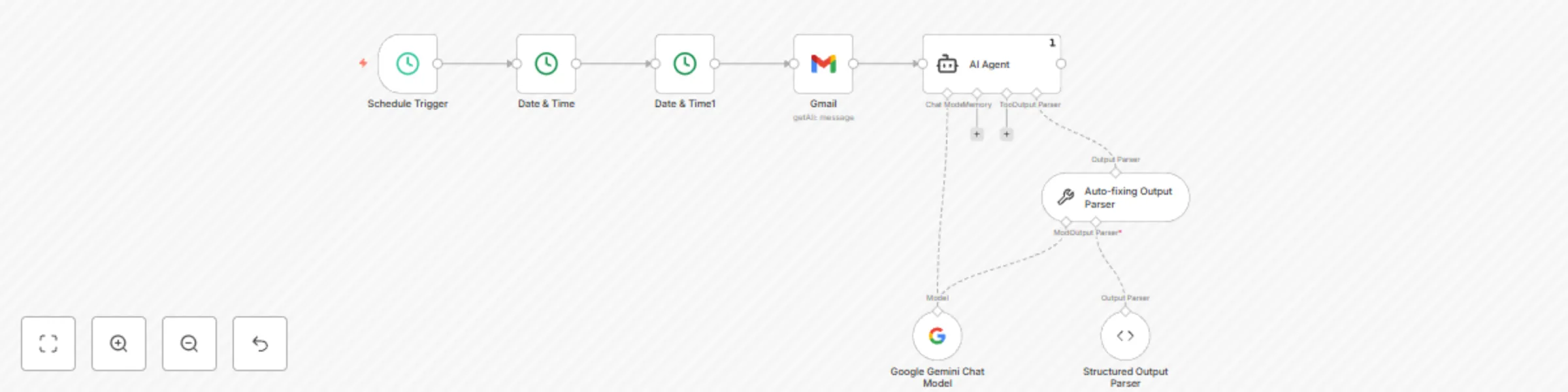
Workflow preview


 Early Deal
DISCOUNT 20%

Important notice
This workflow is provided as-is. Please review and test before using in production.
Overview
Gmail Daily Summary Scheduler - Template Description
Never miss important emails again! This intelligent automation runs every morning at 8 AM to analyze your Gmail inbox from the past 24 hours and delivers a comprehensive summary powered by Google Gemini AI.
🚀 What it does:
Automatically triggers daily at 8 AM (customizable) Fetches Gmail emails from the last 24 hours AI analyzes all emails to identify themes and key updates Highlights priority emails with reasons why they're important Delivers structured output in consistent JSON format
💡 Perfect for:
Busy professionals managing high email volumes Team leads who need quick inbox overviews Anyone wanting to prioritize email responses efficiently Remote workers staying on top of communications
🎯 Key Features:
Smart filtering - Only processes emails from the last 24 hours AI-powered analysis - Uses Google Gemini for intelligent summaries Priority detection - Identifies urgent, time-sensitive emails Consistent output - Structured JSON with summary and highlights Fully automated - Set it and forget it
📋 Sample Output:
Summary: "Today's emails covered 3 project updates, 2 meeting requests, and 1 urgent client issue requiring immediate attention."
Important Emails:
- Subject: "Project Deadline Extension Request" | Sender: [email protected] | Reason: Client requesting timeline change for major deliverable due this week
- Subject: "Tomorrow's Board Meeting Moved" | Sender: [email protected] | Reason: Last-minute schedule change requiring immediate calendar adjustment
🛠 Prerequisites:
Gmail account with API access Google Gemini API credentials Basic n8n knowledge for credential setup
⚙️ Easy to Customize:
Change schedule time (default: 8 AM daily) Adjust time window (default: 24 hours) Modify AI analysis focus Add email filters by sender, subject, etc. Extend with notifications (Slack, email, etc.)
🔒 Privacy Note:
This workflow processes email content through Google Gemini API. Ensure compliance with your organization's data policies. Save hours of manual email sorting every week! Import this template and start getting intelligent email summaries delivered automatically every morning.