T

Tamer

6
Workflows

Workflows by Tamer
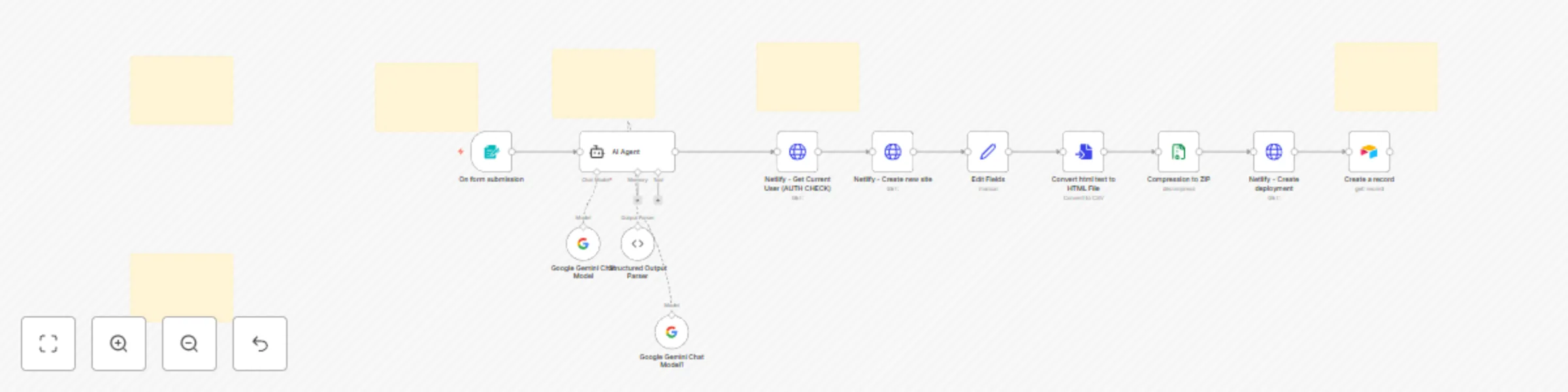
Workflow preview: Generate and deploy websites with Gemini AI and Netlify auto-deployment
Free advanced

Generate and deploy websites with Gemini AI and Netlify auto-deployment

# 🚀 AI Website Generator & Auto-Deployer Template Transform any idea into a live website in seconds! This AI-powered template generates professional, fully-functional websites from simple text descriptions and automatically deploys them to Netlify. ## ✨ What You Get **Instant Website Creation**: Just provide a name and description - our AI agent creates complete HTML files with embedded CSS/JavaScript, ready for immediate deployment. **Professional Quality**: Every website includes mobile-responsive design, modern CSS Grid/Flexbox layouts, SEO optimization, accessibility features, and smooth animations. No amateur-looking sites - only professional results. **Zero-Config Deployment**: Automatic Netlify deployment with SSL certificates, CDN distribution, and custom URLs. No technical setup required. ## 🛠️ AI-Powered Features - **Smart Content Generation**: Creates contextual, industry-appropriate content (no Lorem Ipsum) - **Adaptive Design**: Automatically detects website type (portfolio, business, landing page) and adapts accordingly - **Modern Tech Stack**: HTML5, CSS3 with variables, ES6+ JavaScript, cross-browser compatibility ## 💼 Perfect For - **Digital Agencies**: Rapid client prototyping and proposals - **Freelancers**: Quick turnaround projects - **Startups**: MVP landing pages - **Small Businesses**: Professional web presence without coding - **Marketers**: Campaign landing pages - **Designers**: Convert concepts to functional prototypes ## 🔧 Setup Requirements **Required API Keys:** 1. **Netlify Personal Access Token** - Enables automatic deployment and domain management 2. **Gemini API Key** - Powers AI content generation (alternatives: OpenAI GPT, Claude) 3. **Airtable Token** (Optional) - Project tracking and analytics ## ⚡ Lightning-Fast Workflow 1. Input project name and description 2. AI generates complete website (under 30 seconds) 3. Automatic quality validation 4. Live deployment to Netlify 5. Optional dashboard tracking ## 📈 Business Impact - **95% time reduction** in development - **Eliminate coding hours** - focus on strategy - **Handle multiple projects** simultaneously - **Consistent quality** across all websites - **Impress clients** with rapid turnaround ## 💡 Real Examples **"Modern UX designer portfolio"** → Clean design with project galleries **"Local bakery website with menu"** → Appetizing layout with image galleries **"SaaS product landing page"** → Conversion-focused with pricing tables **"Tech conference site"** → Event layout with speaker bios and schedules **Transform your web development workflow today!**

T
Tamer
Content Creation
25 Aug 2025
76
0

Workflow preview: Vacation planning agent
Free intermediate

Vacation planning agent

# Vacation Planning Agent - n8n Workflow ## Overview This n8n workflow creates an intelligent vacation planning chatbot that helps users find and book the perfect hotel accommodations. The agent acts as a professional travel consultant, systematically gathering travel requirements and providing personalized hotel recommendations through an interactive chat interface. ## Core Functionality The workflow provides a conversational AI agent that: - **Conducts structured information gathering** through natural conversation - **Automatically searches for hotels** using real-time data from Google Hotels - **Provides personalized recommendations** with detailed hotel information - **Maintains conversation context** throughout the planning process - **Delivers professional travel consultation** in a friendly, accessible format ## User Experience Flow ### Initial Interaction Users are greeted with a warm welcome message in German: *"Hallo! Ich helfe dir, deinen perfekten Urlaub zu planen. Bitte beanworte mir die folgenden Fragen :)"* ### Information Collection Process The agent systematically collects essential travel details: 1. **Destination** - City and country/state 2. **Travel Dates** - Check-in and check-out dates 3. **Guest Count** - Number of travelers 4. **Room Requirements** - Number of rooms needed 5. **Budget Preferences** - Optional price range ### Automated Hotel Search Once core information is gathered, the agent automatically searches for available accommodations without requiring user permission. ### Recommendation Delivery Results are presented in a structured format including: - Hotel names and star ratings - Pricing information - Location details - Guest ratings and reviews - Key amenities and highlights - Direct booking links ## Required Integrations ### OpenAI API - **Purpose**: Powers the conversational AI agent - **Model**: GPT-4o-mini for cost-effective, intelligent responses - **Requirement**: Valid OpenAI API credentials ### SerpAPI (Google Hotels) - **Purpose**: Real-time hotel search and pricing data - **Service**: Google Hotels search engine integration - **Requirement**: Active SerpAPI account and API key ## Key Features ### Intelligent Conversation Management - Maintains conversation context with 20-message memory buffer - Handles edge cases like no available hotels or unclear responses - Provides alternative suggestions when initial searches yield limited results ### Flexible Search Parameters - Supports location-based searches worldwide - Accommodates date range specifications - Handles guest count and room quantity requirements - Optional budget filtering (min/max price ranges) - Currency customization support ### Professional Presentation - Structured hotel recommendation format - Clear pricing and availability information - Contextual explanations for recommendations - Additional destination insights when relevant ## Use Cases This workflow is ideal for: - **Travel websites** seeking to add AI-powered hotel booking assistance - **Travel agencies** wanting to automate initial consultation processes - **Hospitality businesses** providing customer service automation - **Personal travel planning** applications - **Customer support** for travel-related inquiries ## User Benefits - **Time-saving**: Eliminates manual hotel research - **Personalized results**: Tailored recommendations based on specific needs - **Real-time data**: Current pricing and availability information - **Professional guidance**: Expert-level travel consultation - **Seamless experience**: Natural conversation flow without complex forms ## Technical Requirements ### Essential Services - n8n workflow automation platform - OpenAI API access (GPT-4o-mini model) - SerpAPI account with Google Hotels access ### Configuration Needs - API credential setup for both OpenAI and SerpAPI - Webhook endpoint configuration for chat trigger - Memory buffer configuration for conversation context ### Optional Enhancements - Custom branding for chat interface - Additional language support beyond German greeting - Integration with booking platforms for direct reservations - Analytics tracking for usage insights

T
Tamer
Support Chatbot
26 Jun 2025
1832
0

Workflow preview: AI-powered restaurant order and menu management with WhatsApp and Google Gemini
Free advanced

AI-powered restaurant order and menu management with WhatsApp and Google Gemini

# RestaurantBot Pro - WhatsApp Order Automation System ## Description RestaurantBot Pro is a complete AI-powered restaurant ordering system that transforms your WhatsApp into a smart ordering platform. This intelligent automation handles customer interactions in any language you configure, manages your menu database, processes orders, and coordinates delivery operations - all through familiar WhatsApp messaging. ## How It Works ### Customer Experience: Customers message your restaurant's WhatsApp number in their preferred language The AI assistant greets them and presents your current menu with prices Customers can ask questions about items, place orders, and specify delivery details The system remembers customer preferences and order history for personalized service Customers receive instant confirmation and order updates ### Restaurant Operations: All orders are automatically saved to your database with customer details The system generates formatted messages for your delivery team with all order specifics Menu items are stored using advanced AI search, making it easy to find and recommend dishes Customer database grows automatically, tracking preferences and order history Real-time order processing with preparation time estimates ### Smart Features: Understands natural language ordering in any language (easily customizable in system settings) Intelligent menu recommendations based on customer queries Automatic price calculations and order summaries Memory system that recalls customer preferences across conversations Seamless integration between customer orders and delivery coordination Fully customizable language support - simply modify the AI agent's system instructions to serve customers in Arabic, English, French, Spanish, or any language of your choice ## Setup Steps 1. Database Preparation Set up your restaurant database with customer and order tables Configure AI-powered menu search capabilities Enable vector extensions for intelligent menu recommendations 2. WhatsApp Integration Connect your business WhatsApp account Configure webhook endpoints for message handling Set up automated responses and delivery notifications 3. AI Configuration Connect Google Gemini AI models for natural language processing Customize language settings by editing the AI agent's system instructions to match your target audience Set up structured order processing and validation 4. Menu Management Add your menu items through the admin interface Include prices, descriptions, categories, and preparation times Enable intelligent search and recommendations 5. Delivery Setup : just add delevery phone number to the "Send Order to delevery" node Perfect for: Restaurants serving any cuisine and customer base - whether you need Arabic, English, French, Spanish, or any other language support. Simply adjust the AI agent's language settings to match your customers' preferences. Ideal for traditional ethnic restaurants, international chains, local eateries, delivery-focused establishments, and any restaurant wanting to modernize their ordering process while maintaining authentic customer communication in their preferred language.

T
Tamer
Support Chatbot
21 Jun 2025
1722
0

Workflow preview: Create daily Gmail summaries with Google Gemini AI
Free intermediate

Create daily Gmail summaries with Google Gemini AI

# Gmail Daily Summary Scheduler - Template Description Never miss important emails again! This intelligent automation runs every morning at 8 AM to analyze your Gmail inbox from the past 24 hours and delivers a comprehensive summary powered by Google Gemini AI. ### 🚀 What it does: Automatically triggers daily at 8 AM (customizable) Fetches Gmail emails from the last 24 hours AI analyzes all emails to identify themes and key updates Highlights priority emails with reasons why they're important Delivers structured output in consistent JSON format ### 💡 Perfect for: Busy professionals managing high email volumes Team leads who need quick inbox overviews Anyone wanting to prioritize email responses efficiently Remote workers staying on top of communications ### 🎯 Key Features: Smart filtering - Only processes emails from the last 24 hours AI-powered analysis - Uses Google Gemini for intelligent summaries Priority detection - Identifies urgent, time-sensitive emails Consistent output - Structured JSON with summary and highlights Fully automated - Set it and forget it ### 📋 Sample Output: Summary: "Today's emails covered 3 project updates, 2 meeting requests, and 1 urgent client issue requiring immediate attention." Important Emails: - Subject: "Project Deadline Extension Request" | Sender: [email protected] | Reason: Client requesting timeline change for major deliverable due this week - Subject: "Tomorrow's Board Meeting Moved" | Sender: [email protected] | Reason: Last-minute schedule change requiring immediate calendar adjustment ### 🛠 Prerequisites: Gmail account with API access Google Gemini API credentials Basic n8n knowledge for credential setup ### ⚙️ Easy to Customize: Change schedule time (default: 8 AM daily) Adjust time window (default: 24 hours) Modify AI analysis focus Add email filters by sender, subject, etc. Extend with notifications (Slack, email, etc.) ### 🔒 Privacy Note: This workflow processes email content through Google Gemini API. Ensure compliance with your organization's data policies. Save hours of manual email sorting every week! Import this template and start getting intelligent email summaries delivered automatically every morning.

T
Tamer
Personal Productivity
13 Jun 2025
1063
0

Workflow preview: WhatsApp dietitian AI chatbot workflow
Free advanced

WhatsApp dietitian AI chatbot workflow

# WhatsApp Dietitian AI Chatbot Workflow Transform your WhatsApp into a professional nutrition consultant with this comprehensive AI-powered dietitian assistant. Built using n8n automation and Google Gemini AI, this workflow provides instant, intelligent nutrition advice to your clients 24/7. ## 🍽️ What It Does **Meal Analysis**: Users can send photos of their meals with captions like "analyze this meal" and receive detailed nutritional breakdowns including calories, macronutrients, and personalized recommendations. **Nutrition Guidance**: Answers questions about general nutrition, dietary restrictions, meal planning, and healthy eating habits with evidence-based information. **Meal Recommendations**: Suggests customized meals based on specific criteria like calorie targets, dietary preferences (vegan, keto, etc.), or available ingredients. ## 🚀 Key Features - **Dual Input Processing**: Handles both text questions and image analysis seamlessly - **Professional AI Responses**: Uses Google Gemini 2.0 Flash for accurate, contextual nutrition advice - **WhatsApp Optimized**: Responses formatted specifically for mobile messaging with emojis and clear structure - **Smart Routing**: Automatically detects message type (text vs image) and processes accordingly - **Structured Output**: Consistent, professional formatting for all responses - **Scope Management**: Stays within nutrition expertise and includes appropriate medical disclaimers ## 🛠️ Technical Stack - **Platform**: n8n workflow automation - **AI Model**: Google Gemini 2.0 Flash - **Integration**: WhatsApp Business API - **Message Types**: Text messages, images with captions - **Output**: Structured, conversational responses ## 📱 Perfect For - Nutritionists and dietitians offering remote consultations - Health coaches providing 24/7 client support - Fitness professionals adding nutrition guidance - Wellness businesses expanding their service offerings - Anyone wanting to monetize nutrition expertise ## 🎯 Ready to Deploy This workflow comes with comprehensive documentation, clear setup instructions, and professional prompt engineering. Simply configure your WhatsApp Business API and Google Gemini credentials to start serving clients immediately. **Transform your nutrition expertise into an automated, scalable WhatsApp service that works around the clock!**

T
Tamer
Support Chatbot
11 Jun 2025
800
0
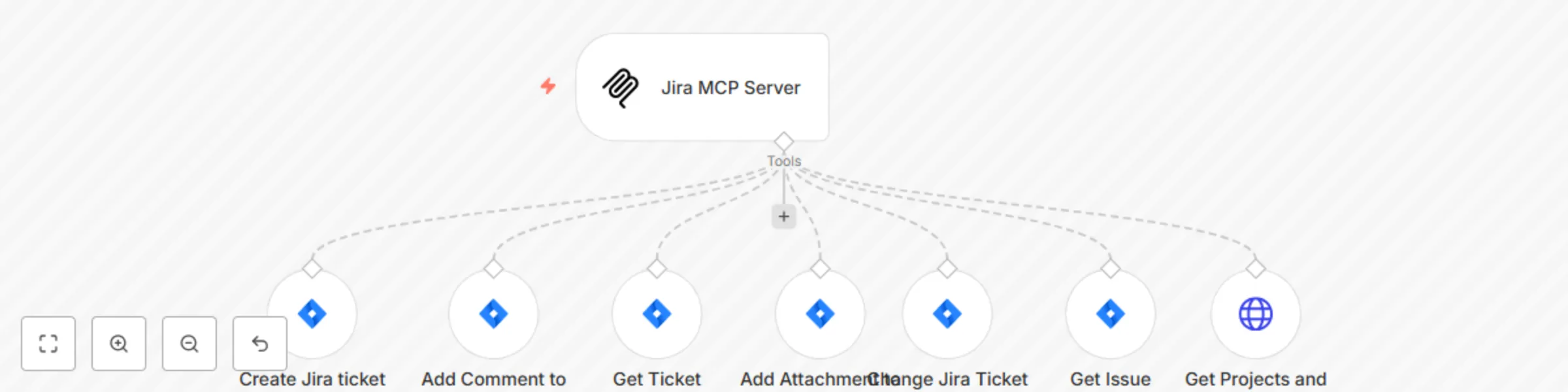
Workflow preview: Jira MCP server
Free intermediate

Jira MCP server

What it does This n8n workflow creates a powerful AI-powered Jira management system that allows you to use Claude or other AI assistants to create, update, and manage Jira tickets through natural language requests. The workflow exposes key Jira functions as AI tools, enabling you to interact with your Jira instance through conversational commands. How it works The workflow sets up an MCP (Model Control Protocol) server, allowing compatible AI assistants to use a suite of Jira management tools The AI assistant can perform various Jira operations including: Creating new tickets with customized fields Adding comments to existing tickets Retrieving available status transitions for tickets Attaching files to tickets Changing ticket statuses Retrieving detailed information about tickets Getting available projects and issue types When you make a request to your AI assistant, it determines which Jira operation to perform and executes it through this workflow Setup Steps Prerequisites: Active Jira Cloud account with admin access n8n instance with the Langchain and MCP nodes installed Claude Desktop App or another compatible AI assistant Jira Credentials Setup: Configure your Jira Cloud API credentials in n8n Ensure your Jira account has sufficient permissions for all operations Workflow Configuration: Import this template into your n8n instance Set up the MCP Trigger node with your desired path (currently "test_mcp") Verify that all Jira tool nodes are correctly connected to the MCP Server node Activate the workflow Using Claude as an MCP Client: Open your Claude Desktop App Navigate to Settings > Developer Settings Enable "Connect to local MCP servers" Add a new connection with the URL path to your n8n MCP server (e.g., "http://localhost:5678/webhook/test_mcp") Start a new conversation and ask Claude to perform Jira tasks Example Usage with Claude Once you've set up the connection between Claude and your MCP server, you can use natural language to manage your Jira tickets. Here are some examples: Creating a ticket: "Claude, please create a new Jira ticket in the Web Development project with bug issue type. The summary should be 'Homepage loading slowly' and the description should be 'Users are experiencing delays of 5+ seconds when loading the homepage on mobile devices.'" Adding a comment: "Claude, please add a comment to Jira ticket WEB-123 saying 'This issue has been reproduced on multiple devices and browsers. Priority should be increased.'" Checking status: "Claude, can you get the details of ticket WEB-123 and tell me its current status?" Changing status: "Claude, please move ticket WEB-123 to 'In Progress' status." This workflow creates a seamless bridge between your AI assistant and Jira, making project management more efficient through natural language interactions.

T
Tamer
Project Management
8 May 2025
1275
0