Block 1 - Gmail
- Type / Role
- n8n-nodes-base.gmail - gmail
- Config choices
- Version 2.1


 Early Deal
This workflow is provided as-is. Please review and test before using in production.
Gmail Daily Summary Scheduler Template Description Never miss important emails again! This intelligent automation runs every morning at 8 AM to analyze your Gmail inbox from the past 24 hours and d...
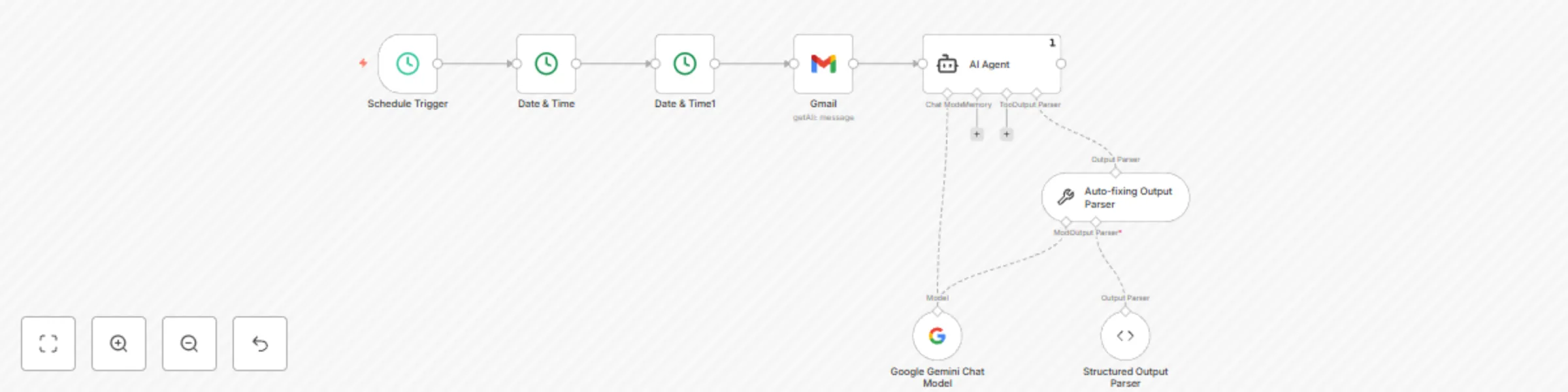
n8n-nodes-base.gmail, n8n-nodes-base.scheduletrigger, n8n-nodes-base.datetime, @n8n/n8n-nodes-langchain.agent, @n8n/n8n-nodes-langchain.lmchatgooglegemini, @n8n/n8n-nodes-langchain.outputparserautofixing, @n8n/n8n-nodes-langchain.outputparserstructured
This workflow is cataloged by N8N Workflows and links back to its original n8n.io source page by Tamer.
Original n8n.io sourceNever miss important emails again! This intelligent automation runs every morning at 8 AM to analyze your Gmail inbox from the past 24 hours and delivers a comprehensive summary powered by Google Gemini AI.
Automatically triggers daily at 8 AM (customizable) Fetches Gmail emails from the last 24 hours AI analyzes all emails to identify themes and key updates Highlights priority emails with reasons why they're important Delivers structured output in consistent JSON format
Busy professionals managing high email volumes Team leads who need quick inbox overviews Anyone wanting to prioritize email responses efficiently Remote workers staying on top of communications
Smart filtering - Only processes emails from the last 24 hours AI-powered analysis - Uses Google Gemini for intelligent summaries Priority detection - Identifies urgent, time-sensitive emails Consistent output - Structured JSON with summary and highlights Fully automated - Set it and forget it
Summary: "Today's emails covered 3 project updates, 2 meeting requests, and 1 urgent client issue requiring immediate attention."
Important Emails:
Gmail account with API access Google Gemini API credentials Basic n8n knowledge for credential setup
Change schedule time (default: 8 AM daily) Adjust time window (default: 24 hours) Modify AI analysis focus Add email filters by sender, subject, etc. Extend with notifications (Slack, email, etc.)
This workflow processes email content through Google Gemini API. Ensure compliance with your organization's data policies. Save hours of manual email sorting every week! Import this template and start getting intelligent email summaries delivered automatically every morning.
This catalog entry is organized from the workflow JSON. The node-level section below shows the executable blocks available for review before importing the template.
| Workflow | Create daily Gmail summaries with Google Gemini AI |
|---|---|
| Complexity | intermediate |
| Nodes | 8 |
| Categories | Personal Productivity, AI Summarization |
| Author | Tamer |
| Published | 13 Jun 2025 |
Use the JSON export at /data/workflows/4915/4915.json as the source template for this automation.
Open n8n, import the downloaded JSON, and review each node before activating the workflow.
Replace placeholder credentials, API keys, webhook URLs, account IDs, and environment-specific values with your own settings.
Run the workflow manually or in a staging workspace, inspect node output, and confirm downstream systems receive the expected data.
Enable the workflow only after testing, then monitor executions, errors, and rate limits during the first production runs.
Review imported nodes carefully before activation. This catalog entry is intended to help you inspect the workflow structure, understand required services, and find related templates faster.
Node names, credentials, schedules, webhook paths, and external service limits may need adjustment for your workspace.
Gmail Daily Summary Scheduler Template Description Never miss important emails again! This intelligent automation runs every morning at 8 AM to analyze your Gmail inbox from the past 24 hours and d...
Review the workflow JSON, configure any required credentials in n8n, and test the automation in a safe workspace before using it in production.
Yes. Use the block-by-block analysis and the downloadable JSON to inspect each node, then adjust credentials, prompts, schedules, filters, or destinations for your Personal Productivity, AI Summarization use case.