Create, add an attachment, and send a draft using Microsoft Outlook
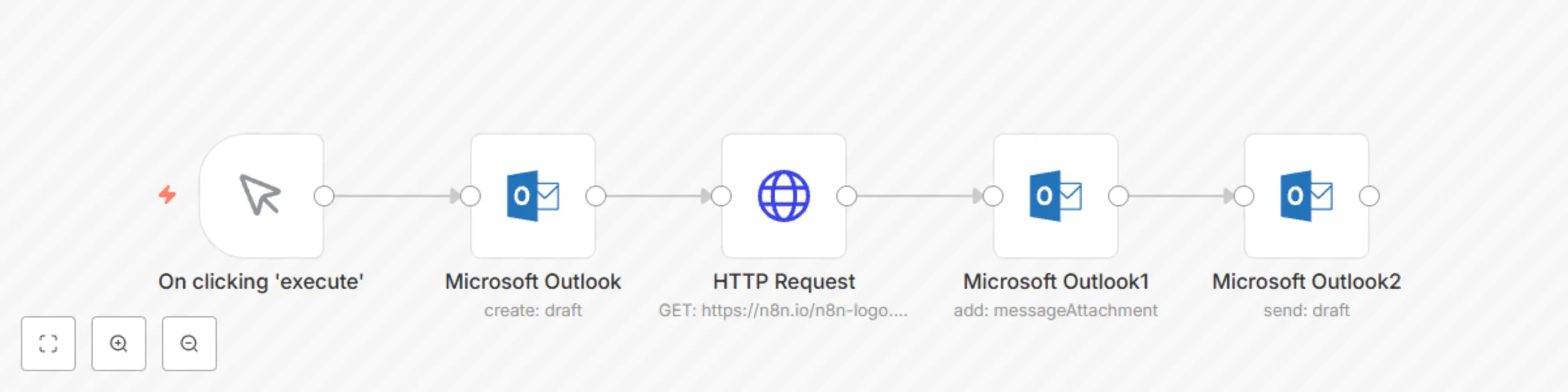
Workflow preview


 Early Deal
DISCOUNT 20%

Important notice
This workflow is provided as-is. Please review and test before using in production.
Overview
This workflow allows you to create, add an attachment, and send a draft using the Microsoft Outlook node.
Microsoft Outlook node: This node creates a draft message with HTML content. You can either set the content as Text or HTML. You can also add the recipients to the draft in this node.
HTTP Request node: This node fetches the logo of n8n from a URL and returns the binary data. You might want to fetch files from your machine or another email or a database. You can replace this node with the relevant node.
Microsoft Outlook1 node: This node adds the attachment that we receive from the previous node to the draft message that we created.
Microsoft Outlook2 node: This node sends the draft message to a recipient. Since we didn't mention the recipient in the Microsoft Outlook node, we add the recipient in this node. You can also enter multiple recipients.