Build a scalable AI chatbot with GPT-4 and Pipedream: Calendly, Gmail integration
Workflow preview


$20/month : Unlimited workflows
2500 executions/month

THE #1 IN WEB SCRAPING
Scrape any website without limits
HOSTINGER  Early Deal
DISCOUNT 20% Try free
Early DealDISCOUNT 20%
Self-hosted n8n
Unlimited workflows - from $4.99/mo

#1 hub for scraping, AI & automation
6000+ actors - $5 credits/mo
Important notice
This workflow is provided as-is. Please review and test before using in production.
Overview
This workflow contains community nodes that are only compatible with the self-hosted version of n8n.
This n8n workflow integrates the powerful Pipedream MCP server with AI capabilities to create a smart, extensible assistant that can interact with over 2,700 APIs and 10,000+ tools — all within a secure and modular structure.
This setup seamlessly integrates Pipedream's MCP server with n8n, enabling your AI assistant to leverage thousands of APIs and tools securely.
Benefits
- Massive Tool Access: Instantly connect 2,700+ APIs using Pipedream MCP tools — from productivity apps to custom APIs — with zero-code integration.
- Dynamic AI Agent: The use of a LangChain agent allows for flexible tool execution and contextual conversations, powered by GPT.
- Easy Customization: Simply copy your MCP tool URL into the respective
sseEndpointfield to extend the agent’s capabilities. - Scalable and Modular: Add or remove tools (like Slack, Notion, Stripe, etc.) without altering the core logic.
- Secure and Revocable: Credentials and API access can be managed directly via Pipedream’s MCP dashboard.
How It Works
- Chat Trigger: The workflow begins when a chat message is received via the
When chat message receivednode, which acts as the entry point. - AI Agent Processing: The message is passed to the
AI Agentnode, which orchestrates the interaction using the connected tools and memory. - Language Model: The
OpenAI Chat Model(GPT-4.1-mini) processes the user's input and generates responses or actions. - Memory: The
Simple Memorynode retains context from the conversation to enable coherent multi-turn interactions. - Tool Integration:
- The
CalendlyandGmailnodes (connected via Pipedream's MCP server) allow the AI to perform actions like scheduling events or sending emails. These tools use SSE (Server-Sent Events) endpoints provided by Pipedream.
- The
- Response: The AI Agent combines the model's output and tool responses to deliver a final reply to the user.
Set Up Steps
- Sign Up for Pipedream:
- Create an account on and set up your MCP server.
- Configure MCP Tools:
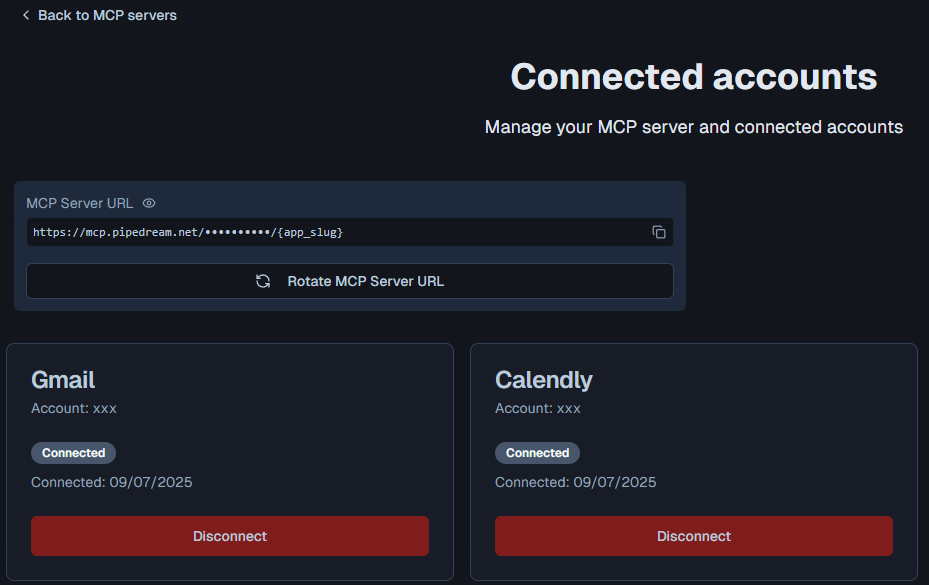
- Connect your accounts (e.g., Calendly, Gmail) in Pipedream and obtain the SSE endpoints for each tool (e.g.,
https://mcp.pipedream.net/xxx/calendly_v2).
- Connect your accounts (e.g., Calendly, Gmail) in Pipedream and obtain the SSE endpoints for each tool (e.g.,
- Update n8n Nodes:
- Replace the placeholder SSE endpoints in the
CalendlyandGmailnodes with your Pipedream MCP URLs.
- Replace the placeholder SSE endpoints in the
- OpenAI Credentials:
- Ensure the
OpenAI Chat Modelnode has valid API credentials (configured under "OpenAi account").
- Ensure the
- Activate Workflow:
- Enable the
When chat message receivednode (currently disabled) and deploy the workflow.
- Enable the
Need help customizing?
Contact me for consulting and support or add me on Linkedin.