Automated resume screening & interview scheduling with Gmail, GPT & Airtable

Workflow preview

Workflow preview
100%
Automated resume screening & interview scheduling with Gmail, GPT & Airtable preview
Open on n8n.io

Important notice

This workflow is provided as-is. Please review and test before using in production.

1. Workflow Overview

How it works The workflow detects incoming job application emails, extracts resumes, and parses them for AI analysis. It evaluates each candidate against three open roles and assigns a fit score wi...

Best for

  • HR automation workflows
  • AI Chatbot automation workflows
  • advanced n8n builders looking for reusable templates

Tools used

n8n-nodes-base.gmailtrigger, @n8n/n8n-nodes-langchain.openai, n8n-nodes-base.if, n8n-nodes-base.gmail, n8n-nodes-base.googledrive, n8n-nodes-base.extractfromfile, n8n-nodes-base.airtable, n8n-nodes-base.set

Source and attribution

This workflow is cataloged by N8N Workflows and links back to its original n8n.io source page by Avkash Kakdiya.

Original n8n.io source

1.1 Workflow description

Title
Automated resume screening & interview scheduling with Gmail, GPT & Airtable
Workflow name
Automated resume screening & interview scheduling with Gmail, GPT & Airtable

How it works

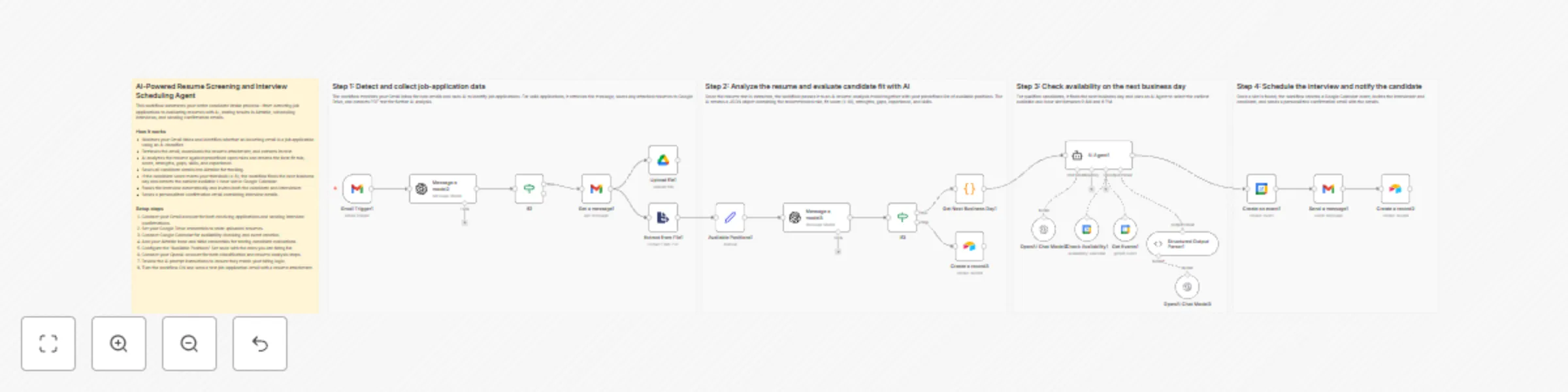
The workflow detects incoming job-application emails, extracts resumes, and parses them for AI analysis. It evaluates each candidate against three open roles and assigns a fit score with structured reasoning. Low-scoring applicants are stored for review, while strong candidates move into an automated scheduling flow. The system checks availability on the next business day, books the slot, sends a confirmation email, and records all details in Airtable.


Step-by-step

Detect and collect job-application data

  • Gmail Trigger1 – Monitors inbox for all new emails.
  • Message a model2 – Classifies whether the email is a job application.
  • If2 – Continues only when the AI result is YES.
  • Get a message1 – Fetches the full message and attachments.
  • Upload file1 – Uploads the resume to Google Drive.
  • Extract from File1 – Converts the PDF resume into text.

Analyze the resume and evaluate fit

  • Available Positions1 – Defines the three open roles.
  • Message a model3 – Produces recommended role, fit score, strengths, gaps, skills, and reasoning.
  • If3 – Routes candidates based on fit_score ≥ 8.
  • Create a record3 – Stores lower-scoring applicants in Airtable.
  • Get Next Business Day1 – Calculates the schedule window for qualified candidates.

Check availability on the next business day

  • AI Agent1 – Orchestrates availability search using calendar nodes.
  • Get Events1 – Retrieves events for the target day.
  • Check Availability1 – Evaluates free 1-hour slots.
  • OpenAI Chat Model2 – Reasoning engine for the agent.
  • Structured Output Parser1 – Returns clean JSON with start_time and end_time.
  • OpenAI Chat Model3 – Supports structured parsing.

Schedule the interview and notify the candidate

  • Create an event1 – Books the interview in Google Calendar.
  • Send a message1 – Sends an HTML confirmation email to the candidate.
  • Create a record2 – Saves shortlisted candidate and interview data in Airtable.

Why use this?

  • Removes manual screening by automating email intake and resume parsing.
  • Ensures consistent AI-based role matching and scoring.
  • Books interviews automatically using real calendar availability.
  • Keeps all applicant and scheduling data organized in Airtable.
  • Provides a fully hands-off, end-to-end hiring pipeline.

1.2 Logical Blocks

This catalog entry is organized from the workflow JSON. The node-level section below shows the executable blocks available for review before importing the template.

2. Block-by-Block Analysis

Block 1 - Gmail Trigger1

Type / Role
n8n-nodes-base.gmailTrigger - gmailTrigger
Config choices
Version 1.3

Block 2 - Message a model2

Type / Role
@n8n/n8n-nodes-langchain.openAi - openAi
Config choices
Version 1.8

Block 3 - If2

Type / Role
n8n-nodes-base.if - if
Config choices
Version 2.2

Block 4 - Get a message1

Type / Role
n8n-nodes-base.gmail - gmail
Config choices
Version 2.1

Block 5 - Upload file1

Type / Role
n8n-nodes-base.googleDrive - googleDrive
Config choices
Version 3

Block 6 - Extract from File1

Type / Role
n8n-nodes-base.extractFromFile - extractFromFile
Config choices
Version 1

Block 7 - Message a model3

Type / Role
@n8n/n8n-nodes-langchain.openAi - openAi
Config choices
Version 1.8

Block 8 - Create a record2

Type / Role
n8n-nodes-base.airtable - airtable
Config choices
Version 2.1

Block 9 - Available Positions1

Type / Role
n8n-nodes-base.set - set
Config choices
Version 3.4

Block 10 - If3

Type / Role
n8n-nodes-base.if - if
Config choices
Version 2.2

Block 11 - Create a record3

Type / Role
n8n-nodes-base.airtable - airtable
Config choices
Version 2.1

Block 12 - Get Next Business Day1

Type / Role
n8n-nodes-base.code - code
Config choices
Version 2

Block 13 - AI Agent1

Type / Role
@n8n/n8n-nodes-langchain.agent - agent
Config choices
Version 2.2

Block 14 - OpenAI Chat Model2

Type / Role
@n8n/n8n-nodes-langchain.lmChatOpenAi - lmChatOpenAi
Config choices
Version 1.2

Block 15 - Check Availability1

Type / Role
n8n-nodes-base.googleCalendarTool - googleCalendarTool
Config choices
Version 1.3

Block 16 - Create an event1

Type / Role
n8n-nodes-base.googleCalendar - googleCalendar
Config choices
Version 1.3

Block 17 - Structured Output Parser1

Type / Role
@n8n/n8n-nodes-langchain.outputParserStructured - outputParserStructured
Config choices
Version 1.3

Block 18 - Send a message1

Type / Role
n8n-nodes-base.gmail - gmail
Config choices
Version 2.1

Block 19 - OpenAI Chat Model3

Type / Role
@n8n/n8n-nodes-langchain.lmChatOpenAi - lmChatOpenAi
Config choices
Version 1.3

Block 20 - Get Events1

Type / Role
n8n-nodes-base.googleCalendarTool - googleCalendarTool
Config choices
Version 1.3

Block 21 - Sticky Note5

Type / Role
n8n-nodes-base.stickyNote - stickyNote
Config choices
Version 1

Block 22 - Sticky Note6

Type / Role
n8n-nodes-base.stickyNote - stickyNote
Config choices
Version 1

Block 23 - Sticky Note7

Type / Role
n8n-nodes-base.stickyNote - stickyNote
Config choices
Version 1

Block 24 - Sticky Note8

Type / Role
n8n-nodes-base.stickyNote - stickyNote
Config choices
Version 1

Showing the first 24 of 25 workflow blocks. Download the JSON for the full node graph.

3. Summary Table

Workflow Automated resume screening & interview scheduling with Gmail, GPT & Airtable
Complexity advanced
Nodes 25
Categories HR, AI Chatbot
Author Avkash Kakdiya
Published 18 Dec 2025

4. Reproducing the Workflow from Scratch

  1. 1. Download the workflow JSON

    Use the JSON export at /data/workflows/11912/11912.json as the source template for this automation.

  2. 2. Import the template into n8n

    Open n8n, import the downloaded JSON, and review each node before activating the workflow.

  3. 3. Configure credentials and variables

    Replace placeholder credentials, API keys, webhook URLs, account IDs, and environment-specific values with your own settings.

  4. 4. Test with sample data

    Run the workflow manually or in a staging workspace, inspect node output, and confirm downstream systems receive the expected data.

  5. 5. Activate and monitor

    Enable the workflow only after testing, then monitor executions, errors, and rate limits during the first production runs.

5. General Notes & Resources

Review imported nodes carefully before activation. This catalog entry is intended to help you inspect the workflow structure, understand required services, and find related templates faster.

Node names, credentials, schedules, webhook paths, and external service limits may need adjustment for your workspace.

Frequently asked questions

What does Automated resume screening & interview scheduling with Gmail, GPT & Airtable do?

How it works The workflow detects incoming job application emails, extracts resumes, and parses them for AI analysis. It evaluates each candidate against three open roles and assigns a fit score wi...

What do I need before importing this workflow?

Review the workflow JSON, configure any required credentials in n8n, and test the automation in a safe workspace before using it in production.

Can I customize this workflow?

Yes. Use the block-by-block analysis and the downloadable JSON to inspect each node, then adjust credentials, prompts, schedules, filters, or destinations for your HR, AI Chatbot use case.