Block 1 - Schedule Trigger
- Type / Role
- n8n-nodes-base.scheduleTrigger - scheduleTrigger
- Config choices
- Version 1.2


 Early Deal
This workflow is provided as-is. Please review and test before using in production.
This workflow contains community nodes that are only compatible with the self hosted version of n8n. Brief Overview This automation template helps you track the latest job...
n8n-nodes-base.scheduletrigger, n8n-nodes-scrapeless.scrapeless, n8n-nodes-base.code, n8n-nodes-base.googlesheets, n8n-nodes-base.stickynote
This workflow is cataloged by N8N Workflows and links back to its original n8n.io source page by scrapeless official.
Original n8n.io sourceThis workflow contains community nodes that are only compatible with the self-hosted version of n8n.
This automation template helps you track the latest job listings from the Y Combinator Jobs page.
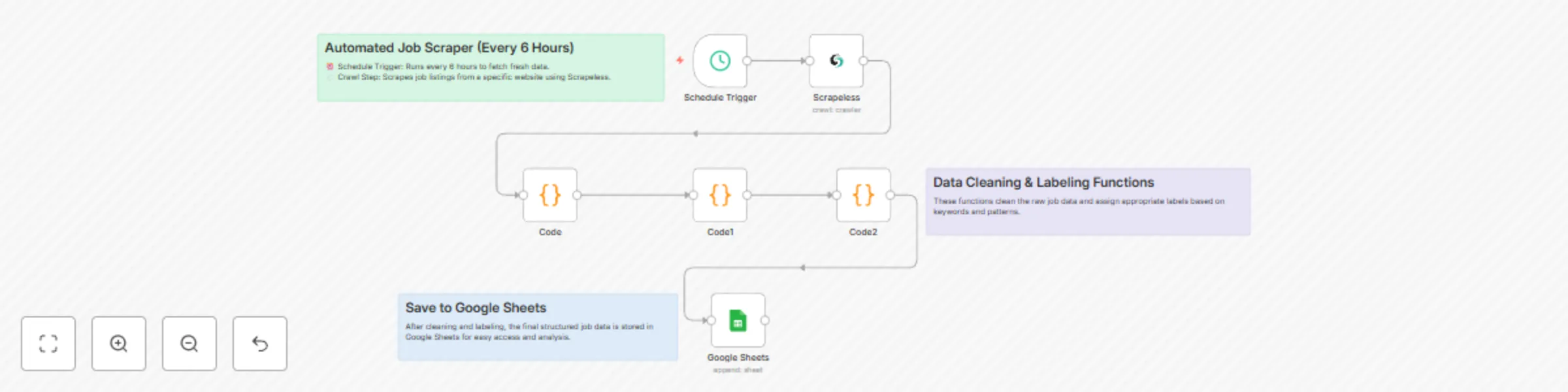
By using Scrapeless to scrape job listings, n8n to orchestrate the workflow, and Google Sheets to store the results, you can build a zero-code job tracking solution that runs automatically every 6 hours.
Trigger on a Schedule: Every 6 hours, the workflow kicks off automatically.
Scrape Job Listings: Scrapeless crawls the Y Combinator Jobs page and returns structured Markdown data.
Extract & Parse Content: JavaScript nodes process the Markdown to extract job titles and links.
Flatten Data: Each job becomes a single row with its title and link.
Save to Google Sheets: New job listings are appended to your Google Sheet for easy viewing and sharing.
No-code, automated job listing scraper.
Scrapes and structures the latest Y Combinator job posts.
Saves data directly to Google Sheets.
Easy to schedule and run without manual effort.
Extensible: Add Telegram, Slack, or email notifications easily in n8n.
Log in to the Scrapeless Dashboard
Then click "Setting" on the left -> select "API Key Management" -> click "Create API Key". Finally, click the API Key you created to copy it.
n8n Instance: Self-hosted or n8n.cloud account.
Google Account: For Google Sheets API access.
Target Site: This template is designed for the Y Combinator Jobs page but can be modified for other job boards.
Deploy n8n on your preferred platform.
Import this workflow JSON file into your n8n workspace.
Create and add your Scrapeless API Key in n8n’s credential manager.
Connect your Google Sheets account in n8n.
Update the target Google Sheet document URL and sheet name.
This automated job finder agent is ideal for:
| Industry / Role | Use Case |
|---|---|
| Job Seekers | Automatically track newly posted startup jobs without manually visiting job boards. |
| Recruitment Agencies | Monitor YC job postings and build a candidate-job matching system. |
| Startup Founders / CTOs | Stay aware of which startups are hiring, for networking and market insights. |
| Tech Media & Bloggers | Aggregate new job listings for newsletters, blogs, or social media sharing. |
| HR & Talent Acquisition Teams | Monitor competitors’ hiring activity. |
| Automation Enthusiasts | Example use case for learning web scraping + automation + data storage. |
This catalog entry is organized from the workflow JSON. The node-level section below shows the executable blocks available for review before importing the template.
| Workflow | Automated job finder agent |
|---|---|
| Complexity | intermediate |
| Nodes | 9 |
| Categories | HR |
| Author | scrapeless official |
| Published | 07 Jul 2025 |
Use the JSON export at /data/workflows/5737/5737.json as the source template for this automation.
Open n8n, import the downloaded JSON, and review each node before activating the workflow.
Replace placeholder credentials, API keys, webhook URLs, account IDs, and environment-specific values with your own settings.
Run the workflow manually or in a staging workspace, inspect node output, and confirm downstream systems receive the expected data.
Enable the workflow only after testing, then monitor executions, errors, and rate limits during the first production runs.
Review imported nodes carefully before activation. This catalog entry is intended to help you inspect the workflow structure, understand required services, and find related templates faster.
Node names, credentials, schedules, webhook paths, and external service limits may need adjustment for your workspace.
This workflow contains community nodes that are only compatible with the self hosted version of n8n. Brief Overview This automation template helps you track the latest job...
Review the workflow JSON, configure any required credentials in n8n, and test the automation in a safe workspace before using it in production.
Yes. Use the block-by-block analysis and the downloadable JSON to inspect each node, then adjust credentials, prompts, schedules, filters, or destinations for your HR use case.