S

scrapeless official

8
Workflows

Workflows by scrapeless official

Workflow preview: AI-powered research assistant with Linear, Scrapeless, and Claude
Free advanced

AI-powered research assistant with Linear, Scrapeless, and Claude

![image.png](fileId:1814) ## Brief Overview This workflow integrates Linear, Scrapeless, and Claude AI to create an AI research assistant that can respond to natural language commands and automatically perform market research, trend analysis, data extraction, and intelligent analysis. Simply enter commands such as /search, /trends, /crawl in the Linear task, and the system will automatically perform search, crawling, or trend analysis operations, and return Claude AI's analysis results to Linear in the form of comments. --- ## How It Works 1. **Trigger**: A user creates or updates an issue in Linear and enters a specific command (e.g. /search competitor analysis). 2. **n8n Webhook**: Listens to Linear events and triggers automated processes. 3. **Command identification**: Determines the type of command entered by the user through the Switch node (search/trends/unlock/scrape/crawl). 4. **Data extraction**: Calls the Scrapeless API to perform the corresponding data crawling task. 5. **Data cleaning and aggregation**: Use Code Node to unify the structure of the data returned by Scrapeless. 6. **Claude AI analysis**: Claude receives structured data and generates summaries, insights, and recommendations. 7. **Result writing**: Writes the analysis results to the original issue as comments through the Linear API. --- ## Features **Multiple commands supported** - /search: Google SERP data query - /trends: Google Trends trend analysis - /unlock: Unlock protected web content (JS rendering) - /scrape: Single page crawling - /crawl: Whole site multi-page crawling **Claude AI intelligent analysis** - Automatically structure Scrapeless data - Generate executable suggestions and trend insights - Format optimization to adapt to Linear comment format **Complete automation process** - Codeless process management based on n8n - Multi-channel parallel logic distribution + data standardization processing - Support custom API Key, regional language settings and other parameters --- ## Requirements - **Scrapeless API Key**: Scrapeless Service request credentials. - [Log in](https://app.scrapeless.com/passport/login?utm_source=github&utm_medium=n8n-integration&utm_campaign=ai-powered-research-assistant) to the Scrapeless Dashboard - Then click "**Setting**" on the left -> select "**API Key Management**" -> click "**Create API Key**". Finally, click the API Key you created to copy it. ![image.png](fileId:1813) - **n8n Instance**: Self-hosted or n8n.cloud account. - **Claude AI**: Anthropic API Key (Claude Sonnet 3.7 model recommended) --- ## Installation 1. Log in to Linear and get a Personal API Token 2. Log in to n8n Cloud or a local instance 3. Import the n8n workflow JSON file provided by Scrapeless 4. Configure the following environment variables and credentials: - Linear API Token - Scrapeless API Token - Claude API Key 5. Configure the Webhook URL and bind to the Linear Webhook settings page --- ## Usage This automated job finder agent is ideal for: | **Industry / Role** | **Use Case** | | --------------------------------- | -------------------------------------------------------------------------------------------------- | | **SaaS / B2B Software** | | | Market Research Teams | Analyze competitor pricing pages using /unlock, and feature pages via /scrape. | | Content & SEO | Discover trending keywords and SERP data via /search and /trends to guide content topics. | | Product Managers | Use /crawl to explore product documentation across competitor sites for feature benchmarking. | | **AI & Data-Driven Teams** | | | AI Application Developers | Automate info extraction + LLM summarization for building intelligent research agents. | | Data Analysts | Aggregate structured insights at scale using /crawl + Claude summarization. | | Automation Engineers | Integrate command workflows (e.g., /scrape, /search) into tools like Linear to boost productivity. | | **E-commerce / DTC Brands** | | | Market & Competitive Analysts | Monitor competitor sites, pricing, and discounts with /unlock and /scrape. | | SEO & Content Teams | Track keyword trends and popular queries via /search and /trends. | | **Investment / Consulting / VC** | | | Investment Analysts | Crawl startup product docs, guides, and support pages via /crawl for due diligence. | | Consulting Teams | Combine SERP and trend data (/search, /trends) for fast market snapshots. | | **Media / Intelligence Research** | | | Journalists & Editors | Extract forum/news content from platforms like HN or Reddit using /scrape. | | Public Opinion Analysts | Monitor multi-source keyword trends and sentiment signals to support real-time insights. | --- ## Output ![image.png](fileId:1815)

s
scrapeless official
Market Research
21 Jul 2025
609
0
Workflow preview: Generate SEO-optimized blog content with Gemini, Scrapeless and Pinecone RAG
Free advanced

Generate SEO-optimized blog content with Gemini, Scrapeless and Pinecone RAG

*This workflow contains community nodes that are only compatible with the self-hosted version of n8n.* ## How it works This advanced automation builds a **fully autonomous SEO blog writer** using **n8n**, **Scrapeless**, **LLMs**, and **Pinecone vector database**. It’s powered by a Retrieval-Augmented Generation (RAG) system that collects high-performing blog content, stores it in a vector store, and then generates new blog posts based on that knowledge—endlessly. ## Part 1: Build a Knowledge Base from Popular Blogs - **Scrape existing articles** from a well-established writer (in this case, Mark Manson) using the Scrapeless node. - **Extract content from blog pages** and store it in **Pinecone**, a powerful vector database that supports similarity search. - **Use Gemini Embedding 001** or any other supported embedding model to encode blog content into vectors. - **Result**: You’ll have a searchable vector store of expert-level content, ready to be used for content generation and intelligent search. ## Part 2: SERP Analysis & AI Blog Generation - Use **Scrapeless' SERP node** to fetch search results based on your keyword and search intent. - Send the results to an **LLM** (like Gemini, OpenRouter, or OpenAI) to generate a **keyword analysis report** in Markdown → then converted to HTML. - Extract **long-tail keywords**, **search intent insights**, and **content angles** from this report. - Feed everything into another LLM with access to your **Pinecone-stored knowledge base**, and generate a **fully SEO-optimized blog post**. ## Set up steps ### Prerequisites - [**Scrapeless API key**](https://scrapeless.com/?utm_source=n8n&utm_campaign=ai-powered-blog-writer) ![image.png](fileId:1757) - [Pinecone account and index setup](https://www.pinecone.io/) - An embedding model (Gemini, OpenAI, etc.) - n8n instance with **Community Node: `n8n-nodes-scrapeless`** installed ### Credential Configuration - Add your Scrapeless and Pinecone credentials in n8n under the "Credentials" tab - Choose embedding dimensions according to the model you use (e.g., 768 for Gemini Embedding 001) ## Key Highlights - **Clones a real content creator**: Replicates knowledge and writing style from top-performing blog authors. - **Auto-scrapes hundreds of blog posts** without being blocked. - **Stores expert content** in a vector DB to build a reusable knowledge base. - **Performs real-time SERP analysis** using Scrapeless to fetch and analyze search data. - **Generates SEO blog drafts** using RAG with detailed keyword intelligence. - **Output includes**: blog title, HTML summary report, long-tail keywords, and AI-written article body. ## RAG + SEO: The Future of Content Creation This template combines: - **AI reasoning** from large language models - **Reliable data scraping** from Scrapeless - **Scalable storage** via Pinecone vector DB - **Flexible orchestration** using n8n nodes This is **not just an automation**—it’s a **full-stack SEO content machine** that enables you to: - Build a domain-specific knowledge base - Run intelligent keyword research - Generate traffic-ready content on autopilot ## 💡 Use Cases - SaaS content teams cloning competitor success - Affiliate marketers scaling high-traffic blog production - Agencies offering automated SEO content services - AI researchers building personal knowledge bots - Writers automating first-draft generation with real-world tone

s
scrapeless official
Content Creation
16 Jul 2025
1145
0
Workflow preview: Automated SEO content engine with Claude AI, Scrapeless, and competitor analysis
Free advanced

Automated SEO content engine with Claude AI, Scrapeless, and competitor analysis

*This workflow contains community nodes that are only compatible with the self-hosted version of n8n.* ### How it works This n8n workflow helps you build a fully automated **SEO content engine** using [Scrapeless](https://www.scrapeless.com/?utm_source=n8n&utm_campaign=seo-engine) and AI. It’s designed for teams running international websites—such as SaaS products, e-commerce platforms, or content-driven businesses—who want to grow **targeted search traffic** through **high-conversion content**, without relying on manual research or hit-or-miss topics. The flow runs in **three key phases**: #### 🔍 Phase 1: Topic Discovery Automatically find **high-potential long-tail keywords** based on a seed keyword using Google Trends via Scrapeless. Each keyword is analyzed for trend strength and categorized by priority (P0–P3) with the help of an AI agent. #### 🧠 Phase 2: Competitor Research For each P0–P2 keyword, the flow performs a Google Search (via [Deep SerpAPI](https://www.scrapeless.com/en/product/deep-serp-api?utm_source=n8n&utm_campaign=seo-engine)) and extracts the top 3 organic results. Scrapeless then crawls each result to extract full article content in clean Markdown. This gives you a structured, comparable view of how competitors are writing about each topic. #### ✍️ Phase 3: AI Article Generation Using AI (OpenAI or other LLM), the workflow generates a **complete SEO article draft**, including: - SEO title - Slug - Meta description - Trend-based strategy summary - Structured JSON-based article body with H2/H3 blocks Finally, the article is stored in **Supabase** (or any other supported DB), making it ready for review, API-based publishing, or further automation. ### Set up steps This flow requires intermediate familiarity with n8n and API key setup. Full configuration may take **30–60 minutes**. #### ✅ Prerequisites - **Scrapeless** account (for Google Trends and web crawling) - **LLM provider** (e.g. OpenAI or Claude) - **Supabase** or **Google Sheets** (to store keywords & article output) #### 🧩 Required Credentials in n8n - `Scrapeless API Key` - `OpenAI (or other LLM)` credentials - `Supabase` or `Google Sheets` credentials --- #### 🔧 Setup Instructions (Simplified) 1. **Input Seed Keyword** Edit the “Set Seed Keyword” node to define your niche, e.g., `"project management"`. 2. **Google Trends via Scrapeless** Use Scrapeless to retrieve “related queries” and their interest-over-time data. 3. **Trend Analysis with AI Agent** AI evaluates each keyword's trend strength and assigns a priority (P0–P3). 4. **Filter & Store Keyword Data** Group and sort keywords by priority, then store them in Google Sheets. 5. **Competitor Research** Use Deep SerpAPI to get top 3 Google results. Crawl each using Scrapeless. 6. **AI Content Generation** Feed competitor content + trend data into AI. Output a structured SEO blog article. 7. **Store Final Article** Save full article JSON (title, meta, slug, content) to Supabase.

s
scrapeless official
Content Creation
14 Jul 2025
1294
0
Workflow preview: Automate real estate listing scraper with Scrapeless and Google Sheets
Free intermediate

Automate real estate listing scraper with Scrapeless and Google Sheets

![image.png](fileId:1740) ## Brief Overview This automation template helps you track the latest real estate listings from the LoopNet platform. By using **Scrapeless** to scrape property listings, **n8n** to orchestrate the workflow, and **Google Sheets** to store the results, you can build a **real estate data pipeline** that runs automatically on a weekly schedule. --- ## How It Works * **Trigger on a Schedule:** The workflow runs automatically every week (can be adjusted to every 6 hours, daily, etc.). * **Scrape Property Listings:** Scrapeless crawls the LoopNet real estate website and returns structured Markdown data. * **Extract & Parse Content:** JavaScript nodes use regex to parse property titles, links, sizes, year built from Markdown. * **Flatten Data:** Each property listing becomes a single row with structured fields. * **Save to Google Sheets:** Property data is appended to your Google Sheet for easy analysis, sharing, and reporting. --- ## Features * No-code, automated real estate listing scraper. * Scrapes and structures the latest commercial property listings (for sale or lease). * Saves structured listing data directly to Google Sheets. * Fully automated, scheduled scraping—no manual scraping is required. * Extensible: Add filters, deduplication, Slack/Email notifications, or multi-city scraping. --- ## Requirements * **Scrapeless API Key:** * [Sign up](https://app.scrapeless.com/passport/login?utm_source=github&utm_medium=n8n-integration&utm_campaign=automated-real-estate-listing-scraper) on the Scrapeless Dashboard. * Go to `Settings → API Key Management → Create API Key`, then copy the generated key. ![Scrapeless API Key](fileId:1739) * **n8n Instance:** Self-hosted or n8n.cloud account. * **Google Account:** For Google Sheets API access. * **Target Site:** This template is configured for LoopNet real estate listings but can be adapted for other property platforms like Crexi. --- ## Installation 1. Deploy n8n on your preferred platform. 2. Install the Scrapeless node from the community marketplace. 3. Import this workflow JSON file into your n8n workspace. 4. Create and add your Scrapeless API Key in n8n’s credential manager. 5. Connect your Google Sheets account in n8n. 6. Update the target LoopNet URL and Google Sheet details. --- ## Usage This automated real estate scraper is ideal for: | Industry / Role | Use Case | | ---------------------- | ----------------------------------------------------------------- | | Real Estate Agencies | Monitor new commercial properties and streamline lead generation. | | Market Research Teams | Track market dynamics and property availability in real-time. | | BI/Data Analysts | Automate data collection for dashboards and market insights. | | Investors | Keep tabs on the latest commercial property opportunities. | | Automation Enthusiasts | Example use case for learning web scraping + automation. | --- ## Output Example ![image.png](fileId:1741)

s
scrapeless official
Market Research
11 Jul 2025
2053
0
Workflow preview: Automated job finder agent
Free intermediate

Automated job finder agent

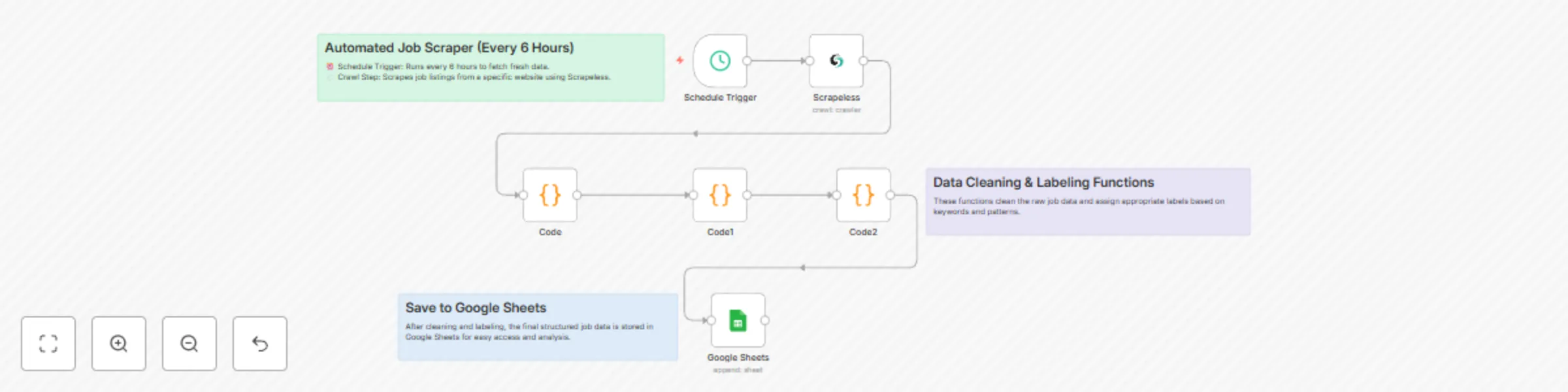
*This workflow contains community nodes that are only compatible with the self-hosted version of n8n.* ![image.png](fileId:1689) ## Brief Overview This automation template helps you track the latest job listings from the Y Combinator Jobs page. By using Scrapeless to scrape job listings, n8n to orchestrate the workflow, and Google Sheets to store the results, you can build a zero-code job tracking solution that runs automatically every 6 hours. ## How It Works 1. Trigger on a Schedule: Every 6 hours, the workflow kicks off automatically. 2. Scrape Job Listings: Scrapeless crawls the Y Combinator Jobs page and returns structured Markdown data. 3. Extract & Parse Content: JavaScript nodes process the Markdown to extract job titles and links. 4. Flatten Data: Each job becomes a single row with its title and link. 5. Save to Google Sheets: New job listings are appended to your Google Sheet for easy viewing and sharing. ## Features 1. No-code, automated job listing scraper. 2. Scrapes and structures the latest Y Combinator job posts. 3. Saves data directly to Google Sheets. 4. Easy to schedule and run without manual effort. 5. Extensible: Add Telegram, Slack, or email notifications easily in n8n. ## Requirements 1. Scrapeless API Key: Scrapeless Service request credentials. - [Log in](https://app.scrapeless.com/passport/login?utm_source=n8n-official&utm_medium=n8n-integration&utm_campaign=job-finder-agent) to the Scrapeless Dashboard - Then click "Setting" on the left -> select "API Key Management" -> click "Create API Key". Finally, click the API Key you created to copy it. ![image.png](fileId:1687) 2. n8n Instance: Self-hosted or n8n.cloud account. 3. Google Account: For Google Sheets API access. 4. Target Site: This template is designed for the [Y Combinator Jobs page](https://www.ycombinator.com/jobs) but can be modified for other job boards. ## Installation 1. Deploy n8n on your preferred platform. 2. Import this workflow JSON file into your n8n workspace. 3. Create and add your Scrapeless API Key in n8n’s credential manager. 4. Connect your Google Sheets account in n8n. 5. Update the target Google Sheet document URL and sheet name. ## Usage This automated job finder agent is ideal for: | Industry / Role | Use Case | |-------------------------------|--------------------------------------------------------------------------------------------| | Job Seekers | Automatically track newly posted startup jobs without manually visiting job boards. | | Recruitment Agencies | Monitor YC job postings and build a candidate-job matching system. | | Startup Founders / CTOs | Stay aware of which startups are hiring, for networking and market insights. | | Tech Media & Bloggers | Aggregate new job listings for newsletters, blogs, or social media sharing. | | HR & Talent Acquisition Teams | Monitor competitors’ hiring activity. | | Automation Enthusiasts | Example use case for learning web scraping + automation + data storage. | ## Output ![image.png](fileId:1688)

s
scrapeless official
HR
7 Jul 2025
1256
0
Workflow preview: Automate lead scraping with Scrapeless to Google Sheets with data cleaning
Free intermediate

Automate lead scraping with Scrapeless to Google Sheets with data cleaning

*This workflow contains community nodes that are only compatible with the self-hosted version of n8n.* ## Prerequisites - A [n8n](https://n8n.io) account (free trial available) - A [Scrapeless](https://app.scrapeless.com/passport/login?utm_source=official&utm_medium=n8n&utm_campaign=automate-lead-scraping) account and API key ![image.png](fileId:1587) - A Google account to access Google Sheets --- ## 🛠️ Step-by-Step Setup ### 1. Create a New Workflow in n8n Start by creating a new workflow in n8n. Add a **Manual Trigger** node to begin. --- ### 2. Add the Scrapeless Node - Add the **Scrapeless** node and choose the `Scrape` operation - Paste in your API key - Set your target website URL - Execute the node to fetch data and verify results --- ### 3. Clean Up the Data Add a **Code** node to clean and format the scraped data. Focus on extracting key fields like: - Title - Description - URL --- ### 4. Set Up Google Sheets - Create a new spreadsheet in Google Sheets - Name the sheet (e.g., `Business Leads`) - Add columns like `Title`, `Description`, and `URL` --- ### 5. Connect Google Sheets in n8n - Add the **Google Sheets** node - Choose the operation `Append or update row` - Select the spreadsheet and worksheet - Manually map each column to the cleaned data fields --- ### 6. Run and Test the Workflow - Click "Execute Workflow" in n8n - Check your Google Sheet to confirm the data is properly inserted --- ## Results With this automated workflow, you can continuously extract business lead data, clean it, and push it directly into a spreadsheet — perfect for outbound sales, lead lists, or internal analytics. --- ## How to Use ⚙️ Open the Variables node and plug in your Scrapeless credentials. 📄 Confirm the Google Sheets node points to your desired spreadsheet. ▶️ Run the workflow manually from the Start node. ## Perfect For: - Sales teams doing outbound prospecting - Marketers building lead lists - Agencies running data aggregation tasks

s
scrapeless official
Lead Generation
26 Jun 2025
564
0
Workflow preview: Intelligent B2B lead generation workflow using Scrapeless and Claude
Free intermediate

Intelligent B2B lead generation workflow using Scrapeless and Claude

> ⚠️ **Disclaimer**: This workflow uses [Scrapeless](https://scrapeless.com?utm_source=n8n&utm_campaign=b2b-leads) and Claude AI via *community nodes*, which require **n8n self-hosted** to work properly. --- ## 🔁 How It Works This intelligent B2B lead generation workflow combines search automation, website crawling, AI analysis, and multi-channel output: 1. It starts by using **Scrapeless’s Deep Serp API** to find company websites from targeted Google Search queries. 2. Each result is then **individually crawled** using Scrapeless's **Crawler** module, retrieving key business information from pages like `/about`, `/contact`, `/services`. 3. The raw web content is processed via a **Code node** to clean, extract, and prepare structured data. 4. The cleaned data is passed to **Claude Sonnet (Anthropic)** which analyzes and qualifies the lead based on content richness, contact data, and relevance. 5. A **filter step** ensures only high-quality leads (e.g. lead score ≥ 6) are kept. 6. Sent via **Discord webhook** for real-time notification (can be replaced with Slack, email, or CRM tools). > 📌 The result is a fully automated system that finds, qualifies, and organizes B2B leads with high efficiency and minimal manual input. --- ## ✅ Pre-Conditions Before using this workflow, make sure you have: - An **n8n self-hosted** instance - A **Scrapeless** account and API key ([get it here](https://app.scrapeless.com/passport/login)) - An **Anthropic Claude API key** - A configured **Discord webhook URL** (or alternative notification service) ## ⚙️ Workflow Overview Manual Trigger → Scrapeless Google Search → Item Lists → Scrapeless Crawler → Code (Data Cleaning) → Claude Sonnet → Code (Response Parser) → Filter → Discord Notification ## 🔨 Step-by-Step Breakdown 1. **Manual Trigger** – For testing purposes (can be replaced with Cron or Webhook) 2. **Scrapeless Google Search** – Queries target B2B topics via Scrapeless’s Deep SERP API 3. **Item Lists** – Splits search results into individual items 4. **Scrapeless Crawler** – Visits each company domain and scrapes structured content 5. **Code Node (Data Cleaner)** – Extracts and formats content for LLM input 6. **Claude Sonnet (via HTTP Request)** – Evaluates lead quality, relevance, and contact info 7. **Code Node (Parser)** – Parses Claude’s JSON response 8. **IF Filter** – Filters leads based on score threshold 9. **Discord Webhook** – Sends formatted message with company info --- ## 🧩 Customization Guidance You can easily adjust the workflow to match your needs: - **Lead Criteria**: Modify the Claude prompt and scoring logic in the Code node - **Output Channels**: Replace the Discord webhook with Slack, Email, Airtable, or any CRM node - **Search Topics**: Change your query in the Scrapeless SERP node to find leads in different niches or countries - **Scoring Threshold**: Adjust the filter logic (`lead_score >= 6`) to match your quality tolerance --- ## 🧪 How to Use 1. Insert your Scrapeless and Claude API credentials in the designated nodes 2. Replace or configure the Discord webhook (or alternative outputs) 3. Run the workflow manually (or schedule it) 4. View qualified leads directly in your chosen notification channel --- ## 📦 Output Example Each qualified lead includes: - 🏢 Company Name - 🌐 Website - ✉️ Email(s) - 📞 Phone(s) - 📍 Location - 📈 Lead Score - 📝 Summary of relevant content --- ## 👥 Ideal Users This workflow is perfect for: - **AI SaaS companies** targeting mid-market & enterprise leads - **Marketing agencies** looking for B2B-qualified leads - **Automation consultants** building scraping solutions - **No-code developers** working with n8n, Make, Pipedream - **Sales teams** needing enriched prospecting data

s
scrapeless official
Lead Generation
25 Jun 2025
372
0
Workflow preview: Create AI-ready vector datasets from web content with Claude, Ollama & Qdrant
Free advanced

Create AI-ready vector datasets from web content with Claude, Ollama & Qdrant

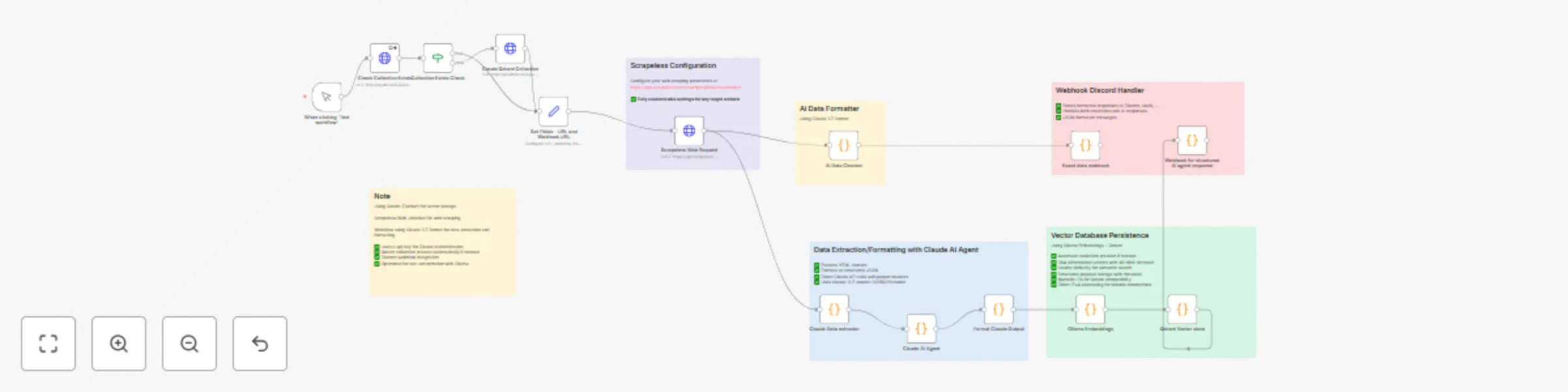
# AI-Powered Web Data Pipeline with n8n ![f70ca7d4da7544ce92333c57c5e62954.png](fileId:1324) ## How It Works This `n8n` workflow builds an **AI-powered web data pipeline** that automates the entire process of: - **Extraction** - **Structuring** - **Vectorization** - **Storage** It integrates multiple advanced tools to transform messy web pages into clean, searchable vector databases. ### Integrated Tools - **Scrapeless** Bypasses JavaScript-heavy websites and anti-bot protections to reliably extract HTML content. - **Claude AI** Uses LLMs to analyze unstructured HTML and generate clean, structured JSON data. - **Ollama Embeddings** Generates local vector embeddings from structured text using the `all-minilm` model. - **Qdrant Vector DB** Stores semantic vector data for fast and meaningful search capabilities. - **Webhook Notifications** Sends real-time updates when workflows complete or errors occur. From messy webpages to structured vector data — this pipeline is perfect for building intelligent agents, knowledge bases, or research automation tools. --- ## Setup Steps ### 1. Install n8n > Requires Node.js v18 / v20 / v22 ``` npm install -g n8n n8n ``` After installation, access the n8n interface via: **URL:** [http://localhost:5678](http://localhost:5678) --- ### 2. Set Up Scrapeless 1. Register at: [Scrapeless](https://app.scrapeless.com/passport/login?utm_source=n8n&&utm_campaign=webdatapipe) 2. Copy your **API token** 3. Paste the token into the `HTTP Request` node labeled **"Scrapeless Web Request"** --- ### 3. Set Up Claude API (Anthropic) 1. Sign up at Anthropic Console 2. Generate your **Claude API key** 3. Add the API key to the following nodes: - `Claude Extractor` - `AI Data Checker` - `Claude AI Agent` --- ### 4. Install and Run Ollama #### macOS ``` brew install ollama ``` #### Linux ``` curl -fsSL https://ollama.com/install.sh | sh ``` **Windows** Download the installer from: https://ollama.com #### Start Ollama Server ``` ollama serve ``` #### Pull Embedding Model ``` ollama pull all-minilm ``` ### 5. Install Qdrant (via Docker) ``` docker pull qdrant/qdrant docker run -d \ --name qdrant-server \ -p 6333:6333 -p 6334:6334 \ -v $(pwd)/qdrant_storage:/qdrant/storage \ qdrant/qdrant ``` Test if Qdrant is running: ``` curl http://localhost:6333/healthz ``` ### 6. Configure the n8n Workflow - Modify the Trigger (Manual or Scheduled) - Input your Target URLs and Collection Name in the designated nodes - Paste all required API Tokens / Keys into their corresponding nodes - Ensure your Qdrant and Ollama services are running ## Ideal Use Cases - Custom AI Chatbots - Private Search Engines - Research Tools - Internal Knowledge Bases - Content Monitoring Pipelines

s
scrapeless official
Document Extraction
19 May 2025
1316
0