Block 1 - Section: Trigger
- Type / Role
- n8n-nodes-base.stickyNote - stickyNote
- Config choices
- Version 1


 Early Deal
This workflow is provided as-is. Please review and test before using in production.
Description: Automate your developer onboarding quality checks with this n8n workflow template. Whenever a new onboarding task is created in ClickUp, the workflow logs it to Google Sheets, evaluate...
n8n-nodes-base.stickynote, n8n-nodes-base.clickuptrigger, n8n-nodes-base.set, n8n-nodes-base.googlesheets, @n8n/n8n-nodes-langchain.agent, @n8n/n8n-nodes-langchain.lmchatazureopenai, n8n-nodes-base.code, n8n-nodes-base.if
This workflow is cataloged by N8N Workflows and links back to its original n8n.io source page by Rahul Joshi.
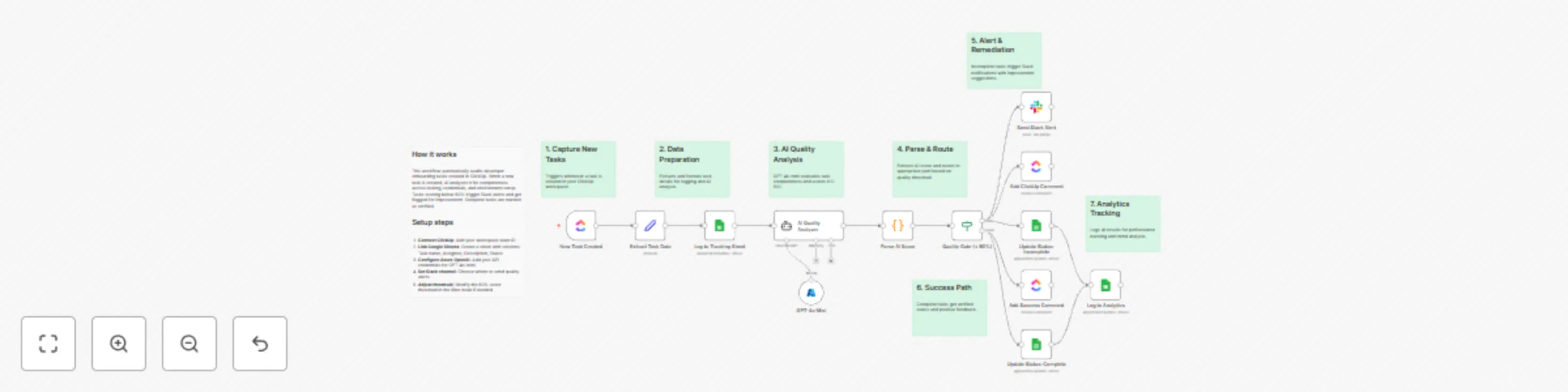
Original n8n.io sourceAutomate your developer onboarding quality checks with this n8n workflow template. Whenever a new onboarding task is created in ClickUp, the workflow logs it to Google Sheets, evaluates its completeness using Azure OpenAI GPT-4o-mini, and alerts your team in Slack if critical details are missing. Perfect for engineering managers, DevOps leads, and HR tech teams who want to maintain consistent onboarding quality and ensure every developer gets the tools, credentials, and environment setup they need — without manual review.
⚡ Step 1: Auto-Trigger on ClickUp Task Creation Listens for new task creation events (taskCreated) in your ClickUp workspace to initiate the audit automatically.
📊 Step 2: Log Task Details to Google Sheets Records essential task data — task name, assignee, and description — creating a central audit trail for all onboarding activities.
🧠 Step 3: AI Completeness Analysis (GPT-4o-mini) Uses Azure OpenAI GPT-4o-mini to evaluate each onboarding task for completeness across key areas:
score is below 80. Incomplete tasks automatically move to the alert stage for review.
📢 Step 5: Alert Team via Slack Sends a structured Slack message summarizing the issue, including:
🤖 AI-driven task completeness scoring 📊 Automatic task logging for audit visibility ⚙️ Smart quality gate (score threshold < 80) 📢 Instant Slack alerts for incomplete tasks 🔄 End-to-end automation from ClickUp to Slack
🎓 Audit onboarding checklists for new developers 🧩 Standardize environment setup and credential handover 🚨 Identify missing steps before onboarding deadlines 📈 Maintain onboarding consistency across teams
✅ Ensures every new developer receives a full, ready-to-start setup ✅ Eliminates manual checklist verification ✅ Improves onboarding quality and compliance tracking ✅ Creates a transparent audit trail for continuous improvement
This catalog entry is organized from the workflow JSON. The node-level section below shows the executable blocks available for review before importing the template.
| Workflow | Automated developer onboarding audit with ClickUp, GPT-4o-mini, and Slack alerts |
|---|---|
| Complexity | advanced |
| Nodes | 21 |
| Categories | HR, AI Summarization |
| Author | Rahul Joshi |
| Published | 30 Oct 2025 |
Use the JSON export at /data/workflows/10334/10334.json as the source template for this automation.
Open n8n, import the downloaded JSON, and review each node before activating the workflow.
Replace placeholder credentials, API keys, webhook URLs, account IDs, and environment-specific values with your own settings.
Run the workflow manually or in a staging workspace, inspect node output, and confirm downstream systems receive the expected data.
Enable the workflow only after testing, then monitor executions, errors, and rate limits during the first production runs.
Review imported nodes carefully before activation. This catalog entry is intended to help you inspect the workflow structure, understand required services, and find related templates faster.
Node names, credentials, schedules, webhook paths, and external service limits may need adjustment for your workspace.
Description: Automate your developer onboarding quality checks with this n8n workflow template. Whenever a new onboarding task is created in ClickUp, the workflow logs it to Google Sheets, evaluate...
Review the workflow JSON, configure any required credentials in n8n, and test the automation in a safe workspace before using it in production.
Yes. Use the block-by-block analysis and the downloadable JSON to inspect each node, then adjust credentials, prompts, schedules, filters, or destinations for your HR, AI Summarization use case.