Automated client journey appointment reminders & follow-ups with Twilio
Workflow preview

$20/month : Unlimited workflows
2500 executions/month

THE #1 IN WEB SCRAPING
Scrape any website without limits
HOSTINGER  Early Deal
DISCOUNT 20% Try free
Early DealDISCOUNT 20%
Self-hosted n8n
Unlimited workflows - from $4.99/mo

#1 hub for scraping, AI & automation
6000+ actors - $5 credits/mo
Important notice
This workflow is provided as-is. Please review and test before using in production.
Overview
How It Works ⚙️
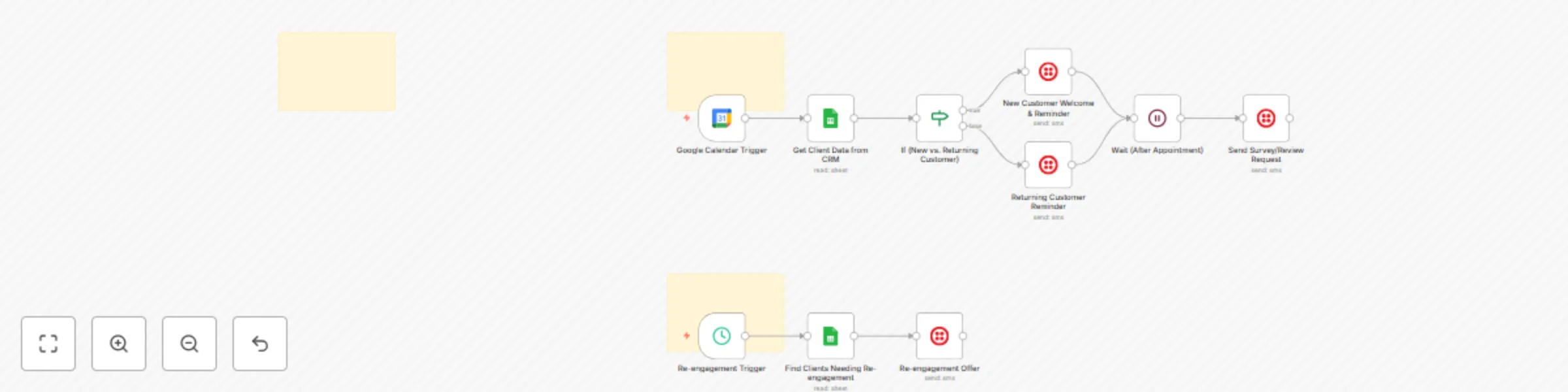
This workflow is a comprehensive, AI-powered system that acts as a virtual client relationship manager for any appointment-based business. It handles the entire client journey—from appointment booking to follow-up and re-engagement—all on autopilot.
- Appointment Trigger: The workflow starts when a new event is created in your Google Calendar.
- Client Data Management: It queries your client CRM database (Airtable or Google Sheets) to check if the client's email exists, preparing to send a personalized message.
- Dynamic Reminders: An
Ifnode splits the workflow. It sends a personalized welcome message for new clients and a standard reminder for returning clients, drastically reducing no-shows. - Post-Appointment Follow-up: A
Waitnode pauses the workflow until after the appointment ends. It then sends a personalized "thank you" message via Twilio with a link to a review or survey. - Re-engagement Loop: A separate
Crontrigger runs weekly, automatically identifying clients who haven't rebooked in a set period (e.g., 30 days) and sends them a personalized offer to encourage them to return. - Data Logging: It automatically logs all client data and engagement actions into a central database like Airtable or Google Sheets, creating a real-time dashboard for your business.
How to Set Up 🛠️
Import the Workflow: Copy the provided workflow JSON and import it into your n8n instance.
Configure Credentials:
- Google Calendar: Add your OAuth2 credential.
- Twilio: Add your API credentials.
- Google Sheets / Airtable: Add your credentials for your chosen CRM.
Customize Workflow Nodes:
- Node 1 (
Google Calendar Trigger): Select your Google Calendar credential and the calendar you use for bookings. - Node 2 (
Google Sheets / Airtable): Connect to your client CRM. Adjust the filter to search by the client's email from the calendar event. - Node 4 & 5 (
Twilio Reminders): ReplaceYOUR_TWILIO_NUMBERwith your Twilio number. Customize the message body to fit your business. - Node 6 (
Wait): Adjust theWait Durationif you want to send the follow-up message at a different time after the appointment. - Node 7 (
Twilio Follow-up): Replace the placeholder[LINK TO YOUR REVIEW/SURVEY PAGE]with your actual link. - Nodes 8, 9, 10 (
Re-engagement Loop): This is an optional, high-value part of the workflow. Configure theCronnode to run on your desired schedule. Adjust the filter in theFind Clientsnode to your specific re-engagement criteria (e.g., last visit date is older than 30 days).
- Node 1 (
Save & Activate: Once all settings and credentials are configured, save the workflow and click the "Inactive" toggle in the top-right corner to make it live.