Automate SEO keyword & SERP analysis with DataForSEO and Google Sheets
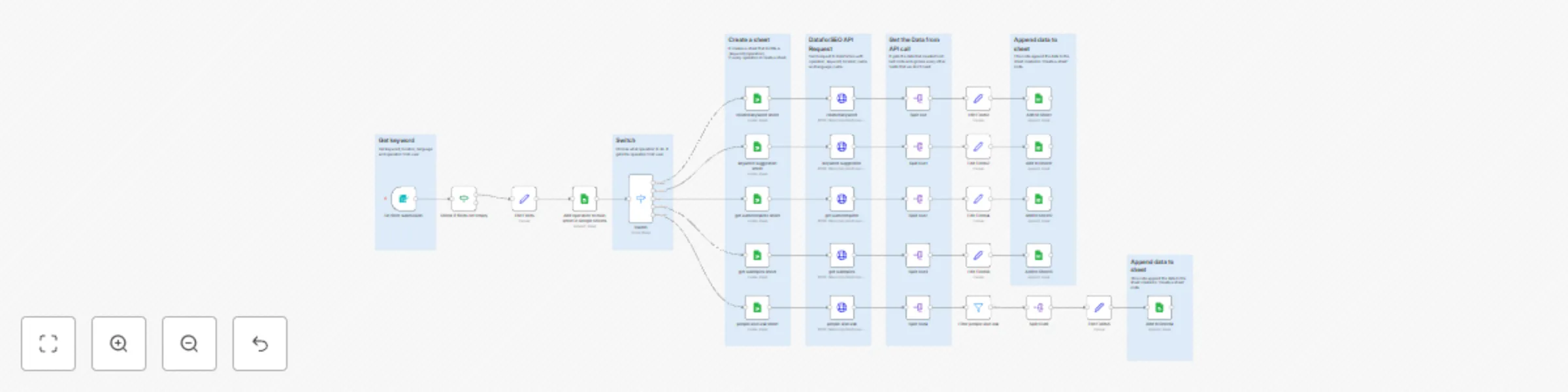
Workflow preview


 Early Deal
DISCOUNT 20%

Important notice
This workflow is provided as-is. Please review and test before using in production.
Overview
🧠 Automated SEO Keyword and SERP Analysis with DataForSEO for High-Converting Content | n8n workflow template
Overview 🌐
This is a complete SEO automation workflow built for professionals who want to manage all their DataForSEO operations inside n8n — no coding required ⚙️
You can easily choose your operator (action), such as:
- 🔍 SERP Analysis – Get ranking data for specific keywords
- 📈 Keyword Data – Retrieve search volume, CPC, and trends
- 🧠 Competitor Research – Analyze which domains dominate target queries
Once the workflow runs, it automatically creates a new Google Sheet 📊 (if it doesn’t exist) and appends the results — including metrics like keyword, rank, domain, and date — to keep a growing historical record of your SEO data 📅
💡 Ideal for SEO specialists, agencies, and growth teams who want a single automation to handle all keyword and ranking data pipelines using DataForSEO + Google Sheets + n8n.
Examples
related keyword sheet
Each operator (SERP, Keywords Data, Competitors) automatically creates a separate Google Sheet 📊
👤 Who’s it for?
- 🧩 SEO Specialists who need accurate keyword & SERP insights daily
- ✍️ Content Marketers planning new blog posts or landing pages
- 📊 Digital Marketing Teams tracking top-performing keywords and competitors
- 💼 Agencies managing multiple websites or niches with automated reports
- 🧠 AI-Driven SEOs building GPT-powered content strategies using live ranking data
⚙️ How It Works
Trigger & Input Setup
- Start the workflow manually or schedule it to run daily / weekly 🕒
- Import a keyword list from Google Sheets 📄, NocoDB, or an internal database
Keyword Data Retrieval (DataForSEO Keyword API)
- Sends requests to the
keywords_dataendpoint of DataForSEO - Gathers search volume, CPC, competition level, and trend data
- Identifies the most promising keywords for conversion-focused content
- Sends requests to the
SERP Analysis (DataForSEO SERP API)
- Fetches the top organic results for each keyword
- Extracts domains, titles, snippets, and ranking positions
- Highlights which competitors dominate the search landscape
Data Enrichment & Filtering
- Uses Code nodes to clean and normalize the DataForSEO JSON output
- Filters out low-intent or irrelevant keywords automatically
- Optionally integrates OpenAI or GPT nodes for insight generation ✨
Store & Visualize
- Saves results into Google Sheets, Airtable, or NocoDB for tracking
- Each run adds fresh data, building a performance history over time 📈
Optional AI Layer (Advanced)
- Use OpenAI Chat Model to summarize SERP insights:
> “Top 3 competitors for cloud storage pricing focus on cost transparency — recommend including pricing tables.” - Automatically generate content briefs or keyword clusters
- Use OpenAI Chat Model to summarize SERP insights:
🧩 Workflow Highlights
- ⚡ Multiple DataForSEO Endpoints Supported (
keywords_data,serp,competitors) - 🔁 Automated Scheduling for daily / weekly updates
- 🧠 Data Normalization for clean, structured SEO metrics
- 📊 Easy Export to Google Sheets or NocoDB
- 🧩 Expandable Design — integrate GPT, Google Search Console, or Analytics
- 🌎 Multi-Language & Multi-Location Support via
language_codeandlocation_code
📊 Example Output (Google Sheets)
| keyword | rank | domain | volume | cpc | competition | date |
|---|---|---|---|---|---|---|
| cloud hosting | 1 | cloud.google.com | 18,100 | $2.40 | 0.62 | 2025-10-25 |
| cloud server | 3 | aws.amazon.com | 12,900 | $3.10 | 0.75 | 2025-10-25 |
| hybrid cloud | 5 | vmware.com | 9,800 | $2.90 | 0.58 | 2025-10-25 |
Each run appends new keyword metrics for trend and performance tracking.
💡 Pro Tips
- 🔍 Combine this workflow with Google Search Console for even richer insights
- ⚙️ Adjust the
location_codeandlanguage_codefor local SEO targeting - 💬 Add a Slack or Gmail alert to receive weekly keyword opportunity reports
- 🤖 Extend with OpenAI to automatically create content briefs or topic clusters
📚 Integrations Used
- 🧭 DataForSEO API – Keyword & SERP data source
- 📄 Google Sheets / Airtable / NocoDB – Storage and visualization
- 🤖 OpenAI Chat Model (optional) – Insight generation and summarization
- ⚙️ Code Nodes – JSON parsing and custom data processing
✅ Features
🌎 Choose from 100+ Locations
Select your target country, region, or city using thelocation_codeparameter.
Perfect for local SEO tracking or multi-market analysis.🗣️ Choose from 50+ Languages
Define thelanguage_codeto get accurate, language-specific keyword and SERP data.
Supports English (en), Spanish (es), French (fr), German (de), and more.📊 Auto-Creates Google Sheets for You
No need to manually set up a spreadsheet — the workflow automatically creates a new Google Sheet (if it doesn’t exist) and structures it with the right columns (query,rank,domain,date, etc.).🔁 Append New Data Automatically
Every run adds fresh SEO metrics to your sheet, building a continuous daily or weekly ranking history.⚙️ Flexible Operator Selection
Choose which DataForSEO operator (action) you want to run:keywords_data,serp, orcompetitors.
Each operator retrieves a different type of SEO insight.🧠 Fully Expandable
Add Slack alerts, Airtable sync, or AI summaries using OpenAI — all within the same workflow.
⚙️ How to Set Up
🔑 Add DataForSEO Credentials
- Get your API login from dataforseo.com
- Add it under HTTP Request → Basic Auth in n8n
📄 Connect Google Sheets
- Authorize your Google account
- The workflow will auto-create the sheet if it doesn’t exist
🎛 Choose Operator (Action)
- Pick one:
serp,keywords_data, orcompetitors - Each operator runs a different SEO analysis
- Pick one:
🌍 Set Location & Language
- Example:
location_code: 2840(US),language_code: en
- Example:
🕒 Run or Schedule
- Trigger manually or set a daily schedule
- New results will append to your Google Sheet automatically
📺 Check Out My Channel
💬 Learn more about SEO Automation, n8n, and AI-powered content workflows
👉 Connect with me on LinkedIn: Nima Salimi
Follow for more templates, AI workflows, and SEO automation tutorials 💥