N

Nima Salimi

8
Workflows

Workflows by Nima Salimi

Workflow preview: Build a complete email CRM with Google Sheets & MailerSend
Free advanced

Build a complete email CRM with Google Sheets & MailerSend

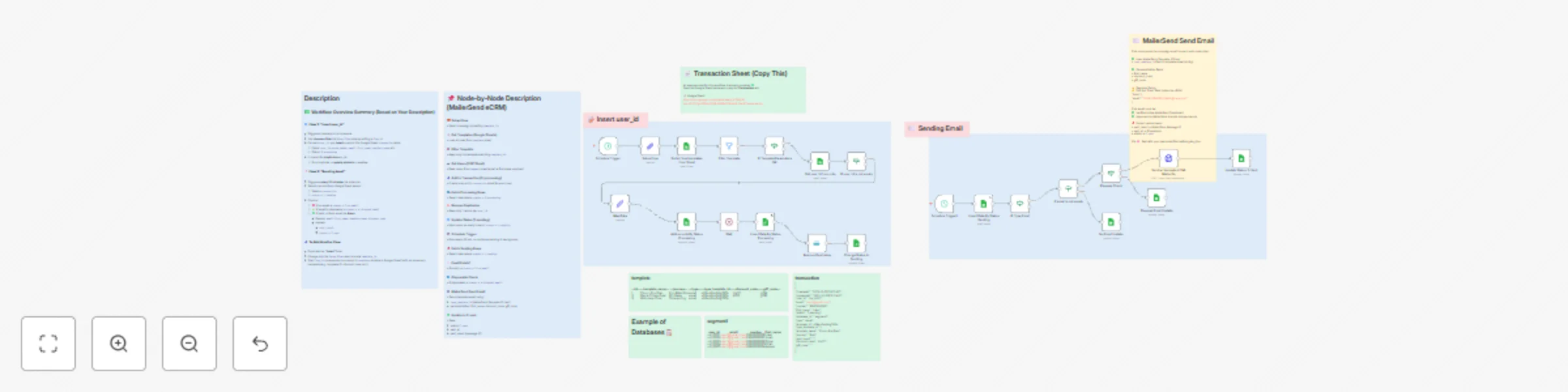
## ✉️ Automate MailerSend Email (Google Sheets) --- ### 🌐 Overview This workflow converts **Google Sheets into a full Email CRM** — no HubSpot or Customer.io needed! It automates segmentation, sending, validation, and delivery tracking using: ✅ Google Sheets → CDP + Email Performance DB ✅ MailerSend → Email Template Delivery ✅ n8n → Automation + Logic + Scheduling It automatically: • Reads subscribers from a selected segment sheet • Validates email + checks for disposable domains • Sends a MailerSend email template • Updates send status + delivery result in Sheets Perfect for onboarding emails, promo campaigns, retention flows, newsletters & more! --- ### ✅ Key Features • 🎯 Unlimited audience segments • 🚫 Deduplication system per execution • 🛡️ Disposable email filtering • 🔄 Automatic recurring runs (every 30 minutes) • 🧩 Template-based personalization (name, codes, journey) • 📊 Real-time delivery tracking + analytics-ready data • 🔐 Zero CRM vendor lock-in --- ### 📊 Database Sheets (Google Sheets Required) Use this database template: 🔗 https://docs.google.com/spreadsheets/d/17KqltP-NqchPhZV7gk6QToqCZX6IiA5EBkDCBNsIX_0/edit?usp=sharing | Sheet Name | Purpose | Required Fields | |-----------|---------|----------------| | `template` | Campaign configuration | Id, template_name, journey, type, type_template_id, discount_code | | `segment1` / `segment2` | Audience lists | user_id, email, first_name, number | | `transaction` | Status + results history | user_id, status, sent_result, sent_at, template_name | ### transaction | CreatedAt | UpdatedAt | user_id | email | number | first_name | status | database_id | type | template_id | type_template_id | template_name | journey | discount_code | gift_code | |----------------------------------|----------------------------------|-----------------|------------------------|-------------|------------|------------|-------------|------|-------------|-------------------|-----------------|---------|---------------|-----------| | 2025-10-25T13:11:41.567-04:00 | 2025-10-25T13:11:41.567-04:00 | uid_0000000001 | [email protected] | 9362000000 | Liam | 1-sending | segment1 | email | 1 | v28xxl2sq8dg785k | SMS-TEST | Test | disxxx | | | 2025-10-25T13:11:41.567-04:00 | 2025-10-25T13:11:41.567-04:00 | uid_0000000002 | [email protected] | 9362000001 | Noah | 1-sending | segment1 | email | 1 | v28xxl2sq8dg785k | SMS-TEST | Test | disxxx | | | 2025-10-25T13:11:41.567-04:00 | 2025-10-25T13:11:41.567-04:00 | uid_0000000003 | [email protected] | 9362000002 | Oliver | 1-sending | segment1 | email | 1 | v28xxl2sq8dg785k | SMS-TEST | Test | disxxx | | ## template | Id | template_name | journey | database_id | type | type_template_id | discount_code | gift_code | |----|---------------------------|----------------|-------------|------|-------------------|---------------|-----------| | 3 | Order-Confirmation | Order | segment3 | email | v28xxl2sq8dg785k | discount2 | | | 4 | Shipping-Notification | Notification | segment4 | email | v28xxl2sq8dg785c | discount3 | | | 5 | Add-to-Cart-day1 | Add-to-Car | segment5 | email | v28xxl2sq8dg785d | discount4 | | | 6 | Welcome-New-Customer | Welcome | segment6 | email | v28xxl2sq8dg785s | discount5 | | | 7 | Churn-Pro-Plan | Churn | segment7 | email | v28xxl2sq8dg785g | proxc | | | 8 | Churn-Pro-Plan-1day-ago | Churn | segment8 | email | v28xxl2sq8dg785h | | shipx | ## segment1 | user_id | email | number | first_name | database_id | |-----------------|-------------------------|--------------|------------|-------------| | uid_0000000001 | [email protected] | 09362000000 | Liam | segment1 | | uid_0000000002 | [email protected] | 09362000001 | Noah | segment1 | | uid_0000000003 | [email protected] | 09362000002 | Oliver | segment1 | | uid_0000000004 | [email protected] | 09362000003 | Elijah | segment1 | | uid_0000000005 | [email protected] | 09362000004 | James | segment1 | 📌 Add more segments simply by creating new sheets (segment3, segment4...) 📌 Change campaign by updating `template_id` in Setup Flow node --- ### 👤 Who’s it for? • Ecommerce email retention teams • SaaS CRM automation operators • Digital marketing & lifecycle pros • Agencies running multi-brand campaigns • No-code builders who want scalable CRM logic --- ### ⚙️ Automations Included #### Flow 1 — Insert Users (Triggered on schedule) • Pull users from selected segment tab • Insert into transaction sheet • Status: `0-processing` → `1-sending` • Prevent duplicate sending ✅ #### Flow 2 — Send Emails (Runs every 30 min) • Selects “ready” users (`1-sending`) • Checks: - Missing email → `3-no-email` - Disposable → `4-disposal-email` • Sends via MailerSend template ID in sheet • Updates status → `2-sent` + message result 🎯 Your entire CRM sending logic runs automatically every day --- ### 🧠 Personalization Support Available merge-fields: • `first_name` • `discount_code` • `gift_code` (Modify jsonBody to add more!) --- ### 🔐 MailerSend Setup Required Inside MailerSend node: - Replace “[email protected]” with your verified sender email ✅ You must: ✔ Verify domain ✔ Approve sender email ✔ Copy correct template ID → Google Sheet --- ### 💡 Optional Enhancements • Slack alerts for failed sends • Connect Looker Studio for dashboards • Add SMS / WhatsApp parallel flows • A/B test templates by duplicating rows • Add AI for subject optimization or copy rewrite --- ### 📺 Connect With Me More workflows, CRM strategy & AI marketing automation 👇 LinkedIn: https://linkedin.com/in/nima-salimi-a655a6231 Follow & ⭐️ this template if it helped you 🚀

N
Nima Salimi
Social Media
26 Oct 2025
116
0
Workflow preview: Automate SEO keyword & SERP analysis with DataForSEO and Google Sheets
Free advanced

Automate SEO keyword & SERP analysis with DataForSEO and Google Sheets

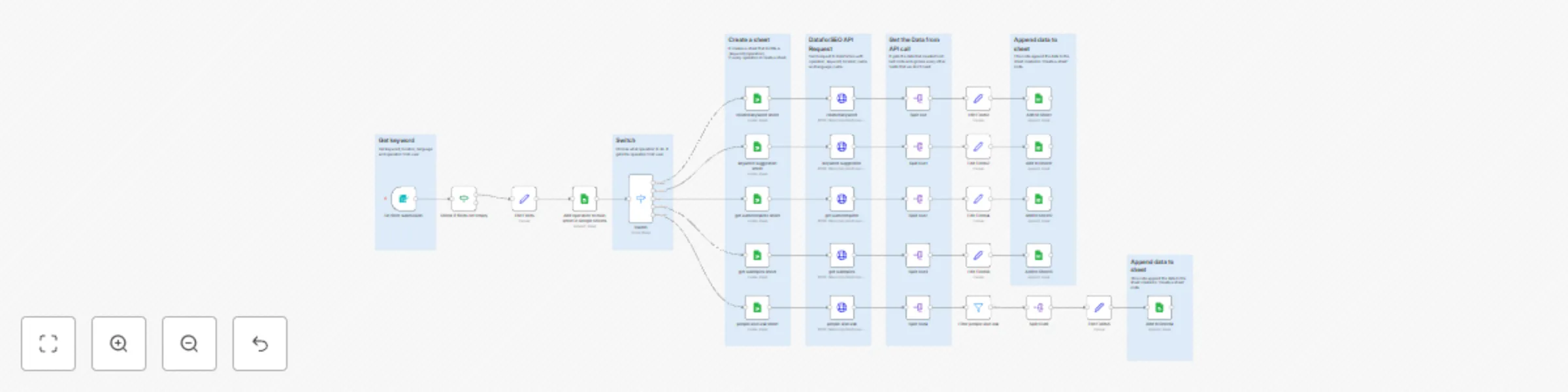
## 🧠 Automated SEO Keyword and SERP Analysis with DataForSEO for High-Converting Content | n8n workflow template **Overview 🌐** ----------------- This is a **complete SEO automation workflow** built for professionals who want to manage all their **DataForSEO operations** inside **n8n** — no coding required ⚙️ You can easily **choose your operator (action)**, such as: - 🔍 **SERP Analysis** – Get ranking data for specific keywords - 📈 **Keyword Data** – Retrieve search volume, CPC, and trends - 🧠 **Competitor Research** – Analyze which domains dominate target queries Once the workflow runs, it automatically **creates a new Google Sheet** 📊 (if it doesn’t exist) and **appends the results** — including metrics like keyword, rank, domain, and date — to keep a growing historical record of your SEO data 📅 💡 Ideal for SEO specialists, agencies, and growth teams who want a **single automation** to handle all keyword and ranking data pipelines using **DataForSEO + Google Sheets + n8n**. --- ### **Examples** ![Screenshot 20251025 at 01.30.26.png](fileId:3110) related keyword sheet ![Screenshot 20251025 at 01.30.37.png](fileId:3109) Each operator (SERP, Keywords Data, Competitors) automatically creates a separate Google Sheet 📊 --- ### 👤 Who’s it for? - 🧩 **SEO Specialists** who need accurate keyword & SERP insights daily - ✍️ **Content Marketers** planning new blog posts or landing pages - 📊 **Digital Marketing Teams** tracking top-performing keywords and competitors - 💼 **Agencies** managing multiple websites or niches with automated reports - 🧠 **AI-Driven SEOs** building GPT-powered content strategies using live ranking data --- ### ⚙️ How It Works 1. **Trigger & Input Setup** - Start the workflow manually or schedule it to run daily / weekly 🕒 - Import a keyword list from Google Sheets 📄, NocoDB, or an internal database 2. **Keyword Data Retrieval (DataForSEO Keyword API)** - Sends requests to the `keywords_data` endpoint of DataForSEO - Gathers search volume, CPC, competition level, and trend data - Identifies the most promising keywords for conversion-focused content 3. **SERP Analysis (DataForSEO SERP API)** - Fetches the top organic results for each keyword - Extracts domains, titles, snippets, and ranking positions - Highlights which competitors dominate the search landscape 4. **Data Enrichment & Filtering** - Uses Code nodes to clean and normalize the DataForSEO JSON output - Filters out low-intent or irrelevant keywords automatically - Optionally integrates OpenAI or GPT nodes for insight generation ✨ 5. **Store & Visualize** - Saves results into **Google Sheets**, **Airtable**, or **NocoDB** for tracking - Each run adds fresh data, building a performance history over time 📈 6. **Optional AI Layer (Advanced)** - Use OpenAI Chat Model to summarize SERP insights: > “Top 3 competitors for *cloud storage pricing* focus on cost transparency — recommend including pricing tables.” - Automatically generate content briefs or keyword clusters --- ### 🧩 Workflow Highlights * ⚡ **Multiple DataForSEO Endpoints Supported** (`keywords_data`, `serp`, `competitors`) * 🔁 **Automated Scheduling** for daily / weekly updates * 🧠 **Data Normalization** for clean, structured SEO metrics * 📊 **Easy Export** to Google Sheets or NocoDB * 🧩 **Expandable Design** — integrate GPT, Google Search Console, or Analytics * 🌎 **Multi-Language & Multi-Location Support** via `language_code` and `location_code` --- ### 📊 Example Output (Google Sheets) | keyword | rank | domain | volume | cpc | competition | date | |----------|------|----------------|---------|---------|---------------|------------| | cloud hosting | 1 | cloud.google.com | 18,100 | $2.40 | 0.62 | 2025-10-25 | | cloud server | 3 | aws.amazon.com | 12,900 | $3.10 | 0.75 | 2025-10-25 | | hybrid cloud | 5 | vmware.com | 9,800 | $2.90 | 0.58 | 2025-10-25 | Each run appends new keyword metrics for trend and performance tracking. --- ### 💡 Pro Tips * 🔍 Combine this workflow with **Google Search Console** for even richer insights * ⚙️ Adjust the `location_code` and `language_code` for local SEO targeting * 💬 Add a Slack or Gmail alert to receive weekly keyword opportunity reports * 🤖 Extend with OpenAI to automatically create **content briefs** or **topic clusters** --- ### 📚 Integrations Used - 🧭 **DataForSEO API** – Keyword & SERP data source - 📄 **Google Sheets / Airtable / NocoDB** – Storage and visualization - 🤖 **OpenAI Chat Model** (optional) – Insight generation and summarization - ⚙️ **Code Nodes** – JSON parsing and custom data processing --- ### ✅ Features - 🌎 **Choose from 100+ Locations** Select your target country, region, or city using the `location_code` parameter. Perfect for local SEO tracking or multi-market analysis. - 🗣️ **Choose from 50+ Languages** Define the `language_code` to get accurate, language-specific keyword and SERP data. Supports English (`en`), Spanish (`es`), French (`fr`), German (`de`), and more. - 📊 **Auto-Creates Google Sheets for You** No need to manually set up a spreadsheet — the workflow automatically **creates a new Google Sheet** (if it doesn’t exist) and structures it with the right columns (`query`, `rank`, `domain`, `date`, etc.). - 🔁 **Append New Data Automatically** Every run adds fresh SEO metrics to your sheet, building a continuous daily or weekly ranking history. - ⚙️ **Flexible Operator Selection** Choose which **DataForSEO operator (action)** you want to run: `keywords_data`, `serp`, or `competitors`. Each operator retrieves a different type of SEO insight. - 🧠 **Fully Expandable** Add Slack alerts, Airtable sync, or AI summaries using OpenAI — all within the same workflow. --- ### ⚙️ How to Set Up 1. **🔑 Add DataForSEO Credentials** - Get your API login from [dataforseo.com](https://dataforseo.com) - Add it under **HTTP Request → Basic Auth** in n8n 2. **📄 Connect Google Sheets** - Authorize your Google account - The workflow will **auto-create the sheet** if it doesn’t exist 3. **🎛 Choose Operator (Action)** - Pick one: `serp`, `keywords_data`, or `competitors` - Each operator runs a different SEO analysis 4. **🌍 Set Location & Language** - Example: `location_code: 2840` (US), `language_code: en` 5. **🕒 Run or Schedule** - Trigger manually or set a daily schedule - New results will append to your Google Sheet automatically --- ### 📺 Check Out My Channel 💬 Learn more about **SEO Automation, n8n, and AI-powered content workflows** 👉 **Connect with me on LinkedIn:** [Nima Salimi](https://linkedin.com/in/nima-salimi-a655a6231) Follow for more templates, AI workflows, and SEO automation tutorials 💥

N
Nima Salimi
Market Research
25 Oct 2025
752
0
Workflow preview: Track daily SEO rankings with DataForSEO and Google Sheets
Free intermediate

Track daily SEO rankings with DataForSEO and Google Sheets

## 🚀 Automated Daily SERP Rank Tracker for SEO Specialists (Google Sheets + DataForSEO) --- **Overview 🌐** ----------------- This workflow automates your **daily keyword rank tracking** 🔍 using **DataForSEO** ⚙️ and **Google Sheets** 📊. It pulls live **Google Search results** for each keyword in your list, extracts key details (`query`, `rank`, `domain`, `date`), and appends them to your Google Sheet automatically. 📆 You’ll have a complete daily snapshot of your keyword positions — no manual checks needed. Built for **SEO professionals**, **digital marketers**, and **agencies**, this workflow helps you centralize ranking data, build trend dashboards, and automate reporting workflows. --- ### 👤 Who’s it for? * 🧠 SEO specialists tracking daily keyword performance * 📈 Marketing teams managing multiple websites * 💼 Agencies providing automated ranking reports for clients * 💻 Growth teams who want rank tracking data for dashboards or AI tools --- ### ⚙️ How to Set Up 1. **Connect Your Google Sheet** - Use this template sheet 👉 [Google Sheet Example](https://docs.google.com/spreadsheets/d/1ShdLc4td6MSQf49l4tDlVohRlFxNO0SdkG0bHQ5LJmE/edit?usp=sharing) - Make sure it has a `query` column containing your target keywords. 2. **Set Up DataForSEO Credentials** - Create an account at [dataforseo.com](https://dataforseo.com) - Add your API credentials under **HTTP Request** node or **DataForSEO node**. 3. **Customize Location & Language** - In the “Fetch SERP Data (DataForSEO API)” node: - `location_code`: 2840 → 🇺🇸 United States (changeable) - `language_code`: en → 🇬🇧 English (changeable) 4. **Format Date** - The “Add Timestamp & Prepare Output” node converts timestamps into `YYYY-MM-DD` format automatically 🗓️ 5. **Run or Schedule** - Trigger manually for tests, or enable **daily schedule trigger** to automate it. - Results append directly to your Google Sheet after each run ✅ --- ### 📊 Example Output | query | rank | domain | date | |--------|-------|-----------------------|------------| | cloud host | 1 | cloudhost.one | 2025-10-24 | | cloud host | 2 | cloud.google.com | 2025-10-24 | | cloud hosting | 1 | cloud.google.com | 2025-10-24 | | cloud hosting | 2 | aws.amazon.com | 2025-10-24 | | cloud hosting | 3 | www.hostinger.com | 2025-10-24 | 📈 Use this data to build trend charts, compare historical performance, or connect to **Looker Studio** for automated dashboards. --- ### 🧩 Workflow Highlights * 🕒 **Automated Daily Runs** – via Schedule Trigger * 🔍 **Accurate SERP Data** – powered by DataForSEO API * 📄 **Dynamic Keyword Input** – read directly from Google Sheets * 📊 **Historical Tracking** – appends new data each day * 🌎 **Regional Customization** – change language and location easily * 🧠 **AI-Ready** – integrate GPT or AI nodes for insights or summaries --- ### 💡 Pro Tips * Add a **Slack** or **Gmail** alert node for position drops or gains 📬 * Combine with **NocoDB** or **Airtable** for more advanced data storage * Expand with **DataForSEO Labs** endpoints for keyword difficulty, CPC, or SERP features --- ### 📺 Check Out My Channel 💬 Learn more about **SEO Automation & n8n Workflows** 👉 **Connect with me on LinkedIn:** [linkedin.com/in/nima-salimi-a655a6231](https://linkedin.com/in/nima-salimi-a655a6231) Follow for more workflow templates, AI integrations, and SEO automation tutorials 💥

N
Nima Salimi
Market Research
25 Oct 2025
460
0
Workflow preview: Automate monthly CrUX report transfer from BigQuery to NocoDB with data cleanup
Free intermediate

Automate monthly CrUX report transfer from BigQuery to NocoDB with data cleanup

## **Overview** This n8n workflow automatically **retrieves the monthly CrUX (Chrome User Experience) Report from Google BigQuery** and updates the data in **NocoDB**. It removes the previous month’s data before inserting the new dataset, ensuring your database always contains the latest CrUX rankings for website origins. The flow is fully automated, using schedule triggers to handle both data cleanup and data insertion each month. --- ## ✅ **Tasks** * ⏰ Runs automatically on a **monthly schedule** * 🔢 Converts the **month name to a numeric value** for table selection * 🧹 Deletes last month’s CrUX data from **NocoDB** * 🌐 Queries **Google BigQuery** for the latest monthly dataset * 💾 Inserts the new CrUX rankings into **NocoDB** * ⚙️ Keeps your database up to date with **zero manual effort** --- ## **🛠 How to Use** 1️⃣ **Set Up BigQuery Access** - Connect your **Google BigQuery** credentials. - Make sure your project includes access to the **chrome-ux-report** public dataset. 2️⃣ **Adjust the Query** - In the **Google BigQuery** node, change the `LIMIT` value to control how many top-ranked sites are retrieved. - Ensure the `{{ $json.table }}` field correctly references the dataset for the desired month (e.g., `202509`). 3️⃣ **Prepare NocoDB Table** - Create a table in **NocoDB** with fields: `origin`, `crux_rank`, and any additional metadata you wish to track. 4️⃣ **Schedule Automation** - The workflow includes two **Schedule Trigger** nodes: - One runs the **data cleanup** process (deletes last month). - One runs the **data insertion** for the new month. 5️⃣ **Run or Activate the Workflow** - Activate it to run automatically each month. - You can also run it manually to refresh data on demand. ## **📋 Prerequisites** Before running this workflow, make sure you complete the following setup steps: * 🧱 **Enable BigQuery API** - Go to [Google Cloud Console → APIs & Services](https://console.cloud.google.com/apis/library/bigquery.googleapis.com) - Enable the **BigQuery API** for your project. * 📊 **Access the Chrome UX Report Dataset** - In BigQuery, search for **“Chrome UX Report”** in the Marketplace or go directly to: [https://console.cloud.google.com/marketplace/product/chrome-ux-report/chrome-ux-report](https://console.cloud.google.com/marketplace/product/chrome-ux-report/chrome-ux-report) - Click **“View Dataset”** and add it to your BigQuery project. * 🔑 **Connect BigQuery to n8n** - In n8n, create credentials for your Google BigQuery account using **Service Account Authentication**. - Ensure the account has permission to query the `chrome-ux-report` dataset. * 🗄️ **Create a NocoDB Table** - In NocoDB, create a new table to store your CrUX data with the following fields: - **origin** → Short text - **crux_rank** → Number * ⚙️ **Connect NocoDB to n8n** - Use your **NocoDB API Token** to connect and allow the workflow to read/write data. ## **What is CrUX Rank?** **CrUX Rank** (Chrome User Experience Rank) is a metric from Google’s **Chrome UX Report (CrUX)** dataset that indicates a website’s **popularity based on real user visits**. It reflects how frequently an origin (website) is loaded by Chrome users around the world. - A **lower rank number** means the site is **more popular** (e.g., rank 1 = top site). - The data is collected from **anonymized Chrome usage statistics**, aggregated monthly. - This rank helps you **track site popularity trends** and compare your domain’s visibility over time.

N
Nima Salimi
Document Extraction
8 Oct 2025
45
0
Workflow preview: Inserting Brevo contact reports into NocoDB
Free advanced

Inserting Brevo contact reports into NocoDB

## **Overview** This n8n workflow automatically **retrieves Brevo contact reports** and **inserts summarized engagement data into NocoDB**. It groups campaign activity by email, creating a clean, unified record that includes sent, delivered, opened, clicked, and blacklisted events. This setup keeps your CRM or marketing database synchronized with the latest Brevo email performance data. --- ## ✅ **Tasks** * ⏰ Runs automatically on schedule or manually * 🌐 Fetches contact activity data from **Brevo API** * 🧩 Groups all campaign activity per email * 💾 Inserts summarized data into **NocoDB** * ⚙️ Keeps engagement metrics synced between **Brevo** and **NocoDB** --- ## **🛠 How to Use** * 🧱 **Prepare your NocoDB table** Create a table with fields for: **email**, **messagesSent**, **delivered**, **opened**, **clicked**, **done**, and **blacklisted**. * 🔑 **Connect your Brevo credentials** Add your **Brevo API Key** in the **HTTP Request** node to fetch contact data securely. * 🧮 **Review the Code Nodes** These nodes group contact activity by email and prepare a single dataset for insertion. * 🚀 **Run or schedule the workflow** Execute it manually or use a **Schedule Trigger** to automate the data sync process. --- ## **📌 Notes** * 🗂 Make sure the **field names** in NocoDB match those used in the workflow. * 🔐 Keep your **Brevo API Key** secure and private. * ⚙️ The workflow can be expanded to include additional fields or filters. * 📊 Use the data for engagement analytics, segmentation, or campaign performance tracking.

N
Nima Salimi
CRM
8 Oct 2025
47
0
Workflow preview: Daily Import Yesterday's Forex Factory Calendar to Google Sheets with Telegram Alerts
Free intermediate

Daily Import Yesterday's Forex Factory Calendar to Google Sheets with Telegram Alerts

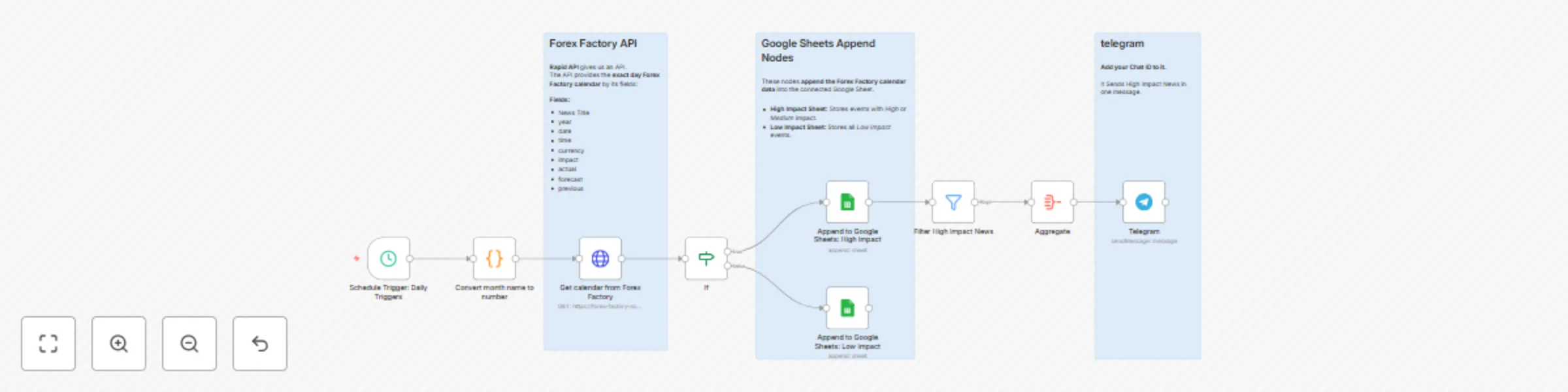
## **Overview** This n8n workflow automatically **fetches the Forex Factory calendar for yesterday** using **Rapid API**, then saves the data to a connected **Google Sheet** and sends **Telegram alerts** for high and medium impact events. It runs **daily on schedule**, collecting key fields such as **currency, time, impact, and market indicators**, and organizes them for easy tracking and analysis. Perfect for **forex traders** and **analysts** who need quick access to reliable market data from the **previous day’s events**. ## ✅ **Tasks** * ⏰ Runs automatically every day * 🌐 Fetches **yesterday’s Forex Factory calendar** via Rapid API * 🧾 Collects key data fields: **year, date, time, currency, impact, actual, forecast, previous** * 📊 Saves all records to **Google Sheets** for tracking and analysis * 🚨 Sends **Telegram alerts** for high and medium impact events * ⚙️ Keeps your market data updated and organized with **no manual work required** ## **🛠 How to Use** * 📄 **Create a Google Spreadsheet** Create a new spreadsheet in Google Sheets and add two sheets: **High Impact** and **Low Impact**. Connect it to your **Google Sheets** nodes in n8n. * 🌐 **Find the API on Rapid API** Go to [Rapid API](https://rapidapi.com/) and search for **Forex Factory Scraper**. Subscribe to the API to get your access key. * 🔑 **Connect Rapid API to n8n** In your **HTTP Request** node, add the header below to authenticate your request: * 💬 **Add Your Telegram Chat ID** In the **Telegram** node, paste your **Chat ID** to receive daily alerts for high-impact news. * 🕒 **Activate the Workflow** Enable the **Schedule Trigger** to run daily. The workflow will automatically fetch **yesterday’s Forex Factory calendar**, save it to **Google Sheets**, and send **Telegram notifications**.

N
Nima Salimi
Crypto Trading
7 Oct 2025
191
0
Workflow preview: Daily import validated contacts from NocoDB to Brevo
Free advanced

Daily import validated contacts from NocoDB to Brevo

## Overview Automate your daily contact imports from NocoDB to Brevo.The workflow updates the record status in NocoDB at each step. For every email campaign, it’s essential to keep your Brevo contact list updated so you can send personalized and targeted emails. This flow automates that process. ## ✅ Tasks ⏰ Runs automatically every day 🗂 Fetches only new/unimported records from NocoDB 🔍 Checks for missing required fields 🚫 Filters out disposable/temporary emails 📬 Creates contacts in Brevo 📝 Updates NocoDB status after each step ## 🛠 How to Use 1️⃣ **Set your schedule** - The Schedule Trigger node runs the flow daily adjust to your preferred time. 2️⃣ **Prepare your table in NocoDB** Your NocoDB table should contain at least: - id - first_name - last_name - email - status (default: 0-not-imported) 3️⃣ **Configure your credentials** - Connect your NocoDB API Token in the NocoDB nodes. - Connect your Brevo API Key in the Brevo node. 4️⃣ **Map your fields** - In the Brevo: Create Contact node, make sure first name, last name, and email match your NocoDB column names. ## 📌 Notes 🛡 Make sure your NocoDB project/table IDs match the ones in this template. 🚀 This workflow processes contacts one-by-one to avoid heavy API calls and rate limit issues with Brevo. ✅ **status values:** 0-not-imported → new record 1-empty-fields → missing required fields 2-disposal-email → disposable email detected 3-contact-created → successfully created in Brevo

N
Nima Salimi
Social Media
10 Aug 2025
165
0
Workflow preview: Automate email marketing campaigns with NocoDB & Brevo
Free advanced

Automate email marketing campaigns with NocoDB & Brevo

## **Description🔍** This n8n workflow is a **complete marketing automation system** that connects to your CDP (Customer Data Platform), selects which flows to send, and delivers personalized emails using Brevo. It's modular and extensible — you can also add SMS, push notifications, Telegram messages, or other channels. To build a full marketing automation system, you need **four key components**: 1. **Workflow Automation** – using n8n (this workflow) 2. **CDP** – store and manage user data (e.g., NocoDB, Metabase, Power BI, etc.) 3. **Database** – track transactions, templates, and send statuses (e.g., NocoDB) 4. **BI / Analytics** – monitor performance by flows, journeys, and sent events This workflow represents the **Workflow Automation** layer. You can connect it to your own data stack or use the included example databases (`cdp-ecrm`, `n8n-templates-ecrm`, and `n8n-transaction-ecrm`) to get started quickly. ### 👤 Who’s it for? - Growth & CRM teams managing user engagement flows - Ecommerce marketers running time-sensitive email journeys - Marketing automation pros using low-code CRM stacks - Data teams building custom campaign triggers from CDPs ### ✅ Features - 🔁 Two modular flows: "Insert user_id" and "Sending Email" - 🧠 Select flow using `flow_id` from templates in NocoDB - ✏️ Insert user data into `n8n-transaction-ecrm` with processing status - 🔍 Filter duplicate users by `user_id` to avoid over-sending - 📧 Validate email fields and flag disposables - 📨 Send personalized emails using Brevo template parameters - 📊 Track delivery with `sent_result`, `sent_at`, and status updates - 🕒 Runs every 30 minutes via schedule trigger ### 🛠 How to Use 1. **Set your flow** In the `Setup Flow` node, change the `flow_id` to match a row in your `n8n-templates-ecrm` table. 2. **Prepare your tables in NocoDB** - `cdp-ecrm`: contains users (`user_id`, `email`, `first_name`, `phone_number`) - `n8n-templates-ecrm`: contains flows with metadata - `n8n-transaction-ecrm`: stores and updates user send status 3. **Configure credentials** - NocoDB API Token - Brevo (Sendinblue) API Key 4. **Trigger the flows** - Run “Insert user_id” manually or on a schedule to prepare users - “Sending Email” runs automatically every 30 minutes ### 📌 Notes - Disposable email domains are filtered using regex - Status: - `0-processing` → just inserted - `1-sending` → ready to send - `2-sent` → email sent successfully - `3-no-email` → missing email address - `4-disposal-email` → disposable or banned email - Easily duplicate the "Insert user_id" flow to add more campaigns

N
Nima Salimi
Social Media
7 Aug 2025
987
0