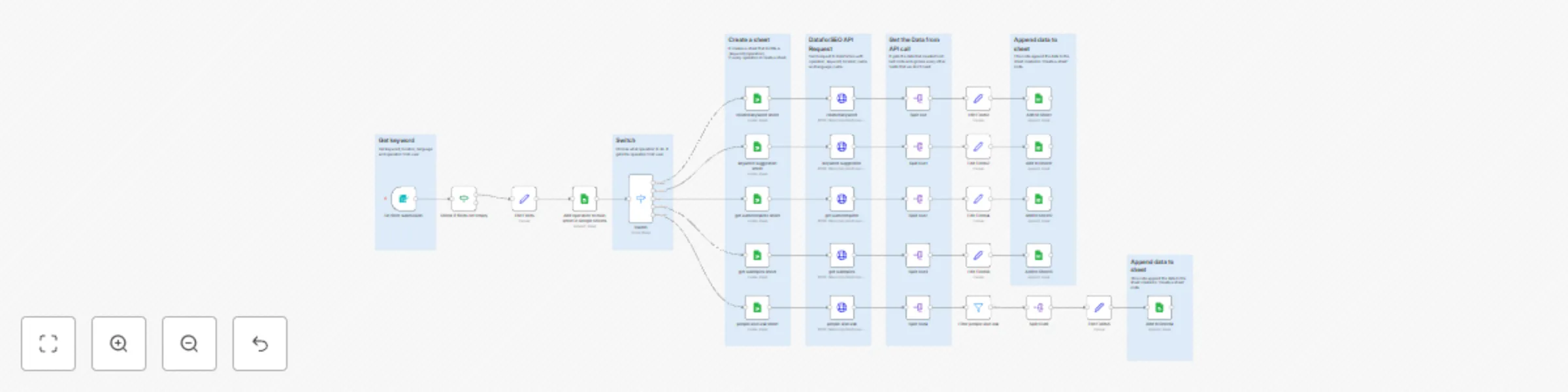
Automate SEO keyword & SERP analysis with DataForSEO and Google Sheets

Workflow preview

Workflow preview
100%
Automate SEO keyword & SERP analysis with DataForSEO and Google Sheets preview
Open on n8n.io

Important notice

This workflow is provided as-is. Please review and test before using in production.

1. Workflow Overview

Automated SEO Keyword and SERP Analysis with DataForSEO for High Converting Content n8n workflow template Overview This is a complete SEO automation workflow built for professionals who wan...

Best for

  • Market Research automation workflows
  • advanced n8n builders looking for reusable templates

Tools used

n8n-nodes-base.formtrigger, n8n-nodes-base.httprequest, n8n-nodes-base.switch, n8n-nodes-base.set, n8n-nodes-base.splitout, n8n-nodes-base.googlesheets, n8n-nodes-base.stickynote, n8n-nodes-base.filter

Source and attribution

This workflow is cataloged by N8N Workflows and links back to its original n8n.io source page by Nima Salimi.

Original n8n.io source

1.1 Workflow description

Title
Automate SEO keyword & SERP analysis with DataForSEO and Google Sheets
Workflow name
Automate SEO keyword & SERP analysis with DataForSEO and Google Sheets

🧠 Automated SEO Keyword and SERP Analysis with DataForSEO for High-Converting Content | n8n workflow template

Overview 🌐

This is a complete SEO automation workflow built for professionals who want to manage all their DataForSEO operations inside n8n β€” no coding required βš™οΈ

You can easily choose your operator (action), such as:

  • πŸ” SERP Analysis – Get ranking data for specific keywords
  • πŸ“ˆ Keyword Data – Retrieve search volume, CPC, and trends
  • 🧠 Competitor Research – Analyze which domains dominate target queries

Once the workflow runs, it automatically creates a new Google Sheet πŸ“Š (if it doesn’t exist) and appends the results β€” including metrics like keyword, rank, domain, and date β€” to keep a growing historical record of your SEO data πŸ“…

πŸ’‘ Ideal for SEO specialists, agencies, and growth teams who want a single automation to handle all keyword and ranking data pipelines using DataForSEO + Google Sheets + n8n.


Examples

related keyword sheet

Each operator (SERP, Keywords Data, Competitors) automatically creates a separate Google Sheet πŸ“Š


πŸ‘€ Who’s it for?

  • 🧩 SEO Specialists who need accurate keyword & SERP insights daily
  • ✍️ Content Marketers planning new blog posts or landing pages
  • πŸ“Š Digital Marketing Teams tracking top-performing keywords and competitors
  • πŸ’Ό Agencies managing multiple websites or niches with automated reports
  • 🧠 AI-Driven SEOs building GPT-powered content strategies using live ranking data

βš™οΈ How It Works

  1. Trigger & Input Setup

    • Start the workflow manually or schedule it to run daily / weekly πŸ•’
    • Import a keyword list from Google Sheets πŸ“„, NocoDB, or an internal database
  2. Keyword Data Retrieval (DataForSEO Keyword API)

    • Sends requests to the keywords_data endpoint of DataForSEO
    • Gathers search volume, CPC, competition level, and trend data
    • Identifies the most promising keywords for conversion-focused content
  3. SERP Analysis (DataForSEO SERP API)

    • Fetches the top organic results for each keyword
    • Extracts domains, titles, snippets, and ranking positions
    • Highlights which competitors dominate the search landscape
  4. Data Enrichment & Filtering

    • Uses Code nodes to clean and normalize the DataForSEO JSON output
    • Filters out low-intent or irrelevant keywords automatically
    • Optionally integrates OpenAI or GPT nodes for insight generation ✨
  5. Store & Visualize

    • Saves results into Google Sheets, Airtable, or NocoDB for tracking
    • Each run adds fresh data, building a performance history over time πŸ“ˆ
  6. Optional AI Layer (Advanced)

    • Use OpenAI Chat Model to summarize SERP insights:
      > β€œTop 3 competitors for cloud storage pricing focus on cost transparency β€” recommend including pricing tables.”
    • Automatically generate content briefs or keyword clusters

🧩 Workflow Highlights

  • ⚑ Multiple DataForSEO Endpoints Supported (keywords_data, serp, competitors)
  • πŸ” Automated Scheduling for daily / weekly updates
  • 🧠 Data Normalization for clean, structured SEO metrics
  • πŸ“Š Easy Export to Google Sheets or NocoDB
  • 🧩 Expandable Design β€” integrate GPT, Google Search Console, or Analytics
  • 🌎 Multi-Language & Multi-Location Support via language_code and location_code

πŸ“Š Example Output (Google Sheets)

keyword rank domain volume cpc competition date
cloud hosting 1 cloud.google.com 18,100 $2.40 0.62 2025-10-25
cloud server 3 aws.amazon.com 12,900 $3.10 0.75 2025-10-25
hybrid cloud 5 vmware.com 9,800 $2.90 0.58 2025-10-25

Each run appends new keyword metrics for trend and performance tracking.


πŸ’‘ Pro Tips

  • πŸ” Combine this workflow with Google Search Console for even richer insights
  • βš™οΈ Adjust the location_code and language_code for local SEO targeting
  • πŸ’¬ Add a Slack or Gmail alert to receive weekly keyword opportunity reports
  • πŸ€– Extend with OpenAI to automatically create content briefs or topic clusters

πŸ“š Integrations Used

  • 🧭 DataForSEO API – Keyword & SERP data source
  • πŸ“„ Google Sheets / Airtable / NocoDB – Storage and visualization
  • πŸ€– OpenAI Chat Model (optional) – Insight generation and summarization
  • βš™οΈ Code Nodes – JSON parsing and custom data processing

βœ… Features

  • 🌎 Choose from 100+ Locations
    Select your target country, region, or city using the location_code parameter.
    Perfect for local SEO tracking or multi-market analysis.

  • πŸ—£οΈ Choose from 50+ Languages
    Define the language_code to get accurate, language-specific keyword and SERP data.
    Supports English (en), Spanish (es), French (fr), German (de), and more.

  • πŸ“Š Auto-Creates Google Sheets for You
    No need to manually set up a spreadsheet β€” the workflow automatically creates a new Google Sheet (if it doesn’t exist) and structures it with the right columns (query, rank, domain, date, etc.).

  • πŸ” Append New Data Automatically
    Every run adds fresh SEO metrics to your sheet, building a continuous daily or weekly ranking history.

  • βš™οΈ Flexible Operator Selection
    Choose which DataForSEO operator (action) you want to run:
    keywords_data, serp, or competitors.
    Each operator retrieves a different type of SEO insight.

  • 🧠 Fully Expandable
    Add Slack alerts, Airtable sync, or AI summaries using OpenAI β€” all within the same workflow.


βš™οΈ How to Set Up

  1. πŸ”‘ Add DataForSEO Credentials

    • Get your API login from dataforseo.com
    • Add it under HTTP Request β†’ Basic Auth in n8n
  2. πŸ“„ Connect Google Sheets

    • Authorize your Google account
    • The workflow will auto-create the sheet if it doesn’t exist
  3. πŸŽ› Choose Operator (Action)

    • Pick one: serp, keywords_data, or competitors
    • Each operator runs a different SEO analysis
  4. 🌍 Set Location & Language

    • Example: location_code: 2840 (US), language_code: en
  5. πŸ•’ Run or Schedule

    • Trigger manually or set a daily schedule
    • New results will append to your Google Sheet automatically

πŸ“Ί Check Out My Channel

πŸ’¬ Learn more about SEO Automation, n8n, and AI-powered content workflows
πŸ‘‰ Connect with me on LinkedIn: Nima Salimi

Follow for more templates, AI workflows, and SEO automation tutorials πŸ’₯

1.2 Logical Blocks

This catalog entry is organized from the workflow JSON. The node-level section below shows the executable blocks available for review before importing the template.

2. Block-by-Block Analysis

Block 1 - On form submission

Type / Role
n8n-nodes-base.formTrigger - formTrigger
Config choices
Version 2.2

Block 2 - related keyword

Type / Role
n8n-nodes-base.httpRequest - httpRequest
Config choices
Version 4.2

Block 3 - Switch

Type / Role
n8n-nodes-base.switch - switch
Config choices
Version 3.2

Block 4 - Edit Fields

Type / Role
n8n-nodes-base.set - set
Config choices
Version 3.4

Block 5 - Edit Fields1

Type / Role
n8n-nodes-base.set - set
Config choices
Version 3.4

Block 6 - Split Out

Type / Role
n8n-nodes-base.splitOut - splitOut
Config choices
Version 1

Block 7 - Split Out1

Type / Role
n8n-nodes-base.splitOut - splitOut
Config choices
Version 1

Block 8 - Split Out2

Type / Role
n8n-nodes-base.splitOut - splitOut
Config choices
Version 1

Block 9 - Split Out3

Type / Role
n8n-nodes-base.splitOut - splitOut
Config choices
Version 1

Block 10 - Split Out4

Type / Role
n8n-nodes-base.splitOut - splitOut
Config choices
Version 1

Block 11 - keyword suggestion

Type / Role
n8n-nodes-base.httpRequest - httpRequest
Config choices
Version 4.2

Block 12 - keyword suggestion sheet

Type / Role
n8n-nodes-base.googleSheets - googleSheets
Config choices
Version 4.6

Block 13 - get autocomplete

Type / Role
n8n-nodes-base.httpRequest - httpRequest
Config choices
Version 4.2

Block 14 - get subtopics

Type / Role
n8n-nodes-base.httpRequest - httpRequest
Config choices
Version 4.2

Block 15 - people also ask

Type / Role
n8n-nodes-base.httpRequest - httpRequest
Config choices
Version 4.2

Block 16 - get autocomplete sheet

Type / Role
n8n-nodes-base.googleSheets - googleSheets
Config choices
Version 4.6

Block 17 - get subtopics sheet

Type / Role
n8n-nodes-base.googleSheets - googleSheets
Config choices
Version 4.6

Block 18 - people also ask sheet

Type / Role
n8n-nodes-base.googleSheets - googleSheets
Config choices
Version 4.6

Block 19 - Edit Fields4

Type / Role
n8n-nodes-base.set - set
Config choices
Version 3.4

Block 20 - Edit Fields6

Type / Role
n8n-nodes-base.set - set
Config choices
Version 3.4

Block 21 - Split Out6

Type / Role
n8n-nodes-base.splitOut - splitOut
Config choices
Version 1

Block 22 - Edit Fields5

Type / Role
n8n-nodes-base.set - set
Config choices
Version 3.4

Block 23 - Edit Fields2

Type / Role
n8n-nodes-base.set - set
Config choices
Version 3.4

Block 24 - Sticky Note

Type / Role
n8n-nodes-base.stickyNote - stickyNote
Config choices
Version 1

Showing the first 24 of 39 workflow blocks. Download the JSON for the full node graph.

3. Summary Table

Workflow Automate SEO keyword & SERP analysis with DataForSEO and Google Sheets
Complexity advanced
Nodes 39
Categories Market Research
Author Nima Salimi
Published 24 Oct 2025

4. Reproducing the Workflow from Scratch

  1. 1. Download the workflow JSON

    Use the JSON export at /data/workflows/10137/10137.json as the source template for this automation.

  2. 2. Import the template into n8n

    Open n8n, import the downloaded JSON, and review each node before activating the workflow.

  3. 3. Configure credentials and variables

    Replace placeholder credentials, API keys, webhook URLs, account IDs, and environment-specific values with your own settings.

  4. 4. Test with sample data

    Run the workflow manually or in a staging workspace, inspect node output, and confirm downstream systems receive the expected data.

  5. 5. Activate and monitor

    Enable the workflow only after testing, then monitor executions, errors, and rate limits during the first production runs.

5. General Notes & Resources

Review imported nodes carefully before activation. This catalog entry is intended to help you inspect the workflow structure, understand required services, and find related templates faster.

Node names, credentials, schedules, webhook paths, and external service limits may need adjustment for your workspace.

Frequently asked questions

What does Automate SEO keyword & SERP analysis with DataForSEO and Google Sheets do?

Automated SEO Keyword and SERP Analysis with DataForSEO for High Converting Content n8n workflow template Overview This is a complete SEO automation workflow built for professionals who wan...

What do I need before importing this workflow?

Review the workflow JSON, configure any required credentials in n8n, and test the automation in a safe workspace before using it in production.

Can I customize this workflow?

Yes. Use the block-by-block analysis and the downloadable JSON to inspect each node, then adjust credentials, prompts, schedules, filters, or destinations for your Market Research use case.