Automate product launch sequence with Notion, Mailchimp, Buffer, Google Calendar & Telegram
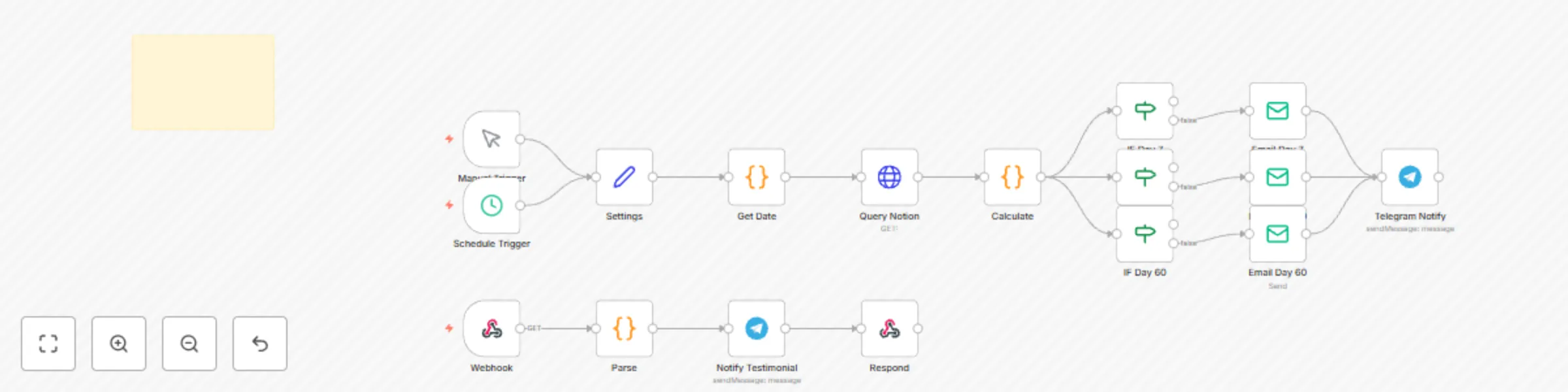
Workflow preview

$20/month : Unlimited workflows
2500 executions/month

THE #1 IN WEB SCRAPING
Scrape any website without limits
HOSTINGER  Early Deal
DISCOUNT 20% Try free
Early DealDISCOUNT 20%
Self-hosted n8n
Unlimited workflows - from $4.99/mo

#1 hub for scraping, AI & automation
6000+ actors - $5 credits/mo
Important notice
This workflow is provided as-is. Please review and test before using in production.
Overview
Automate Product Launch Sequence with Notion, Mailchimp, Buffer, Google Calendar & Telegram 🚀
Launch your digital products, courses, or content with confidence — using a fully automated sequence that handles email, social media, internal tracking, and team alerts.
No more missed steps. No last-minute panic. Just smooth, professional launches — on autopilot.
This workflow is perfect for:
- 🧑🏫 Creators launching a course or eBook
- 💼 Solopreneurs introducing a new offer
- 📣 Marketers running a 5-day launch
- 👩👧 Homemakers sharing a printables bundle
It automatically:
- 📅 Pulls launch content from your Notion database
- 💌 Sends email campaigns via Mailchimp
- 📱 Schedules social posts using Buffer
- 📆 Logs events in Google Calendar
- 📢 Sends internal alerts via Telegram
Setup Instructions
1. Notion Database Requirements
Your Notion database must have the following columns:
| Property | Type | Example |
|---|---|---|
Name |
Title | "Day 1: Welcome Email" |
Content Type |
Select | Email, Social Post, Webinar |
Platform |
Multi-select | Mailchimp, Buffer, Telegram |
Scheduled Date |
Date | 2025-09-05 9:00 AM |
Email Subject |
Text | "You're In! Here’s Your Guide" |
Email Body |
Text | "Hi {{name}}, thanks for joining..." |
Social Message |
Text | "Our new planner is live! Grab it here →" |
Status |
Status | To Do, In Progress, Done |
📌 Tip: Duplicate our free Notion template to get started quickly.
How to Install
- Import the JSON into n8n.
- Set up credentials:
- Notion API
- Mailchimp API
- Buffer (OAuth)
- Google Calendar
- Telegram Bot
- Connect to your Notion database.
- Run the workflow — it will process all items scheduled for today.
Customization Guidance
- 🔄 Change the schedule: Replace the Trigger node with a Schedule node (e.g., daily at 8 AM).
- 📧 Add more email platforms: Swap Mailchimp for ConvertKit or ActiveCampaign.
- 📲 Use WhatsApp instead of Telegram: Replace Telegram with WhatsAble for team alerts.
- 🎯 Filter by tag or audience: Add a Function node to route content based on
Content Type. - 🌐 Add Instagram or LinkedIn: Extend Buffer to post to more platforms.
This workflow grows with your launch strategy.
Nodes Used
n8n-nodes-base.notion– Pull launch tasksn8n-nodes-base.mailchimp– Send email campaignsn8n-nodes-base.buffer– Schedule social median8n-nodes-base.googleCalendar– Log launch eventsn8n-nodes-base.telegram– Send internal alerts