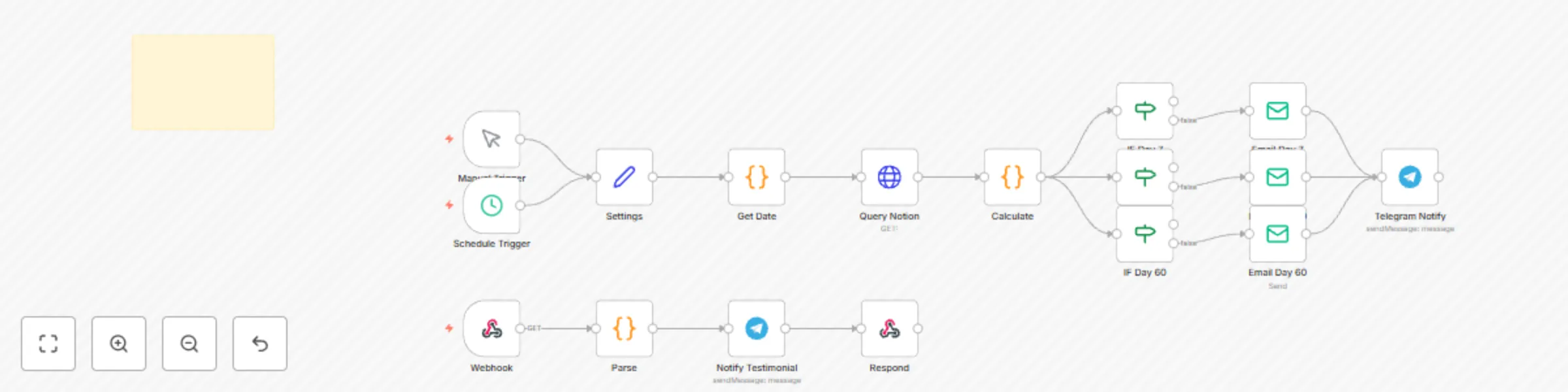
Automate product launch sequence with Notion, Mailchimp, Buffer, Google Calendar & Telegram

Workflow preview

Workflow preview
100%
Automate product launch sequence with Notion, Mailchimp, Buffer, Google Calendar & Telegram preview
Open on n8n.io

Important notice

This workflow is provided as-is. Please review and test before using in production.

1. Workflow Overview

Automate Product Launch Sequence with Notion, Mailchimp, Buffer, Google Calendar & Telegram Launch your digital products, courses, or content with confidence β€” using a fully automated sequence t...

Best for

  • Social Media automation workflows
  • advanced n8n builders looking for reusable templates

Tools used

n8n-nodes-base.stickynote, n8n-nodes-base.manualtrigger, n8n-nodes-base.scheduletrigger, n8n-nodes-base.set, n8n-nodes-base.code, n8n-nodes-base.httprequest, n8n-nodes-base.if, n8n-nodes-base.emailsend

Source and attribution

This workflow is cataloged by N8N Workflows and links back to its original n8n.io source page by Shelly-Ann Davy.

Original n8n.io source

1.1 Workflow description

Title
Automate product launch sequence with Notion, Mailchimp, Buffer, Google Calendar & Telegram
Workflow name
Automate product launch sequence with Notion, Mailchimp, Buffer, Google Calendar & Telegram

Automate Product Launch Sequence with Notion, Mailchimp, Buffer, Google Calendar & Telegram πŸš€

Launch your digital products, courses, or content with confidence β€” using a fully automated sequence that handles email, social media, internal tracking, and team alerts.

No more missed steps. No last-minute panic. Just smooth, professional launches β€” on autopilot.

This workflow is perfect for:

  • πŸ§‘β€πŸ« Creators launching a course or eBook
  • πŸ’Ό Solopreneurs introducing a new offer
  • πŸ“£ Marketers running a 5-day launch
  • πŸ‘©β€πŸ‘§ Homemakers sharing a printables bundle

It automatically:

  1. πŸ“… Pulls launch content from your Notion database
  2. πŸ’Œ Sends email campaigns via Mailchimp
  3. πŸ“± Schedules social posts using Buffer
  4. πŸ“† Logs events in Google Calendar
  5. πŸ“’ Sends internal alerts via Telegram

Setup Instructions

1. Notion Database Requirements

Your Notion database must have the following columns:

Property Type Example
Name Title "Day 1: Welcome Email"
Content Type Select Email, Social Post, Webinar
Platform Multi-select Mailchimp, Buffer, Telegram
Scheduled Date Date 2025-09-05 9:00 AM
Email Subject Text "You're In! Here’s Your Guide"
Email Body Text "Hi {{name}}, thanks for joining..."
Social Message Text "Our new planner is live! Grab it here β†’"
Status Status To Do, In Progress, Done

πŸ“Œ Tip: Duplicate our free Notion template to get started quickly.


How to Install

  1. Import the JSON into n8n.
  2. Set up credentials:
    • Notion API
    • Mailchimp API
    • Buffer (OAuth)
    • Google Calendar
    • Telegram Bot
  3. Connect to your Notion database.
  4. Run the workflow β€” it will process all items scheduled for today.

Customization Guidance

  • πŸ”„ Change the schedule: Replace the Trigger node with a Schedule node (e.g., daily at 8 AM).
  • πŸ“§ Add more email platforms: Swap Mailchimp for ConvertKit or ActiveCampaign.
  • πŸ“² Use WhatsApp instead of Telegram: Replace Telegram with WhatsAble for team alerts.
  • 🎯 Filter by tag or audience: Add a Function node to route content based on Content Type.
  • 🌐 Add Instagram or LinkedIn: Extend Buffer to post to more platforms.

This workflow grows with your launch strategy.


Nodes Used

  • n8n-nodes-base.notion – Pull launch tasks
  • n8n-nodes-base.mailchimp – Send email campaigns
  • n8n-nodes-base.buffer – Schedule social media
  • n8n-nodes-base.googleCalendar – Log launch events
  • n8n-nodes-base.telegram – Send internal alerts

1.2 Logical Blocks

This catalog entry is organized from the workflow JSON. The node-level section below shows the executable blocks available for review before importing the template.

2. Block-by-Block Analysis

Block 1 - Sticky Note

Type / Role
n8n-nodes-base.stickyNote - stickyNote
Config choices
Version 1

Block 2 - Manual Trigger

Type / Role
n8n-nodes-base.manualTrigger - manualTrigger
Config choices
Version 1

Block 3 - Schedule Trigger

Type / Role
n8n-nodes-base.scheduleTrigger - scheduleTrigger
Config choices
Version 1.2

Block 4 - Settings

Type / Role
n8n-nodes-base.set - set
Config choices
Version 2

Block 5 - Get Date

Type / Role
n8n-nodes-base.code - code
Config choices
Version 2

Block 6 - Query Notion

Type / Role
n8n-nodes-base.httpRequest - httpRequest
Config choices
Version 4.2

Block 7 - Calculate

Type / Role
n8n-nodes-base.code - code
Config choices
Version 2

Block 8 - IF Day 7

Type / Role
n8n-nodes-base.if - if
Config choices
Version 2

Block 9 - IF Day 30

Type / Role
n8n-nodes-base.if - if
Config choices
Version 2

Block 10 - IF Day 60

Type / Role
n8n-nodes-base.if - if
Config choices
Version 2

Block 11 - Email Day 7

Type / Role
n8n-nodes-base.emailSend - emailSend
Config choices
Version 2.1

Block 12 - Email Day 30

Type / Role
n8n-nodes-base.emailSend - emailSend
Config choices
Version 2.1

Block 13 - Email Day 60

Type / Role
n8n-nodes-base.emailSend - emailSend
Config choices
Version 2.1

Block 14 - Telegram Notify

Type / Role
n8n-nodes-base.telegram - telegram
Config choices
Version 1

Block 15 - Webhook

Type / Role
n8n-nodes-base.webhook - webhook
Config choices
Version 1

Block 16 - Parse

Type / Role
n8n-nodes-base.code - code
Config choices
Version 2

Block 17 - Notify Testimonial

Type / Role
n8n-nodes-base.telegram - telegram
Config choices
Version 1

Block 18 - Respond

Type / Role
n8n-nodes-base.respondToWebhook - respondToWebhook
Config choices
Version 1

3. Summary Table

Workflow Automate product launch sequence with Notion, Mailchimp, Buffer, Google Calendar & Telegram
Complexity advanced
Nodes 18
Categories Social Media
Author Shelly-Ann Davy
Published 03 Sept 2025

4. Reproducing the Workflow from Scratch

  1. 1. Download the workflow JSON

    Use the JSON export at /data/workflows/8207/8207.json as the source template for this automation.

  2. 2. Import the template into n8n

    Open n8n, import the downloaded JSON, and review each node before activating the workflow.

  3. 3. Configure credentials and variables

    Replace placeholder credentials, API keys, webhook URLs, account IDs, and environment-specific values with your own settings.

  4. 4. Test with sample data

    Run the workflow manually or in a staging workspace, inspect node output, and confirm downstream systems receive the expected data.

  5. 5. Activate and monitor

    Enable the workflow only after testing, then monitor executions, errors, and rate limits during the first production runs.

5. General Notes & Resources

Review imported nodes carefully before activation. This catalog entry is intended to help you inspect the workflow structure, understand required services, and find related templates faster.

Node names, credentials, schedules, webhook paths, and external service limits may need adjustment for your workspace.

Frequently asked questions

What does Automate product launch sequence with Notion, Mailchimp, Buffer, Google Calendar & Telegram do?

Automate Product Launch Sequence with Notion, Mailchimp, Buffer, Google Calendar & Telegram Launch your digital products, courses, or content with confidence β€” using a fully automated sequence t...

What do I need before importing this workflow?

Review the workflow JSON, configure any required credentials in n8n, and test the automation in a safe workspace before using it in production.

Can I customize this workflow?

Yes. Use the block-by-block analysis and the downloadable JSON to inspect each node, then adjust credentials, prompts, schedules, filters, or destinations for your Social Media use case.