Auto-post Facebook and Instagram content with OpenAI, Google Sheets and review

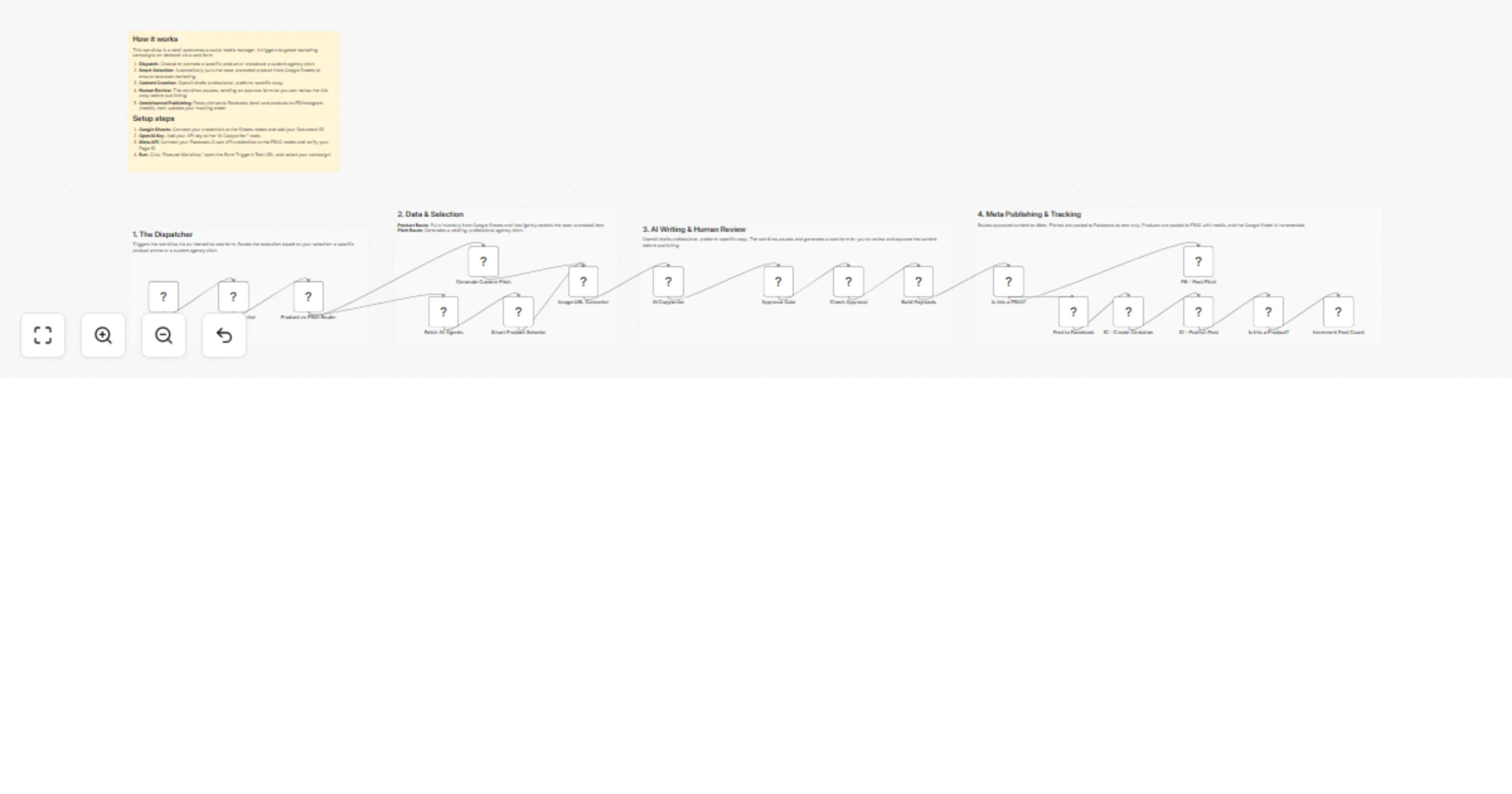
Workflow preview

Workflow preview
100%
Auto-post Facebook and Instagram content with OpenAI, Google Sheets and review preview
Open on n8n.io

1. Workflow Overview

Who is this for? This workflow is designed for social media managers, marketing agencies, and business owners who want to automate their Facebook and Instagram posting without losing quality contro...

Best for

  • Social Media automation workflows
  • AI Chatbot automation workflows
  • advanced n8n builders looking for reusable templates

Tools used

n8n-nodes-base.if, n8n-nodes-base.googlesheets, n8n-nodes-base.code, @n8n/n8n-nodes-langchain.openai, n8n-nodes-base.wait, n8n-nodes-base.facebookgraphapi, n8n-nodes-base.formtrigger, n8n-nodes-base.stickynote

Source and attribution

This workflow is cataloged by N8N Workflows and links back to its original n8n.io source page by Pixril.

Original n8n.io source

1.1 Workflow description

Title
Auto-post Facebook and Instagram content with OpenAI, Google Sheets and review
Workflow name
Auto-post Facebook and Instagram content with OpenAI, Google Sheets and review

Who is this for? This workflow is designed for social media managers, marketing agencies, and business owners who want to automate their Facebook and Instagram posting without losing quality control. It is perfect if you manage content in Google Sheets and want AI to write your captions, but you still need a human to review the final post before it goes live to your audience.

What this workflow does This workflow acts as a complete social media auto-poster. It reads your product inventory from Google Sheets, finds items that haven't been promoted recently, and uses OpenAI to write a professional, engaging caption. Before publishing, the workflow pauses and sends you a simple web form. Once you click "Approve," it automatically publishes the post to Facebook and Instagram, then logs the successful post back in your Google Sheet.

Key Features

  • Smart Google Sheets Tracking: Uses your spreadsheet as an inventory tracker to ensure you never over-promote the same product twice.
  • AI Copywriting: Automatically drafts platform-optimized, emoji-free captions based on your product data.
  • Approval Gate: Pauses the automation to let you manually review and approve the AI-generated content via an n8n web form.
  • Multi-Platform Auto-Posting: Connects directly to the Facebook Graph API to publish to your Facebook Page and Instagram Business Account.

How it works

  1. Trigger: Open the n8n form and choose to promote a specific product or a general agency pitch.
  2. Selection: The workflow scans your Google Sheet and picks the item with the lowest "Times Posted" count.
  3. Generation: OpenAI writes a tailored caption for the selected item.
  4. Review: You receive an interactive prompt to review the text and image URL.
  5. Publishing: Upon approval, it posts instantly to Meta (Facebook/Instagram) and increments the post count in your Google Sheet.

Set up steps Estimated time: 10 minutes

  1. Google Sheets: Connect your Google credential to the Sheets nodes and add your Spreadsheet ID.
  2. OpenAI Key: Add your API key to the "AI Copywriter" node.
  3. Meta API: Connect your Facebook Graph API credentials to the FB/IG nodes and ensure your Page ID is correct.
  4. Run: Click "Test URL" on the Pixril Dispatcher form to trigger your first post!

About the Creator Built by Pixril. We specialize in building advanced, production-ready AI workflows and automation templates for n8n.

Find more professional workflows in our shop: https://pixril.etsy.com

1.2 Logical Blocks

This catalog entry is organized from the workflow JSON. The node-level section below shows the executable blocks available for review before importing the template.

2. Block-by-Block Analysis

Block 1 - Product vs Pitch Router

Type / Role
n8n-nodes-base.if - if
Config choices
Version 2.3

Block 2 - Fetch All Agents

Type / Role
n8n-nodes-base.googleSheets - googleSheets
Config choices
Version 4.7

Block 3 - Smart Product Selector

Type / Role
n8n-nodes-base.code - code
Config choices
Version 2

Block 4 - Generate Custom Pitch

Type / Role
n8n-nodes-base.code - code
Config choices
Version 2

Block 5 - Image URL Converter

Type / Role
n8n-nodes-base.code - code
Config choices
Version 2

Block 6 - AI Copywriter

Type / Role
@n8n/n8n-nodes-langchain.openAi - openAi
Config choices
Version 2.1

Block 7 - Approval Gate

Type / Role
n8n-nodes-base.wait - wait
Config choices
Version 1.1

Block 8 - Check Approval

Type / Role
n8n-nodes-base.if - if
Config choices
Version 2.3

Block 9 - Build Payloads

Type / Role
n8n-nodes-base.code - code
Config choices
Version 2

Block 10 - Is this a Product?

Type / Role
n8n-nodes-base.if - if
Config choices
Version 2.3

Block 11 - Increment Post Count

Type / Role
n8n-nodes-base.googleSheets - googleSheets
Config choices
Version 4.7

Block 12 - Post to Facebook

Type / Role
n8n-nodes-base.facebookGraphApi - facebookGraphApi
Config choices
Version 1

Block 13 - IG - Create Container

Type / Role
n8n-nodes-base.facebookGraphApi - facebookGraphApi
Config choices
Version 1

Block 14 - IG - Publish Post

Type / Role
n8n-nodes-base.facebookGraphApi - facebookGraphApi
Config choices
Version 1

Block 15 - Is this a Pitch?

Type / Role
n8n-nodes-base.if - if
Config choices
Version 2.3

Block 16 - FB - Post Pitch

Type / Role
n8n-nodes-base.facebookGraphApi - facebookGraphApi
Config choices
Version 1

Block 17 - Pixril Dispatcher

Type / Role
n8n-nodes-base.formTrigger - formTrigger
Config choices
Version 2.5

Block 18 - Manual Dispatcher

Type / Role
n8n-nodes-base.code - code
Config choices
Version 2

Block 19 - Sticky Note

Type / Role
n8n-nodes-base.stickyNote - stickyNote
Config choices
Version 1

Block 20 - Sticky Note1

Type / Role
n8n-nodes-base.stickyNote - stickyNote
Config choices
Version 1

Block 21 - Sticky Note2

Type / Role
n8n-nodes-base.stickyNote - stickyNote
Config choices
Version 1

Block 22 - Sticky Note3

Type / Role
n8n-nodes-base.stickyNote - stickyNote
Config choices
Version 1

Block 23 - Sticky Note4

Type / Role
n8n-nodes-base.stickyNote - stickyNote
Config choices
Version 1

3. Summary Table

Workflow Auto-post Facebook and Instagram content with OpenAI, Google Sheets and review
Complexity advanced
Nodes 23
Categories Social Media, AI Chatbot
Author Pixril
Published 12 Apr 2026

4. Reproducing the Workflow from Scratch

  1. 1. Download the workflow JSON

    Use the JSON export at /data/workflows/15001/15001.json as the source template for this automation.

  2. 2. Import the template into n8n

    Open n8n, import the downloaded JSON, and review each node before activating the workflow.

  3. 3. Configure credentials and variables

    Replace placeholder credentials, API keys, webhook URLs, account IDs, and environment-specific values with your own settings.

  4. 4. Test with sample data

    Run the workflow manually or in a staging workspace, inspect node output, and confirm downstream systems receive the expected data.

  5. 5. Activate and monitor

    Enable the workflow only after testing, then monitor executions, errors, and rate limits during the first production runs.

5. General Notes & Resources

Review imported nodes carefully before activation. This catalog entry is intended to help you inspect the workflow structure, understand required services, and find related templates faster.

Node names, credentials, schedules, webhook paths, and external service limits may need adjustment for your workspace.

Frequently asked questions

What does Auto-post Facebook and Instagram content with OpenAI, Google Sheets and review do?

Who is this for? This workflow is designed for social media managers, marketing agencies, and business owners who want to automate their Facebook and Instagram posting without losing quality contro...

What do I need before importing this workflow?

Review the workflow JSON, configure any required credentials in n8n, and test the automation in a safe workspace before using it in production.

Can I customize this workflow?

Yes. Use the block-by-block analysis and the downloadable JSON to inspect each node, then adjust credentials, prompts, schedules, filters, or destinations for your Social Media, AI Chatbot use case.