Automate patient journey with GPT-4, Twilio & Slack notifications
Workflow preview

$20/month : Unlimited workflows
2500 executions/month

THE #1 IN WEB SCRAPING
Scrape any website without limits
HOSTINGER  Early Deal
DISCOUNT 20% Try free
Early DealDISCOUNT 20%
Self-hosted n8n
Unlimited workflows - from $4.99/mo

#1 hub for scraping, AI & automation
6000+ actors - $5 credits/mo
Important notice
This workflow is provided as-is. Please review and test before using in production.
Overview
How It Works ⚙️
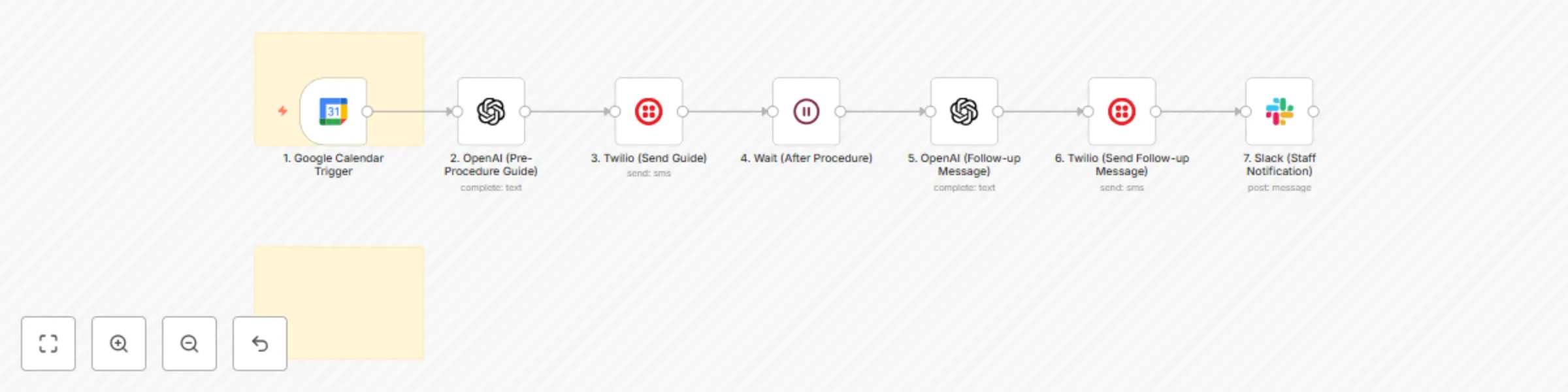
This workflow is a comprehensive, AI-powered system that acts as a virtual patient assistant for clinics. It automates the entire patient journey from appointment confirmation to post-procedure follow-up.
- Appointment Trigger: The workflow starts when a new event is created in your Google Calendar for a patient appointment.
- AI-Powered Education: The new appointment is sent to an OpenAI (GPT-4) node, which acts as a virtual clinic assistant. It instantly generates a personalized pre-procedure guide based on the appointment's details.
- Automated Communication: The workflow then uses Twilio to send this AI-generated guide directly to the patient via SMS or WhatsApp, ensuring they are well-prepared for their appointment.
- Post-Procedure Follow-up: After the appointment ends, a
Waitnode pauses the workflow for a set period. It then sends a personalized follow-up message—also generated by OpenAI—to the patient, encouraging them to provide feedback. - Staff Notification: A Slack notification is sent to the team once a follow-up message has been dispatched, keeping everyone informed and ready to act on incoming feedback.
How to Set Up 🛠️
- Import the Workflow: Copy the provided workflow JSON and import it into your n8n instance.
- Configure Credentials:
- Google Calendar: Add your OAuth2 credential.
- OpenAI: Add your API Key.
- Twilio: Add your API credentials.
- Slack: Add your Bot Token credential.
- Customize Workflow Nodes:
- Node 1 (
Google Calendar Trigger): Select your clinic's booking calendar. - Node 2 & 5 (
OpenAI): You can customize the prompts to better match your clinic's tone and specific procedures. - Node 3 & 6 (
Twilio): ReplaceYOUR_TWILIO_NUMBERwith your Twilio number and ensure you can extract the patient's phone number from your calendar events (e.g., from the event description). - Node 7 (
Slack): ReplaceYOUR_SLACK_CHANNEL_IDwith the ID of your team's feedback or operations channel.
- Node 1 (
- Save & Activate: Once all settings and credentials are configured, save the workflow and click the "Inactive" toggle in the top-right corner to make it live.