Automate passive candidate sourcing & engagement with Hunter.io, AI scoring & Gmail

Workflow preview

Workflow preview
100%
Automate passive candidate sourcing & engagement with Hunter.io, AI scoring & Gmail preview
Open on n8n.io

Important notice

This workflow is provided as-is. Please review and test before using in production.

1. Workflow Overview

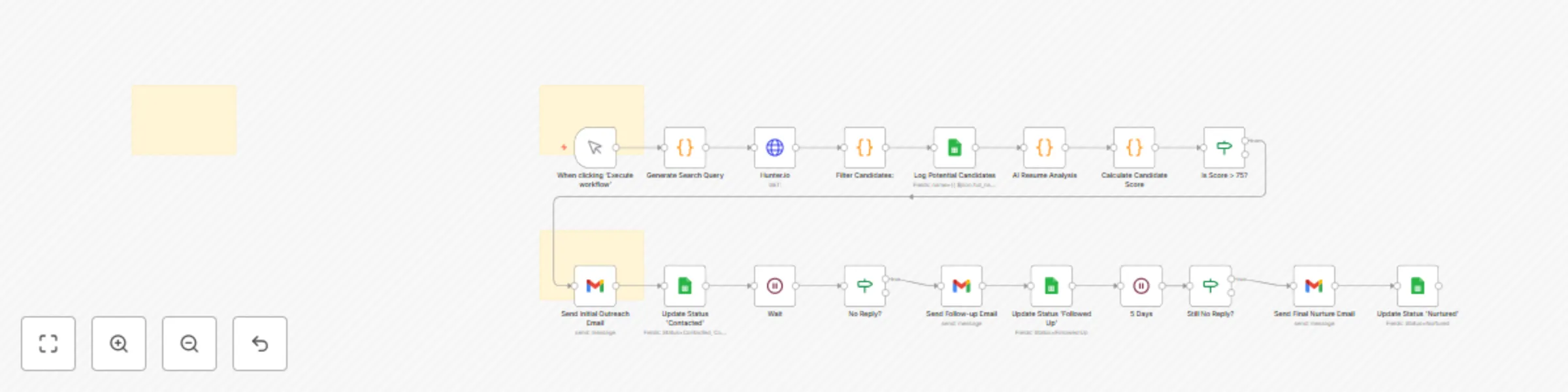
How It Works: The AI Recruiter Engine This workflow is a powerful, two phase system designed to automate the entire passive candidate sourcing and engagement cycle. Phase 1: Sourcing & Enrichment T...

Best for

  • HR automation workflows
  • AI Summarization automation workflows
  • advanced n8n builders looking for reusable templates

Tools used

n8n-nodes-base.manualtrigger, n8n-nodes-base.code, n8n-nodes-base.httprequest, n8n-nodes-base.googlesheets, n8n-nodes-base.if, n8n-nodes-base.stickynote, n8n-nodes-base.gmail, n8n-nodes-base.wait

Source and attribution

This workflow is cataloged by N8N Workflows and links back to its original n8n.io source page by Marth.

Original n8n.io source

1.1 Workflow description

Title
Automate passive candidate sourcing & engagement with Hunter.io, AI scoring & Gmail
Workflow name
Automate passive candidate sourcing & engagement with Hunter.io, AI scoring & Gmail

How It Works: The AI Recruiter Engine

This workflow is a powerful, two-phase system designed to automate the entire passive candidate sourcing and engagement cycle.


Phase 1: Sourcing & Enrichment

This phase is triggered manually and focuses on finding, analyzing, and scoring potential candidates.

  1. Manual Trigger: You start the workflow manually by providing a jobTitle and keywords.
  2. Code (Generate Search Query): This node uses your input to create a sophisticated search query for an external sourcing platform.
  3. HTTP Request (Hunter.io/Clearbit): The workflow queries a third-party API to find public email addresses for the target companies or candidates.
  4. Code (Filter Candidates): This node filters the raw data, keeping only candidates who match your basic criteria.
  5. Airtable/Google Sheets (Log Candidates): All potential candidates are logged into your centralized database to serve as your simple ATS.
  6. Code (AI Analysis & Score): This node prepares a prompt with the candidate's profile data and sends it to a generative AI model (via an HTTP Request). It then calculates a final score based on the AI's analysis and other criteria.
  7. If (Is Score > 75?): This node checks if the candidate’s score meets your threshold. If so, they are passed to the next phase; otherwise, they are filtered out.
Phase 2: Automated Outreach & Nurturing

This phase handles the multi-step, personalized email communication with high-scoring candidates.

  1. Gmail (Send Initial Email): The workflow sends a personalized first email using dynamic data from the candidate's profile.
  2. Airtable/Google Sheets (Update Status): The candidate's status is updated to Contacted in your database.
  3. Wait: The workflow pauses for a set period (e.g., 3 days) to allow time for a response.
  4. If (No Reply?): This node checks the candidate's status in your database. If they haven't replied, the workflow proceeds to the next email.
  5. Gmail (Send Follow-up): A follow-up email is sent to the candidate. This sequence repeats with a final nurture email to close the loop.

How to Set Up

  1. Prepare Your Credentials & Database:

    • Database: Create a database in Airtable or Google Sheets with columns for Name, Email, Score, Status, and any other data you want to track.
    • Email: Set up a Gmail or other email service credential in n8n.
    • Sourcing API: Obtain an API key for a sourcing service like Hunter.io to find public email addresses.
  2. Import the Workflow:

    • Import the JSON code for the AI Recruiter Engine into your n8n instance.
  3. Configure the Nodes:

    • Manual Trigger: When running the workflow, manually input the jobTitle and keywords you are sourcing for.
    • HTTP Request: Update the URL with your sourcing API key.
    • Code Nodes: Review and adjust the JavaScript in the Code nodes to match your specific job criteria and data structure.
    • Airtable/Google Sheets: Connect to your database, select the correct table, and ensure the column names in the node settings match your database.
    • Gmail: Select your email credential and customize the content of the outreach emails in each Gmail node.
    • If: Adjust the finalScore threshold in the If node to your desired value.
  4. Test and Activate:

    • Run the workflow once manually to ensure all nodes are configured correctly and data flows as expected.
    • Once you are confident, the workflow is ready to be run for your sourcing campaigns.

1.2 Logical Blocks

This catalog entry is organized from the workflow JSON. The node-level section below shows the executable blocks available for review before importing the template.

2. Block-by-Block Analysis

Block 1 - When clicking ‘Execute workflow’

Type / Role
n8n-nodes-base.manualTrigger - manualTrigger
Config choices
Version 1

Block 2 - Generate Search Query

Type / Role
n8n-nodes-base.code - code
Config choices
Version 2

Block 3 - Hunter.io

Type / Role
n8n-nodes-base.httpRequest - httpRequest
Config choices
Version 4.2

Block 4 - Filter Candidates:

Type / Role
n8n-nodes-base.code - code
Config choices
Version 2

Block 5 - Log Potential Candidates

Type / Role
n8n-nodes-base.googleSheets - googleSheets
Config choices
Version 4.6

Block 6 - AI Resume Analysis

Type / Role
n8n-nodes-base.code - code
Config choices
Version 2

Block 7 - Calculate Candidate Score

Type / Role
n8n-nodes-base.code - code
Config choices
Version 2

Block 8 - Is Score > 75?

Type / Role
n8n-nodes-base.if - if
Config choices
Version 2.2

Block 9 - Sticky Note

Type / Role
n8n-nodes-base.stickyNote - stickyNote
Config choices
Version 1

Block 10 - Send Initial Outreach Email

Type / Role
n8n-nodes-base.gmail - gmail
Config choices
Version 2.1

Block 11 - Update Status 'Contacted'

Type / Role
n8n-nodes-base.googleSheets - googleSheets
Config choices
Version 4.6

Block 12 - Wait

Type / Role
n8n-nodes-base.wait - wait
Config choices
Version 1.1

Block 13 - No Reply?

Type / Role
n8n-nodes-base.if - if
Config choices
Version 2.2

Block 14 - Send Follow-up Email

Type / Role
n8n-nodes-base.gmail - gmail
Config choices
Version 2.1

Block 15 - Update Status 'Followed Up'

Type / Role
n8n-nodes-base.googleSheets - googleSheets
Config choices
Version 4.6

Block 16 - 5 Days

Type / Role
n8n-nodes-base.wait - wait
Config choices
Version 1.1

Block 17 - Still No Reply?

Type / Role
n8n-nodes-base.if - if
Config choices
Version 2.2

Block 18 - Send Final Nurture Email

Type / Role
n8n-nodes-base.gmail - gmail
Config choices
Version 2.1

Block 19 - Update Status 'Nurtured'

Type / Role
n8n-nodes-base.googleSheets - googleSheets
Config choices
Version 4.6

Block 20 - Sticky Note1

Type / Role
n8n-nodes-base.stickyNote - stickyNote
Config choices
Version 1

Block 21 - Sticky Note2

Type / Role
n8n-nodes-base.stickyNote - stickyNote
Config choices
Version 1

3. Summary Table

Workflow Automate passive candidate sourcing & engagement with Hunter.io, AI scoring & Gmail
Complexity advanced
Nodes 21
Categories HR, AI Summarization
Author Marth
Published 04 Aug 2025

4. Reproducing the Workflow from Scratch

  1. 1. Download the workflow JSON

    Use the JSON export at /data/workflows/6971/6971.json as the source template for this automation.

  2. 2. Import the template into n8n

    Open n8n, import the downloaded JSON, and review each node before activating the workflow.

  3. 3. Configure credentials and variables

    Replace placeholder credentials, API keys, webhook URLs, account IDs, and environment-specific values with your own settings.

  4. 4. Test with sample data

    Run the workflow manually or in a staging workspace, inspect node output, and confirm downstream systems receive the expected data.

  5. 5. Activate and monitor

    Enable the workflow only after testing, then monitor executions, errors, and rate limits during the first production runs.

5. General Notes & Resources

Review imported nodes carefully before activation. This catalog entry is intended to help you inspect the workflow structure, understand required services, and find related templates faster.

Node names, credentials, schedules, webhook paths, and external service limits may need adjustment for your workspace.

Frequently asked questions

What does Automate passive candidate sourcing & engagement with Hunter.io, AI scoring & Gmail do?

How It Works: The AI Recruiter Engine This workflow is a powerful, two phase system designed to automate the entire passive candidate sourcing and engagement cycle. Phase 1: Sourcing & Enrichment T...

What do I need before importing this workflow?

Review the workflow JSON, configure any required credentials in n8n, and test the automation in a safe workspace before using it in production.

Can I customize this workflow?

Yes. Use the block-by-block analysis and the downloadable JSON to inspect each node, then adjust credentials, prompts, schedules, filters, or destinations for your HR, AI Summarization use case.