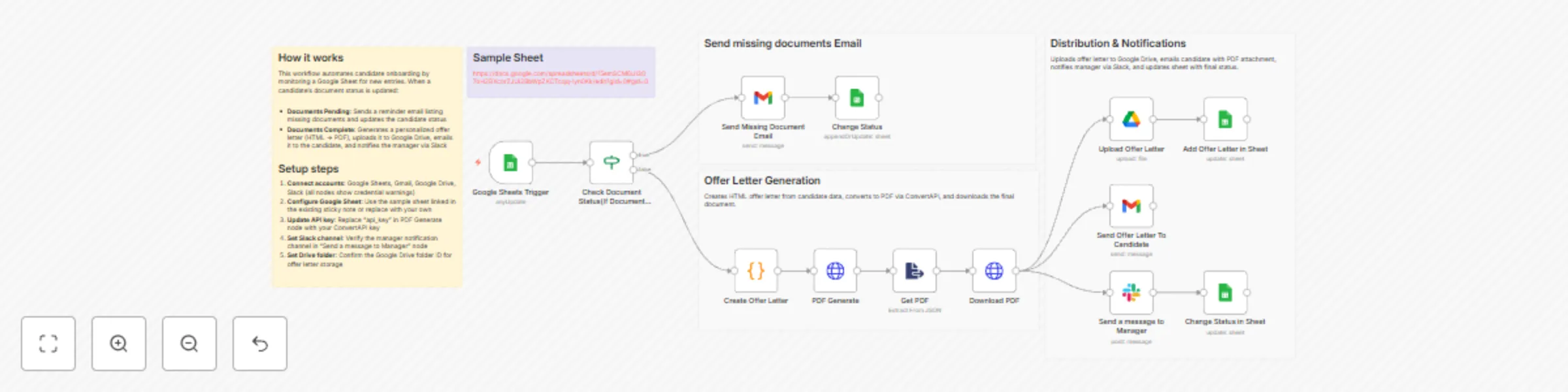
Automate offer letters & notifications with Google Sheets, Gmail & Slack

Workflow preview

Workflow preview
100%
Automate offer letters & notifications with Google Sheets, Gmail & Slack preview
Open on n8n.io

Important notice

This workflow is provided as-is. Please review and test before using in production.

1. Workflow Overview

What problem does this workflow solve? Hiring teams often struggle with document follow ups, offer letter generation, and stakeholder communication. Manual checks, email back and forth, and missi...

Best for

  • HR automation workflows
  • Multimodal AI automation workflows
  • advanced n8n builders looking for reusable templates

Tools used

n8n-nodes-base.googlesheetstrigger, n8n-nodes-base.extractfromfile, n8n-nodes-base.httprequest, n8n-nodes-base.slack, n8n-nodes-base.stickynote, n8n-nodes-base.if, n8n-nodes-base.code, n8n-nodes-base.gmail

Source and attribution

This workflow is cataloged by N8N Workflows and links back to its original n8n.io source page by InfyOm Technologies.

Original n8n.io source

1.1 Workflow description

Title
Automate offer letters & notifications with Google Sheets, Gmail & Slack
Workflow name
Automate offer letters & notifications with Google Sheets, Gmail & Slack

โœ… What problem does this workflow solve?

Hiring teams often struggle with document follow-ups, offer letter generation, and stakeholder communication. Manual checks, email back-and-forth, and missing files slow down hiring and create chaos during onboarding.

This workflow automates the entire offer letter lifecycle-from document validation to offer delivery-so HR teams can move faster with zero manual chasing.


โš™๏ธ What does this workflow do?

  • Monitors candidate records in Google Sheets.
  • Detects pending onboarding documents automatically.
  • Sends reminder emails for missing documents.
  • Generates professional offer letters (HTML โ†’ PDF).
  • Emails offer letters to candidates automatically.
  • Notifies hiring managers on Slack.
  • Stores offer letters securely in Google Drive.
  • Tracks onboarding status and document links in Google Sheets.

๐Ÿ’ก Main Use Cases

  • Automate offer letter creation and delivery.
  • Eliminate manual follow-ups for missing documents.
  • Keep hiring managers informed in real time.
  • Maintain a clean onboarding audit trail.
  • Improve candidate experience with faster responses.

๐Ÿง  How It Works โ€“ Step by Step

1. Candidate Data Trigger

The workflow monitors Google Sheets for candidate records containing:

  • Name, email, phone
  • Profession and offered salary
  • Document submission status

2. Pending Document Check

If documents are pending:

  • A reminder email is sent to the candidate listing missing documents.
  • Candidate status is updated to Documents_Pending.
  • Workflow stops until documents are submitted.

3. Offer Letter Generation

If no documents are pending:

  • A customized offer letter is generated dynamically using candidate data.
  • The offer letter is converted from HTML to a professional PDF.
  • The PDF is prepared for distribution and storage.

4. Notifications & Delivery

  • Offer letter PDF is emailed to the candidate.
  • Hiring manager receives a Slack notification about the new joining.

5. Storage & Status Tracking

  • Offer letter PDF is uploaded to Google Drive.
  • Google Sheets is updated with:
    • Offer letter link
    • Candidate status set to Offer_Sent
  • Creates a complete onboarding audit trail.

๐Ÿ—‚ Integrations Used

  • Google Sheets โ€“ Candidate tracking and onboarding status
  • Gmail โ€“ Candidate communication and reminders
  • Slack โ€“ Hiring manager notifications
  • Google Drive โ€“ Secure offer letter storage
  • ConvertAPI โ€“ HTML to PDF generation
  • n8n Code Nodes โ€“ Dynamic offer letter creation

๐Ÿ‘ค Who can use this?

This workflow is ideal for:

  • ๐Ÿข HR teams
  • ๐Ÿš€ Startups and growing companies
  • ๐Ÿง‘โ€๐Ÿ’ผ Recruitment agencies
  • ๐Ÿ“‹ Operations teams handling onboarding

If your hiring process involves repetitive checks and emails, this automation saves hours per hire.


๐Ÿš€ Benefits

  • โœ… Zero manual document chasing
  • โœ… Consistent, branded offer letters
  • โœ… Faster hiring cycles
  • โœ… Centralized document storage
  • โœ… Clear onboarding visibility

1.2 Logical Blocks

This catalog entry is organized from the workflow JSON. The node-level section below shows the executable blocks available for review before importing the template.

2. Block-by-Block Analysis

Block 1 - Google Sheets Trigger

Type / Role
n8n-nodes-base.googleSheetsTrigger - googleSheetsTrigger
Config choices
Version 1

Block 2 - Get PDF

Type / Role
n8n-nodes-base.extractFromFile - extractFromFile
Config choices
Version 1

Block 3 - PDF Generate

Type / Role
n8n-nodes-base.httpRequest - httpRequest
Config choices
Version 4.2

Block 4 - Download PDF

Type / Role
n8n-nodes-base.httpRequest - httpRequest
Config choices
Version 4.2

Block 5 - Send a message to Manager

Type / Role
n8n-nodes-base.slack - slack
Config choices
Version 2.3

Block 6 - Sticky Note

Type / Role
n8n-nodes-base.stickyNote - stickyNote
Config choices
Version 1

Block 7 - Check Document Status(If Document Status is Pending)

Type / Role
n8n-nodes-base.if - if
Config choices
Version 2.2

Block 8 - Create Offer Letter

Type / Role
n8n-nodes-base.code - code
Config choices
Version 2

Block 9 - Send Missing Document Email

Type / Role
n8n-nodes-base.gmail - gmail
Config choices
Version 2.1

Block 10 - Change Status

Type / Role
n8n-nodes-base.googleSheets - googleSheets
Config choices
Version 4.7

Block 11 - Upload Offer Letter

Type / Role
n8n-nodes-base.googleDrive - googleDrive
Config choices
Version 3

Block 12 - Add Offer Letter in Sheet

Type / Role
n8n-nodes-base.googleSheets - googleSheets
Config choices
Version 4.7

Block 13 - Send Offer Letter To Candidate

Type / Role
n8n-nodes-base.gmail - gmail
Config choices
Version 2.1

Block 14 - Change Status in Sheet

Type / Role
n8n-nodes-base.googleSheets - googleSheets
Config choices
Version 4.7

Block 15 - Workflow Overview

Type / Role
n8n-nodes-base.stickyNote - stickyNote
Config choices
Version 1

Block 16 - Document Verification

Type / Role
n8n-nodes-base.stickyNote - stickyNote
Config choices
Version 1

Block 17 - Offer Letter Generation

Type / Role
n8n-nodes-base.stickyNote - stickyNote
Config choices
Version 1

Block 18 - Distribution & Notifications

Type / Role
n8n-nodes-base.stickyNote - stickyNote
Config choices
Version 1

3. Summary Table

Workflow Automate offer letters & notifications with Google Sheets, Gmail & Slack
Complexity advanced
Nodes 18
Categories HR, Multimodal AI
Author InfyOm Technologies
Published 18 Dec 2025

4. Reproducing the Workflow from Scratch

  1. 1. Download the workflow JSON

    Use the JSON export at /data/workflows/11916/11916.json as the source template for this automation.

  2. 2. Import the template into n8n

    Open n8n, import the downloaded JSON, and review each node before activating the workflow.

  3. 3. Configure credentials and variables

    Replace placeholder credentials, API keys, webhook URLs, account IDs, and environment-specific values with your own settings.

  4. 4. Test with sample data

    Run the workflow manually or in a staging workspace, inspect node output, and confirm downstream systems receive the expected data.

  5. 5. Activate and monitor

    Enable the workflow only after testing, then monitor executions, errors, and rate limits during the first production runs.

5. General Notes & Resources

Review imported nodes carefully before activation. This catalog entry is intended to help you inspect the workflow structure, understand required services, and find related templates faster.

Node names, credentials, schedules, webhook paths, and external service limits may need adjustment for your workspace.

Frequently asked questions

What does Automate offer letters & notifications with Google Sheets, Gmail & Slack do?

What problem does this workflow solve? Hiring teams often struggle with document follow ups, offer letter generation, and stakeholder communication. Manual checks, email back and forth, and missi...

What do I need before importing this workflow?

Review the workflow JSON, configure any required credentials in n8n, and test the automation in a safe workspace before using it in production.

Can I customize this workflow?

Yes. Use the block-by-block analysis and the downloadable JSON to inspect each node, then adjust credentials, prompts, schedules, filters, or destinations for your HR, Multimodal AI use case.