Block 1 - Download file
- Type / Role
- n8n-nodes-base.googleDrive - googleDrive
- Config choices
- Version 3


 Early Deal
This workflow is provided as-is. Please review and test before using in production.
Description This workflow helps you find and evaluate job opportunities automatically, without spending hours searching and comparing roles. It uses your resume to look for relevant jobs on LinkedI...
n8n-nodes-base.googledrive, n8n-nodes-base.extractfromfile, n8n-nodes-base.code, n8n-nodes-base.httprequest, n8n-nodes-base.html, n8n-nodes-base.splitout, n8n-nodes-base.splitinbatches, n8n-nodes-base.wait
This workflow is cataloged by N8N Workflows and links back to its original n8n.io source page by Dinakar Selvakumar.
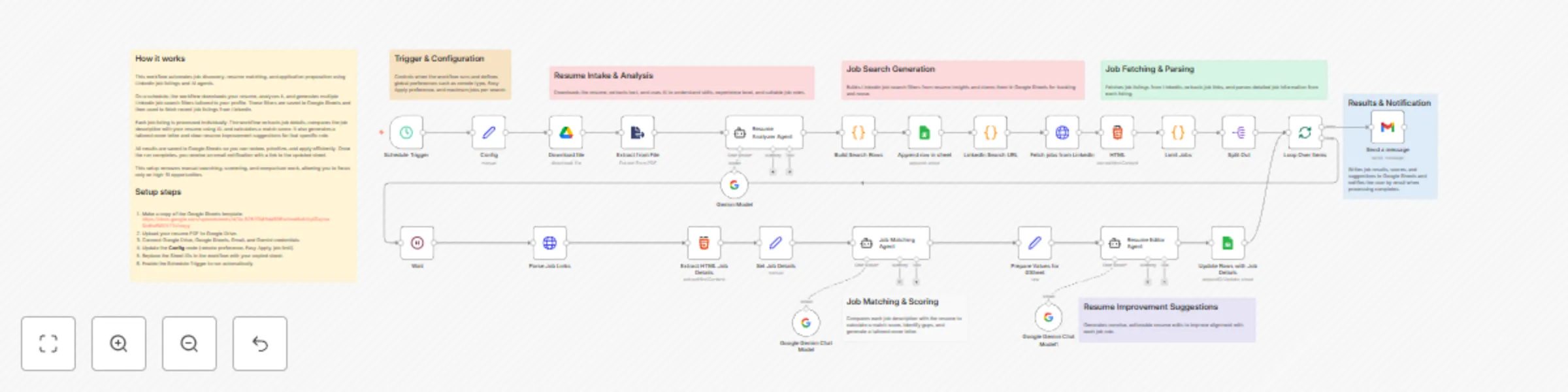
Original n8n.io sourceThis workflow helps you find and evaluate job opportunities automatically, without spending hours searching and comparing roles. It uses your resume to look for relevant jobs on LinkedIn, checks how well each role matches your profile, and organises everything neatly in Google Sheets so you can focus on applying to the best opportunities.
On a schedule, the workflow downloads your resume from Google Drive and analyses it to understand your skills and experience. Based on this, it creates LinkedIn job searches and pulls in recent job listings. Each job is then reviewed using AI to compare the job description with your resume, produce a match score, suggest resume improvements, and generate a tailored cover letter. All results are saved to Google Sheets, and you’re notified by email when the run finishes.
You can easily adapt this workflow to suit your goals. Change the job limits, locations, or remote preferences in the Config node. Update the AI prompts to target different roles or industries, or extend the workflow to send results to tools like Notion, a CRM, or your own application tracker.
This workflow is designed to help you screen and prepare for jobs, not to apply automatically. Match scores are a guide, not a guarantee, so it’s always worth reviewing roles manually. Also, since LinkedIn pages can change over time, you may occasionally need to update HTML selectors to keep things running smoothly.
This catalog entry is organized from the workflow JSON. The node-level section below shows the executable blocks available for review before importing the template.
Showing the first 24 of 33 workflow blocks. Download the JSON for the full node graph.
| Workflow | Automate job search & resume matching with LinkedIn, Gemini AI & Google Sheets |
|---|---|
| Complexity | advanced |
| Nodes | 33 |
| Categories | HR, AI Summarization |
| Author | Dinakar Selvakumar |
| Published | 22 Dec 2025 |
Use the JSON export at /data/workflows/12014/12014.json as the source template for this automation.
Open n8n, import the downloaded JSON, and review each node before activating the workflow.
Replace placeholder credentials, API keys, webhook URLs, account IDs, and environment-specific values with your own settings.
Run the workflow manually or in a staging workspace, inspect node output, and confirm downstream systems receive the expected data.
Enable the workflow only after testing, then monitor executions, errors, and rate limits during the first production runs.
Review imported nodes carefully before activation. This catalog entry is intended to help you inspect the workflow structure, understand required services, and find related templates faster.
Node names, credentials, schedules, webhook paths, and external service limits may need adjustment for your workspace.
Description This workflow helps you find and evaluate job opportunities automatically, without spending hours searching and comparing roles. It uses your resume to look for relevant jobs on LinkedI...
Review the workflow JSON, configure any required credentials in n8n, and test the automation in a safe workspace before using it in production.
Yes. Use the block-by-block analysis and the downloadable JSON to inspect each node, then adjust credentials, prompts, schedules, filters, or destinations for your HR, AI Summarization use case.