Automate job posting creation with Forms, Dropbox, and Foxit PDF generation
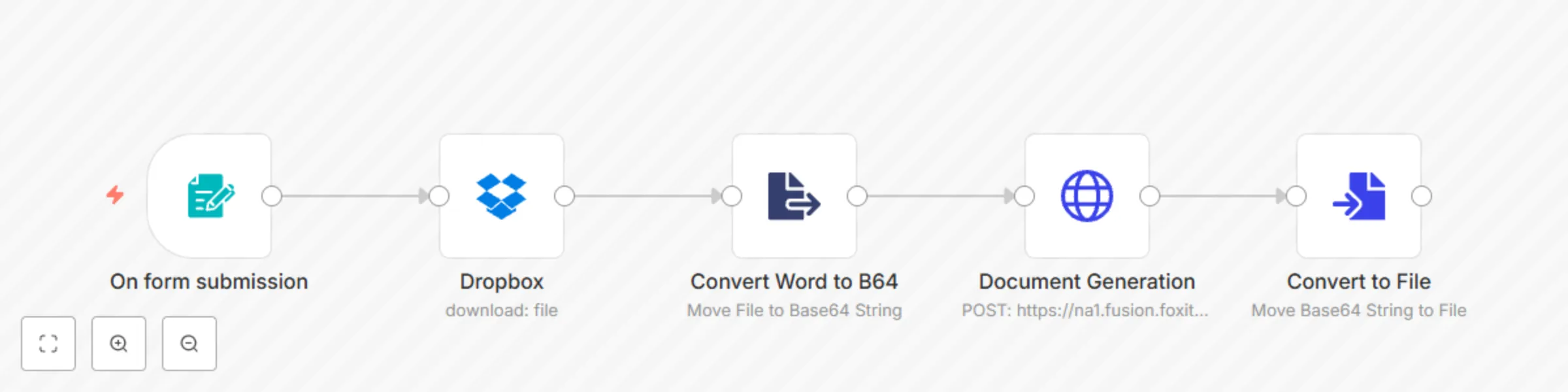
Workflow preview

$20/month : Unlimited workflows
2500 executions/month

THE #1 IN WEB SCRAPING
Scrape any website without limits
HOSTINGER  Early Deal
DISCOUNT 20% Try free
Early DealDISCOUNT 20%
Self-hosted n8n
Unlimited workflows - from $4.99/mo

#1 hub for scraping, AI & automation
6000+ actors - $5 credits/mo
Important notice
This workflow is provided as-is. Please review and test before using in production.
Overview
This n8n template demonstrates how to add a tie form data to a new PDF. The idea is to automate the creation of a professional looking job posting.
Use cases would be organizations who need to automate the creation of job postings.
How it Works
- The trigger is a form that asks for job position, salary, office location, and responsiblities
- When the form is posted, it kicks off the workflow's next steps
- A Word document is downloaded from a Dropbox folder. This Word document is used as the template for the posting.
- The Word document is converted to base64.
- A call to Foxit's Document Generation endpoint includes the encoded Word document along with the form information.
- The resulting PDF is downloaded and converted from base64 into binary.
- At this point, the PDF is just there, but it could be emailed, sent to another workflow, etc.
Requirements
- A Dropbox account. The workflow's first step points to a Word template. See our doc gen APIs for information on how to craft the Word doc, but the easiest way is to copy text like so:
Job Position
We are pleased to announce the opening of a new job, {{ jobPosition }}. This job pays ${{ salary }} per year and is in our {{ office }} location. The details of this job are:

{{ responsibilities }}
- Foxit developer account (https://developer-api.foxit.com)
Next Steps
As mentioned above, you could do anything with the resulting PDF when done.