Raymond Camden
Workflows by Raymond Camden
Extract organizations & summarize documents with Foxit and Diffbot
## How It Works This N8N template demonstrates using Foxit's Extraction API to get information from an incoming document and then using Diffbot's APIs to turn the text into a list of organizations mentioned in the document and create a summary. ## How it works * Listen for a new file added to a Google Drive folder. When executed, the bits are downloaded. * Upload the bits to Foxit. * Call the [Extract API](https://docs.developer-api.foxit.com/#f7aaf21d-f519-4c20-90b9-17d0c1763476) to get the text contents of the document. * Poll the API to see if it's done, and when it is, grab the text. * Send the text to [Diffbot API](https://docs.diffbot.com/reference/introduction-to-natural-language-api) to get a list of entities mentioned in the doc as well as the summary. * Use a code step to filter the entities returned from Diffbot to ones that are organizations, as well as filtering to a high confidence score. * Use another code step to make an HTML string from the previous data. * Email it using the GMail node. ## Requirements * A Google account for Google Drive and GMail * Foxit developer account (https://developer-api.foxit.com) * Diffbot developer account (https://app.diffbot.com/get-started) ## Next Steps This workflow assumes PDF input, but Foxit has APIs to convert Office docs to PDF and that flow could be added before the Extract API is called. Diffbot returns an incredible set of information and more could be used in the email. Instead of emailing, you could sort documents by organizations into new folders.
Automate job posting creation with Forms, Dropbox, and Foxit PDF generation
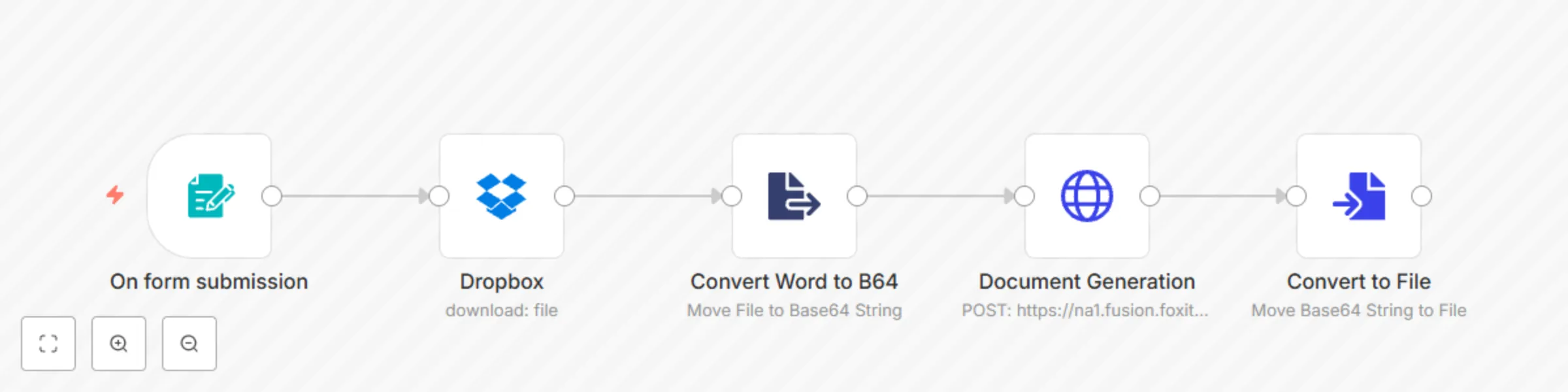
## This n8n template demonstrates how to add a tie form data to a new PDF. The idea is to automate the creation of a professional looking job posting. Use cases would be organizations who need to automate the creation of job postings. ### How it Works * The trigger is a form that asks for job position, salary, office location, and responsiblities * When the form is posted, it kicks off the workflow's next steps * A Word document is downloaded from a Dropbox folder. This Word document is used as the template for the posting. * The Word document is converted to base64. * A call to Foxit's Document Generation endpoint includes the encoded Word document along with the form information. * The resulting PDF is downloaded and converted from base64 into binary. * At this point, the PDF is just there, but it could be emailed, sent to another workflow, etc. ### Requirements * A Dropbox account. The workflow's first step points to a Word template. See our [doc gen](https://docs.developer-api.foxit.com/#document-generation-apis) APIs for information on how to craft the Word doc, but the easiest way is to copy text like so: ``` Job Position We are pleased to announce the opening of a new job, {{ jobPosition }}. This job pays ${{ salary }} per year and is in our {{ office }} location. The details of this job are: {{ responsibilities }} ``` * Foxit developer account (https://developer-api.foxit.com) ### Next Steps As mentioned above, you could do anything with the resulting PDF when done.
Auto-convert OneDrive Word documents to PDF with Foxit and send via Gmail
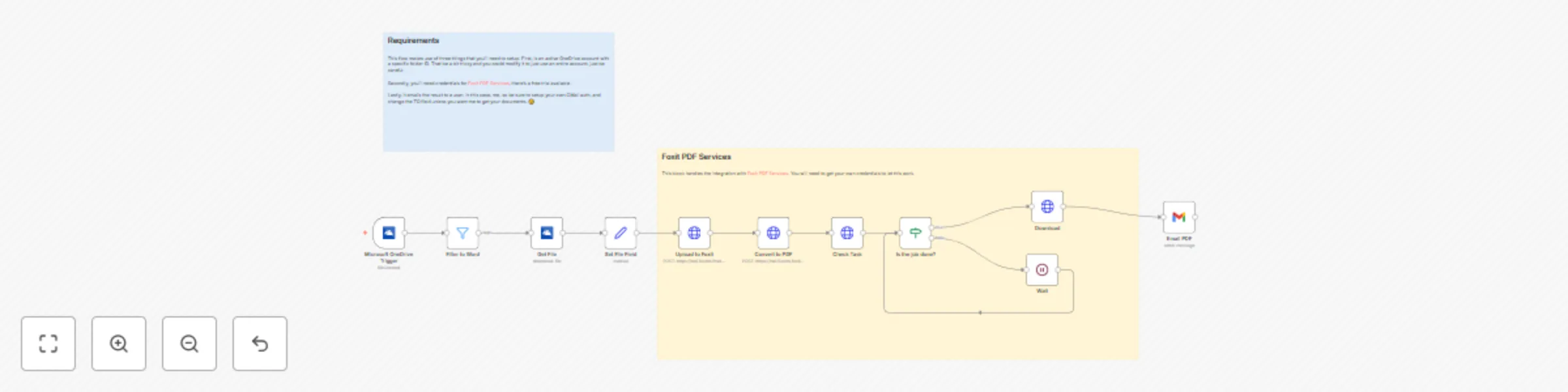
## This n8n template demonstrates how to add a document conversion process to incoming Word documents in a OneDrive folder. Documents are converted to PDF and emailed to a reviewer. Use cases would be environments where incoming documents are dropped into cloud storage and a human needs to review them. By converting to PDF, it becomes easier to read in a consistent format in the browser. ## How it works * Listen for new files added in a OneDrive folder, identified by an ID * Download the bits of the new document if the file was a Micrsoft Word document (the API I'm using can convert any Office document, but wanted to start simple) * Upload to Foxit's API service, convert to PDF, and download when done * Use GMail to mail the PDF to a human reviewer. ## How to use * You'll need to determine a OneDrive folder ID to monitor, or select an entire account instead, just be careful when testing. * When the workflow is done, it emails to myself, so please connect your own GMail and set a preferred email address for testing. ## Requirements * A Microsoft OneDrive account * Foxit developer account (https://developer-api.foxit.com) * A Gmail account * At least one Word document - we all have that, right? ## Next Steps This workflow could be modified to work with any Office style document, and could also upload the PDF version back to OneDrive.