Automate job application processing from forms to Telegram for HR teams

Workflow preview

Workflow preview
100%
Automate job application processing from forms to Telegram for HR teams preview
Open on n8n.io

Important notice

This workflow is provided as-is. Please review and test before using in production.

1. Workflow Overview

Who’s it for This workflow is perfect for HR teams, recruiters, or hiring managers who collect applicant information via a web form and want to automatically forward both candidate details and atta...

Best for

  • HR automation workflows
  • advanced n8n builders looking for reusable templates

Tools used

n8n-nodes-base.formtrigger, n8n-nodes-base.if, n8n-nodes-base.set, n8n-nodes-base.datetime, n8n-nodes-base.merge, n8n-nodes-base.telegram, n8n-nodes-base.noop, n8n-nodes-base.code

Source and attribution

This workflow is cataloged by N8N Workflows and links back to its original n8n.io source page by Mal Chia.

Original n8n.io source

1.1 Workflow description

Title
Automate job application processing from forms to Telegram for HR teams
Workflow name
Automate job application processing from forms to Telegram for HR teams

Who’s it for

This workflow is perfect for HR teams, recruiters, or hiring managers who collect applicant information via a web form and want to automatically forward both candidate details and attached resumes into a dedicated Telegram channel or group. It streamlines manual email checks, speeding up review and collaboration.

How it works

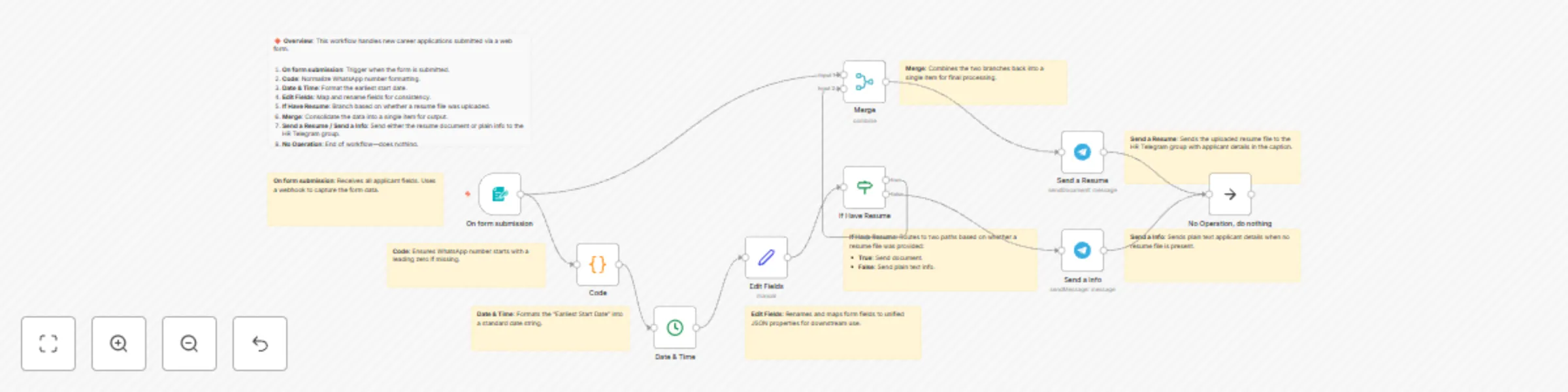
  1. On form submission: A Form Trigger node captures all applicant fields (name, age, WhatsApp number, education, desired role, availability date, expected salary, resume file, and additional comments).
  2. Date & Time: Formats the “fastest start date” into a human-readable string.
  3. Edit Fields: A Set node renames and reshapes incoming JSON into clear key/value pairs.
  4. If Have Resume: An If node routes submissions with an attached resume to one branch (sending both info and document) and submissions without a resume to a simpler info-only branch.
  5. Merge: Combines branches so both message types terminate in a single unified flow.
  6. Send a Resume & Send a Info: Two Telegram nodes post Markdown-formatted messages (and the PDF resume when available) to your specified Telegram chat.

How to set up

  1. Install and enable the n8n-nodes-base.formTrigger and n8n-nodes-base.telegram community nodes (preview).

  2. Copy this JSON into your n8n instance (Workflow → Import from clipboard).

  3. Create environment variables for credentials:

    • TELEGRAM_BOT_TOKEN
    • TELEGRAM_CHAT_ID
  4. In each Telegram node, reference these variables instead of hard-coding ({{$env.TELEGRAM_BOT_TOKEN}}, {{$env.TELEGRAM_CHAT_ID}}).

Requirements

  • n8n version ≥ 0.200.0
  • Community nodes: Form Trigger, Telegram
  • A Telegram bot with chat permissions
  • A hosted form endpoint or embedded form at path /mmc-newjob

How to customize the workflow

  • Form fields: Edit the Form Trigger node’s formFields.values to add or remove fields.
  • Telegram formatting: Tweak captions under Send a Resume and Send a Info to adjust the MarkdownV2 styling.
  • Conditional logic: Modify the If Have Resume node to branch on other criteria (e.g., education level).
  • Styling: Update the customCss section in Form Trigger to match your brand’s look.

Good to know

  • Community nodes may be in preview; test thoroughly before production.
  • Webhook URLs change when you rename the workflow—revisit your form’s embed or webhook settings after renaming.
  • Consider adding an Error Trigger node to capture failures and notify your team.

1.2 Logical Blocks

This catalog entry is organized from the workflow JSON. The node-level section below shows the executable blocks available for review before importing the template.

2. Block-by-Block Analysis

Block 1 - On form submission

Type / Role
n8n-nodes-base.formTrigger - formTrigger
Config choices
Version 2.2

Block 2 - If Have Resume

Type / Role
n8n-nodes-base.if - if
Config choices
Version 2.2

Block 3 - Edit Fields

Type / Role
n8n-nodes-base.set - set
Config choices
Version 3.4

Block 4 - Date & Time

Type / Role
n8n-nodes-base.dateTime - dateTime
Config choices
Version 2

Block 5 - Merge

Type / Role
n8n-nodes-base.merge - merge
Config choices
Version 3.2

Block 6 - Send a Resume

Type / Role
n8n-nodes-base.telegram - telegram
Config choices
Version 1.2

Block 7 - Send a Info

Type / Role
n8n-nodes-base.telegram - telegram
Config choices
Version 1.2

Block 8 - No Operation, do nothing

Type / Role
n8n-nodes-base.noOp - noOp
Config choices
Version 1

Block 9 - Code

Type / Role
n8n-nodes-base.code - code
Config choices
Version 2

Block 10 - Overview Note

Type / Role
n8n-nodes-base.stickyNote - stickyNote
Config choices
Version 1

Block 11 - Form Trigger Note

Type / Role
n8n-nodes-base.stickyNote - stickyNote
Config choices
Version 1

Block 12 - Normalize Phone Note

Type / Role
n8n-nodes-base.stickyNote - stickyNote
Config choices
Version 1

Block 13 - Format Date Note

Type / Role
n8n-nodes-base.stickyNote - stickyNote
Config choices
Version 1

Block 14 - Map Fields Note

Type / Role
n8n-nodes-base.stickyNote - stickyNote
Config choices
Version 1

Block 15 - Branch Note

Type / Role
n8n-nodes-base.stickyNote - stickyNote
Config choices
Version 1

Block 16 - Merge Note

Type / Role
n8n-nodes-base.stickyNote - stickyNote
Config choices
Version 1

Block 17 - Send Resume Note

Type / Role
n8n-nodes-base.stickyNote - stickyNote
Config choices
Version 1

Block 18 - Send Info Note

Type / Role
n8n-nodes-base.stickyNote - stickyNote
Config choices
Version 1

3. Summary Table

Workflow Automate job application processing from forms to Telegram for HR teams
Complexity advanced
Nodes 18
Categories HR
Author Mal Chia
Published 06 Jul 2025

4. Reproducing the Workflow from Scratch

  1. 1. Download the workflow JSON

    Use the JSON export at /data/workflows/5713/5713.json as the source template for this automation.

  2. 2. Import the template into n8n

    Open n8n, import the downloaded JSON, and review each node before activating the workflow.

  3. 3. Configure credentials and variables

    Replace placeholder credentials, API keys, webhook URLs, account IDs, and environment-specific values with your own settings.

  4. 4. Test with sample data

    Run the workflow manually or in a staging workspace, inspect node output, and confirm downstream systems receive the expected data.

  5. 5. Activate and monitor

    Enable the workflow only after testing, then monitor executions, errors, and rate limits during the first production runs.

5. General Notes & Resources

Review imported nodes carefully before activation. This catalog entry is intended to help you inspect the workflow structure, understand required services, and find related templates faster.

Node names, credentials, schedules, webhook paths, and external service limits may need adjustment for your workspace.

Frequently asked questions

What does Automate job application processing from forms to Telegram for HR teams do?

Who’s it for This workflow is perfect for HR teams, recruiters, or hiring managers who collect applicant information via a web form and want to automatically forward both candidate details and atta...

What do I need before importing this workflow?

Review the workflow JSON, configure any required credentials in n8n, and test the automation in a safe workspace before using it in production.

Can I customize this workflow?

Yes. Use the block-by-block analysis and the downloadable JSON to inspect each node, then adjust credentials, prompts, schedules, filters, or destinations for your HR use case.