Automate job application processing from forms to Telegram for HR teams
### Who’s it for
This workflow is perfect for HR teams, recruiters, or hiring managers who collect applicant information via a web form and want to automatically forward both candidate details and attached resumes into a dedicated Telegram channel or group. It streamlines manual email checks, speeding up review and collaboration.
### How it works
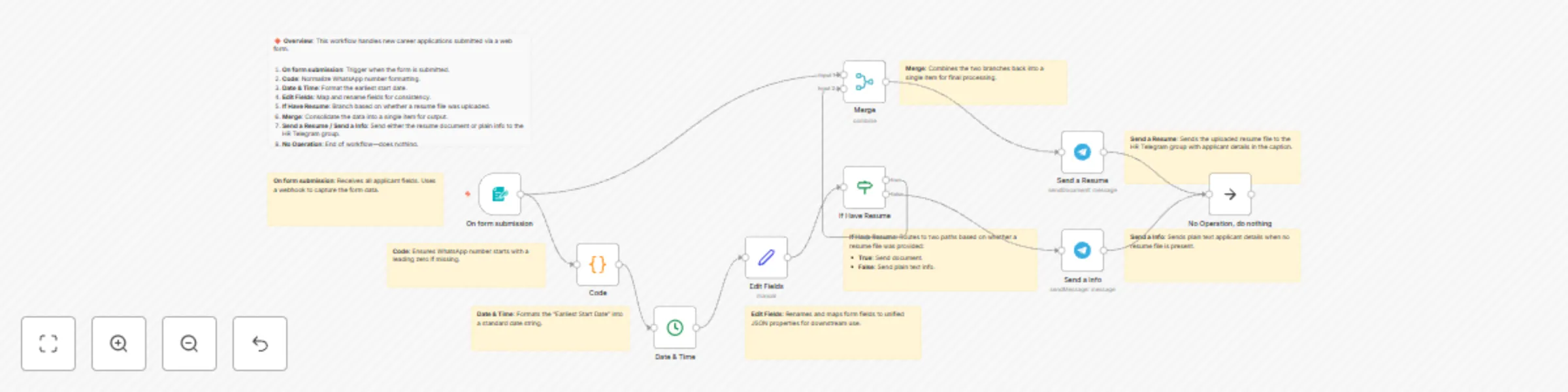
1. **On form submission**: A **Form Trigger** node captures all applicant fields (name, age, WhatsApp number, education, desired role, availability date, expected salary, resume file, and additional comments).
2. **Date & Time**: Formats the “fastest start date” into a human-readable string.
3. **Edit Fields**: A **Set** node renames and reshapes incoming JSON into clear key/value pairs.
4. **If Have Resume**: An **If** node routes submissions with an attached resume to one branch (sending both info and document) and submissions without a resume to a simpler info-only branch.
5. **Merge**: Combines branches so both message types terminate in a single unified flow.
6. **Send a Resume** & **Send a Info**: Two **Telegram** nodes post Markdown-formatted messages (and the PDF resume when available) to your specified Telegram chat.
### How to set up
1. Install and enable the **n8n-nodes-base.formTrigger** and **n8n-nodes-base.telegram** community nodes (preview).
2. Copy this JSON into your n8n instance (Workflow → Import from clipboard).
3. Create environment variables for credentials:
* `TELEGRAM_BOT_TOKEN`
* `TELEGRAM_CHAT_ID`
4. In each Telegram node, reference these variables instead of hard-coding (`{{$env.TELEGRAM_BOT_TOKEN}}`, `{{$env.TELEGRAM_CHAT_ID}}`).
### Requirements
* n8n version ≥ 0.200.0
* Community nodes: **Form Trigger**, **Telegram**
* A Telegram bot with chat permissions
* A hosted form endpoint or embedded form at path `/mmc-newjob`
### How to customize the workflow
* **Form fields**: Edit the **Form Trigger** node’s `formFields.values` to add or remove fields.
* **Telegram formatting**: Tweak captions under **Send a Resume** and **Send a Info** to adjust the MarkdownV2 styling.
* **Conditional logic**: Modify the **If Have Resume** node to branch on other criteria (e.g., education level).
* **Styling**: Update the `customCss` section in **Form Trigger** to match your brand’s look.
### Good to know
* Community nodes may be in preview; test thoroughly before production.
* Webhook URLs change when you rename the workflow—revisit your form’s embed or webhook settings after renaming.
* Consider adding an **Error Trigger** node to capture failures and notify your team.