Block 1 - When clicking ‘Execute workflow’
- Type / Role
- n8n-nodes-base.manualTrigger - manualTrigger
- Config choices
- Version 1


 Early Deal
This workflow is provided as-is. Please review and test before using in production.
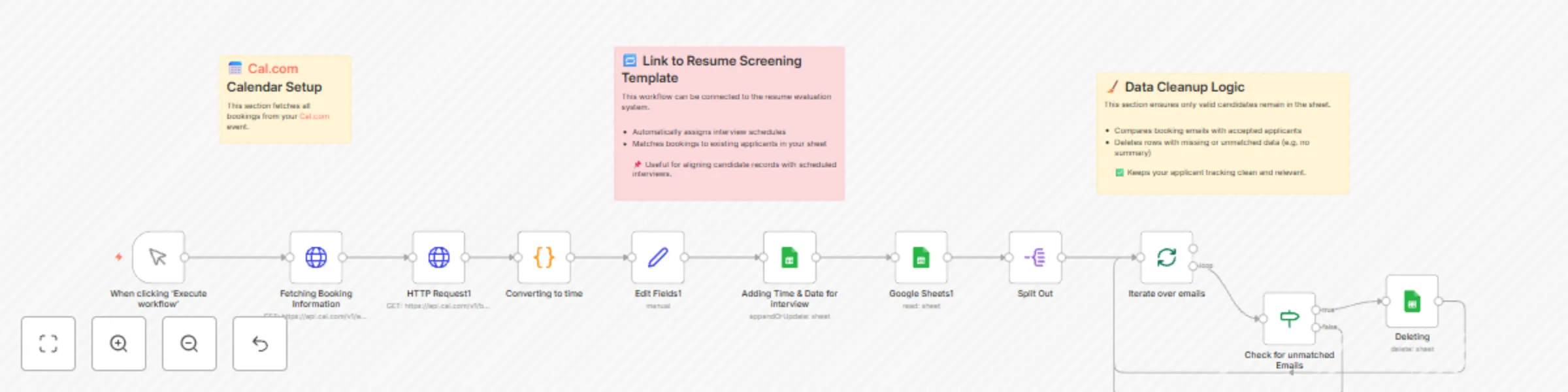
Workflow Description Automate your candidate interview pipeline with precision. This powerful integration pulls booking data from Cal.com, extracts interview details (name, email, date & time), and...
n8n-nodes-base.manualtrigger, n8n-nodes-base.httprequest, n8n-nodes-base.set, n8n-nodes-base.googlesheets, n8n-nodes-base.splitout, n8n-nodes-base.stickynote, n8n-nodes-base.splitinbatches, n8n-nodes-base.if
This workflow is cataloged by N8N Workflows and links back to its original n8n.io source page by Abdulaziz.
Original n8n.io sourceWorkflow Description Automate your candidate interview pipeline with precision. This powerful integration pulls booking data from Cal.com, extracts interview details (name, email, date & time), and syncs them directly into your Google Sheets tracker. It matches applicants using email, formats the date in the Asia/Riyadh timezone, and appends only relevant entries.
But it doesn’t stop there — it cleans your sheet automatically by removing unmatched or empty records, ensuring your data stays clean, reliable, and ready for HR decisions.
What it does: Fetches interview bookings from Cal.com
Converts time to readable format (e.g. 30 June, 09:00 AM)
Matches booking emails with existing applicant records
Auto-updates interview date in your sheet
Detects and deletes irrelevant or blank entries
Use Cases: Resume screening workflows that require automated interview sync
HR dashboards needing real-time calendar updates
Applicant pipelines where only valid interviews should remain
Ideal for: Recruiters • HR teams • Automation architects • Remote hiring pipelines
This catalog entry is organized from the workflow JSON. The node-level section below shows the executable blocks available for review before importing the template.
| Workflow | Automate interview scheduling and data cleanup with Cal.com and Google Sheets |
|---|---|
| Complexity | intermediate |
| Nodes | 14 |
| Categories | HR |
| Author | Abdulaziz |
| Published | 30 Jun 2025 |
Use the JSON export at /data/workflows/5481/5481.json as the source template for this automation.
Open n8n, import the downloaded JSON, and review each node before activating the workflow.
Replace placeholder credentials, API keys, webhook URLs, account IDs, and environment-specific values with your own settings.
Run the workflow manually or in a staging workspace, inspect node output, and confirm downstream systems receive the expected data.
Enable the workflow only after testing, then monitor executions, errors, and rate limits during the first production runs.
Review imported nodes carefully before activation. This catalog entry is intended to help you inspect the workflow structure, understand required services, and find related templates faster.
Node names, credentials, schedules, webhook paths, and external service limits may need adjustment for your workspace.
Workflow Description Automate your candidate interview pipeline with precision. This powerful integration pulls booking data from Cal.com, extracts interview details (name, email, date & time), and...
Review the workflow JSON, configure any required credentials in n8n, and test the automation in a safe workspace before using it in production.
Yes. Use the block-by-block analysis and the downloadable JSON to inspect each node, then adjust credentials, prompts, schedules, filters, or destinations for your HR use case.