Automate HR candidate shortlisting with Sheets, Gmail, ClickUp & Calendly

Workflow preview

Workflow preview
100%
Automate HR candidate shortlisting with Sheets, Gmail, ClickUp & Calendly preview
Open on n8n.io

Important notice

This workflow is provided as-is. Please review and test before using in production.

1. Workflow Overview

Description This n8n workflow automates the candidate shortlisting process by integrating Google Sheets, Gmail, ClickUp, and Calendly. It fetches candidate records, filters high scoring profiles...

Best for

  • HR automation workflows
  • intermediate n8n builders looking for reusable templates

Tools used

n8n-nodes-base.manualtrigger, n8n-nodes-base.googlesheets, n8n-nodes-base.if, n8n-nodes-base.gmail, n8n-nodes-base.clickup, n8n-nodes-base.stickynote

Source and attribution

This workflow is cataloged by N8N Workflows and links back to its original n8n.io source page by Rahul Joshi.

Original n8n.io source

1.1 Workflow description

Title
Automate HR candidate shortlisting with Sheets, Gmail, ClickUp & Calendly
Workflow name
Automate HR candidate shortlisting with Sheets, Gmail, ClickUp & Calendly

📝 Description

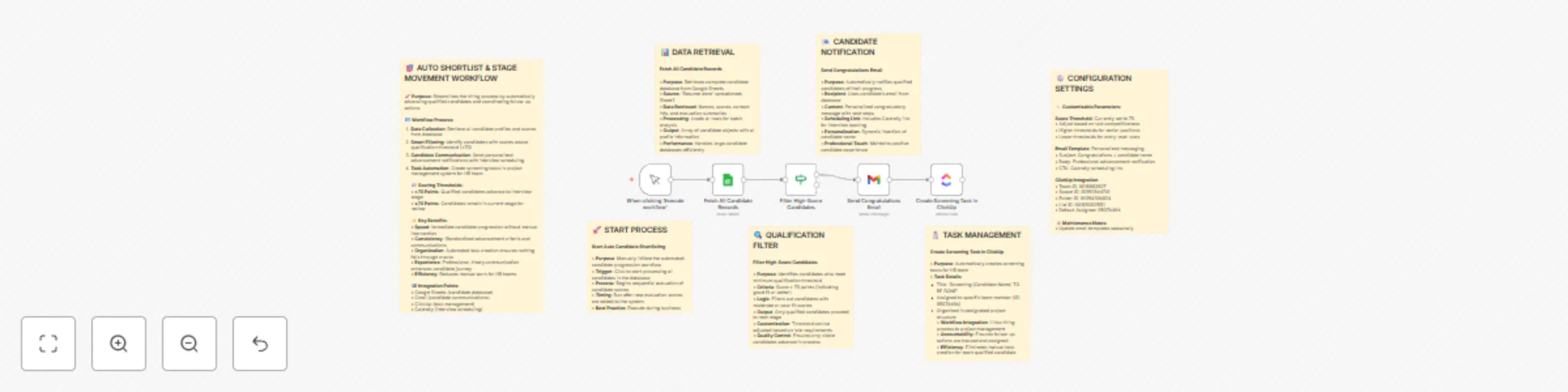
This n8n workflow automates the candidate shortlisting process by integrating Google Sheets, Gmail, ClickUp, and Calendly. It fetches candidate records, filters high-scoring profiles, sends personalized advancement emails, and creates screening tasks for your HR team—all with a single manual trigger.

🚀 What It Does

Fetch All Candidate Records

  • Retrieves complete candidate data (names, scores, contact info, summaries) from the ‘Resume store’ Google Sheet (Sheet2).
  • Efficiently loads all rows for batch analysis.

Filter High-Score Candidates

  • Applies a threshold filter (default: score > 70) to identify strong-fit candidates.
  • Only qualified profiles advance; threshold is customizable per role.

Send Congratulations Email

  • Sends personalized emails to qualified candidates using Gmail.
  • Includes a dynamic Calendly scheduling link for interview booking.
  • Maintains a positive candidate experience with professional messaging.

Create Screening Task in ClickUp

  • Automatically generates screening tasks for each qualified candidate in ClickUp.
  • Assigns tasks to a designated team member and organizes them in specified project folders.
  • Ensures accountability and seamless follow-up.

📈 Key Benefits

  • Speed: Instantly advances qualified candidates—no manual sorting.
  • Consistency: Standardized criteria and communications for every role.
  • Organization: Auto-creates ClickUp tasks so nothing slips through.
  • Experience: Timely, professional communication enhances candidate journey.
  • Efficiency: Reduces HR workload and error risk.

⚙️ Customization & Integration

  • Score Threshold: Set to 70 by default; adjust for different roles or seniority.
  • Email Template: Editable subject, body, and CTA (Calendly link).
  • ClickUp Integration: Uses configurable Team, Space, Folder, List, and Assignee IDs.
  • Systems Supported: Google Sheets (data), Gmail (email), ClickUp (tasks), Calendly (scheduling).
  • 🔧 Setup Requirements
  • n8n instance (self-hosted or cloud).
  • Google Sheets access for ‘Resume store’ (Sheet2).
  • Gmail credentials for candidate notifications.
  • ClickUp API token and IDs for task creation.
  • Calendly link for interview scheduling.

👥 Target Audience

  • HR teams, recruiters, staffing agencies.
  • Operations managing high-volume candidate pipelines.
  • Startups/SMBs seeking standardized hiring automation.

🛠️ Maintenance Tips

  • Update email templates seasonally.
  • Review scoring thresholds monthly.
  • Monitor ClickUp task completion rates.
  • Ensure Calendly links remain active.

📋 Step-by-Step Usage

  • Connect Google Sheets, Gmail, and ClickUp credentials in n8n.
  • Import the workflow; configure threshold, email, and ClickUp settings.
  • Edit the email node with your Calendly link and branding.
  • Trigger “Execute workflow” after new candidate scores are added.
  • Review logs and results for successful candidate progression.

1.2 Logical Blocks

This catalog entry is organized from the workflow JSON. The node-level section below shows the executable blocks available for review before importing the template.

2. Block-by-Block Analysis

Block 1 - When clicking ‘Execute workflow’

Type / Role
n8n-nodes-base.manualTrigger - manualTrigger
Config choices
Version 1

Block 2 - Fetch All Candidate Records

Type / Role
n8n-nodes-base.googleSheets - googleSheets
Config choices
Version 4.6

Block 3 - Filter High-Score Candidates

Type / Role
n8n-nodes-base.if - if
Config choices
Version 2.2

Block 4 - Send Congratulations Email

Type / Role
n8n-nodes-base.gmail - gmail
Config choices
Version 2.1

Block 5 - Create Screening Task in ClickUp

Type / Role
n8n-nodes-base.clickUp - clickUp
Config choices
Version 1

Block 6 - Sticky Note1

Type / Role
n8n-nodes-base.stickyNote - stickyNote
Config choices
Version 1

Block 7 - Sticky Note2

Type / Role
n8n-nodes-base.stickyNote - stickyNote
Config choices
Version 1

Block 8 - Sticky Note3

Type / Role
n8n-nodes-base.stickyNote - stickyNote
Config choices
Version 1

Block 9 - Sticky Note4

Type / Role
n8n-nodes-base.stickyNote - stickyNote
Config choices
Version 1

Block 10 - Sticky Note5

Type / Role
n8n-nodes-base.stickyNote - stickyNote
Config choices
Version 1

Block 11 - Sticky Note6

Type / Role
n8n-nodes-base.stickyNote - stickyNote
Config choices
Version 1

Block 12 - Sticky Note7

Type / Role
n8n-nodes-base.stickyNote - stickyNote
Config choices
Version 1

3. Summary Table

Workflow Automate HR candidate shortlisting with Sheets, Gmail, ClickUp & Calendly
Complexity intermediate
Nodes 12
Categories HR
Author Rahul Joshi
Published 12 Sept 2025

4. Reproducing the Workflow from Scratch

  1. 1. Download the workflow JSON

    Use the JSON export at /data/workflows/8528/8528.json as the source template for this automation.

  2. 2. Import the template into n8n

    Open n8n, import the downloaded JSON, and review each node before activating the workflow.

  3. 3. Configure credentials and variables

    Replace placeholder credentials, API keys, webhook URLs, account IDs, and environment-specific values with your own settings.

  4. 4. Test with sample data

    Run the workflow manually or in a staging workspace, inspect node output, and confirm downstream systems receive the expected data.

  5. 5. Activate and monitor

    Enable the workflow only after testing, then monitor executions, errors, and rate limits during the first production runs.

5. General Notes & Resources

Review imported nodes carefully before activation. This catalog entry is intended to help you inspect the workflow structure, understand required services, and find related templates faster.

Node names, credentials, schedules, webhook paths, and external service limits may need adjustment for your workspace.

Frequently asked questions

What does Automate HR candidate shortlisting with Sheets, Gmail, ClickUp & Calendly do?

Description This n8n workflow automates the candidate shortlisting process by integrating Google Sheets, Gmail, ClickUp, and Calendly. It fetches candidate records, filters high scoring profiles...

What do I need before importing this workflow?

Review the workflow JSON, configure any required credentials in n8n, and test the automation in a safe workspace before using it in production.

Can I customize this workflow?

Yes. Use the block-by-block analysis and the downloadable JSON to inspect each node, then adjust credentials, prompts, schedules, filters, or destinations for your HR use case.