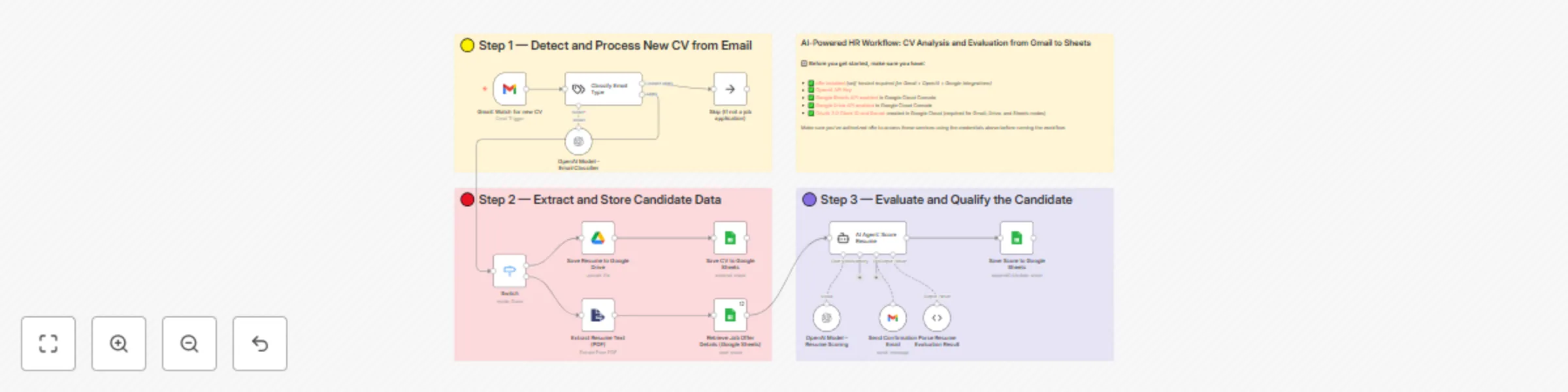
Automate CV screening with GPT-4o-mini: Gmail to Google Sheets HR evaluation system

Workflow preview

Workflow preview
100%
Automate CV screening with GPT-4o-mini: Gmail to Google Sheets HR evaluation system preview
Open on n8n.io

Important notice

This workflow is provided as-is. Please review and test before using in production.

1. Workflow Overview

AI Powered HR Workflow: CV Analysis and Evaluation from Gmail to Sheets Who is this for? This workflow is des...

Best for

  • HR automation workflows
  • AI Summarization automation workflows
  • advanced n8n builders looking for reusable templates

Tools used

n8n-nodes-base.stickynote, n8n-nodes-base.gmailtrigger, @n8n/n8n-nodes-langchain.textclassifier, @n8n/n8n-nodes-langchain.lmchatopenai, n8n-nodes-base.noop, n8n-nodes-base.extractfromfile, n8n-nodes-base.googledrive, n8n-nodes-base.googlesheets

Source and attribution

This workflow is cataloged by N8N Workflows and links back to its original n8n.io source page by Dr. Firas.

Original n8n.io source

1.1 Workflow description

Title
Automate CV screening with GPT-4o-mini: Gmail to Google Sheets HR evaluation system
Workflow name
Automate CV screening with GPT-4o-mini: Gmail to Google Sheets HR evaluation system

AI-Powered HR Workflow: CV Analysis and Evaluation from Gmail to Sheets

Who is this for?

This workflow is designed for HR professionals, recruiters, startup founders, and operations teams who receive candidate resumes by email and want to automate the evaluation process using AI.

It's ideal for teams that receive high volumes of applications and want to streamline screening without sacrificing quality.

What problem is this workflow solving?

Manually reviewing every resume is time-consuming, inconsistent, and often inefficient. This workflow automates the initial screening process by:

  • Extracting resume data directly from incoming emails
  • Analyzing resumes using GPT-4 to evaluate candidate fit
  • Saving scores and notes in Google Sheets for easy filtering

It helps teams qualify candidates faster while staying organized.

What this workflow does

  1. Detects when a new email with a CV is received (Gmail)
  2. Filters out non-relevant messages using an AI classifier
  3. Extracts the resume text (PDF parsing)
  4. Uploads the original file to Google Drive
  5. Retrieves job offer details from a connected Google Sheet
  6. Uses GPT-4 to evaluate the candidate’s fit for the job
  7. Parses the AI output to extract the candidate's score
  8. Logs the results into a central Google Sheet
  9. Sends a confirmation email to the applicant

Setup

  1. Install n8n self-hosted
  2. Add your OpenAI API Key in the AI nodes
  3. Enable the following APIs in your Google Cloud Console:
    • Gmail API
    • Google Drive API
    • Google Sheets API
  4. Create OAuth credentials and connect them in n8n
  5. Configure your Gmail trigger to watch the inbox receiving CVs
  6. Create a Google Sheet with columns like: Candidate, Score, Job, Status, etc.

How to customize this workflow to your needs

  • Adjust the AI scoring prompt to match your company’s hiring criteria
  • Add new columns to the Google Sheet for additional metadata
  • Include Slack or email notifications for each qualified candidate
  • Add multiple job profiles and route candidates accordingly
  • Add a Telegram or WhatsApp step to notify HR in real time

📄 Documentation: Notion Guide


Need help customizing?

Contact me for consulting and support : Linkedin / Youtube

1.2 Logical Blocks

This catalog entry is organized from the workflow JSON. The node-level section below shows the executable blocks available for review before importing the template.

2. Block-by-Block Analysis

Block 1 - Sticky Note

Type / Role
n8n-nodes-base.stickyNote - stickyNote
Config choices
Version 1

Block 2 - Sticky Note1

Type / Role
n8n-nodes-base.stickyNote - stickyNote
Config choices
Version 1

Block 3 - Sticky Note2

Type / Role
n8n-nodes-base.stickyNote - stickyNote
Config choices
Version 1

Block 4 - Sticky Note3

Type / Role
n8n-nodes-base.stickyNote - stickyNote
Config choices
Version 1

Block 5 - Gmail: Watch for new CV

Type / Role
n8n-nodes-base.gmailTrigger - gmailTrigger
Config choices
Version 1.2

Block 6 - Classify Email Type

Type / Role
@n8n/n8n-nodes-langchain.textClassifier - textClassifier
Config choices
Version 1

Block 7 - OpenAI Model – Email Classifier

Type / Role
@n8n/n8n-nodes-langchain.lmChatOpenAi - lmChatOpenAi
Config choices
Version 1.2

Block 8 - Skip (If not a job application)

Type / Role
n8n-nodes-base.noOp - noOp
Config choices
Version 1

Block 9 - Extract Resume Text (PDF)

Type / Role
n8n-nodes-base.extractFromFile - extractFromFile
Config choices
Version 1

Block 10 - Save Resume to Google Drive

Type / Role
n8n-nodes-base.googleDrive - googleDrive
Config choices
Version 3

Block 11 - Retrieve Job Offer Details (Google Sheets)

Type / Role
n8n-nodes-base.googleSheets - googleSheets
Config choices
Version 4.6

Block 12 - AI Agent: Score Resume

Type / Role
@n8n/n8n-nodes-langchain.agent - agent
Config choices
Version 1.8

Block 13 - OpenAI Model – Resume Scoring

Type / Role
@n8n/n8n-nodes-langchain.lmChatOpenAi - lmChatOpenAi
Config choices
Version 1.2

Block 14 - Send Confirmation Email

Type / Role
n8n-nodes-base.gmailTool - gmailTool
Config choices
Version 2.1

Block 15 - Parse Resume Evaluation Result

Type / Role
@n8n/n8n-nodes-langchain.outputParserStructured - outputParserStructured
Config choices
Version 1.2

Block 16 - Save Score to Google Sheets

Type / Role
n8n-nodes-base.googleSheets - googleSheets
Config choices
Version 4.5

Block 17 - Switch

Type / Role
n8n-nodes-base.switch - switch
Config choices
Version 3.2

Block 18 - Save CV to Google Sheets

Type / Role
n8n-nodes-base.googleSheets - googleSheets
Config choices
Version 4.5

3. Summary Table

Workflow Automate CV screening with GPT-4o-mini: Gmail to Google Sheets HR evaluation system
Complexity advanced
Nodes 18
Categories HR, AI Summarization
Author Dr. Firas
Published 20 Jul 2025

4. Reproducing the Workflow from Scratch

  1. 1. Download the workflow JSON

    Use the JSON export at /data/workflows/6207/6207.json as the source template for this automation.

  2. 2. Import the template into n8n

    Open n8n, import the downloaded JSON, and review each node before activating the workflow.

  3. 3. Configure credentials and variables

    Replace placeholder credentials, API keys, webhook URLs, account IDs, and environment-specific values with your own settings.

  4. 4. Test with sample data

    Run the workflow manually or in a staging workspace, inspect node output, and confirm downstream systems receive the expected data.

  5. 5. Activate and monitor

    Enable the workflow only after testing, then monitor executions, errors, and rate limits during the first production runs.

5. General Notes & Resources

Review imported nodes carefully before activation. This catalog entry is intended to help you inspect the workflow structure, understand required services, and find related templates faster.

Node names, credentials, schedules, webhook paths, and external service limits may need adjustment for your workspace.

Frequently asked questions

What does Automate CV screening with GPT-4o-mini: Gmail to Google Sheets HR evaluation system do?

AI Powered HR Workflow: CV Analysis and Evaluation from Gmail to Sheets Who is this for? This workflow is des...

What do I need before importing this workflow?

Review the workflow JSON, configure any required credentials in n8n, and test the automation in a safe workspace before using it in production.

Can I customize this workflow?

Yes. Use the block-by-block analysis and the downloadable JSON to inspect each node, then adjust credentials, prompts, schedules, filters, or destinations for your HR, AI Summarization use case.